⚡ Key Takeaways
- How Air Coolers Work
- How Liquid Coolers Work
- Air vs Liquid Cooling: Direct Comparison
- Cooling Performance: Which Keeps Your CPU Cooler?
- Noise: A Closer Call Than You Think
- Reliability and Lifespan
- Installation: What to Expect From Each
- Which Should You Choose?
- Related Guides
- Frequently Asked Questions
- Conclusion
- Related Articles
- Related Guides


As an Amazon Associate we earn from qualifying purchases at no extra cost to you. Product prices and availability are accurate as of the date shown and are subject to change.


- A metal baseplate sits on top of your CPU and draws heat away through copper heat pipes into a stack of aluminum fins.
- Liquid cooling, specifically the all-in-one (AIO) units most gamers buy, uses a pump to circulate coolant through a block on the CPU, out to a radiator, and back.
- For everyday gaming, both options will keep a typical CPU comfortably within safe temperatures.
- Many people assume liquid cooling is automatically quieter, but it's nuanced.
One of the most debated choices in any PC build is the air vs liquid cooling question. Both keep your processor at safe temperatures, both can look great, and both have passionate advocates. But they take very different approaches, and the right answer depends on your CPU, your case, your budget, and how much you value silence and aesthetics. This guide cuts through the marketing to explain how each cooling method works, where each one shines, and how to confidently pick the right cooler for your specific build.
Related: best CPU coolers for gaming.
🛒 Best Price Today on Amazon
Prime members get fast, free shipping on everything above, plus member-only deals. New members get a 30-day free trial — cancel anytime.
Quick answer: Our top pick in 2026 is the Cost — our #1 rated choice. See the full ranked comparison, alternatives and buying advice below.
How Air Coolers Work
An air cooler is beautifully simple. A metal baseplate sits on top of your CPU and draws heat away through copper heat pipes into a stack of aluminum fins. One or two fans then blow air across those fins to carry the heat out of the case. There’s no liquid, no pump, and very few points of failure. A quality air cooler can run for a decade with nothing more than occasional dust cleaning.
Modern tower air coolers are remarkably capable. Large dual-tower designs can tame even high-end processors, often matching or beating entry-level liquid coolers. Their main downsides are physical size, which can block tall RAM or crowd a small case, and weight that hangs off the motherboard.
How Liquid Coolers Work
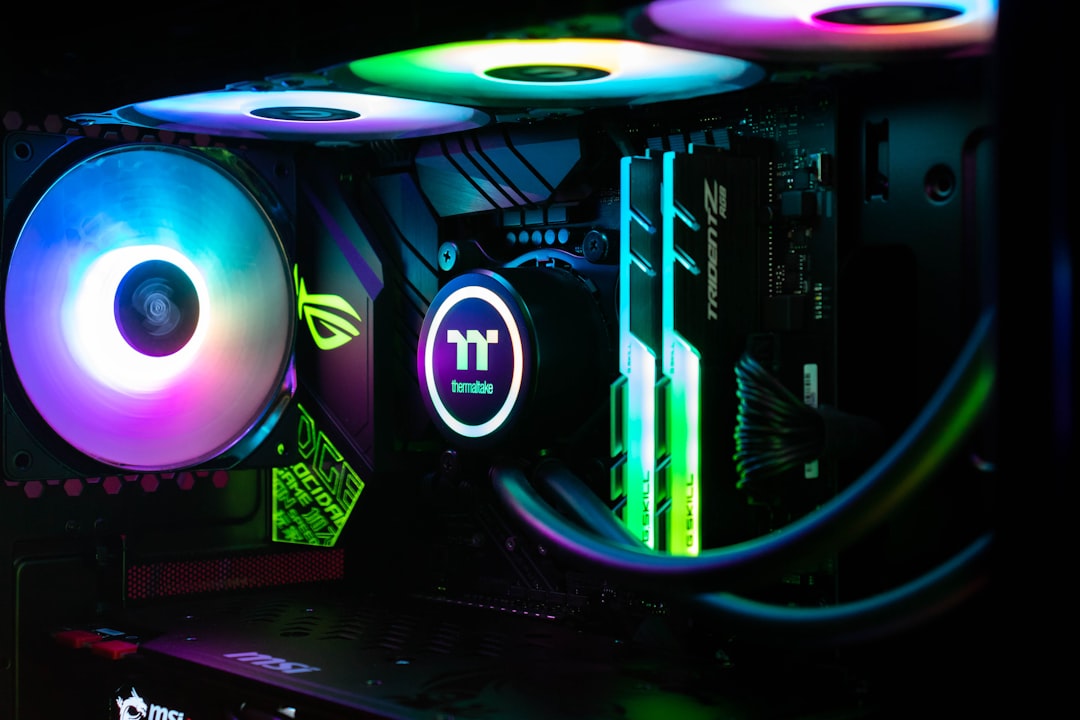
Liquid cooling, specifically the all-in-one (AIO) units most gamers buy, uses a pump to circulate coolant through a block on the CPU, out to a radiator, and back. The radiator, mounted to the case with its own fans, dissipates the absorbed heat. Because liquid transfers heat efficiently and the radiator can be large, AIOs handle intense, sustained loads very well and move the heat away from the cramped CPU socket area.
AIOs come sealed and pre-filled, so they’re nearly as easy to install as air coolers despite the extra components. They free up space around the socket, look sleek with a small pump block, and often run quieter under heavy load because a large radiator can use slower, quieter fans.
Air vs Liquid Cooling: Direct Comparison
| Factor | Air Cooler | AIO Liquid Cooler |
|---|---|---|
| Cost | Lower | Higher |
| Installation | Simple | Slightly more involved |
| Cooling performance | Good to excellent | Excellent under sustained load |
| Noise | Quiet to moderate | Often quieter at load |
| Reliability | Very high (no pump) | High, but pump can fail |
| Lifespan | 10+ years | 5–7 years typical |
| Aesthetics | Bulky | Clean, modern look |
| Case clearance | Can be tight | Frees socket area |
Cooling Performance: Which Keeps Your CPU Cooler?
For everyday gaming, both options will keep a typical CPU comfortably within safe temperatures. The gap appears under sustained heavy loads, like long rendering jobs or running a power-hungry overclocked processor. There, a 280mm or 360mm AIO generally pulls ahead because its large radiator dissipates more heat over time without the fans needing to spin to a roar.
That said, a premium dual-tower air cooler can keep pace with mid-sized AIOs in many scenarios. Unless you’re pushing a flagship CPU to its limits, the real-world temperature difference during gaming is often smaller than people expect.
Noise: A Closer Call Than You Think
Many people assume liquid cooling is automatically quieter, but it’s nuanced. An AIO has both fans and a pump, and a cheap pump can produce a noticeable hum or gurgle. A good AIO with a large radiator can run very quietly because its fans don’t have to work as hard. A quality air cooler with a large, slow-spinning fan is also extremely quiet for typical loads. The quietest setup depends more on the specific model and your case airflow than on the cooling type alone.
Reliability and Lifespan
This is where air cooling has a clear edge. With no pump and no liquid, an air cooler has almost nothing to fail. AIOs are reliable, but the pump is a mechanical part that will eventually wear out, and there’s a small risk of leaks over many years. Most AIOs last five to seven years comfortably, while a good air cooler can outlive several builds. If set-and-forget longevity is your priority, air wins.
Installation: What to Expect From Each
Installation is sometimes assumed to be a major hurdle for liquid cooling, but the gap is smaller than people think. An air cooler mounts directly to the CPU socket with a bracket and a few screws, then you plug in a single fan cable. It’s quick and forgiving, which is part of why it’s the default recommendation for first-time builders. The main consideration is its size and weight relative to your case and RAM clearance.
An AIO involves a couple of extra steps: mounting the radiator and its fans to the case, securing the pump block to the CPU, and connecting the pump and fan headers. None of it is difficult, but it requires a bit more planning around where the radiator goes and how the tubing routes. Sealed AIOs come pre-filled, so there’s no messy liquid handling. For most people, either cooler can be installed in under half an hour with basic tools and a little patience.
Which Should You Choose?
Choose an air cooler if you want the best value, maximum reliability, and a build you’ll rarely think about again. It’s the smart default for most gamers, especially on mid-range CPUs. Choose an AIO liquid cooler if you’re running a high-end or overclocked processor, you have a small case where a bulky air tower won’t fit, or you simply love the clean look of a radiator and a slim pump block. Both are excellent; the decision is about matching the cooler to your specific priorities.
It’s also worth thinking about future upgrades when you choose. If you expect to move to a more powerful CPU down the line, a larger AIO gives you headroom to grow into, while a top-tier air cooler can handle most upgrades within the same socket. Either way, buying a cooler with a little extra capacity than you strictly need today means you won’t have to replace it the moment you upgrade your processor.
Whichever you pick, cooling is part of a balanced setup. Keeping your CPU cool ensures steady frame rates, which you’ll appreciate most on a responsive gaming monitor. Competitive players chasing every frame on a 240Hz 1440p monitor benefit from cooling that holds clock speeds steady during long sessions. And a quiet cooler pairs nicely with good gaming speakers so fan noise doesn’t compete with your audio.
Frequently Asked Questions
Is liquid cooling better than air cooling?
Not universally. Liquid cooling can outperform air on high-end or overclocked CPUs and frees up socket space, but quality air coolers match mid-sized AIOs for most gaming. Air wins on cost and reliability, while liquid wins on aesthetics and peak sustained performance.
Can a liquid cooler leak and damage my PC?
It’s rare with modern sealed AIOs, which are designed and tested to prevent leaks for years. The risk exists but is low. If you’re worried about it, an air cooler eliminates the possibility entirely.
Do I need liquid cooling for gaming?
Usually not. A good air cooler handles most gaming CPUs comfortably. Liquid cooling becomes worthwhile mainly for flagship processors, overclocking, small cases, or if you prefer the look.
How long does an AIO liquid cooler last?
Most last five to seven years before the pump begins to wear. Air coolers can last well over a decade since they have no pump. Both are reliable, but air has the longevity advantage.
Will a bigger air cooler block my RAM?
It can. Large dual-tower coolers sometimes overhang the RAM slots, requiring low-profile memory or shifting a fan higher. Always check your cooler’s clearance specs against your RAM height and case width before buying.
Conclusion
The air vs liquid cooling debate has no single winner because the best choice depends on you. Air cooling delivers unbeatable value and reliability, making it the sensible pick for most gaming builds. Liquid cooling shines for high-end processors, compact cases, and anyone who prioritizes a clean aesthetic and quiet operation under heavy load. Match the cooler to your CPU and case, and either path will keep your system running cool and stable for years.
Ready to decide? Our #1 pick for 2026 is the Cost.
Live price & availability on Amazon.