⚡ Key Takeaways
- What Resolution Actually Means
- 1080p vs 1440p vs 4K: The Comparison
- 1080p: The High-FPS Champion
- 1440p: The Sweet Spot for Most Gamers
- 4K: Maximum Detail for Immersion
- How Refresh Rate Fits In
- Screen Size and Viewing Distance
- Matching Resolution to Your Hardware and Goals
- Top-Rated Picks
- Related Guides
- Frequently Asked Questions
- Conclusion
- Related Articles
- Resolution refers to the number of pixels your monitor displays, measured as width by height.
- 1080p remains the most popular gaming resolution for good reason.
- For a huge number of gamers, 1440p hits the ideal balance.
- 4K is the resolution for those who prioritize stunning visual fidelity above all else.
Choosing your gaming resolution is one of the most consequential decisions for both your experience and your wallet. The 1080p vs 1440p vs 4K question shapes everything from which graphics card you need to how sharp and immersive your games will look. Higher resolutions deliver stunning detail but demand far more from your hardware, while lower resolutions make it easier to hit high frame rates. There’s no single right answer, only the resolution that best fits your GPU, your monitor budget, and the kind of gaming you do. This guide breaks down each option so you can choose with confidence.
As an Amazon Associate we earn from qualifying purchases at no extra cost to you. Product prices and availability are accurate as of the date shown and are subject to change.



🛒 Best Price Today on Amazon
Prime members get fast, free shipping on everything above, plus member-only deals. New members get a 30-day free trial — cancel anytime.
Quick answer: For most people in 2026, the best 1080p vs 1440p vs 4k is the 1080p — our #1 rated choice. See the full ranked comparison, alternatives and buying advice below.
What Resolution Actually Means
Resolution refers to the number of pixels your monitor displays, measured as width by height. 1080p (1920×1080) packs about 2 million pixels, 1440p (2560×1440) jumps to roughly 3.7 million, and 4K (3840×2160) reaches around 8.3 million. More pixels mean a sharper, more detailed image, but they also mean your graphics card has to work much harder to render every frame.
The jump in workload is steep. Moving from 1080p to 1440p increases the pixel count by about 78 percent, and stepping up to 4K is four times the pixels of 1080p. That’s why your choice of resolution is inseparable from your choice of graphics card; they have to be matched to deliver the frame rates you want.
1080p vs 1440p vs 4K: The Comparison
| Resolution | Pixels | GPU Demand | Best For | Sharpness |
|---|---|---|---|---|
| 1080p | ~2.1 million | Low | Competitive, budget, high FPS | Good |
| 1440p | ~3.7 million | Moderate | The sweet spot for most | Very good |
| 4K | ~8.3 million | High | Immersion, single-player, big screens | Excellent |
1080p: The High-FPS Champion
1080p remains the most popular gaming resolution for good reason. It’s easy to drive, meaning even modest graphics cards can push very high frame rates, which is exactly what competitive players want. If your priority is hitting hundreds of frames per second in esports titles, 1080p paired with a high-refresh monitor is hard to beat. It’s also the most affordable path, both for the monitor and the GPU required to drive it.
The trade-off is image sharpness. On larger screens, 1080p can look noticeably soft because the pixels are spread over more area. For a smaller display or a competitive setup where frame rate trumps fidelity, though, 1080p is still an excellent and budget-friendly choice.
1440p: The Sweet Spot for Most Gamers
For a huge number of gamers, 1440p hits the ideal balance. It delivers a noticeably sharper, more detailed image than 1080p without the punishing hardware demands of 4K. A mid-range to upper-mid-range graphics card can drive 1440p at high frame rates, making it the go-to resolution for people who want both visual quality and smooth performance.
This is why 1440p high-refresh monitors have exploded in popularity. They let you enjoy crisp visuals while still hitting the high frame rates that make fast-paced games feel responsive. If you’re building a balanced system and don’t want to compromise heavily in either direction, 1440p is the resolution most experts recommend.
4K: Maximum Detail for Immersion
4K is the resolution for those who prioritize stunning visual fidelity above all else. The image is incredibly sharp and detailed, which makes a massive difference in immersive single-player adventures and on large screens where the extra pixels are easy to appreciate. Cinematic games look breathtaking at 4K.
The catch is the hardware cost. Driving 4K at high frame rates requires a powerful, expensive graphics card, and even then you may rely on upscaling technologies to maintain smooth performance in demanding titles. 4K also makes the most sense on larger displays, where its benefits are most visible. For competitive gaming where frame rate is king, 4K is often overkill.
How Refresh Rate Fits In
Resolution isn’t the only factor; refresh rate matters just as much for how a game feels. A higher refresh rate displays more frames per second, producing smoother motion and a more responsive feel. This is why many gamers pair 1080p or 1440p with high-refresh panels rather than chasing 4K. The combination of a manageable resolution and a fast refresh rate often delivers a better overall experience than maxing out resolution alone.
If you want both sharpness and smoothness, a 240Hz 1440p monitor is a fantastic target, blending crisp 1440p detail with extremely high refresh rates. Whatever resolution you land on, choosing a quality gaming monitor with the right panel and refresh rate is just as important as the pixel count itself.
Screen Size and Viewing Distance
Resolution doesn’t exist in a vacuum; it interacts closely with your screen size and how far you sit from it. The same resolution looks sharper on a smaller screen because the pixels are packed more densely, and softer on a larger screen where they’re spread out. This is measured as pixel density, and it explains why 1080p can look perfectly crisp on a compact monitor but noticeably grainy on a large one.
As a practical rule, larger displays benefit more from higher resolutions to maintain sharpness. A modestly sized monitor is well served by 1080p or 1440p, while a large screen really starts to justify the move to 1440p or 4K. Your viewing distance matters too: the closer you sit, the easier it is to spot individual pixels, which makes higher resolution more worthwhile. Factoring in screen size and seating position alongside your GPU helps you avoid both wasting money on pixels you can’t see and settling for an image that looks soft on a big panel.
Matching Resolution to Your Hardware and Goals
The smart approach is to choose your resolution based on your graphics card and what you play. If you have a budget GPU or play competitive shooters, 1080p lets you maximize frame rates affordably. If you have a mid-range or better card and want a balance of beauty and performance, 1440p is the sweet spot. If you own a high-end GPU and crave the most immersive visuals on a big screen, 4K rewards you with unmatched detail. Don’t forget to complete the experience with good gaming speakers so the audio matches the visual upgrade.
Top-Rated Picks



| Product | Brand | Rating | Reviews | Price |
|---|---|---|---|---|
| Redragon K552 Mechanical Gaming Keyboard, 87-Key Comp… | REDRAGON | ★ 4.5 | 51.6k | $36.99 |
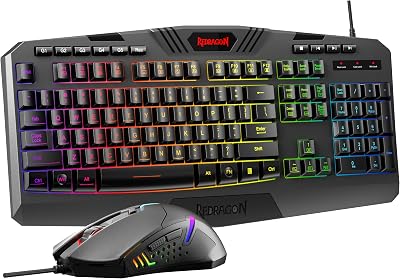
| Redragon S101-3 PRO Gaming Keyboard and Mouse, RGB Ba… | REDRAGON | ★ 4.5 | 51.3k | $39.99 |
| HyperX Alloy Origins 60 – Mechanical Gaming Keyboard,… | HyperX | ★ 4.7 | 15.1k | $59.99 |
| Redragon K556 RGB LED Backlit Wired Mechanical Gaming… | REDRAGON | ★ 4.6 | 8.1k | $49.99 |
| RK ROYAL KLUDGE S108 Typewriter Keyboard, Retro Mecha… | RKROYALKLUDGE | ★ 4.6 | 7.7k | $59.99 |
Frequently Asked Questions
Is 1440p worth it over 1080p?
For most gamers, yes. 1440p offers a clearly sharper image than 1080p without the heavy hardware demands of 4K. If your graphics card can drive it at good frame rates, the upgrade in visual quality is very noticeable and widely considered worthwhile.
Do I need a powerful PC for 4K gaming?
Yes. 4K renders four times the pixels of 1080p, so it requires a powerful, often expensive graphics card to maintain high frame rates. Upscaling technologies help, but 4K remains the most hardware-intensive option of the three.
Which resolution is best for competitive gaming?
1080p is usually best for competitive play because it’s easy to drive at very high frame rates, which improves responsiveness. Many esports professionals still use 1080p paired with high-refresh monitors for exactly this reason.
Can I tell the difference between 1440p and 4K?
On larger screens and up close, yes, 4K looks sharper. On smaller monitors or at a normal viewing distance, the difference is subtler. The benefit of 4K grows with screen size and is most appreciated in detailed single-player games.
Should I prioritize resolution or refresh rate?
It depends on your games. Competitive players generally favor higher refresh rates for smooth, responsive motion. Players who love immersive single-player experiences may prefer higher resolution. A 1440p high-refresh monitor offers a great balance of both.
Conclusion
The 1080p vs 1440p vs 4K decision comes down to matching resolution to your graphics card and your gaming style. 1080p delivers affordable high frame rates ideal for competitive play, 1440p strikes the perfect balance of sharpness and performance for most gamers, and 4K rewards powerful systems with breathtaking detail. Consider your hardware, your budget, and whether you value frame rate or fidelity most, and you’ll land on the resolution that’s right for you.
Ready to decide? Our #1 pick for 2026 is the 1080p.
Live price & availability on Amazon.
Top picks from this guide
 HyperXHyperX Alloy Origins 60 - Mechanical Gaming Keyboard, Ultra Compact…$80 \xc2\xb7 97/100
 RK ROYAL KLUDGERK ROYAL KLUDGE S108 Typewriter Keyboard, Retro Mechanical Gaming Keyboard…$48 \xc2\xb7 96/100
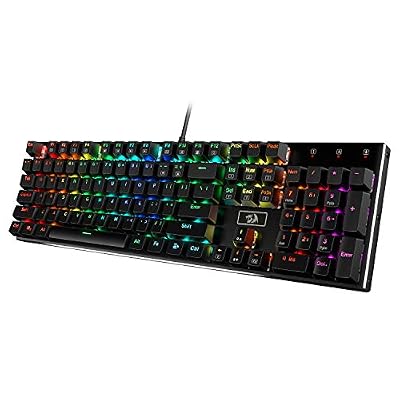 RedragonRedragon K556 Wired RGB Mechanical Gaming Keyboard, 104-Key Aluminum Board$47 \xc2\xb7 95/100
 RedragonRedragon S101-3 PRO Gaming Keyboard and Mouse, RGB Backlit Programmable…$40 \xc2\xb7 95/100