- Top Pick: LG 34U60ZB-B 34-inch UltraWide WQHD 120Hz HDR10 1800R Curved Monitor, Black
- Best Value: SANSUI 34-Inch Curved Gaming Monitor UWQHD 3440 x 1440P 200Hz Ultrawide
- Premium Choice: Sceptre 34-Inch Curved Ultrawide WQHD Monitor (3440 × 1440), R1500, up to 180Hz/165Hz, DisplayPort x2, 99% sRGB, 1ms, Built-in Speakers, Machine Black, 2025 (C345B-QUT168)
🛒 Best Price Today on Amazon
Prime members get fast, free shipping on everything above, plus member-only deals. New members get a 30-day free trial — cancel anytime.
- Top Budget Ultrawide Gaming Monitors Picks for 2026
- Best Budget Ultrawide Gaming Monitors at a Glance
- 1. SANSUI 34″ Ultrawide UWQHD 3440×1440 200Hz Curved Gaming Monitor
- 2. Samsung 34″ ViewFinity S50GC UWQHD 100Hz Curved Ultrawide Monitor
- 3. Gawfolk 34″ Ultrawide UWQHD 165Hz Curved Gaming Monitor
- 4. Dell 34 Plus Ultrawide UWQHD Monitor with USB-C Connectivity
- 5. Sceptre 34″ Ultrawide UWQHD 180Hz Curved Gaming Monitor
- 6. LG 34U650A 34″ Ultrawide UWQHD 100Hz IPS Monitor
- How to Choose a Budget Ultrawide Gaming Monitor
- Frequently Asked Questions
- Related Guides
- About the Author
- About the Author
- Related Articles
Top Budget Ultrawide Gaming Monitors Picks for 2026
Here are our current top budget ultrawide gaming monitors picks, compared on real Amazon owner reviews, price, and features. Live prices update below.
As an Amazon Associate we earn from qualifying purchases at no extra cost to you.


By David Park
PC Gaming Universe is reader-supported. When you buy through links on our site, we may earn an affiliate commission at no extra cost to you.
Ultrawide gaming monitors used to be a luxury reserved for big spenders, but in 2026 a budget ultrawide is one of the best upgrades you can make to a gaming setup. The 21:9 aspect ratio fills your peripheral vision, gives you a wider battlefield in shooters, pulls you into racing and flight sims, and doubles as a productivity powerhouse with room for multiple windows side by side. The only question used to be price — and that has changed.
Today you can get a 34-inch ultrawide with UWQHD 3440×1440 resolution and a high refresh rate for around $200, a figure that would have been unthinkable a few years ago. The budget ultrawide market is now genuinely competitive, with options spanning fast 200Hz panels, big-brand reliability, USB-C convenience and large 34-inch immersion. This guide rounds up six of the best budget ultrawide gaming monitors across the range people actually shop, from a sub-$185 fast panel to a feature-rich USB-C display.
We judged each budget ultrawide monitor on what makes the format worth buying — the 21:9 immersion, resolution, refresh rate and panel quality — and then on value. Prices below run from around $180 to around $400, so there is a pick for every budget ultrawide buyer, whether you want the cheapest fast panel or a feature-loaded display. Below is the at-a-glance comparison, then a closer look at each monitor. If you are new to the format, our wider monitor guides can help you set expectations first.
Best Budget Ultrawide Gaming Monitors at a Glance
| Model | Best For | Key Spec | Price Tier |
|---|---|---|---|
| SANSUI 34″ UWQHD 200Hz | Best fast value | UWQHD 3440×1440, 200Hz | $205 / Budget |
| Samsung 34″ S50GC 100Hz | Best big-brand pick | UWQHD, 100Hz, curved | $220 / Budget |
| Gawfolk 34″ 165Hz | Cheapest high-refresh | UWQHD, 165Hz | $180 / Budget |
| Dell 34 Plus USB-C | Best for productivity | UWQHD, USB-C hub | $380 / Mid |
| Sceptre 34″ 180Hz | Best balanced speed | UWQHD, 180Hz | $208 / Budget |
| LG 34U650A 100Hz | Best LG reliability | UWQHD, 100Hz, IPS | $400 / Mid |
1. SANSUI 34″ Ultrawide UWQHD 3440×1440 200Hz Curved Gaming Monitor

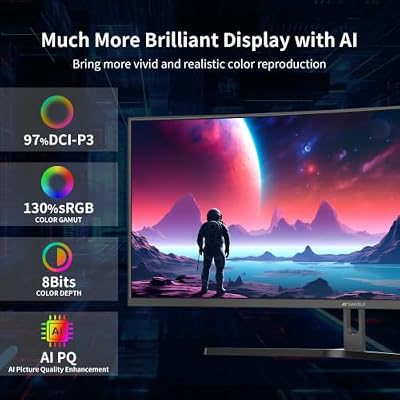
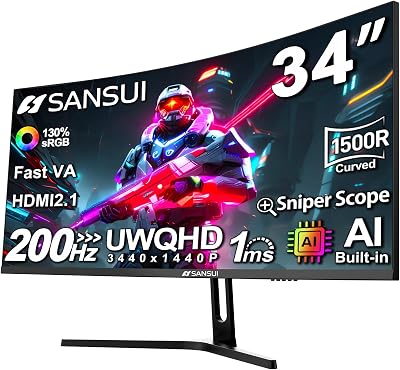
SANSUI 34-Inch Curved Gaming Monitor UWQHD 3440 x 1440P 200Hz Ultrawide | 34” Ultra Wide Gaming Computer Monitor-PBP, OD 1ms, HDR, 300nits, 130%sRGB, DCI-P3 97%,AI Crosshair,HDMI2.1x2,DP1.4




As an Amazon Associate we earn from qualifying purchases. Product prices and availability are accurate as of the date/time indicated.
The SANSUI 34-inch is the best fast-value budget ultrawide, pairing a true UWQHD 3440×1440 panel with a quick 200Hz refresh rate for around $205. That combination — full ultrawide resolution and a genuinely fast refresh rate at a budget price — is exactly what makes it the standout pick for players who want immersion and speed without overspending.
This is the ultrawide to buy if you want the format’s wide field of view plus competitive smoothness. The 21:9 UWQHD resolution wraps a sharp, detailed image across the full width of the panel, the 200Hz refresh rate keeps fast motion fluid in shooters and racers, and the curve pulls the edges of the screen toward you for a more enveloping feel. SANSUI has carved out a reputation for delivering real high-refresh panels at prices that undercut the majors.
As a value brand SANSUI does not offer flagship HDR or factory calibration, and a 200Hz ultrawide asks a lot of your GPU. But for a fast, sharp 34-inch UWQHD panel at around $205, the SANSUI is the best-balanced budget ultrawide on this list.
Pros: True UWQHD 3440×1440 at a fast 200Hz, curved immersion, excellent fast-value pick.
Cons: Value brand without flagship HDR; 200Hz ultrawide needs a strong GPU.
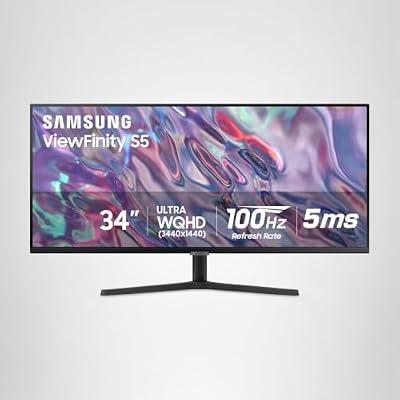
2. Samsung 34″ ViewFinity S50GC UWQHD 100Hz Curved Ultrawide Monitor

SAMSUNG 34" ViewFinity S50GC Series Ultra-WQHD Monitor, 100Hz, 5ms, HDR10, AMD FreeSync, Eye Care, Borderless Design, PIP, PBP, LS34C502GANXZA, 2023, Black


As an Amazon Associate we earn from qualifying purchases. Product prices and availability are accurate as of the date/time indicated.
The Samsung 34-inch S50GC is the best big-brand budget ultrawide for buyers who want a trusted name. At around $220 it brings Samsung’s display quality and reliability to the ultrawide format with a UWQHD curved panel, prioritizing image quality, color and brand support over the highest possible refresh rate.
This is the pick for the buyer who values a major brand and a polished, color-accurate image more than raw speed. The UWQHD 3440×1440 resolution keeps the wide 34-inch screen sharp for both gaming and work, the gentle curve adds immersion, and Samsung’s panel tuning delivers the clean, consistent image the brand is known for. At 100Hz it is smooth enough for most games and excellent for immersive single-player titles and productivity.
The 100Hz refresh rate is lower than the fast budget picks here, so it is less suited to high-level competitive shooters. But for a big-brand ultrawide with Samsung’s image quality and support at around $220, the S50GC is a reassuring, well-rounded choice.
Pros: Trusted Samsung brand, UWQHD curved panel, clean color and image quality, reliable support.
Cons: 100Hz refresh is lower than fast budget rivals; less ideal for competitive FPS.
3. Gawfolk 34″ Ultrawide UWQHD 165Hz Curved Gaming Monitor

Gawfolk 34" Ultrawide Curved Gaming Monitor, UWQHD 3440x1440 165Hz 1500R | PIP/PBP 1ms(MPRT) 128% sRGB HDMI & DP Tilt Adjustable 21:9 PC Screen


As an Amazon Associate we earn from qualifying purchases. Product prices and availability are accurate as of the date/time indicated.
The Gawfolk 34-inch is the cheapest high-refresh ultrawide on this list at around $180, showing how affordable the format has become. It pairs a UWQHD-class ultrawide panel with a 165Hz refresh rate, delivering the wide 21:9 immersion and smooth high-refresh motion that make ultrawides desirable at the lowest price here.
This is the pick for the budget-minded player who wants ultrawide immersion and high refresh above all else. The 21:9 aspect ratio gives you the wide field of view and multitasking room the format is known for, the 165Hz refresh rate keeps fast games fluid, and the curve adds to the enveloping feel — all for under $185. For a first ultrawide or a budget immersive setup, it spans the essentials at an unbeatable entry price.
Gawfolk is a smaller brand than Samsung or LG, so name recognition and resale value are lower, and the extras are basic. But as the most affordable high-refresh 34-inch ultrawide here, the Gawfolk is the easiest entry point into fast ultrawide gaming for budget buyers.
Pros: Lowest-priced high-refresh ultrawide, 21:9 UWQHD-class panel at 165Hz, great budget immersion.
Cons: Smaller brand with basic extras; lower resale value than Samsung or LG.
4. Dell 34 Plus Ultrawide UWQHD Monitor with USB-C Connectivity
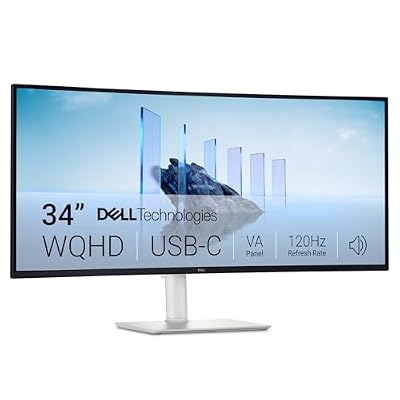
Dell 34 Monitor S3425DW, WQHD VA, 120Hz, FreeSync Premium, Eye Comfort | HDR10, Anti-Glare, 300 cd/m2 Brightness, 3,000:1 Contrast, 95% DCI-P3, 2x10W Speakers, USB-C 65W Power Delivery


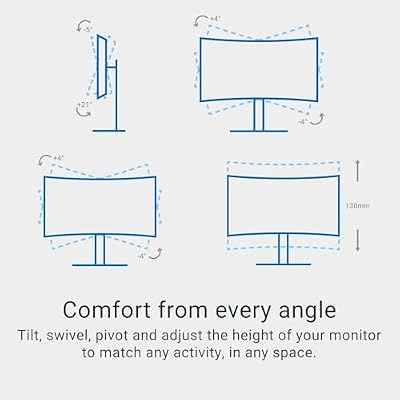


As an Amazon Associate we earn from qualifying purchases. Product prices and availability are accurate as of the date/time indicated.
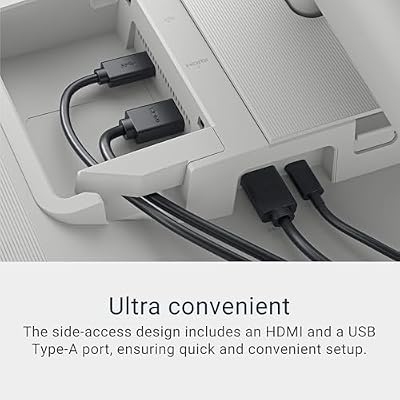
The Dell 34 Plus is the best ultrawide for productivity and a clean, single-cable setup. At around $380 it is one of the pricier picks here, but it earns it with a UWQHD panel, Dell’s build quality and a USB-C hub that powers and connects a laptop with one cable, making it ideal for buyers who game and work on the same display.
This is the alternative for the hybrid user who wants ultrawide immersion for games and a productivity workhorse for the workday. The UWQHD 3440×1440 resolution gives you huge desktop space for multiple windows, the USB-C connectivity charges a laptop and carries video and data over a single cable for a tidy desk, and Dell’s reputation for reliable, well-built monitors and strong support backs it up. It is the most office-friendly pick on this list.
Its refresh rate is tuned more for productivity than high-end competitive gaming, and the price is well above the budget panels. But for a premium-feeling, USB-C-equipped ultrawide that excels at work and still delivers immersive gaming, the Dell 34 Plus is the best do-it-all pick here.
Pros: UWQHD panel with single-cable USB-C hub, Dell build quality and support, ideal for work and play.
Cons: Refresh tuned for productivity over competitive gaming; higher price.
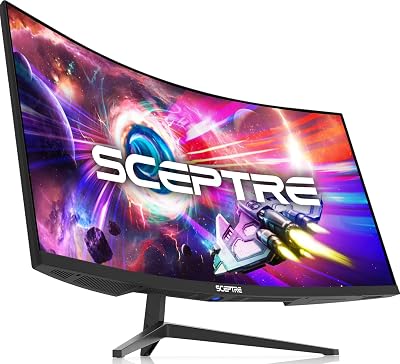
5. Sceptre 34″ Ultrawide UWQHD 180Hz Curved Gaming Monitor
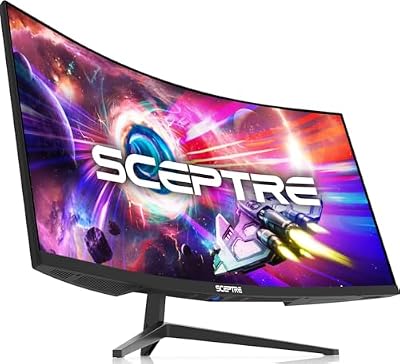
Sceptre 34-inch Curved ultrawide WQHD Monitor (3440 × 1440), R1500, up to 180Hz/165Hz, DisplayPort x2, 99% sRGB, 1ms, Built-in Speakers, Machine Black, 2025 (C345B-QUT168)


As an Amazon Associate we earn from qualifying purchases. Product prices and availability are accurate as of the date/time indicated.
The Sceptre 34-inch is the best balanced-speed budget ultrawide, hitting a 180Hz refresh rate on a UWQHD curved panel for around $208. It sits neatly between the cheapest high-refresh panels and the pricier big-brand options, offering fast motion and full ultrawide immersion at a reasonable price.
This is the pick for the player who wants strong competitive speed without paying mid-tier money. The 180Hz refresh rate edges past 165Hz for smoother fast motion, the UWQHD 3440×1440 resolution keeps the wide screen sharp, and the curve wraps the image around your field of view. Sceptre is a well-known value brand that consistently delivers fast panels at accessible prices, and this ultrawide continues that pattern.
As with other value-brand panels, the HDR is basic and Sceptre lacks the polish of a major brand. But for a 180Hz UWQHD ultrawide at around $208, the Sceptre offers an excellent balance of speed, immersion and price among budget ultrawide monitors.
Pros: 180Hz UWQHD curved panel, balanced speed and immersion, strong value from a known value brand.
Cons: Basic HDR and less brand polish than Samsung, LG or Dell.

6. LG 34U650A 34″ Ultrawide UWQHD 100Hz IPS Monitor

LG 34U650A-B 34-inch UltraWide IPS WQHD 100Hz HDR10 Curved Monitor, Black | (3440 x 1440), 21:9, Built-in Speaker, sRGB 99% (Typ.), HDMI, DisplayPort, USB Type-C PD 96W, Tilt/Height/Swivel Stand


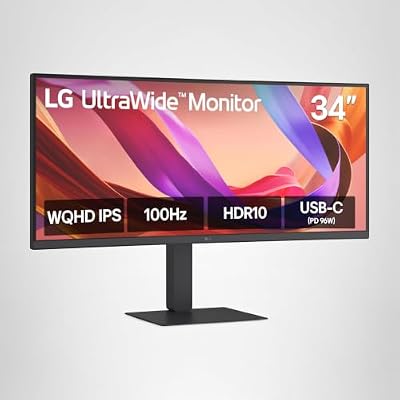
As an Amazon Associate we earn from qualifying purchases. Product prices and availability are accurate as of the date/time indicated.
The LG 34U650A is the best pick for buyers who want LG’s display reliability in an ultrawide. At around $400 it is the priciest monitor here, but it brings an LG IPS UWQHD panel with the color accuracy, viewing angles and build quality the brand is known for, aimed at buyers who prioritize image quality and long-term reliability over raw refresh.
This is the alternative for the buyer who values a trusted brand and a high-quality IPS image. The IPS panel delivers wide viewing angles and accurate, consistent color across the full 34-inch width, the UWQHD 3440×1440 resolution keeps everything crisp for gaming and creative work, and LG’s reputation for well-built, well-supported monitors gives long-term peace of mind. At 100Hz it is smooth for most games and excellent for immersive and productivity use.
The 100Hz refresh rate and $400 price mean it is not the choice for budget competitive players chasing the most frames per dollar. But for an LG-quality IPS ultrawide with excellent color and reliability, the 34U650A is the premium-leaning, image-first pick on this list.
Pros: LG IPS UWQHD panel, excellent color and viewing angles, trusted brand and reliability.
Cons: Highest price here and only 100Hz; less suited to budget competitive FPS.
How to Choose a Budget Ultrawide Gaming Monitor
Start with refresh rate, because it splits this list cleanly. If you play fast, competitive games, prioritize the high-refresh panels: the SANSUI (200Hz), Sceptre (180Hz) and Gawfolk (165Hz) all deliver smooth motion at budget prices. If you mostly play immersive single-player titles or use the monitor for work, the 100Hz Samsung and LG panels are plenty smooth and prioritize image quality instead.
Next, decide how much brand and features matter. The Samsung and LG picks give you big-brand reliability, refined color and strong support, while the Dell adds a USB-C hub that makes it a superb work-and-play hybrid. The SANSUI, Sceptre and Gawfolk panels deliver more speed per dollar with the trade-off of smaller brands and more basic extras. Decide whether you are buying primarily for speed, image quality or convenience.
Finally, match the monitor to your GPU and budget. Every ultrawide here is UWQHD 3440×1440, which needs a capable graphics card to drive at high frame rates — the 200Hz SANSUI rewards the strongest GPUs. On price, you can spend as little as $180 on the Gawfolk, land around $205-220 for well-rounded fast or big-brand panels, or step up to around $380-400 for the feature-rich Dell or premium LG.
Frequently Asked Questions
Is a budget ultrawide worth it for gaming?
For immersive, single-player and racing or flight games, absolutely — the wide 21:9 field of view is a genuine experience upgrade and doubles as a productivity boost. For high-level competitive shooters some players prefer a flat 16:9 panel, but a fast ultrawide like the 200Hz SANSUI still delivers excellent competitive smoothness.
Which budget ultrawide monitor is the best value?
The SANSUI 34-inch UWQHD 200Hz at around $205 is the best fast-value pick, combining full ultrawide resolution with a quick refresh rate. If you want the lowest price, the Gawfolk 34-inch at around $180 is the cheapest high-refresh ultrawide on this list.
Do I need a powerful GPU for an ultrawide monitor?
Ultrawides at UWQHD 3440×1440 have more pixels than a standard 1440p monitor, so they ask more of your graphics card, especially at high refresh rates. A mid-range or better GPU is recommended; for the 200Hz panels you will want a stronger card to actually hit those frame rates in demanding games.
Is 100Hz enough for an ultrawide, or do I need 165Hz+?
100Hz, as on the Samsung and LG picks, is smooth and great for immersive and productivity use. If you play fast competitive games and want the sharpest motion, choose a 165Hz, 180Hz or 200Hz panel like the Gawfolk, Sceptre or SANSUI for a noticeably smoother feel.
Can I use these ultrawides for work as well as gaming?
Yes — the wide 21:9 desktop is excellent for multitasking with multiple windows side by side. The Dell 34 Plus is the standout for work thanks to its single-cable USB-C hub, while the Samsung and LG panels offer the color accuracy that benefits creative work.
Related Guides
- Best Gaming Monitor 2026
- Best 144Hz Gaming Monitors
- Best Samsung Odyssey G7 Alternatives
- Dell vs Samsung 4K Gaming Monitors
- VA vs OLED Gaming Panels
- Best 1440p 240Hz Monitors for FPS
- Best OLED Gaming Monitors
- Best Budget 1440p 240Hz Monitors
About the Author
David Park is the Displays Editor at PC Gaming Universe. He has spent the last eight years testing gaming monitors across panel technologies — VA, IPS and OLED — with a focus on refresh rate, response time, motion clarity and real-world color accuracy. He cares about the specs that show up on screen during a match, not the ones that only look good on a box.
Ready to decide? Our #1 pick for 2026 is the SANSUI 34" UWQHD 200Hz.
Live price & availability on Amazon.
Top picks from this guide
SceptreSceptre 34-inch Curved ultrawide WQHD Monitor (3440 × 1440), R1500,…$198 \xc2\xb7 99/100LGLG 34U650A-B 34-inch UltraWide IPS WQHD 100Hz HDR10 Curved Monitor,…$396 \xc2\xb7 99/100SANSUISANSUI 34-Inch Curved Gaming Monitor UWQHD 3440 x 1440P 200Hz…$216 \xc2\xb7 99/100DellDell 34 Monitor S3425DW, WQHD VA, 120Hz, FreeSync Premium, Eye…$380 \xc2\xb7 98/100