A standard gaming mouse gives you fast tracking and two main clicks. A mouse built around programmable buttons gives you something different: a small command center under your hand. Abilities, macros, media controls, editing shortcuts and push-to-talk can all move from the keyboard to the mouse, where your thumb and fingers can reach them without looking away from the screen.
- How to Choose a Gaming Mouse With Programmable Buttons
- 1. Razer Naga V2 Pro Wireless MMO Gaming Mouse
- 2. Corsair Scimitar RGB Elite Wired Gaming Mouse
- 3. Logitech G502 X Plus Wireless Gaming Mouse
- 4. SteelSeries Aerox 9 Wireless Gaming Mouse
- 5. Logitech G604 Lightspeed Wireless Gaming Mouse
- Gaming Mouse With Programmable Buttons at a Glance
- Frequently Asked Questions
That shift matters most in games and tasks with long action bars. In an MMO, a twelve-button side panel can hold an entire rotation, plus interrupts, potions and mount commands. In a MOBA, a smaller cluster can hold item actives and camera controls close to your thumb. The same layout helps outside games too: video editors map timeline tools to side buttons, and streamers trigger scenes and mute toggles without reaching for a second device.
The best options combine three things. The buttons need to be numerous enough to be useful and placed well enough to press accurately under pressure. The software needs to make remapping simple, with per-game profiles, layered assignments and straightforward macro recording. And onboard memory needs to store those profiles on the mouse itself, so your layout travels to another computer without rebuilding everything.
Every pick below has a strong programmable layout, capable software and a precise sensor. The right choice depends on how many buttons you will use and whether you prefer wired or wireless.
How to Choose a Gaming Mouse With Programmable Buttons
Button Count and Placement
More buttons are only helpful if you can tell them apart by touch. A twelve-button grid suits MMO players who want a full number row under the thumb, but it needs clear shaping, spacing or texture so each row feels distinct. Angled rows and raised dividers help reduce mis-presses during a busy fight.
Placement matters as much as count. Thumb buttons should sit where your thumb rests naturally, not so far forward that you stretch or so far back that you squeeze them by accident. Buttons beside the left click suit quick actions such as sensitivity changes or a melee command, and wheel tilt clicks add two more inputs on some models.
Match the layout to your main games. MMO and strategy players often benefit from a full grid, MOBA players may prefer six well-spaced thumb buttons that are faster to learn, and shooter players who also work at the same desk often land in the middle with a moderate cluster for utility commands.
Software, Macros and Layers
Software is where a programmable mouse earns its place. Look for an editor that lets you assign keyboard keys, mouse functions, system commands, text blocks and recorded macros to any button, then save those assignments per application. Automatic profile switching is especially valuable, because it loads your MMO layout when the game launches and returns to your work layout when you close it.
Layer features multiply what a mouse can do. Some ecosystems add a shift-style modifier that gives every button a second assignment while you hold one key down, turning a moderate control set into a much larger one without adding physical buttons. A clear visual map of the mouse and easy macro timing edits save real time, and core layouts should work from onboard storage even when the software is closed.
Onboard Profiles and Memory
Onboard memory stores button assignments, sensitivity stages and lighting settings directly on the mouse. With several onboard profiles, you can carry separate layouts for an MMO, a MOBA, desktop work and a creative app, then switch between them with a dedicated button or a software command.
This matters for anyone who moves between machines. A work laptop may not allow extra software installs, and a second PC may run a different operating system. If your main macros live on the mouse, the experience stays consistent in both places. Check how much a profile holds: strong implementations store full macro sequences and multiple sensitivity stages, while simpler ones store basic remaps only.
Sensor and Tracking
Programmable buttons do not excuse weak tracking. A modern optical sensor should provide stable tracking across common desk surfaces, adjustable sensitivity in small steps and consistent behavior at slow and fast hand speeds. High maximum figures look impressive, but control at the settings you actually use matters far more.
For MMO and MOBA play, reliable movement supports ability targeting, map clicks and menu navigation during long sessions. For mixed use that includes shooters, look for a sensor known for raw, consistent tracking. Wireless models should pair it with a low-latency gaming connection, plus Bluetooth as a second link for a laptop. Wired models remove charging entirely and suit a fixed desk.
Comfort, Grip and Build
A button-heavy mouse tends to be larger and more sculpted than a minimalist esports shape. That can benefit palm and relaxed claw grips during long sessions, but it can be a drawback for fingertip grips or smaller hands if the side grid forces your thumb into an awkward position.
Weight matters as well. A heavier mouse can feel planted for MMO play and desktop work, while a lighter grid mouse reduces fatigue during fast camera movement. Side grip texture, pinky support, crisp main clicks and defined scroll wheel steps all shape daily comfort. The best pick lets you reach every programmed button without loosening your grip.
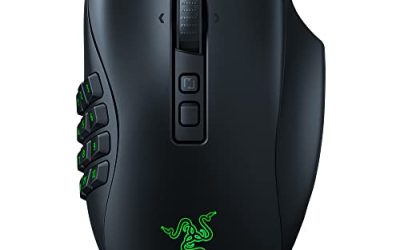
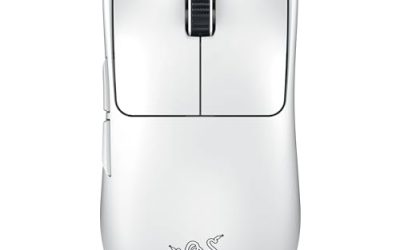
1. Razer Naga V2 Pro Wireless MMO Gaming Mouse

The Naga V2 Pro is the most flexible option in this guide because it does not commit you to a single side layout. It ships with three interchangeable magnetic side plates, giving you a twelve-button panel for MMOs, a six-button panel for MOBAs and action games, and a two-button panel for simpler play or focused aiming. Swapping plates changes the character of the mouse without changing the sensor, shape or wireless system underneath.
Razer lists up to nineteen plus one programmable buttons depending on the plate fitted, and every assignment is handled in Razer Synapse. Synapse supports per-game profiles, macro recording and a secondary assignment layer through its shift-style function, which suits players who want one plate to cover abilities, consumables and communication commands. Profiles can be stored on the mouse, so a core layout remains available when you move to another machine.
Tracking comes from the Focus Pro 30K optical sensor, suited to fast swipes and fine adjustments alike. Connectivity covers HyperSpeed wireless for gaming, Bluetooth for a second device and a wired connection over the included cable. The HyperScroll Pro wheel adds tactile and free-spin scrolling, useful for cycling abilities and moving through long pages at work.
Comfort favors medium to larger hands using a palm or claw grip. The wide, right-handed shape gives the thumb grid room without crowding the grip, and the added weight feels stable during ability-heavy play. For players who split time between an MMO, a MOBA and daily productivity, this mouse adapts to all three without compromise on button access.
- View on Amazon: https://www.amazon.com/dp/B0BGJTLFN5
2. Corsair Scimitar RGB Elite Wired Gaming Mouse
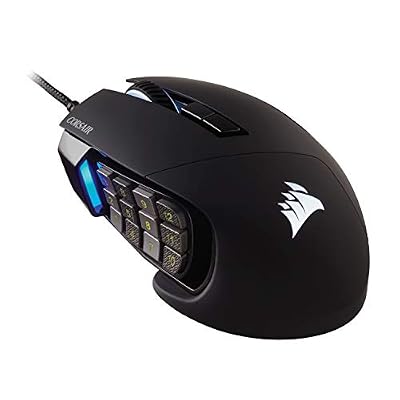
The Scimitar RGB Elite is built for players who know they want a full grid and want that grid to fit their hand precisely. Its twelve mechanical side buttons sit on Corsair’s patented Key Slider system, which lets you slide the entire panel forward or back and lock it in place. That adjustment aligns the rows with your thumb length instead of forcing your thumb to adapt to a fixed position.
In total the mouse provides seventeen fully programmable buttons. Corsair iCUE handles assignments, macro programming, sensitivity stages and lighting, and it can synchronize lighting with other compatible Corsair gear. Onboard profile storage keeps your main layout on the mouse itself, which is useful for a second PC or a laptop where you do not want to rebuild your MMO bindings.
The sensor is a custom PixArt PMW3391 optical sensor with native sensitivity up to eighteen thousand DPI, adjustable in single-step increments, which helps you match the exact feel you want for map movement and cursor work. The wired connection removes battery management entirely, and the braided cable and Omron switches suit a fixed battlestation.
The substantial right-handed shape supports palm and claw grips, with textured sides that help maintain control across the grid. If your priority is a dedicated wired MMO and MOBA mouse with a grid you can physically position for your hand, the Scimitar RGB Elite remains a focused choice.
- View on Amazon: https://www.amazon.com/dp/B082LRMY53
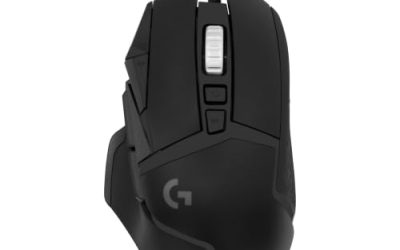
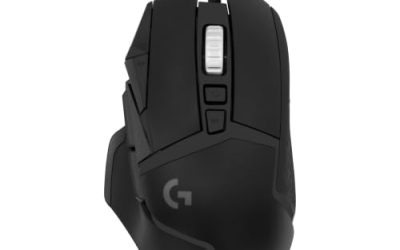
3. Logitech G502 X Plus Wireless Gaming Mouse

The G502 X Plus takes a different path from the grid mice. Instead of a number pad under the thumb, it spreads thirteen programmable controls around a familiar right-handed shape: thumb buttons, a repositioned sensitivity shift button, buttons beside the left click and a dual-mode scroll wheel with tilt inputs. For many players, this layout is easier to master while still covering abilities, item actives and work shortcuts.
Logitech G HUB is the control center. It handles button assignments, macros, sensitivity stages and lighting, and the mouse can store up to five onboard memory profiles. One profile can hold an MMO layout, another a MOBA layout, and a third can hold editing or office shortcuts, with each profile ready on the mouse when you change computers. That combination suits a hybrid routine particularly well.
The HERO 25K sensor provides precise tracking across a wide sensitivity range, and LIGHTSPEED wireless keeps the connection responsive for gaming while the mouse also works wired over USB-C for charging and play. LIGHTFORCE hybrid optical-mechanical switches give the main clicks a crisp, immediate feel. The removable sensitivity shift button can be reversed to sit closer to your thumb or replaced with the included cover if you prefer a cleaner side profile.
At just over one hundred grams, the G502 X Plus feels planted rather than featherlight, which many palm and claw users prefer. The free-spin wheel is a standout for productivity, then locks back into stepped mode for games. Choose this model if you want generous programmability in a versatile shape rather than a full side grid.
- View on Amazon: https://www.amazon.com/dp/B092CB69Q4
4. SteelSeries Aerox 9 Wireless Gaming Mouse
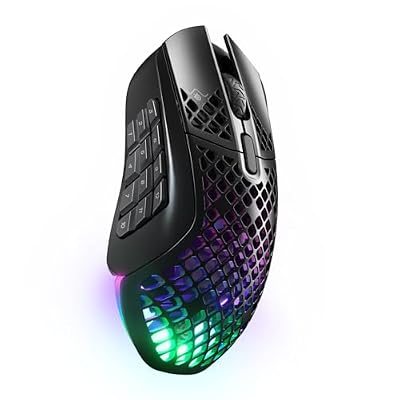
The Aerox 9 Wireless solves the weight problem that usually comes with a twelve-button side panel. Its perforated shell brings the weight down to eighty-nine grams while still fitting eighteen programmable buttons, including the full side grid for MMO and MOBA commands. That combination is rare: grid access without the heavy feel that can tire your hand during fast camera work.
SteelSeries GG and Engine software handle assignments, macros and sensitivity settings, with an editor that makes mapping the grid straightforward. The twelve side buttons use a configuration designed to be learned by touch, and the remaining controls cover sensitivity adjustment and top functions. For productivity, the grid works well for application shortcuts, audio controls and window commands across a long workday.
Tracking comes from the TrueMove Air optical sensor with sensitivity up to eighteen thousand DPI. Quantum 2.0 wireless provides a low-latency two point four gigahertz connection for gaming and Bluetooth for a second device, with long battery life and fast charging. AquaBarrier protection rated IP54 helps guard the interior from dust, dirt and splashes.
The larger right-handed shape suits palm and claw grips, and the lighter build makes it the easiest grid mouse here to move quickly. Players who avoided MMO mice because of weight will find the Aerox 9 Wireless the most agile way to keep a full command grid under the thumb.
- View on Amazon: https://www.amazon.com/dp/B09VNPB6Q1
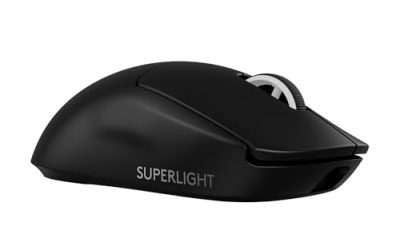
5. Logitech G604 Lightspeed Wireless Gaming Mouse

The G604 Lightspeed sits between the grid mice and the versatile all-rounders. It provides fifteen programmable controls, including six thumb buttons arranged in two rows of three. That layout gives MMO and MOBA players meaningful ability access while remaining quick to learn, and it gives productivity users a tidy bank of shortcuts that does not overwhelm the side of the mouse.
Assignments are handled in Logitech G HUB, where you can build per-game profiles, record macros and adjust sensitivity stages. Dual connectivity is a practical strength. LIGHTSPEED wireless serves the gaming PC with a fast, stable link, while Bluetooth connects to a laptop or second machine, and a toggle switches between them. That makes the G604 a natural single mouse for a desk that holds both a gaming rig and a work computer.
The HERO sensor delivers precise tracking with strong power efficiency. Logitech lists up to two hundred forty hours of use in LIGHTSPEED mode from a single AA battery, and far longer in Bluetooth mode for everyday work. The dual-mode hyper-fast scroll wheel switches between stepped scrolling for games and free-spin scrolling for long documents, mirroring the hybrid role of the mouse itself.
The sculpted right-handed shape supports relaxed palm and claw grips, with a thumb rest that keeps the cluster accessible without accidental presses. It lacks the sheer button count of the Naga V2 Pro or Scimitar RGB Elite, but for anyone who wants balanced programmable controls, long battery life and easy switching between two computers, the G604 Lightspeed covers the brief well.
- View on Amazon: https://www.amazon.com/dp/B07QN369XX
Gaming Mouse With Programmable Buttons at a Glance
The table below summarizes how many programmable controls you get, how they are arranged, which software manages them and how each mouse connects. Narrow the list by layout first, then confirm details above.
| Mouse | Programmable Controls | Side Layout | Software | Sensor | Connection |
|---|---|---|---|---|---|
| Razer Naga V2 Pro | Up to 19 plus 1 depending on plate | Swappable 12, 6 or 2 button plates | Razer Synapse | Focus Pro 30K optical | HyperSpeed wireless, Bluetooth, wired |
| Corsair Scimitar RGB Elite | 17 | 12 buttons on adjustable Key Slider panel | Corsair iCUE | PixArt PMW3391, up to 18,000 DPI | Wired |
| Logitech G502 X Plus | 13 | Thumb cluster plus wheel tilt and top buttons | Logitech G HUB | HERO 25K | LIGHTSPEED wireless, wired |
| SteelSeries Aerox 9 Wireless | 18 | 12 button side panel | SteelSeries GG with Engine | TrueMove Air, up to 18,000 DPI | 2.4 GHz wireless, Bluetooth, wired |
| Logitech G604 Lightspeed | 15 | 6 thumb buttons | Logitech G HUB | HERO, up to 25,600 DPI | LIGHTSPEED wireless, Bluetooth |
For a pure MMO grid, the Naga V2 Pro leads through swappable plates and the Scimitar RGB Elite through a physically adjustable panel. For lighter grid play, the Aerox 9 Wireless stands apart. For hybrid gaming and work without a grid, the G502 X Plus and G604 Lightspeed are the natural fits.
Frequently Asked Questions
How many programmable buttons do I actually need for an MMO?
Most MMO players use between nine and fifteen mouse assignments regularly, covering core rotation abilities, interrupts, defensive commands and a mount or potion. A twelve-button grid covers that range with room to grow, while a six-button cluster works if you keep part of the rotation on the keyboard. Start with your most frequent abilities on the mouse, so the layout stays memorable.
Can I use a programmable gaming mouse for work as well as games?
Yes, and that is one of the strongest reasons to choose one. The same software that maps game abilities can map copy, paste, undo, tab switching, media controls and application shortcuts. With per-application profiles and onboard memory, the mouse can load your work layout for office apps and your game layout when you play, without manual changes.
What is the difference between onboard profiles and software profiles?
Software profiles live in the companion app and can be more numerous, with automatic switching when an application launches. Onboard profiles are stored on the mouse itself, usually in a smaller set, and they travel with the mouse to any computer. A good setup uses both: build layouts in the software, then save your main layouts onboard for a second machine.
Are macros allowed in every game?
Rules vary by game and by mode. Many games allow simple remaps and single-action macros, while competitive modes and some online titles restrict automation that performs multiple actions from one press. Check the rules for the games you play, and keep macros to convenience functions such as a single ability with a modifier or a communication command.
Should I choose wired or wireless for a button-heavy mouse?
Choose based on your desk routine. Wireless models feel responsive in play and keep the desk clear, with the trade-off of charging or battery changes. Wired models remove power management entirely and suit a fixed setup. If you use two computers, a wireless model with both a gaming receiver and Bluetooth gives the smoothest switching.
Disclosure: As an Amazon Associate, we earn from qualifying purchases.