Diablo asks something unusual from a mouse: you hold or spam the main clicks for hours while also firing skills, drinking potions, and opening town portals without moving your hand to the keyboard every few seconds. Choosing badly means either too few thumb buttons for your build, switches that feel tired during long sessions, or a heavy shell that punishes your wrist during a full evening of dungeon runs and boss farming.
This guide serves three kinds of Diablo players: build-heavy players who want a full thumb grid, wireless players who still need many buttons, and wired players who prefer a fixed connection and no charging. Every pick below was chosen from the names and specifications shown on its Amazon listing, so button counts, sensors, and switch ratings can be checked directly against that listing before you buy.
Quick Picks
As an Amazon Associate we earn from qualifying purchases
| Product | Best for | Key spec from title |
|---|---|---|
| Razer Naga V2 Pro | Players who want to swap between a full skill grid and a simpler layout | 19+1 programmable buttons with swappable side plates |
| Logitech G600 MMO Gaming Mouse | Players who want a wired thumb grid with a second layer of commands | 20 programmable buttons |
| Corsair Scimitar RGB Elite | Players who want an adjustable thumb grid that fits their hand position | 18,000 DPI with 17 programmable buttons |
| SteelSeries Aerox 9 Wireless | Players who want many buttons in a much lighter wireless shell | 18 buttons with Bluetooth and 2.4 GHz wireless |
How to Choose
Side Buttons for Skill Rotations and Potions
Count the commands you actually repeat in Diablo before you count buttons on a box. Most builds need at least a primary skill, a secondary skill, a defensive ability, an ultimate, a potion, and often a portal or mount command within instant reach. A 12-button thumb grid, like those on the Naga V2 Pro, G600, Scimitar RGB Elite, and Aerox 9 Wireless, lets you place that whole set under one thumb. Fewer buttons can still work for simpler builds, but you will push more work back to the keyboard during crowded fights.
Switch Durability for Click-Heavy Play
Diablo turns the left and right buttons into endurance parts. You click to move, click to attack, and hold through dense packs, so a switch rating matters more here than in slower games. Look at the figures stated on each listing: the Naga V2 Pro lists Razer Optical Mouse Switches Gen-3, the Scimitar RGB Elite lists Omron switches rated for 50 million clicks, the Aerox 9 Wireless lists switches rated for 80 million clicks, and the G600 lists primary buttons rated to 20 million clicks. Higher ratings do not guarantee feel, but they signal intended lifespan.
Shape, Weight, and Comfort for Long Sessions
A mouse that feels fine for twenty minutes can become a problem in hour three of a grind. Weight shapes that experience directly: the Aerox 9 Wireless is listed at 89 grams, while the G600 is listed at 133 grams without its cable and the Naga V2 Pro at 134 grams without cable and dongle. Heavier, sculpted shells can feel planted and supportive for palm grips, while a lighter shell reduces the effort of constant small corrections. Match the shell to your grip and hand size, not just to its button count.
Sensor Consistency and Connection Choice
Diablo does not demand tournament-level aiming, yet it does demand predictable cursor movement when you are placing ground effects, kiting elites, or clicking a specific enemy inside a pack. Check the sensor and its range on the listing: examples here run from the G600 at up to 8,200 DPI to the Naga V2 Pro with its Focus Pro 30K Optical Sensor. Then decide on connection. Wired models avoid charging entirely, while wireless models such as the Naga V2 Pro and Aerox 9 Wireless add battery figures you must factor into your routine.
The 4 Best Options
Razer Naga V2 Pro

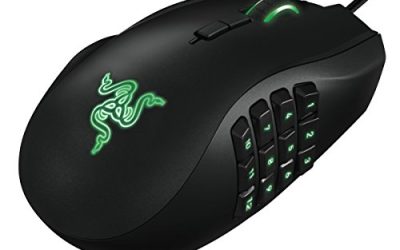
If your Diablo build keeps growing, this is the most adaptable option in the group. Its three magnetic side plates let you start with the 12-button plate for a full skill and potion layout, then switch to the 6-button or 2-button plate for a simpler character without changing mice. That flexibility suits players who rotate between classes or between Diablo and other games. The listed Focus Pro 30K Optical Sensor, HyperScroll Pro Wheel, and long battery figures also make it a strong wireless choice for long sessions at a desk.
Specs
- Brand: Razer
- Model: RZ01-04400100-R3U1
- Buttons: 19+1 programmable buttons with 3 swappable side plates in 2, 6, and 12-button layouts
- Sensor: Focus Pro 30K Optical Sensor
- Switches: Razer Optical Mouse Switches Gen-3
- Wheel: HyperScroll Pro Wheel
- Battery: Up to 150 hours on HyperSpeed Wireless and up to 300 hours on Bluetooth
- Weight: 134 grams, excluding cable and dongle
- Connectivity: HyperSpeed Wireless, Bluetooth, and wired USB Type-C
Best for: Players who want one wireless mouse that can change its thumb layout by class or build.
Watch out for: Confirm which side plate is fitted when it arrives and check the total weight suits your grip, because it is among the heavier picks here.
ASIN: B0BGJTLFN5
Logitech G600 MMO Gaming Mouse

The G600 fits Diablo players who want everything under the thumb and prefer to stay wired. Its 12-button thumb panel covers skills and potions, while the G-Shift button gives those same buttons a second set of actions, which is useful when a build adds buffs, summons, or extra consumables. The sculpted right-handed shape and RGB backlighting, both named on the listing, suit players who settle into a palm grip for extended farming. It is an older design than the wireless picks, but its button system remains directly relevant to this game.
Specs
- Brand: Logitech
- Model: 910-002864
- Buttons: 20 programmable buttons, including a 12-button thumb panel
- Extra control: G-Shift button for a second set of button actions
- Sensor: Gaming-grade laser tracking up to 8,200 DPI
- Switch durability: Primary buttons rated to 20 million clicks
- Weight: 133 grams without cable
- Dimensions: 118 mm x 75 mm x 41 mm
- Cable: 6.5 foot braided USB cable
- Lighting: RGB backlit
- Connectivity: Wired USB
Best for: Wired players who want a 12-button panel plus a second command layer from G-Shift.
Watch out for: Check that a wired, 133-gram mouse fits your desk setup and grip, and confirm the listing variant is the standard model rather than a renewed listing.
ASIN: B0086UK7IQ
Corsair Scimitar RGB Elite
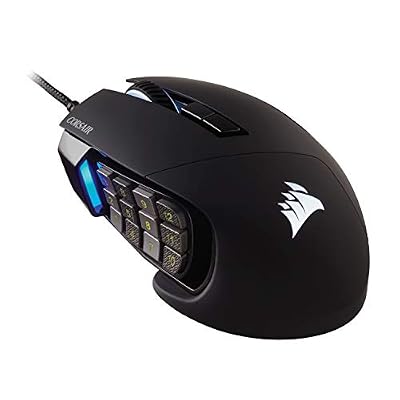
Players whose thumb never lands quite where a fixed grid expects should look closely at the Scimitar RGB Elite. Its Key Slider system lets the 12-button side panel move 8 mm forward or backward, so you can position skills and potions where your thumb naturally rests instead of stretching for them during a fight. The listing also names 17 programmable buttons, iCUE compatibility, and an 18,000 DPI optical sensor. For Diablo, that combination supports a wired setup built around careful button placement and repeated use over long sessions.
Specs
- Brand: Corsair
- Buttons: 17 programmable buttons, including a 12-button side panel
- Side panel: Patented Key Slider system, adjustable 8 mm forward or backward
- Sensor: Custom PixArt PMW3391 optical sensor, 18,000 DPI, adjustable in 1 DPI steps
- Switches: Omron switches rated for 50 million clicks
- Weight: 122 grams
- Cable: 1.8 m braided cable
- Software: Corsair iCUE compatible
- Lighting: Four-zone RGB backlighting
- Connectivity: Wired USB
Best for: Players who want a wired thumb grid they can physically reposition to match their thumb reach.
Watch out for: Allow time to adjust the Key Slider and tighten it in place before a long session, and check that iCUE suits the other gear in your setup.
ASIN: B082LRMY53
SteelSeries Aerox 9 Wireless
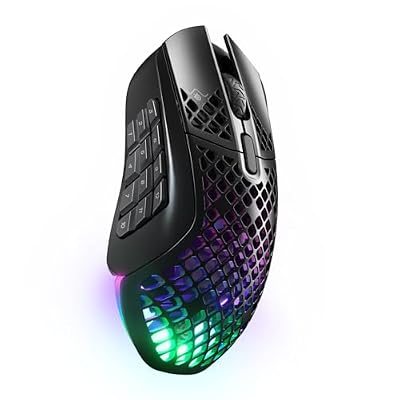
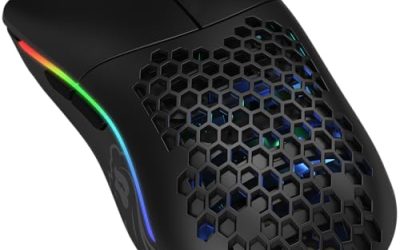
The Aerox 9 Wireless answers a common objection to button-heavy mice: they often feel heavy. At a listed 89 grams, it carries an 18-button layout, including a 12-button side panel, in a far lighter shell than the other picks here. That makes it appealing for Diablo players who make constant small movements and want less mass to push around during long grinds. Its listing highlights a holey, water-resistant design, Bluetooth and 2.4 GHz connections, and the TrueMove Air optical sensor, giving wireless players a lighter route to a full skill layout.
Specs
- Brand: SteelSeries
- Model: 62618
- Buttons: 18 programmable buttons, including a 12-button side panel
- Sensor: TrueMove Air optical sensor, 18K DPI, 400 IPS, 40G acceleration
- Switches: SteelSeries mechanical switches rated for 80 million clicks
- Weight: 89 grams
- Battery: Up to 80 hours on 2.4 GHz and up to 180 hours on Bluetooth
- Connectivity: Bluetooth, 2.4 GHz wireless, and wired USB-C
- Design: Holey shell with AquaBarrier water-resistant protection, rated IP54
- Feet: PTFE glide feet
Best for: Wireless players who want a full thumb panel without the weight of a traditional button-heavy mouse.
Watch out for: Decide whether you like a holey shell before buying, and note that the battery figure differs sharply between Bluetooth and 2.4 GHz use.
ASIN: B09VNPB6Q1
Which One Fits Your Situation
You Run a Build With Many Active Skills
Choose the Razer Naga V2 Pro or the Logitech G600. The Naga lets you fit the 12-button plate for your busiest build and swap it out when a simpler character needs less, while the G600 adds G-Shift for a second layer on the same panel. Either way, put potions and your defensive skill where your thumb lands first, then arrange damage skills around them so panic presses stay reliable.
You Play Long Grinds and Your Wrist Gets Tired
Look first at the SteelSeries Aerox 9 Wireless. Its listed 89-gram weight is far below the other picks, which reduces the effort of the constant small movements Diablo demands. The holey shell will not suit everyone, so weigh that against the weight saving. If you prefer a solid, sculpted shell and can accept more mass, the Scimitar RGB Elite offers an adjustable panel that may reduce thumb strain instead.
You Prefer Wired and Never Want to Charge
Pick between the Logitech G600 and the Corsair Scimitar RGB Elite. Both stay plugged in, so there is no battery routine before a session. The G600 is the choice when you want G-Shift and a second command layer, while the Scimitar is the choice when thumb placement is your main concern, because its side panel slides to meet your grip. Check cable routing on your desk either way, since both are tethered full-time.
You Switch Between Diablo and Other Games
The Razer Naga V2 Pro handles switching best because its side plates change the mouse itself. Use the 12-button plate for Diablo, the 6-button plate for a game with fewer commands, and the 2-button plate when you want a cleaner side profile. Its Bluetooth and HyperSpeed Wireless options also help if the same mouse moves between a gaming PC and a second machine during the week.
Common Mistakes
- Buying a two-button mouse for a build that needs six or more instant commands, then relying on awkward keyboard reaches during elite fights.
- Counting total buttons without checking how many sit under the thumb, where Diablo skills and potions actually need to live.
- Ignoring weight and grip, so a mouse that looks ideal on paper becomes tiring during a three-hour farming session.
- Forgetting the connection trade-off: choosing wireless without noting its battery figures, or choosing wired without checking cable length and desk routing.
- Mapping every side button at once instead of starting with potions and core skills, which makes the grid harder to learn by touch.
Frequently Asked Questions
How many side buttons do you need for Diablo?
Most players do well with at least six thumb buttons, covering core skills, a defensive ability, and a potion. A 12-button panel helps if your build adds summons, buffs, portals, or extra consumables. More buttons only help when you can find them by touch, so start with the commands you press under pressure and expand gradually.
Is a wired or wireless mouse better for Diablo?
Neither connection wins for every player. Wired models such as the G600 and Scimitar RGB Elite remove charging from your routine and keep the setup simple. Wireless models such as the Naga V2 Pro and Aerox 9 Wireless free your desk and list long battery figures, but those figures vary by connection mode, so check which mode you will actually use.
Does a high DPI sensor matter for an action RPG?
It matters less than consistency. Diablo needs the cursor to land exactly where you intend when placing skills or selecting a target in a crowd, and every sensor listed here covers the sensitivity ranges most players use. Set a comfortable DPI, keep it fixed while you learn a build, and prioritise button layout and comfort over the largest headline number.
Can one of these mice work for other games too?
Yes, especially the Razer Naga V2 Pro, whose swappable plates let you reduce the side layout for simpler games. The other picks can also have their extra buttons left unmapped or assigned to everyday commands. Just remember that a large thumb grid takes practice, and a mouse chosen mainly for Diablo will always feel most natural in button-heavy games.