If your wrist aches after a long day of clicking, you’ve probably wondered whether an ergonomic mouse is worth the switch. These vertical and specially shaped mice promise to reduce strain by keeping your hand in a more natural handshake position, but they also come with a learning curve and a different feel. So do they actually deliver?
This review digs into whether ergonomic mice are worth it, examining vertical designs, wired and wireless options, and the wrist-support accessories that complement them, to help you decide if your hands would benefit.


As an Amazon Associate we earn from qualifying purchases at no extra cost to you.







🎮 Get More From Your Setup — Free
Prime Gaming gives you free PC games every month, in-game loot, and a free Twitch channel sub — plus fast free shipping on all the gear above. New members get a 30-day free trial.
Watch: Is An Ergonomic Mouse Worth It — Video Review
Design & Build
Ergonomic mice come in a few flavors. The vertical style, seen in the Logitech Lift, ProtoArc EM11, and Anker vertical mice, tilts your hand into a near-vertical handshake grip that reduces forearm twist. The Logitech Lift is a polished, comfortable wireless option in graphite, while the ProtoArc EM11 adds rechargeability and the Anker models offer both wireless and wired budget-friendly choices. Build quality scales with price, with the Lift feeling the most refined. Rounding out the category are wrist-support accessories like the JYWYBF gel mouse pad, which cushions your wrist during use. The common thread is a shape designed to keep your wrist neutral rather than pronated flat against the desk.
Performance
For comfort during long sessions, ergonomic mice genuinely help many people. By reducing the forearm rotation that a flat mouse forces, a vertical design like the Logitech Lift can ease the strain that leads to wrist and forearm discomfort over hours of work. There is an adjustment period, typically a few days, as your hand learns the new grip and your pointing precision recovers. These mice are tuned for productivity and everyday use rather than fast gaming, so competitive players will still prefer a traditional gaming shape. Pairing a vertical mouse with a gel wrist-rest pad like the JYWYBF adds cushioning that further supports the wrist, making the whole setup more comfortable.
Pros & Cons
- Reduced wrist strain: a neutral handshake grip eases forearm rotation for many users.
- Comfortable for long sessions: ideal for all-day work and browsing.
- Range of options: wireless, wired, and budget models suit different needs.
- Pairs with wrist supports: a gel pad adds extra cushioning and comfort.
- Adjustment period: precision takes a few days to recover with the new grip.
- Not ideal for gaming: the vertical shape isn’t tuned for fast competitive play.
- Fit varies by hand size: the right size matters for full comfort.
Alternatives to Consider
If a full vertical mouse feels like too big a change, a gently contoured ergonomic gaming mouse offers a middle ground with a more familiar shape. Those whose discomfort is mild might find that simply adding a gel wrist-rest pad to their current mouse helps enough. And gamers who need fast performance should keep a traditional gaming mouse for play while using a vertical mouse for work. The best solution depends on the severity of your strain.
Related Guides
- Best Wired Gaming Mice (2026)
- Best Wireless Mouse For Work (2026)
- Best Mouse For Coding (2026)
- Best Productivity Mouse (2026)
- Best Gaming Mice For League Of Legends (2026)
Frequently Asked Questions
Do ergonomic mice really reduce wrist pain?
For many users, yes. By keeping the wrist in a neutral handshake position, vertical mice reduce the forearm rotation that contributes to strain. Results vary by individual, but people who experience discomfort with a flat mouse often find meaningful relief.
Is there a learning curve with a vertical mouse?
Yes, expect a few days of adjustment as your hand adapts to the new grip and your pointing precision returns to normal. Most people acclimate quickly, and the comfort payoff during long sessions makes the brief transition worthwhile.
Can I game with an ergonomic mouse?
You can for casual and slower-paced games, but vertical ergonomic mice aren’t optimized for fast competitive play. Serious gamers usually keep a traditional gaming mouse for play and use a vertical mouse for work to protect their wrist.
Wireless or wired ergonomic mouse, which is better?
Wireless options like the Logitech Lift and ProtoArc EM11 offer a cleaner desk and freedom of movement, while wired models like the Anker vertical mouse are cheaper and never need charging. For comfort the shape matters more than the connection, so choose based on convenience.
Verdict
So, is an ergonomic mouse worth it? For anyone who feels wrist or forearm strain from daily computer use, the answer is usually yes. The Logitech Lift is the standout for comfort and polish, while the ProtoArc EM11 and Anker vertical mice offer solid value. Add a gel wrist pad like the JYWYBF for extra support, give it a few days to adjust, and your hands will likely thank you.
Top picks from this guide
 Pulsar Gaming GearsPulsar Gaming Gears - Xlite V2 Wireless Gaming Mouse, Ultra…
 RedragonRedragon M916AK Wireless 42G Ultra-Light Mouse 26K DPI Remapping Keys…
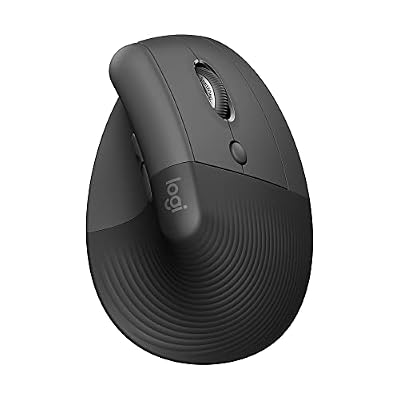 LogitechLogitech Lift Vertical Ergonomic Wireless Mouse - Graphite | Connect…AnkerAnker 2.4G Wireless Ergonomic Mouse, Right Hand Vertical Mouse USB…