The best gaming mouse under $50 for Minecraft Bedwars and Hypixel PvP is a wireless model that weighs roughly 60 grams or less, uses a 2.4GHz receiver instead of Bluetooth for gameplay, and has crisp, consistent left-click switches. The Logitech G305 is the safest all-round pick, the Attack Shark X3 and RK M30 are the lightest, and the Razer Orochi V2 is the pick for battery life.
- Picks at a Glance
- What Makes a Good Mouse for Bedwars and Hypixel PvP?
- Is a Wireless Mouse Good Enough for Hypixel Bedwars?
- How We Chose These Mice
- Top 10 Wireless Gaming Mice Under $50 for Bedwars
- Also Consider
- Which Mouse Weight Is Best for Minecraft PvP?
- Why Click Quality Matters More Than Sensor in Bedwars
- Grip Style: Which Pick Fits How You Hold the Mouse
- Wired or Wireless: Should You Skip Wireless Altogether?
- Common Problems and Quick Fixes
- What About Mousepads and Skates?
- Battery Care and Maintenance
- Buying Guide: What to Look For Under $50
- Setup Tips for Bedwars and Hypixel PvP
- Frequently Asked Questions
- Which One Should You Buy?
- Sources
Minecraft PvP is unusual among shooters and fighters because the mouse is both your aim and your weapon. You click constantly, you flick to track a moving opponent and you bridge or block-place with the right button. That makes click quality, weight and connection stability more important than a headline DPI number. This guide covers ten wireless options (seven main picks and three alternatives) and explains how to choose between them.
Picks at a Glance
| Mouse | Listed weight | Connection | Sensor or DPI (as listed) | Best for |
|---|---|---|---|---|
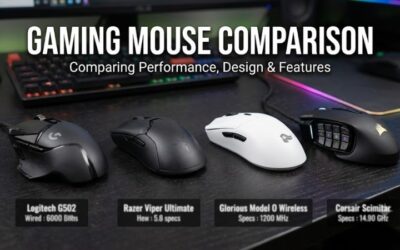
| Logitech G305 | Lightweight (check maker) | LIGHTSPEED 2.4GHz | Hero 12K, 12,000 DPI | Best overall |
| Attack Shark X3 | 49g | Bluetooth 5.2, 2.4G, wired | PAW3395 | Lightest feel with a strong sensor |
| RK Royal Kludge M30 | 43g | 2.4G, Bluetooth, USB-C | PAW3311, 24,000 DPI | Lowest weight |
| Redragon M725 | 49g | Bluetooth 5.1, 2.4GHz, wired | 8,000 DPI | Cheapest lightweight |
| Razer Orochi V2 | Compact (check maker) | HyperSpeed, Bluetooth | 18K DPI, 950 hr battery listed | Battery life and small hands |
| NSYCA G11 | Lightweight (check maker) | BT 5.1, 2.4GHz, USB-C wired | 22,000 DPI, 3 side buttons | Extra side buttons |
| Aula SC620 | Not listed | 2.4GHz, USB-C, BT 5.3 | 12,000 DPI, macro keys | Tri-mode on a tight budget |
What Makes a Good Mouse for Bedwars and Hypixel PvP?
A good Bedwars mouse is light enough that you can flick and click for a whole match without wrist fatigue, quick enough that your clicks register without delay, and stable enough that the cursor never stutters during a fight. In practice, that means weight, switch feel, connection type and sensor quality, in that order.
- Weight: a lighter mouse needs less force to start and stop a flick. The mice in this guide range from about 43 grams to the 80-gram class.
- Switch feel: Minecraft PvP rewards fast, consistent clicking. Switches with a short, crisp travel and a clear reset are easier to click rhythmically than mushy ones.
- Connection: use the 2.4GHz receiver for play. Bluetooth is convenient for a laptop but is generally less responsive, so keep it as a backup mode.
- Sensor: modern budget sensors are good enough for Minecraft. A bigger DPI number is not a better mouse.
Is a Wireless Mouse Good Enough for Hypixel Bedwars?
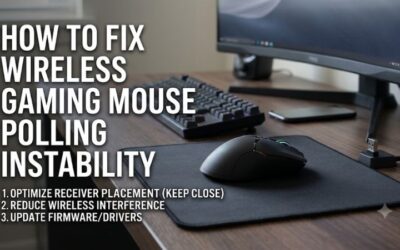
Yes. A 2.4GHz wireless mouse from a reputable brand is fast enough for Bedwars, and many players use them. The practical risks are battery death mid-match and interference, both of which are manageable with a charging habit and a receiver placed near the mouse.
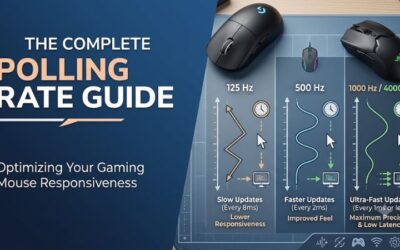
The math supports that. A mouse that reports at 1000Hz sends a position update every 1 millisecond. If you click at 12 clicks per second, your clicks are about 83 milliseconds apart, so a 1 millisecond reporting interval is about 1.2 percent of that gap. That is far below what you can feel in a match. The table shows how the interval changes with polling rate.
| Polling rate | Update interval | Share of an 83ms click gap (12 CPS) |
|---|---|---|
| 125Hz | 8ms | about 9.6% |
| 500Hz | 2ms | about 2.4% |
| 1000Hz | 1ms | about 1.2% |
For budget wireless mice, check the maker’s page for the default polling rate. Some listings mention 1000Hz, while others do not, and we do not claim a number that the listing leaves out.
How We Chose These Mice
This guide is research-based. We did not use these mice ourselves. We reviewed the store listings for wireless gaming mice, kept only models that appear to sell for under $50 at listing time, and favored those with a stated weight, a named sensor, a 2.4GHz or equivalent wireless mode and a clear battery or charging description. We left out renewed and used items, and limited each brand to two entries.
- Wireless with a receiver: every pick has a low-latency wireless mode.
- Weight: we ranked listed weights where they existed and flagged the rest as “check the maker.”
- Brand support: established brands got priority because replacements and driver software matter for a mouse you will use daily.
- No unverified claims: we do not state polling rates, battery hours or switch ratings unless they appear in the listing.
Top 10 Wireless Gaming Mice Under $50 for Bedwars
1. Logitech G305 LIGHTSPEED: Best Overall

Logitech G305 LIGHTSPEED Wireless Gaming Mouse, Hero 12K Sensor - Black | 12,000 DPI, lightweight, 6 programmable buttons, 250h battery life, on-board memory, PC/Mac, lightweight gaming mouse
Included for 'Best Wireless Gaming Mouse Under $50 for Minecraft PvP (7 Picks)' because the listing specifies Hero 12K Sensor and Black, details this guide uses to compare options.
View on AmazonThe Logitech G305 LIGHTSPEED is listed as a wireless gaming mouse with the Hero 12K sensor, 12,000 DPI, a lightweight build and six programmable buttons. It is a long-running budget favorite because it pairs a dependable 2.4GHz connection with a familiar, symmetrical shape that suits most grips. The six buttons give you room to bind a hotbar slot to a thumb button, which can speed up block swapping in Bedwars.
- Sensor: Hero 12K, 12,000 DPI
- Buttons: 6 programmable
- Connection: LIGHTSPEED wireless
Best for: players who want one dependable mouse. Skip if: you want the lowest weight on the list.
Pros: trusted brand, steady wireless, simple software. Cons: not the lightest, runs on a single battery type, check the maker’s page for the exact battery details.
2. Attack Shark X3: Best Lightweight Sensor Value

ATTACK SHARK X3 49g Ultra-Lightweight Wireless Gaming Mouse, White&Tape | Bluetooth 5.2/2.4G Wireless/Wired, PAW3395 Gaming Sensor, 26K DPI, 200h Battery Life, Programmable Buttons for PC/Mac/Win
Included for 'Best Wireless Gaming Mouse Under $50 for Minecraft PvP (7 Picks)' because the listing specifies White&Tape and Bluetooth 5.2/2.4G Wireless/Wired, details this guide uses to compare options.
View on AmazonThe Attack Shark X3 is listed at 49 grams with Bluetooth 5.2, 2.4G wireless and wired modes, and the PAW3395 gaming sensor. For PvP, that combination means a very light shell with a sensor that is usually found in more expensive mice. The tri-mode design also lets you use the same mouse on a laptop in Bluetooth mode and switch to the receiver for ranked matches.
- Weight: 49g as listed
- Sensor: PAW3395
- Modes: Bluetooth 5.2, 2.4G, wired
Best for: flick-heavy PvP players who want a light shell. Skip if: you prefer a brand with a long software history.
Pros: very light, strong sensor, tri-mode. Cons: a newer brand with less track record, small shell may suit claw grip better than palm grip.
3. RK Royal Kludge M30: Best Ultra-Light Pick

RK ROYAL KLUDGE RK M30 Wireless Gaming Mouse, 24000 DPI, 43g Ultra-Lightweight, PAW3311 Sensor, 2.4G/Bluetooth/USB-C Rechargeable Wireless Mouse with 5 Programmable Buttons for PC/Mac, White
Included for 'Best Wireless Gaming Mouse Under $50 for Minecraft PvP (7 Picks)' because the listing specifies 24000 DPI and 43g Ultra-Lightweight, details this guide uses to compare options.
View on AmazonThe RK Royal Kludge M30 is listed at 43 grams with a PAW3311 sensor, up to 24,000 DPI and 2.4G, Bluetooth and USB-C connection options. It is the lightest mouse in this guide, which makes it the best option if wrist fatigue is your biggest issue in long Bedwars sessions. The lower mass means less force to flick, but also means it can feel twitchy if you are used to a heavier mouse.
- Weight: 43g as listed
- Sensor: PAW3311, 24,000 DPI
- Modes: 2.4G, Bluetooth, USB-C
Best for: tired wrists and fast tracking. Skip if: you like a weighty, planted feel.
Pros: lowest weight, wireless tri-mode, strong spec sheet. Cons: very light mice take time to adjust to, battery details need checking on the maker’s page.
4. Redragon M725: Best Budget Lightweight

Redragon M725 Honeycomb Shell Gaming Mouse Wireless Lightweight 49g -Black | 8000 DPI Tri-Mode BT5.1/2.4GHz/Type-C Wired Gamer Mouse with 2 Side Buttons, Macro Programmable for PC/Mac/Laptop
Included for 'Best Wireless Gaming Mouse Under $50 for Minecraft PvP (7 Picks)' because the listing specifies Macro Programmable for PC/Mac/Laptop, details this guide uses to compare options.
View on AmazonThe Redragon M725 is listed as a 49-gram honeycomb-shell wireless gaming mouse with 8,000 DPI and a tri-mode setup covering Bluetooth 5.1, 2.4GHz and Type-C wired. It is the cheapest lightweight option here, which makes it a good first PvP mouse for a younger player or a backup for a travel bag. The honeycomb shell keeps weight down, though it can let dust in over time.
- Weight: 49g as listed
- DPI: 8,000
- Modes: Bluetooth 5.1, 2.4GHz, Type-C wired
Best for: the lowest cost lightweight mouse. Skip if: you want the most refined clicks.
Pros: light, tri-mode, low cost. Cons: lower DPI ceiling, open shell, switch details not listed.
5. Razer Orochi V2: Best Battery Life and Small Grip

Razer Orochi V2 Wireless Gaming Mouse, 950 Hr Battery, Black | 2 Wireless Modes (HyperSpeed & Bluetooth), 18K DPI Sensor, 60M-Click Switches, Lightweight, AA/AAA Battery, PC & Mac
Included for 'Best Wireless Gaming Mouse Under $50 for Minecraft PvP (7 Picks)' because the listing specifies 950 Hr Battery and Black, details this guide uses to compare options.
View on AmazonThe Razer Orochi V2 is listed with a 950-hour battery, two wireless modes (HyperSpeed and Bluetooth) and an 18K DPI sensor. It is a compact mouse, so it suits players with smaller hands or a claw grip, and the long battery rating means you may charge it rarely. For Bedwars, that reliability matters since a dead mouse mid-match costs you the game.
- Battery: 950 hours as listed
- Modes: HyperSpeed 2.4GHz, Bluetooth
- Sensor: 18K DPI
Best for: small hands, travel and long battery life. Skip if: you have large hands or use a palm grip.
Pros: very long listed battery life, compact, brand support. Cons: small shell, battery runtime depends on the cell type and mode.
6. NSYCA G11: Best for Extra Side Buttons
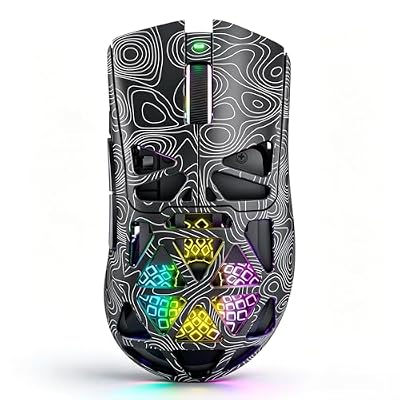
NSYCA G11 Wireless Gaming Mouse Lightweight with 3 Side Buttons, Tri-Mode BT5.1/2.4GHz/USB-C Wired, 22000 DPI Adjustable, RGB Wireless Mouse, Programmable Macro Gamer Mouse for Laptop/PC/Mac
Included for 'Best Wireless Gaming Mouse Under $50 for Minecraft PvP (7 Picks)' because the listing specifies Tri-Mode BT5.1/2.4GHz/USB-C Wired and 22000 DPI Adjustable, details this guide uses to compare options.
View on AmazonThe NSYCA G11 is listed as a lightweight wireless gaming mouse with three side buttons, tri-mode connectivity (Bluetooth 5.1, 2.4GHz and USB-C wired) and an adjustable 22,000 DPI. The extra side buttons give you more bind options, which can be useful for hotbar slots in Minecraft. It is a lesser-known brand, so read the maker’s page for software and warranty details.
- Side buttons: 3
- Modes: BT 5.1, 2.4GHz, USB-C wired
- DPI: up to 22,000 as listed
Best for: players who want more thumb buttons. Skip if: you want a known brand.
Pros: extra buttons, tri-mode, light. Cons: lesser-known brand, weight and battery not stated in the listing.
7. Aula SC620: Best Tri-Mode on a Tight Budget

Aula SC620 Wireless Gaming Mouse, Tri-Mode 2.4GHz/USB-C/BT5.3 Computer Mouse with 12000 DPI, Programmable Macro Gamer Mouse with Rapid Fire Key, RGB Light Gaming Mice for PC/Laptop/Mac(Black)
Included for 'Best Wireless Gaming Mouse Under $50 for Minecraft PvP (7 Picks)' because the listing specifies Tri-Mode 2.4GHz/USB-C/BT5.3 Computer Mouse with 12000 DPI and Programmable Macro Gamer Mouse with Rapid Fire Key, details this guide uses to compare options.
View on AmazonThe Aula SC620 is listed as a tri-mode wireless gaming mouse supporting 2.4GHz, USB-C and Bluetooth 5.3, with 12,000 DPI and programmable macro buttons. It is an entry-level pick for players who want wireless freedom without spending much. Note that Hypixel has rules about unfair advantages, so use the programmable buttons for key binds, not for automated clicking.
- Modes: 2.4GHz, USB-C, Bluetooth 5.3
- DPI: 12,000 as listed
- Buttons: programmable macro keys
Best for: low-cost wireless and travel. Skip if: you need a stated low weight.
Pros: tri-mode, programmable, low cost. Cons: weight not listed, unknown long-term durability.
Also Consider
- Razer Basilisk V3 X HyperSpeed: a customizable wireless mouse with mechanical switches that sits at the top edge of the budget. Choose it if you want a larger, more ergonomic shape than the lightweight picks.
- SOLAKAKA SM822: a tri-mode wireless mouse listed with a charging dock and a PAW3311 sensor. A dock helps if you forget to plug in.
- Redragon M810 Pro: a wireless RGB gaming mouse with rapid-fire macro keybinds in the listing. Avoid using rapid-fire features on Hypixel, since automated clicking can break server rules.
Which Mouse Weight Is Best for Minecraft PvP?
For most players, 45 to 65 grams is a comfortable range for Minecraft PvP. Lighter mice reduce arm effort during flicks and long sessions, but very light shells can feel unstable if you tend to grip hard. A simple way to think about it is force: with Newton’s second law, the same flick on an 80-gram mouse needs about 1.6 times the force of a 49-gram mouse at the same acceleration.
| Weight | Force relative to 49g | Feel |
|---|---|---|
| 43g | 0.88x | Very light, twitchy |
| 49g | 1.00x | Light, balanced |
| 60g | 1.22x | Medium, stable |
| 80g | 1.63x | Heavier, planted |
Your grip matters too. Claw and fingertip grips often prefer lighter mice, while palm grip users tend to want a larger shell, even at a slightly higher weight.
Why Click Quality Matters More Than Sensor in Bedwars
In Bedwars, most fights are decided by who lands more consistent hits, who keeps their aim on a moving target and who places blocks quickly under pressure. Each of those relies on the physical clicking and the shape of the mouse, not on a sensor that tracks at a very high speed. A sensor listed at 22,000 DPI sounds impressive, but most Minecraft players run well under 2,000 DPI, so the extra headroom is never used.
What you do use constantly is the left switch. Cheap switches can feel soft, with a long travel before the click and a vague reset. That makes a steady rhythm harder to hold. Another issue is wear: a switch that starts double-registering a single press can cost you a fight and, in a long session, can be maddening. If you notice that problem in the first weeks, return the mouse under the seller’s return window instead of living with it.
Grip Style: Which Pick Fits How You Hold the Mouse
| Grip | How it feels | Picks that fit |
|---|---|---|
| Claw | Fingers arched, palm touching the back | Razer Orochi V2, Attack Shark X3, RK M30 |
| Fingertip | Only the fingertips touch the mouse | RK M30, Redragon M725 |
| Palm | Whole hand rests on the shell | Logitech G305, Razer Basilisk V3 X HyperSpeed |
The shapes here are based on the listings and general design, so check the maker’s page for exact dimensions. If your hand is longer than about 18 centimeters, a very compact mouse such as the Orochi V2 may cramp your fingers, so prefer a medium shell.
Wired or Wireless: Should You Skip Wireless Altogether?
If you want the cheapest reliable option, a wired mouse has no battery to manage and no receiver to lose. A wired lightweight mouse can cost less than a wireless one, and some players prefer the cable for tournaments. But the cable also drags on the desk and can affect flicks unless you use a mouse bungee.
Wireless removes the drag. The trade-off is battery management. A tri-mode mouse gives you both, since you can plug in USB-C when the battery runs low. For most Bedwars players, a tri-mode wireless mouse is the best balance.
Common Problems and Quick Fixes
| Problem | Likely cause | Fix |
|---|---|---|
| Cursor stutters mid-fight | Receiver too far or blocked | Move the receiver to a front port or use a short extension cable |
| Mouse disconnects | Low battery or Bluetooth mode | Charge, and switch to the 2.4GHz mode |
| Aim feels inconsistent | Mouse acceleration on | Turn off enhanced pointer precision in Windows settings |
| Double clicks | Worn or faulty switch | Use the return window, then replace |
| Hand fatigue | Mouse too heavy or too small | Try a lighter or larger shell |
| Cursor skips on the pad | Dirty sensor or surface | Clean the sensor lens and use a cloth pad |
What About Mousepads and Skates?
A mouse is only half of the setup. A cloth pad of medium size gives you enough room for a low sensitivity setup. If the mouse feels sticky, check the feet: replacing worn skates is a cheap way to restore glide. Avoid using the mouse on a bare glass desk, since many optical sensors track poorly on glass.
Battery Care and Maintenance
A budget wireless mouse should last for years if you treat the battery well. Avoid leaving it fully drained for weeks, since lithium cells dislike deep discharge. Charge it with a standard USB-C cable and a normal computer port instead of a high-power fast charger unless the maker says it is supported. If the mouse has a sleep timer in its software, set it to a short interval so the battery is not drained while you are away.
Every few weeks, wipe the shell with a slightly damp cloth, clean the sensor lens with a dry cotton swab and check that the feet are not chipped. A clean sensor and smooth feet keep tracking consistent, which matters in a match where a single skipped flick can cost you a bed. Store the 2.4GHz receiver in the mouse’s compartment if it has one, so it is not lost when you travel to a friend’s house or a tournament.
Finally, keep a short routine: charge after play, check the receiver is seated firmly before a match, and keep a USB-C cable on the desk so you can switch to wired mode if the battery runs low in the middle of a session.
Buying Guide: What to Look For Under $50
Connection mode
Choose a mouse with a 2.4GHz receiver and use it for play. Bluetooth is better for a second device. A wired USB-C mode is a handy fallback when the battery is low.
Switch quality
Because Minecraft combat depends on rapid clicking, look for switches described as optical or mechanical in the maker’s page, and avoid listings that only talk about DPI. A double-click problem, where one press registers twice, is a common failure in cheap switches, so buy from a seller with a clear return policy.
Battery
Check the maker’s page for the battery capacity and runtime. A mouse with a listed battery life of many days is more convenient than one you charge nightly. Wired charging while you play is possible on most tri-mode models.
Buttons and software
Extra side buttons are helpful for hotbar binds. Keep software simple: set your DPI once and stop adjusting it.
Decision matrix
| Your situation | Pick |
|---|---|
| Want the safest overall choice | Logitech G305 |
| Want the lightest shell | RK M30 or Attack Shark X3 |
| Small hands or claw grip | Razer Orochi V2 |
| Lowest cost, still wireless | Redragon M725 or Aula SC620 |
| Need extra thumb buttons | NSYCA G11 |
Setup Tips for Bedwars and Hypixel PvP
- Use the receiver on a front USB port. Placing it near the mouse lowers the chance of dropouts.
- Set DPI between 400 and 1600. Many Minecraft players use a lower DPI with a higher in-game sensitivity setting. Pick one value and keep it so your muscle memory stays consistent.
- Turn off mouse acceleration in Windows. Open mouse settings and untick enhanced pointer precision so movement is consistent.
- Use a cloth mousepad. A consistent surface gives predictable glide, which matters more than expensive sensors.
- Keep a charging habit. Charge at the end of a session instead of waiting for a low-battery warning.
- Bind hotbar keys to side buttons sparingly. Only bind what you will remember under pressure.
Frequently Asked Questions
What is the best gaming mouse under $50 for Minecraft Bedwars?
The Logitech G305 is the safest overall pick, while the RK M30 and Attack Shark X3 are the lightest. Choose by grip size and weight preference.
Are wireless mice laggy for Hypixel PvP?
Not noticeably when you use a 2.4GHz receiver from a reputable brand. Avoid Bluetooth for competitive play, as it is generally less responsive.
Does DPI matter for Minecraft?
Less than comfort and consistency. A moderate DPI such as 800 or 1600 with an adjusted in-game sensitivity is a common choice.
How light should a Minecraft PvP mouse be?
Between about 45 and 65 grams suits most players. Go lighter for fast flicks and lower arm effort, or heavier for stability.
Can I use macros or rapid-fire on Hypixel?
Check Hypixel’s current rules first. Automated clicking is generally treated as an unfair advantage and can lead to punishment, so use programmable buttons only for key binds.
Which budget mouse has the longest battery life?
The Razer Orochi V2 is listed with a 950-hour battery, the longest figure in this guide. Real runtime depends on the mode and settings.
Is a heavier mouse better for block placement?
Not necessarily. A mouse with a good, large right button and a comfortable shape matters more than weight when you bridge.
Which One Should You Buy?
Buy the Logitech G305 if you want a dependable all-rounder. Choose the RK M30 or Attack Shark X3 if you want the lightest shell. Pick the Razer Orochi V2 for small hands and long battery life, and go with the Redragon M725 or Aula SC620 if cost is the priority. Whichever you choose, use the 2.4GHz receiver, keep DPI consistent and confirm weight and battery details on the maker’s page before you order.
Sources
- Logitech G product information
- Razer product information
- Attack Shark, RK Royal Kludge and Redragon maker pages
- Hypixel network rules
- Store listings for each model
Last updated: November 2026