Finding the best Logitech gaming mouse for FPS play is mostly a question of fit. Logitech G uses the same HERO sensor family and the same LIGHTSPEED wireless technology across most of its range, so the headline specifications rarely separate one model from the next. What actually changes your aim is the shell in your hand: its weight, its width, where the hump sits, how the sides are shaped for lifting, and whether the buttons you need sit under your thumb without forcing a grip change mid-fight.
- What Matters in an FPS Mouse
- The Picks at a Glance
- 1. Logitech G PRO X SUPERLIGHT 2 Wireless Gaming Mouse – Black
- 2. Logitech G PRO X SUPERLIGHT 2 DEX Wireless Gaming Mouse – Black
- 3. Logitech G PRO X SUPERLIGHT Wireless Gaming Mouse – Black
- 4. Logitech G305 LIGHTSPEED Wireless Gaming Mouse – Black
- 5. Logitech G502 X LIGHTSPEED Wireless Gaming Mouse – White
- How to Choose Between Them
- Frequently Asked Questions
- Conclusion
This guide compares five Logitech G mice that suit first-person shooters, from the ultralight PRO X SUPERLIGHT line built for competitive play to the heavier, button-rich G502 X LIGHTSPEED and the long-running G305 LIGHTSPEED. Every pick below is a Logitech G mouse, every specification comes from the manufacturer’s Amazon listing for that exact model, and the differences that matter for shooters such as Valorant, Counter-Strike 2, Apex Legends and Call of Duty are explained in plain terms so you can match a mouse to your hand size, grip style and sensitivity.
As an Amazon Associate we earn from qualifying purchases.
What Matters in an FPS Mouse
Weight is the first filter. A lighter mouse takes less force to start and stop, which makes micro-corrections and fast flicks easier to control, especially on the low sensitivities most tactical shooter players use. All five mice here sit at very different points on the scale, from 60 grams at the lightest end to just over 100 grams, and none of them is objectively correct. Players who aim mostly with the arm and sweep across a large pad usually benefit from the lightest shell they can control, while wrist aimers and players who find ultralight mice twitchy sometimes track more steadily with a little extra mass.
Sensor performance, by contrast, is largely a solved problem in this lineup. The HERO and HERO 2 sensors listed below track at speeds far beyond what a human hand can produce, with no smoothing, filtering or acceleration in the ranges these listings describe. In practice that means you should choose your sensitivity based on the game and your pad space, not chase the highest DPI number on the box. Every mouse here offers far more maximum DPI than any shooter requires, and all of them let you save DPI steps and button assignments through Logitech G HUB software.
Polling and connection type matter more than raw DPI. A standard 1000 Hz report rate sends the mouse position to the PC every millisecond, which is the baseline for competitive play. The PRO X SUPERLIGHT 2 models go further, with report rates up to 8 kHz listed for both the standard and DEX versions, which can reduce the interval between reports when paired with a capable PC and a high-refresh monitor. LIGHTSPEED wireless, used by every pick in this guide, is Logitech’s proprietary 2.4 GHz connection and is designed to match wired responsiveness, so choosing wireless here is about desk freedom and consistent glide rather than giving up performance.
Shape and grip decide the rest. Fingertip and claw grips pair well with shorter, lower, symmetrical shells that leave room to pull the mouse back into the fingers. Palm grip players usually prefer a taller hump that fills the hand and a longer body that supports the fingers. Right-handed ergonomic shells, such as the DEX and the G502 X in this list, curve to support a relaxed hand position but rule themselves out for left-handed use. Finally, consider buttons and battery: FPS players typically need two reliable side buttons for melee, ping, push-to-talk or an ability, and a battery figure that survives a full week of play without turning charging into a routine.
The Picks at a Glance
For pure competitive FPS, the PRO X SUPERLIGHT 2 is the default recommendation in this lineup: 60 grams, the HERO 2 sensor, up to 8 kHz polling and a safe symmetrical shape. The PRO X SUPERLIGHT 2 DEX keeps almost all of that hardware and reshapes the shell into a right-handed ergonomic form for players who found the symmetrical version slippery or flat. The original PRO X SUPERLIGHT remains relevant as the lighter-spec predecessor, with the HERO 25K sensor and a 70-hour listed battery life. The G305 LIGHTSPEED is the endurance pick, trading flagship hardware for a HERO sensor rated to 12,000 DPI and up to 250 hours from a single AA battery. The G502 X LIGHTSPEED is the outlier for hybrid players: heavier and taller, with 13 programmable controls and a dedicated DPI-shift button for anyone who splits time between shooters and button-heavy games.
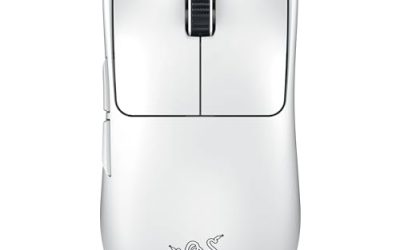
1. Logitech G PRO X SUPERLIGHT 2 Wireless Gaming Mouse – Black

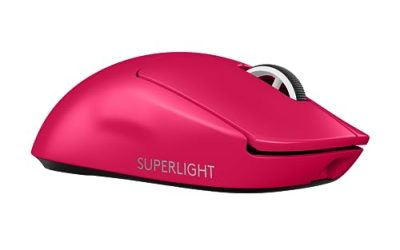
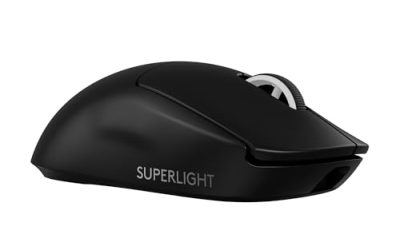
The PRO X SUPERLIGHT 2 is the mouse Logitech builds for the competitive end of FPS, and its listing leads with the number that defines it: 60 grams. That weight, achieved without a perforated shell, means the mouse gets out of the way during long tracking fights and repeated counter-strafing, and the zero-additive PTFE feet listed for the model help it glide consistently across cloth pads.
Inside, the listing specifies the HERO 2 sensor with up to 44,000 DPI, LIGHTFORCE hybrid switches on the main buttons, five programmable buttons in total, USB-C charging and a battery life of up to 95 hours. The headline feature for high-refresh players is the report rate of up to 8 kHz, which the listing presents as the step beyond the usual 1 kHz wireless standard. Higher polling does not change how the sensor reads the surface, but it does deliver position updates more frequently, which is the part of the chain competitive players chase once shape and weight are settled.
The shape is a medium symmetrical shell that suits claw and fingertip grips on small to medium hands, and palm grip on smaller hands. There is no RGB lighting and no extra button cluster, which is the deliberate trade: everything not needed for aiming has been removed. Choose this mouse if you play tactical or arena shooters seriously, use a low to medium sensitivity, and want the lightest, most current hardware Logitech sells for the role. Players with large hands who palm grip, or anyone who wants more than two side buttons, should look at the DEX or the G502 X instead.
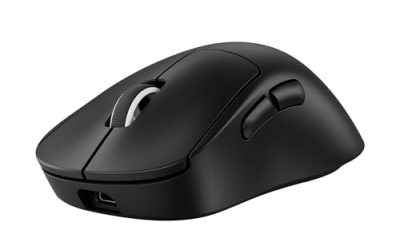
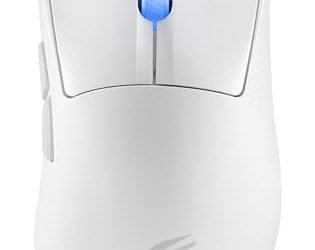
2. Logitech G PRO X SUPERLIGHT 2 DEX Wireless Gaming Mouse – Black

The PRO X SUPERLIGHT 2 DEX answers the most common complaint about the standard SUPERLIGHT 2: a symmetrical shell is safe, but it is not supportive. The DEX keeps the same 60 gram weight class, the same HERO 2 sensor rated up to 44,000 DPI, up to 8 kHz polling, five programmable buttons and USB-C charging, then reshapes the body into an asymmetrical right-handed ergonomic form with a sculpted thumb area.
That shape change matters in shooters more than the spec sheet suggests. An ergonomic shell locks the hand into a repeatable position, which helps players who palm or relax-claw grip keep the sensor angle consistent from round to round. The raised right side and contoured left side give the fingers a defined ledge for lifting the mouse during big swipes, a movement low-sensitivity players repeat hundreds of times per match. Because the shell is built around the right hand, left-handed players cannot use it in their dominant hand at all, which is the clearest limitation in this guide.
Pick the DEX if you like the SUPERLIGHT 2 hardware but want a shaped, supportive shell rather than a neutral one, and you play with your right hand. Pick the standard SUPERLIGHT 2 if you use a fingertip grip, switch grips between games, or simply prefer a symmetrical mouse that does not dictate hand position. On listed specifications the two are closely matched, so this decision is almost entirely about the shape in your hand, and it is worth being honest about your grip before choosing.
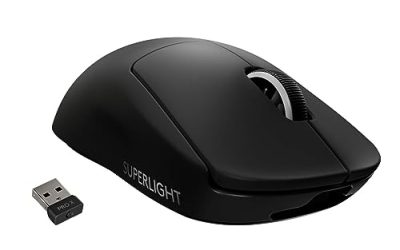
3. Logitech G PRO X SUPERLIGHT Wireless Gaming Mouse – Black
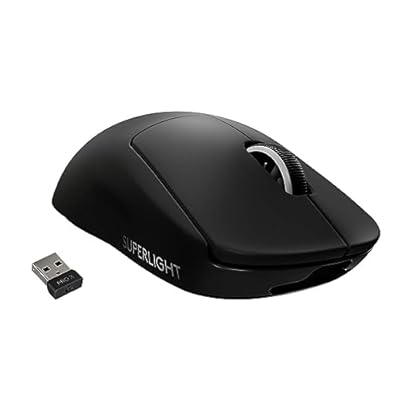
The original PRO X SUPERLIGHT is the mouse that established this category for Logitech, and its listing still describes a very competitive FPS tool: under 63 grams, the HERO 25K sensor with up to 25,600 DPI, five programmable buttons, zero-additive PTFE feet and up to 70 hours of battery life over LIGHTSPEED wireless.
Compared with the SUPERLIGHT 2, the differences are specific rather than dramatic. The sensor is the previous HERO generation, the report rate is the standard wireless figure rather than the 8 kHz ceiling of the newer model, and charging uses the older connector arrangement rather than the USB-C listed for the second generation. In game, the shape is the familiar medium symmetrical shell that made the line popular with professional FPS players, and it supports the same claw and fingertip grips as its successor.
This mouse makes sense for a player who wants the proven SUPERLIGHT shape and a genuinely ultralight wireless mouse, and who does not need the higher polling ceiling or the newer sensor of the second generation. It also suits players who already know the original shell fits their hand, because shape familiarity is worth more in a shooter than a spec-sheet upgrade. If the price gap to the SUPERLIGHT 2 is small at the time you buy, the newer model is the more future-proof choice; if the gap is wide, the original still covers everything an FPS player actually uses: low weight, a flawless-tracking listed sensor, two side buttons and a week-scale battery.
4. Logitech G305 LIGHTSPEED Wireless Gaming Mouse – Black

The G305 LIGHTSPEED is the practical pick in this lineup, and its listing focuses on endurance: the HERO sensor delivers up to 12,000 DPI and tracking beyond 400 IPS, LIGHTSPEED wireless reports at 1 ms, and a single AA battery delivers up to 250 hours of continuous gameplay. At 99 grams it is the second heaviest mouse here, and that weight includes the battery, which also means the balance and mass are things you accept in exchange for never thinking about charging.
The shell is compact and symmetrical, with six programmable buttons and on-board memory for carrying settings between PCs. The small footprint suits small to medium hands and claw or fingertip grips, and the receiver stores inside the body, which makes the G305 easy to move between a desktop and a laptop for players who game in more than one place. There is no rechargeable cell and no cable-free charging system; when the battery eventually runs down, you swap the AA cell and keep playing.
For FPS specifically, the G305 covers the fundamentals honestly. The sensor ceiling of 12,000 DPI is far beyond any in-game sensitivity, the 1 ms report rate matches the standard competitive baseline, and the two side buttons handle the usual shooter binds. What you give up versus the SUPERLIGHT models is weight, and what you gain is simplicity and months between battery changes. It is a strong fit for a first serious FPS mouse, a travel setup, or any player who values reliability over chasing the lightest possible shell.
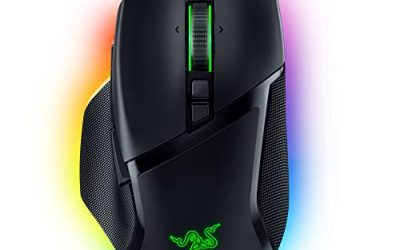
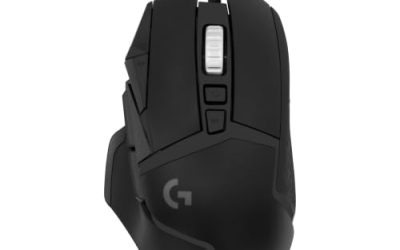
5. Logitech G502 X LIGHTSPEED Wireless Gaming Mouse – White

The G502 X LIGHTSPEED is the choice for players whose gaming is not only FPS. Its listing describes a right-handed ergonomic mouse weighing 102 grams, with the HERO 25K sensor adjustable from 100 to 25,600 DPI, LIGHTFORCE hybrid optical-mechanical switches, 13 programmable controls, USB-C charging, POWERPLAY wireless charging compatibility and a battery life of up to 140 hours.
The feature that translates directly into shooters is the DPI-shift button beside the thumb. It can be reversed, removed, or assigned through software, and its classic role in FPS play is a momentary sensitivity drop: hold it to fine-track a distant target, release it to return to your normal turning speed. The dual-mode scroll wheel, which toggles between a precise ratchet and a free-spinning mode, is more useful for weapon and inventory cycling in games that bind the wheel, and the extra buttons give hybrid players room for push-to-talk, ping and ability keys without reaching for the keyboard.
The trade-offs are weight and size. At 102 grams this is a deliberate step away from the ultralight philosophy of the rest of this list, and the tall ergonomic shell suits palm and relaxed claw grips on medium to large hands far better than fingertip play. Choose the G502 X LIGHTSPEED if you want one mouse for shooters plus MOBA, MMO or productivity work, you like a supportive shaped shell, and you actively use extra buttons. Choose any of the SUPERLIGHT models if your priority is the fastest possible flicks in a dedicated FPS setup.
How to Choose Between Them
Start with your grip and hand size, because no specification fixes a shape that fights your hand. Fingertip and aggressive claw players should shortlist the standard SUPERLIGHT 2 or the original SUPERLIGHT. Palm and relaxed claw players with a right-hand grip should compare the DEX against the G502 X LIGHTSPEED, then decide by buttons: five on the DEX, thirteen controls on the G502 X. Small-handed players on a tighter budget, or anyone who hates charging cables, should look closely at the G305.
Next, be realistic about polling. Up to 8 kHz reporting on the SUPERLIGHT 2 models is a genuine listed advantage, but it pays off most on high-refresh monitors with a PC that can hold very high frame rates in your shooter of choice. On a mainstream setup, the 1 ms class connections of the other three mice are not the bottleneck in anyone’s aim. Weight is the more universal variable: if you play on low sensitivity with arm aiming, lighter is usually better; if you play high sensitivity with wrist aiming, a mid-weight mouse such as the G305 can feel calmer and easier to stop precisely.
Finally, set the mouse up properly once it arrives. Update it in Logitech G HUB, store your DPI steps on the on-board memory where the model supports it, and use one sensitivity across your shooters so your muscle memory transfers. Most FPS players land somewhere between 400 and 1600 DPI paired with an in-game sensitivity that lets them turn 180 degrees in one comfortable swipe. Give a new shape at least a week of regular play before judging it, because grip adaptation is real and first-day impressions of an unfamiliar shell are unreliable.
Frequently Asked Questions
Is wireless fast enough for competitive FPS? In this lineup, yes, on the listings’ own terms: LIGHTSPEED is Logitech’s pro-grade wireless connection, the G305 lists a 1 ms report rate, and the SUPERLIGHT 2 models list report rates up to 8 kHz. The practical requirements are keeping the receiver close to the mouse, ideally on the included extension cable, and keeping the battery charged.
Which of these is best for small hands? The G305 has the most compact shell in this guide, and the standard SUPERLIGHT 2 also works well for small to medium hands in claw or fingertip grips. The G502 X LIGHTSPEED is the largest and tallest shape here and is the hardest for small hands to control.
Does maximum DPI matter for shooters? Not at these levels. Every mouse in this guide lists a maximum far above the sensitivity any FPS player uses in game. Sensor quality shows up as consistent, acceleration-free tracking, which the HERO listings describe, rather than in the size of the DPI number.
Can left-handed players use these mice? The symmetrical models, the SUPERLIGHT 2, the original SUPERLIGHT and the G305, can be held in either hand, although their side buttons sit on the left side of the shell. The DEX and the G502 X LIGHTSPEED are right-handed ergonomic shapes and are not suitable for left-hand use.
Conclusion
The best Logitech gaming mouse for FPS is the PRO X SUPERLIGHT 2 for most competitive players: it pairs the lightest listed weight in this guide with the HERO 2 sensor and up to 8 kHz polling in a shape that fits the widest range of grips. The DEX version is the better buy when you want that same hardware in a supportive right-handed shell. The original SUPERLIGHT remains a sound ultralight alternative, the G305 LIGHTSPEED is the endurance and simplicity pick, and the G502 X LIGHTSPEED serves players who need buttons and a DPI-shift control as much as raw speed. Match the shell to your hand first, and the rest of the decision makes itself.