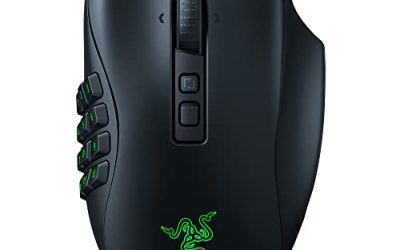
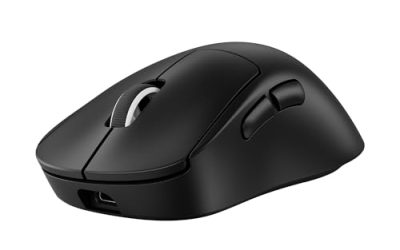
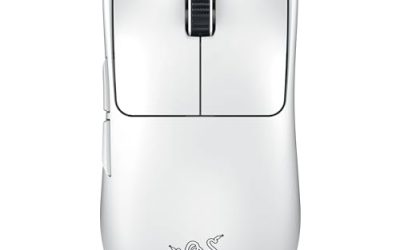
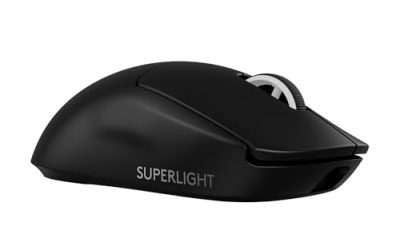
Choosing the best asus rog wireless gaming mouse is less about the highest DPI number and more about matching shape, weight, and button layout to the way you play. ASUS ROG splits its lineup into clear families: the Harpe Ace mice are low, lightweight esports shapes for fast flicks, the Keris line adds a sculpted right-handed ergonomic shell, and the Chakram X Origin goes the other way with far more controls for MMO and MOBA play. All share tri-mode connectivity and ROG AimPoint sensors, so the differences that matter are ergonomic rather than electronic.
Every mouse here connects over 2.4 GHz RF, Bluetooth, and wired USB, so you can compete on the low-latency receiver, pair Bluetooth with a laptop, and plug in to charge without stopping play. Where they diverge is polling headroom, battery life, and weight — from a 47-gram carbon fiber flagship to a 123-gram control hub with a detachable joystick. Shooter players should start with the Harpe Ace Aim Lab Edition or Keris II Ace, smaller hands point to the Harpe Ace Mini, weight-focused competitors to the Harpe Ace Extreme, and macro-heavy players to the Chakram X Origin.
As an Amazon Associate we earn from qualifying purchases.
Quick Picks
Start here, then read below for the shape and battery details that decide the fit.
| Product | ASIN | Best For |
|---|---|---|
| ASUS ROG Keris II Ace | B0D3CX3QMD | Ergonomic FPS play with high polling |
| ASUS ROG Harpe Ace Aim Lab Edition | B0BSKX9V7C | Balanced lightweight esports shape |
| ASUS ROG Harpe Ace Extreme | B0D65GJF7C | Lightest carbon fiber esports build |
| ASUS ROG Harpe Ace Mini | B0DG6DQ2DP | Small hands and fingertip grip |
| ASUS ROG Chakram X Origin | B0BRTK8YPN | MMO and MOBA players who need buttons |
How to Choose
Picking a ROG wireless mouse starts with your hand and grip, then moves to the connection and polling setup you will actually use every day.
Shape, Size, and Grip Style
Shape is the decision you cannot fix in software. The Harpe Ace family uses a flatter, lower profile suiting claw and fingertip grips, where fingers do the steering and quick lifts are frequent. The Keris II Ace is taller and more sculpted, supporting a relaxed palm or palm-claw grip. The Chakram X Origin is larger still, keeping a full palm planted while your thumb works extra controls. A mouse that is too long pushes fingers past the main buttons, while one that is too small can cramp a palm grip within an hour.
Weight and How It Changes Aim
Weight shapes how a mouse starts, stops, and corrects. The lightest models here, at 47 to 54 grams, need little force to flick and are easier on the wrist across long sessions, which is why competitive FPS players prefer them, though an ultralight mouse can feel less planted during slow tracking. The Chakram X Origin, at 123 grams, sits at the other end: its mass steadies slow movements and suits button-heavy games. Low-sensitivity arm aimers usually benefit most from a light shell, while MMO players often prefer more substance.
Sensor and DPI in Real Terms
All five mice use ROG AimPoint sensors rated at either 36,000 or 42,000 DPI. Those numbers are ceilings, not settings to use; most players compete between 400 and 3,200 DPI, where these sensors track cleanly. What matters more is tracking quality at your chosen setting. The Keris II Ace lists 750 IPS speed and 50G acceleration with its AimPoint Pro sensor, plus track-on-glass capability. Both AimPoint variants are well beyond what human aim can bottleneck, so let shape, weight, and polling guide the choice.
Polling Rate and the Booster Question
Polling rate is how often the mouse reports its position. At the standard 1,000 Hz, a report arrives roughly every millisecond, which already feels responsive. The Keris II Ace goes further with its included ROG Polling Rate Booster, reaching up to 4,000 Hz wirelessly and 8,000 Hz wired. Higher polling can smooth motion on high-refresh monitors, but gains shrink quickly and higher rates can add CPU load and drain battery faster. If you play competitive shooters on a very high refresh display, that headroom is a genuine differentiator; otherwise, do not let polling override a better-fitting shape.
Connectivity and Battery Life
Tri-mode connectivity is standard: 2.4 GHz RF for gaming, Bluetooth for a second device, and wired USB for charging and play. Listed battery life ranges from up to 70 hours on the Harpe Ace Extreme to up to 150 hours on the Chakram X Origin, with the Aim Lab Edition at up to 90 hours, the Mini at up to 105 hours, and the Keris II Ace at up to 107 hours in 2.4 GHz mode without lighting. Treat those as best-case figures; RGB and boosted polling shorten them noticeably, so keep lighting modest if you dislike charging.
Switches, Buttons, and Extra Controls
For most FPS players, five buttons are enough: two main clicks, a wheel click, and two side buttons for melee, push-to-talk, or a grenade key. The Harpe and Keris models follow that formula, keeping weight down, and the Keris II Ace uses ROG optical micro switches rated for 100 million clicks. The Chakram X Origin breaks the pattern with 11 programmable buttons and a detachable joystick — a layout built for MMO skill bars, MOBA item actives, and vehicle controls. Count the inputs your games demand before paying in weight for buttons you will never bind.
Software, Receivers, and Ecosystem Fit
ROG mice are configured through Armoury Crate, where you set DPI, polling, buttons, and lighting, and save profiles to onboard memory so settings travel with the mouse. Some models support the ROG Omni Receiver, letting one receiver connect multiple supported ROG devices — worth checking if you also use a ROG wireless keyboard. Receiver placement matters too: a dongle behind a metal case can behave worse than the same receiver on an extender near your pad.
5 Best Options
Each option below is a current ASUS ROG wireless gaming mouse sold on Amazon US, compared on the specs its listing states and the player it suits best.
ASUS ROG Keris II Ace

Specs
- Sensor: ROG AimPoint Pro optical sensor, up to 42,000 DPI
- Tracking: up to 750 IPS and 50G acceleration
- Polling: up to 4,000 Hz wireless and 8,000 Hz wired with ROG Polling Rate Booster
- Weight and size: 54 g; 121 x 67 x 42 mm, right-handed ergonomic shape
- Connectivity: tri-mode 2.4 GHz RF, Bluetooth 5.1, and wired USB
- Switches: ROG 100M optical micro switches
- Battery: up to 107 hours in 2.4 GHz mode without lighting
- ASIN: B0D3CX3QMD
Best for: Competitive players who want an ergonomic shape without giving up ultralight weight or high polling. At 54 grams it matches the Harpe models on weight, but its taller, sculpted shell supports the hand more fully, making it the natural pick for palm and palm-claw players with medium to larger hands. The booster and AimPoint Pro sensor give it the strongest technical ceiling here.
Watch out for: The shape is right-handed only, and its taller hump will not suit fingertip players. High polling requires the booster attached and reduces battery life, so headline polling and longest battery figures cannot be enjoyed at the same time.
ASUS ROG Harpe Ace Aim Lab Edition

Specs
- Sensor: ROG AimPoint optical sensor, up to 36,000 DPI
- Weight and size: 54 g; 127.5 x 63.7 x 39.6 mm, right-handed shape
- Connectivity: tri-mode 2.4 GHz RF with ROG SpeedNova, Bluetooth, and wired USB
- Buttons: 5 programmable buttons
- Polling: 1,000 Hz
- Battery: up to 90 hours
- ASIN: B0BSKX9V7C
Best for: FPS players who want the classic, proven Harpe shape. Developed with Aim Lab settings optimization in mind, it is the reference point for the line: a safe, low profile for claw and fingertip grips, a sensible weight, and no experimental materials. If you want a straightforward ROG esports mouse without boosted polling, this is the balanced default.
Watch out for: It is an earlier design than the Keris II Ace and Extreme, topping out at 1,000 Hz polling and a 36,000 DPI sensor — differences most players will not feel. Its relatively long shape can also overshoot for small hands; those buyers should look at the Mini.
ASUS ROG Harpe Ace Extreme

Specs
- Build: carbon fiber shell
- Sensor: up to 42,000 DPI
- Weight: 47 g
- Connectivity: tri-mode 2.4 GHz RF, Bluetooth, and wired USB
- Feet: glass skates
- Battery: up to 70 hours
- ASIN: B0D65GJF7C
Best for: Dedicated esports players chasing the lightest ROG mouse available. At 47 grams it is noticeably lighter than the standard Harpe, and carbon fiber delivers that weight without a honeycomb shell. Glass skates give a fast, low-friction glide pairing well with speed pads and low-sensitivity arm aiming. For players who measure upgrades in reduced inertia and fatigue, this is the flagship Harpe.
Watch out for: It is a specialist tool. Battery life, up to 70 hours, is the shortest here, glass skates feel different from PTFE feet and are not ideal on every pad, and the carbon fiber build makes it a premium flagship rather than a value pick.
ASUS ROG Harpe Ace Mini

Specs
- Design: small, compact right-handed shape
- Sensor: ROG AimPoint, up to 36,000 DPI
- Weight: 49 g
- Connectivity: tri-mode 2.4 GHz RF, Bluetooth, and wired USB
- Battery: up to 105 hours
- ASIN: B0DG6DQ2DP
Best for: Players with small to medium hands, and fingertip or claw users who find full-size esports mice too long. The Mini keeps the Harpe formula — low, light, and fast, with an AimPoint sensor and tri-mode connectivity — but scales the shell down so fingers land naturally on the main buttons. Its up to 105 hours of battery life is the strongest among the Harpe models here.
Watch out for: Size cuts both ways: palm grip players and larger hands will likely feel cramped, with little support at the back of the shell. If you are between sizes, the standard Harpe Ace is safer. It also sticks to conventional polling, so buyers seeking boosted rates should choose the Keris II Ace.
ASUS ROG Chakram X Origin

Specs
- Sensor: up to 36,000 DPI
- Buttons: 11 programmable buttons with a detachable joystick
- Weight: 123 g, right-handed design
- Connectivity: tri-mode 2.4 GHz RF, Bluetooth, and wired USB
- Cable: ROG Paracord included for wired mode
- Battery: up to 150 hours
- ASIN: B0BRTK8YPN
Best for: MMO, MOBA, and simulation players whose games reward extra inputs over ultralight speed. Eleven programmable buttons plus a removable joystick put skill rotations, item actives, and vehicle controls under your thumb, and up to 150 hours of battery life is the longest here. The larger shell keeps your palm planted while you work those controls, suiting deliberate, command-heavy play.
Watch out for: At 123 grams it is more than twice the weight of the Harpe and Keris models, a real disadvantage in fast shooters where repeated flicks become tiring. It is also the most complex mouse here to configure, so pure FPS players should choose a simpler model.
Which One Fits You
- Ergonomic FPS player with medium or large hands: choose the ASUS ROG Keris II Ace for its sculpted 54-gram shell, AimPoint Pro sensor, and boosted polling headroom.
- Balanced esports player who wants the proven default: choose the ASUS ROG Harpe Ace Aim Lab Edition, the reference Harpe shape with tri-mode connectivity and up to 90 hours of battery.
- Weight-obsessed competitor: choose the ASUS ROG Harpe Ace Extreme, whose 47-gram carbon fiber build and glass skates make it the lightest, fastest-gliding option here.
- Small-handed or fingertip player: choose the ASUS ROG Harpe Ace Mini, which scales the Harpe design down to 49 grams with the longest battery life of the Harpe family.
- MMO or MOBA player with a full skill bar: choose the ASUS ROG Chakram X Origin for its 11 programmable buttons, detachable joystick, and up to 150 hours of battery life.
- Multi-device user who games and works on one mouse: any tri-mode model fits, but the Harpe Ace Mini and Keris II Ace pair strong battery life with easy Bluetooth switching.
Common Mistakes
- Buying by DPI alone: a 42,000 DPI ceiling does not make a mouse more accurate at the 800 to 1,600 DPI most players actually use, so prioritize shape, weight, and grip fit over the biggest sensor number.
- Ignoring hand size and grip: a long esports mouse cramps small hands and a mini mouse starves a palm grip, and no software tuning fixes a shell that does not fit.
- Chasing maximum polling without the full picture: boosted polling needs the booster hardware attached, can raise CPU load, and shortens battery life, so enable it deliberately rather than by default.
- Leaving the receiver in a bad spot: burying the 2.4 GHz dongle behind a metal case or in a crowded USB hub can cause stutter that gets blamed on the mouse, so use an extender or front port near the pad.
- Paying in weight for buttons you never bind: extra programmable controls only help if your games need them and you learn the layout, which is why FPS players are usually better served by a clean five-button shell.
FAQ
Is a ROG wireless mouse fast enough for competitive FPS play?
Yes, in 2.4 GHz RF mode. ROG SpeedNova wireless is designed for low-latency competitive play, and the Keris II Ace adds optional boosted polling up to 4,000 Hz wirelessly for high-refresh monitors. Reserve Bluetooth for casual use, where convenience matters more than the last increment of responsiveness.
Which ASUS ROG wireless mouse is best for small hands?
The ASUS ROG Harpe Ace Mini is the clearest answer, with a compact shell and a 49-gram weight designed for smaller hands and fingertip or claw grips. Players with medium hands who prefer more palm support can also consider the Keris II Ace, but its 121 mm length and taller hump suit medium to larger hands best.
How long do these ROG wireless mice last between charges?
Listed figures range from up to 70 hours for the Harpe Ace Extreme to up to 150 hours for the Chakram X Origin, with the others between 90 and 107 hours. Real results depend on lighting and polling, so turning off RGB gets you closest to the listed numbers. All five can be used wired while charging.
Can one receiver run a ROG mouse and keyboard together?
Some ROG devices support the ROG Omni Receiver, letting one receiver connect multiple compatible ROG peripherals. Support varies by model, so confirm compatibility on the specific listing before assuming your mouse and keyboard will share one dongle. Each mouse still includes its own receiver.
Closing
The best asus rog wireless gaming mouse is the one whose shape disappears under your hand: the Keris II Ace for ergonomic support with flagship polling, the Harpe Ace models for lightweight esports play at three scales, and the Chakram X Origin when your games demand a command center instead of a scalpel. Match the shell to your hand and the buttons to your games first, and the shared ROG foundation will handle the rest.