Affiliate disclosure: As an Amazon Associate we earn from qualifying purchases. This post contains affiliate links — we may earn a small commission at no extra cost to you. This never affects our picks. Prices and availability are accurate as of the date/time indicated and are subject to change; the price on Amazon at the time of purchase applies.
- Quick Comparison Table
- 1. Alienware 34 Curved AW3425DWM: Best for an all-round 34-inch ultrawide
- 2. MSI MAG 346CQDF E20: Best for a lower-cost 34-inch UWQHD
- 3. ASUS ROG PG34WCDN: Best for the fastest 34-inch OLED
- 4. LG UltraGear 45GX950A-B: Best for a 45-inch 5K2K OLED for work and play
- 5. Samsung 57-inch Odyssey Neo G9: Best for a super-ultrawide dual 4K desk
- How to Choose
- Frequently Asked Questions
- About the Author
- Related Articles
Quick answer: The Alienware 34 AW3425DWM is the best ultrawide monitor for most players. The MSI MAG 346CQDF is the lower-cost 34-inch, the ASUS ROG PG34WCDN adds 360Hz OLED, the LG 45GX950A offers 5K2K OLED, and the Samsung 57-inch Neo G9 delivers dual 4K.
This guide compares five ultrawide monitors across sizes from 34 to 57 inches, covering LCD and OLED technology and refresh rates from 180Hz to 360Hz. We focus on resolution, panel type, curve and what graphics card each one demands. Comparisons use each listing’s published specifications; we did not run our own benchmarks, so confirm panel details and port support on each maker’s page.
Quick Comparison Table
| # | Model | Key specs (per listing) | Best for |
|---|---|---|---|
| 1 | Alienware 34 Curved AW3425DWM | 34-inch, WQHD, 180Hz, 1ms, 1500R curve, FreeSync Premium | an all-round 34-inch ultrawide |
| 2 | MSI MAG 346CQDF E20 | 34-inch, 3440 x 1440 UWQHD, 200Hz, 0.5ms, FreeSync Premium, HDR Ready | a lower-cost 34-inch UWQHD |
| 3 | ASUS ROG PG34WCDN | 34-inch, 1440p, 360Hz, tandem RGB QD-OLED, 0.03ms, DisplayHDR 500 True Black, USB-C 90W | the fastest 34-inch OLED |
| 4 | LG UltraGear 45GX950A-B | 45-inch, 5120 x 2160 WUHD OLED, 165Hz, 0.03ms, DP 2.1, USB-C 90W | a 45-inch 5K2K OLED for work and play |
| 5 | Samsung 57-inch Odyssey Neo G9 | 57-inch, Dual 4K UHD, 1000R, 240Hz, 1ms, DP 2.1, Quantum Mini-LED, DisplayHDR 1000 | a super-ultrawide dual 4K desk |
1. Alienware 34 Curved AW3425DWM: Best for an all-round 34-inch ultrawide
Specs per the listing: 34-inch curved, WQHD resolution, 180Hz, 1ms response, 1500R curvature, AMD FreeSync Premium, VESA AdaptiveSync. Panel type is not stated in the title.
The AW3425DWM is the balanced 34-inch ultrawide in this group. It pairs a 180Hz refresh rate with a 1500R curve, a tight enough bend to feel immersive on a screen this wide without distorting desktop work. A 34-inch WQHD ultrawide is also the resolution most mid-range and high-end graphics cards drive comfortably.
Alienware lists the monitor without naming the panel technology in the title, so check the maker page before you decide if panel type matters to you. For gamers who want an ultrawide that handles both competitive and single-player titles, it is the safest starting point here.
- Pros: 180Hz refresh at ultrawide size; 1500R curve; FreeSync Premium and AdaptiveSync
- Cons: Panel type not stated in the title; sits below the OLED options for contrast; no HDR rating listed
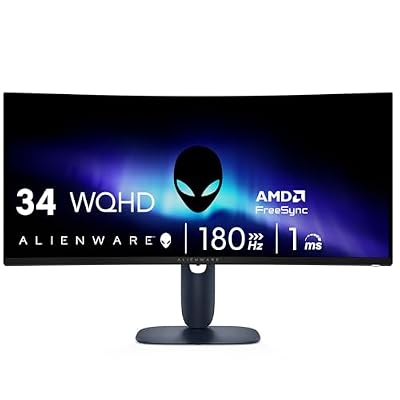
Alienware 34 Curved Gaming Monitor – AW3425DWM - 34-inch WQHD 180Hz 1ms Display, 1500R, AMD FreeSync Premium, VESA AdaptiveSync.
Included for 'Best Ultrawide Monitors for Gaming: 34 to 57 Inch' as a representative home product in this roundup; selection reflects the product set returned for this topic.
View on Amazon2. MSI MAG 346CQDF E20: Best for a lower-cost 34-inch UWQHD
Specs per the listing: 34-inch, 3440 x 1440 (UWQHD), 200Hz, 0.5ms, AMD FreeSync Premium, HDR Ready, HDMI, VGA port, VESA mount, tilt stand.
This MSI is the practical entry point for ultrawide gaming. It offers the full 3440 x 1440 resolution with a 200Hz refresh rate and a 0.5ms response time listed, so the specs line up with monitors that cost more. It also lists a VESA mount, which helps if you prefer a monitor arm.
The compromise is the stand and extras. The listing says tilt only, so you will not get height adjustment, and HDR Ready is a looser label than a certified HDR tier. It is the choice for someone upgrading from a 16:9 monitor who wants the wide view without a flagship budget.
- Pros: 200Hz at 3440 x 1440; VESA mount; tilt stand
- Cons: Tilt-only stand; HDR Ready is not a certified tier; panel type not stated in the title

msi MAG 346CQDF E20 34-inch 3440 x 1440 (UWQHD) Gaming Monitor, 200Hz, AMD FreeSync Premium, HDR Ready, HDMI, VGA Port, VESA, Tilt, 0.5ms, Black
Included for 'Best Ultrawide Monitors for Gaming: 34 to 57 Inch' as a representative home product in this roundup; selection reflects the product set returned for this topic.
View on Amazon3. ASUS ROG PG34WCDN: Best for the fastest 34-inch OLED
Specs per the listing: 34-inch ultrawide, 1440p, 360Hz, tandem RGB QD-OLED, RGB stripe pixel layout, OLED Care Pro, DisplayHDR 500 True Black, USB-C 90W, 0.03ms.
For competitive players who want ultrawide, a 360Hz OLED is a rare combination. This ASUS lists a tandem QD-OLED panel, a 0.03ms response time and an RGB stripe pixel layout, which is aimed at sharper text than earlier OLEDs. USB-C with 90W is also helpful if you connect a laptop.
OLED brings its own habits: static elements can cause burn-in risk over time, so features such as OLED Care Pro matter, and bright rooms may reduce perceived contrast. It also needs a strong graphics card to use 360Hz at this resolution. It is the premium refresh-rate pick.
- Pros: 360Hz at ultrawide size; OLED with 0.03ms response; USB-C with 90W
- Cons: Needs a powerful GPU to use the refresh rate; OLED burn-in care required; high-end tier

ASUS ROG PG34WCDN 34 Inch 1440p 360Hz Ultrawide RGB OLED Gaming Monitor | Tandem RGB QD-OLED, RGB Stripe Pixel, OLED Care Pro, DisplayHDR 500 True Black, USB-C 90W, 0.03ms
Included for 'Best Ultrawide Monitors for Gaming: 34 to 57 Inch' because the listing lists an explicit depth/thickness, which is the attribute this article compares.
View on Amazon4. LG UltraGear 45GX950A-B: Best for a 45-inch 5K2K OLED for work and play
Specs per the listing: 45-inch curved, 5K2K WUHD (5120 x 2160) OLED, dual-mode, 165Hz, 0.03ms, NVIDIA G-Sync and AMD FreeSync Premium Pro, HDR True Black 400, USB Type-C 90W, DP 2.1.
This LG is the large, high-resolution option. A 45-inch 5120 x 2160 panel gives you far more screen than a 34-inch model, and the extra pixel count means text and fine detail stay sharp. It suits people who split time between gaming, editing and multitasking and want one big display.
The cost is hardware demand and desk space. Driving 5120 x 2160 needs a high-end GPU, and 165Hz at this size will need a card in the RTX 5080 class for demanding games. The dual-mode label points to a second, lower resolution mode with a higher refresh rate. Confirm those modes on the maker page.
- Pros: 5K2K resolution on a 45-inch OLED; DP 2.1 and USB-C 90W; G-Sync and FreeSync Premium Pro
- Cons: Very demanding on the GPU; large desk footprint; dual-mode details not in the title

LG 45GX950A-B 45-inch Ultragear 5K2K WUHD (5120 x 2160) OLED Curved Gaming Monitor, Dual-Mode, 165Hz, 0.03ms, NVIDIA G-Sync, AMD FreeSync Premium Pro, HDR True Black 400, USB Type-C 90W, DP2.1
Included for 'Best Ultrawide Monitors for Gaming: 34 to 57 Inch' as a representative home product in this roundup; selection reflects the product set returned for this topic.
View on Amazon5. Samsung 57-inch Odyssey Neo G9: Best for a super-ultrawide dual 4K desk
Specs per the listing: 57-inch, Dual 4K UHD, 1000R curve, 240Hz, 1ms, DisplayPort 2.1, Quantum Mini-LED, DisplayHDR 1000, AMD FreeSync Premium Pro.
The Neo G9 is the extreme choice, a 57-inch screen with a dual 4K resolution that replaces two monitors with one. Its 1000R curve wraps around you, and Quantum Mini-LED with DisplayHDR 1000 brings strong brightness for HDR content. This is a simulation and productivity display as much as a gaming one.
It is also the most demanding to run. A dual 4K ultrawide needs a flagship graphics card with DisplayPort 2.1 to reach its listed 240Hz, and it takes a large, deep desk. If you have the hardware and the space, it is the most immersive option in the guide.
- Pros: Dual 4K at 57 inches; 240Hz with DisplayPort 2.1; Mini-LED with DisplayHDR 1000
- Cons: Needs a flagship GPU and DisplayPort 2.1; very large; 1000R curve takes time to get used to

Samsung 57" Odyssey Neo G9 (G95NC) Dual 4K UHD 1000R Curved Gaming Monitor | 240Hz, 1ms with DisplayPort 2.1, Quantum Mini-LED, DisplayHDR 1000, AMD FreeSync Premium Pro (LS57CG952NNXZA)
Included for 'Best Ultrawide Monitors for Gaming: 34 to 57 Inch' as a representative home product in this roundup; selection reflects the product set returned for this topic.
View on AmazonHow to Choose
Pick the size and resolution you can drive
A 34-inch 3440 x 1440 ultrawide suits most mid-range and high-end graphics cards. The 45-inch 5120 x 2160 and 57-inch dual 4K models need flagship GPUs, and DisplayPort 2.1 for the highest refresh rates. Check what your card supports before you choose, since a monitor that outruns the GPU wastes its refresh rate.
Choose between OLED and LCD
OLED panels give perfect blacks, very fast response and rich contrast, but they cost more and need burn-in care, such as avoiding static elements for long periods and using the maker’s protection features. LCD models, including VA and IPS types, are more affordable and have no burn-in concern. If the listing does not name the panel type, check the maker page.
Look at refresh rate and sync support
A 144Hz to 200Hz ultrawide covers most players. Go beyond 240Hz only if you play fast esports titles and your GPU can feed it. Confirm FreeSync or G-Sync support against your graphics card brand, and check that the ports, DisplayPort or HDMI, support the refresh rate at your resolution.
Mind curve, stand and desk space
Curve is listed as R values: 1500R is gentle and 1000R is tight. Tighter curves feel immersive on wide screens but can look odd on a shallow desk. Check whether the stand adjusts for height, or whether a VESA mount lets you use an arm, and measure your desk depth for the larger models.
Frequently Asked Questions
Is an ultrawide monitor good for gaming?
Yes, in supported games it widens your view and adds immersion. Some older titles do not support ultrawide, so check the games you play.
OLED or LCD for an ultrawide?
OLED offers better contrast and response but needs burn-in care. LCD is easier to live with for long desktop use. Choose based on how you use the screen.
What graphics card do I need for a 34-inch ultrawide?
A 3440 x 1440 screen is comfortable for mid-range and high-end cards. Higher resolutions like 5120 x 2160 need flagship cards.
What does 1500R mean?
It describes the curve radius in millimetres. Lower numbers are tighter. 1500R is gentle, and 1000R is a stronger wrap-around curve.
Will an ultrawide fit my desk?
A 34-inch model needs a normal desk. A 45-inch or 57-inch model needs a deep, wide desk and a sturdy stand or arm.