Affiliate disclosure: As an Amazon Associate we earn from qualifying purchases. This post contains affiliate links — we may earn a small commission at no extra cost to you. This never affects our picks. Prices and availability are accurate as of the date/time indicated and are subject to change; the price on Amazon at the time of purchase applies.
- Quick Comparison Table
- 1. LG UltraGear 27GX704A-B: Best for a 1440p OLED entry point
- 2. GIGABYTE MO27Q2A: Best for the highest QHD refresh rate here
- 3. ASUS ROG PG27UCDM: Best for 4K OLED at a desktop size
- 4. Alienware 34 AW3425DW: Best for curved ultrawide immersion
- 5. LG UltraGear 32GX870A-B: Best for a large 4K dual-mode screen
- How to Choose
- Frequently Asked Questions
- About the Author
- Related Articles
Quick answer: The best OLED monitors on this list start with the LG 27GX704A-B for a 1440p OLED entry point. The Gigabyte MO27Q2A suits high refresh, the ASUS PG27UCDM gives 4K, the Alienware AW3425DW is ultrawide and the LG 32GX870A is a large 4K option.
This guide compares five gaming OLED monitors across QHD, 4K and ultrawide formats. Each pick suits a different player, from someone with a mid-range graphics card to someone pairing a high-end GPU with a 4K display. Comparisons use each listing’s published specs, including resolution, refresh rate and ports. We did not run our own benchmarks or color measurements.
Quick Comparison Table
| # | Model | Key specs (per listing) | Best for |
|---|---|---|---|
| 1 | LG UltraGear 27GX704A-B | 27in QHD OLED, 240Hz, 0.03ms, G-Sync Compatible, HDR TrueBlack 400 | a 1440p OLED entry point |
| 2 | GIGABYTE MO27Q2A | 27in QD-OLED QHD, 280Hz, 0.03ms, HDMI 2.1, USB-C, KVM | the highest QHD refresh rate here |
| 3 | ASUS ROG PG27UCDM | 27in 4K QD-OLED, 240Hz, DisplayPort 2.1, true 10-bit, PS5/Xbox | 4K OLED at a desktop size |
| 4 | Alienware 34 AW3425DW | 34.2in curved QD-OLED, 3440×1440, 240Hz, 0.03ms, 1800R | curved ultrawide immersion |
| 5 | LG UltraGear 32GX870A-B | 32in 4K OLED, 240Hz, dual-mode, DP 2.1, USB-C | a large 4K dual-mode screen |
1. LG UltraGear 27GX704A-B: Best for a 1440p OLED entry point
Specs per the listing: 27-inch QHD OLED, 240Hz, 0.03ms response, NVIDIA G-Sync Compatible, AMD FreeSync Premium Pro, VESA DisplayHDR TrueBlack 400, HDMI 2.1, DisplayPort.
A 27-inch QHD panel at 240Hz is the sweet spot for most OLED shoppers: sharp enough for desktop use and light enough on the GPU that mid-range cards can drive it. The listing includes both G-Sync Compatible and FreeSync Premium Pro labels, so it fits either graphics brand.
OLED’s self-lit pixels give deep blacks and fast response, which the 0.03ms figure reflects. The trade-off is the usual OLED care: static elements can cause burn-in over time if left on screen for long stretches. The listing does not state panel type beyond OLED, so check the maker page if you care whether it is WOLED or QD-OLED.
- Pros: 240Hz QHD OLED; G-Sync Compatible and FreeSync Premium Pro; HDMI 2.1 and DisplayPort
- Cons: Burn-in care needed; Panel subtype not listed

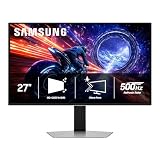
LG 27GX704A-B 27-inch Ultragear QHD (2650x1440) OLED Gaming Monitor 240Hz, 0.03ms, NVIDIA G-Sync Compatible, AMD FreeSync Premium Pro, VESA Display HDR TrueBlack400, HDMI 2.1, DisplayPort, Black
Included for 'Best OLED Monitors for Gaming: QHD, 4K and Ultrawide' as a representative home product in this roundup; selection reflects the product set returned for this topic.
View on Amazon2. GIGABYTE MO27Q2A: Best for the highest QHD refresh rate here
Specs per the listing: 27-inch QD-OLED, QHD 2560×1440, 280Hz, 0.03ms GTG, FreeSync Premium Pro, G-SYNC Compatible, HDMI 2.1, DP 1.4, Type-C, KVM, height and tilt adjustable.
This Gigabyte monitor pushes refresh to 280Hz on a QD-OLED panel and adds a USB-C port with KVM, which lets one keyboard and mouse control two computers. That makes it appealing for people who game on a desktop and work on a laptop at the same desk.
DisplayPort 1.4 caps bandwidth compared with newer DP versions, which matters mostly at 4K, not at QHD. Height and tilt adjustment are included, but swivel and pivot are not mentioned. Competitive players who want very high refresh rates will find this the most responsive 27-inch QHD in the list.
- Pros: 280Hz QD-OLED; USB-C with KVM; Height and tilt adjustable
- Cons: DisplayPort 1.4 only; Swivel and pivot not listed

GIGABYTE MO27Q2A 27" QD-OLED QHD AMD Freesync Premium Pro Gaming Monitor | Black, QHD 2560x1440, 280Hz, 0.03ms GTG, G-SYNC Compatible, HDMI2.1, DP1.4, Type-C, KVM, Height and Tilt Adjustable
Included for 'Best OLED Monitors for Gaming: QHD, 4K and Ultrawide' as a representative home product in this roundup; selection reflects the product set returned for this topic.
View on Amazon3. ASUS ROG PG27UCDM: Best for 4K OLED at a desktop size
Specs per the listing: 27-inch 4K 240Hz QD-OLED, OLED Care Pro, Neo Proximity Sensor, custom heatsink, DisplayPort 2.1, G-SYNC Compatible, true 10-bit, listed for PS5 and Xbox.
A 27-inch 4K panel is very sharp, with a pixel density that makes text and detail crisp. At 240Hz and with DisplayPort 2.1, it is aimed at players with a high-end graphics card who want 4K without choosing between sharpness and speed.
The ROG listing mentions OLED Care Pro and a Neo Proximity Sensor, both features aimed at reducing burn-in risk. A heatsink is also included. You will need a powerful GPU to feed 4K at high refresh rates, so this is a package to match with an RTX 5070 Ti class card or better.
- Pros: 4K at 240Hz on QD-OLED; DisplayPort 2.1; Burn-in care features
- Cons: Needs a powerful GPU; Higher cost tier than QHD models

ASUS ROG PG27UCDM 27 Inch 4K 240Hz OLED Gaming Monitor QD-OLED | OLED Care Pro, Neo Proximity Sensor, Custom Heatsink, DisplayPort 2.1, G-SYNC Compatible, True 10-bit, for PS5 and Xbox
Included for 'Best OLED Monitors for Gaming: QHD, 4K and Ultrawide' because the listing lists an explicit depth/thickness, which is the attribute this article compares.
View on Amazon4. Alienware 34 AW3425DW: Best for curved ultrawide immersion
Specs per the listing: 34.2-inch QD-OLED, WQHD 3440×1440, 240Hz, 0.03ms, 1800R curve, AMD FreeSync Premium Pro, VESA AdaptiveSync, DisplayHDR TrueBlack 400.
Ultrawide screens add field of view in racing, flight and open-world games, and an 1800R curve wraps the image around you. At 3440×1440, it has more pixels than standard QHD, so it asks a bit more of your graphics card.
The listing mentions FreeSync Premium Pro and AdaptiveSync, but not G-Sync, so NVIDIA owners should check compatibility on the maker page. Some games do not support ultrawide aspect ratios properly, so check the titles you play. For people who value immersion over esports speed, it is a strong choice.
- Pros: Curved ultrawide QD-OLED; 240Hz refresh; DisplayHDR TrueBlack 400
- Cons: G-Sync not mentioned; Some games lack ultrawide support
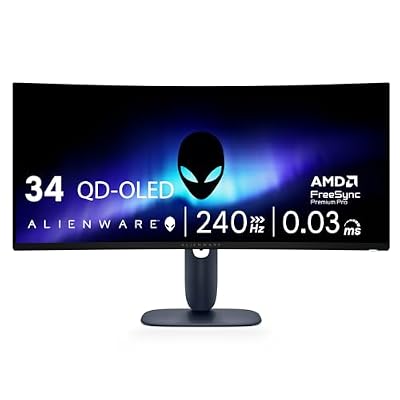
Alienware 34 240Hz QD-OLED Curved Gaming Monitor - AW3425DW - 34.2-inch WQHD (3440 x 1440) 0.03ms Display, 1800R Curve, AMD FreeSync Premium Pro, VESA AdaptiveSync, DisplayHDR TrueBlack 400
Included for 'Best OLED Monitors for Gaming: QHD, 4K and Ultrawide' as a representative home product in this roundup; selection reflects the product set returned for this topic.
View on Amazon5. LG UltraGear 32GX870A-B: Best for a large 4K dual-mode screen
Specs per the listing: 32-inch 4K UHD (3840×2160) OLED, dual-mode, 240Hz, 0.03ms, NVIDIA and AMD FreeSync Premium Pro support, VESA DisplayHDR True Black 400, USB Type-C, DP 2.1.
At 32 inches, this panel gives 4K more room, which suits big desks and viewing distance and also works well for video and photo editing. The dual-mode label points to a switchable refresh mode, though the listing does not explain the lower-resolution setting, so confirm that on the maker page.
The same 4K demands apply: a strong graphics card is needed to reach high frame rates at native resolution. For players who also watch films and edit media on the same display, a larger OLED with USB-C and DP 2.1 ties it together.
- Pros: 32-inch 4K OLED at 240Hz; USB-C and DP 2.1; Dual-mode label
- Cons: Heavy GPU demands; Dual-mode details not listed
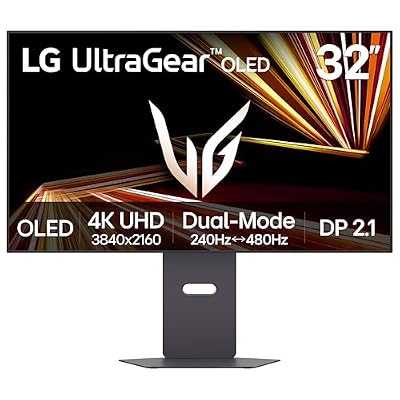
LG 32GX870A-B 32-inch Ultragear 4K UHD (3840 x 2160) OLED Gaming Monitor, Dual-Mode, 240Hz, 0.03ms, NVIDIA, AMD FreeSync Premium Pro, VESA DisplayHDR True Black 400, USB Type-C, DP2.1
Included for 'Best OLED Monitors for Gaming: QHD, 4K and Ultrawide' as a representative home product in this roundup; selection reflects the product set returned for this topic.
View on AmazonHow to Choose
Match resolution to your graphics card
QHD at 240Hz is the easiest for mid-range cards to drive. 4K at 240Hz needs an RTX 5070 Ti class card or better to use the refresh rate well. Ultrawide 3440×1440 sits in between. Choose the resolution your GPU can drive, not the biggest number.
Understand burn-in and panel care
OLED pixels can wear unevenly if static images stay on screen. Look for care features such as ROG’s OLED Care Pro and use a dark theme, auto-hide the taskbar and let screen savers run. Spend a few minutes setting them up, since warranty terms are not listed and should be read on the maker page.
Check ports for your setup
For 4K at high refresh, DisplayPort 2.1 or HDMI 2.1 matters. The ASUS PG27UCDM lists DisplayPort 2.1, while the Gigabyte MO27Q2A lists DisplayPort 1.4, which is fine at QHD. USB-C is useful for laptops, and KVM support is handy if you share the monitor between two computers.
Pick a size that fits your desk
27 inches suits most desks at normal viewing distance, 32 inches suits deeper desks, and a 34-inch ultrawide needs width. Measure your space, and avoid a curve that is too tight if you also use the monitor for office work. Also check stand adjustment, since not every listing mentions height or swivel.
Frequently Asked Questions
Are OLED monitors good for gaming?
Yes. They offer very fast response and deep blacks, which many players prefer. The trade-off is burn-in risk with static images and usually higher cost than LCD panels.
Is 4K OLED worth it over QHD?
Only with a powerful graphics card. 4K looks sharper but needs more GPU power. A 27-inch QHD OLED at 240Hz is easier to drive and still looks excellent.
Do these monitors support G-Sync?
Most list G-Sync Compatible or FreeSync Premium Pro. The Alienware AW3425DW lists FreeSync and AdaptiveSync, so NVIDIA owners should check the maker page.
What is the difference between QD-OLED and WOLED?
QD-OLED uses quantum dots for color, while WOLED uses a white OLED layer with color filters. Several picks here state QD-OLED, and the LG listings do not give the subtype.
How do I reduce burn-in risk?
Use dark mode, hide static taskbars, enable the monitor’s care features and let pixel refresh cycles run. Avoid leaving the same image on for many hours at a time.