🛒 Best Price Today on Amazon
Prime members get fast, free shipping on everything above, plus member-only deals. New members get a 30-day free trial — cancel anytime.
- Top Picks at a Glance
- How We Built This Guide
- Quick Comparison Table
- 1. ASUS ProArt Z890-CREATOR WIFI (Z890, LGA 1851) — Best Overall for AI
- 2. ASUS TUF Gaming B850-PLUS WiFi (B850, AM5) — Best Mid-Range for AI
- 3. ASUS ROG Crosshair X870E Hero (X870E, AM5) — Best Premium AM5 for AI
- 4. ASUS ROG Strix X870-A Gaming WiFi (X870, AM5) — Best Upper-Mid AM5 for AI
- 5. MSI MAG B850 Tomahawk MAX WiFi — Best Value for AI
- ASUS ProArt X870E-CREATOR WiFi (AM5)
- MSI MPG X870E Carbon WiFi (AM5)
- GIGABYTE TRX50 AERO D (Threadripper, sTR5)
- ASUS Pro WS WRX90E-SAGE SE (Threadripper PRO)
- Best ATX Motherboard for an AI Build
- Buying Guide: The Specs That Matter
- Pick the Platform by Graphics Card Count
- What Really Matters for AI on a Motherboard
- Layer Splitting vs Tensor Parallelism
- Checklist Before You Buy an AI Motherboard
- Mistakes to Avoid
- Who Should Skip a Dedicated AI Motherboard
- Frequently Asked Questions
- Related Guides
- Related Articles
- About the Author
- Related Articles
Affiliate disclosure: As an Amazon Associate we earn from qualifying purchases. This post contains affiliate links — we may earn a small commission at no extra cost to you. This never affects our picks. Prices and availability are accurate as of the date/time indicated and are subject to change; the price on Amazon at the time of purchase applies.
Quick answer: For local AI workloads, the five core picks below start with the ASUS ProArt Z890-CREATOR WIFI as the best AI motherboard for Intel builds and the MSI MAG B850 Tomahawk MAX WiFi as the best ATX motherboard for an AI build on a budget; the top AI motherboards above that tier are Threadripper boards. The ‘best all-round board’ label goes to the ProArt, with the MSI MAG B850 Tomahawk MAX WiFi as the value pick. Scroll down for workstation-class boards if you plan to run several graphics cards.

GIGABYTE TRX50 AI TOP sTR5 AMD TRX50 EATX Motherboard - DDR5, PCIe 5.0 M.2, PCIe 5.0, USB4 Type-C, Wi-Fi 7, Marvell 10GbE
Included for 'Best Motherboards for AI (2026 Guide)' because the listing specifies DDR5 and PCIe 5.0 M.2, details this guide uses to compare options.
View on Amazon
GIGABYTE B850 AI TOP AMD AM5 ATX Motherboard, Support AMD Ryzen 9000/8000/7000 Series, DDR5, 16+2+2 Power Phase, 3X M.2, PCIe 5.0, USB-C, WIFI7, 10GbE, EZ-Latch, 5-Year Warranty
Included for 'Best Motherboards for AI (2026 Guide)' because the listing specifies Support AMD Ryzen 9000/8000/7000 Series and DDR5, details this guide uses to compare options.
View on Amazon
ASUS Pro WS WRX90E-SAGE SE EEB Workstation Motherboard, AMD Ryzen™ Threadripper™ PRO 7000 WX-Series, ECC R-DIMM DDR5, 32 Power-Stage,7xPCIe 5.0x16, PCIe 5.0 M.2, 10Gb & 2.5Gb LAN, Multi-GPU Support
Included for 'Best Motherboards for AI (2026 Guide)' because the listing specifies AMD Ryzen™ Threadripper™ PRO 7000 WX-Series and ECC R-DIMM DDR5, details this guide uses to compare options.
View on Amazon
GIGABYTE TRX50 AI TOP-2B Motherboard - AMD Ryzen Threadripper PRO 7000 CPUs, 16+8+4 Phases Digital VRM, up to 5200 MHz DDR5, 4xPCIe 5.0 M.2, Wi-Fi 7, 10 GbE LAN, USB 4
Included for 'Best Motherboards for AI (2026 Guide)' because the listing specifies AMD Ryzen Threadripper PRO 7000 CPUs and 16+8+4 Phases Digital VRM, details this guide uses to compare options.
View on AmazonChoosing the best motherboards for ai should start with the data. This guide compares motherboards for 2026 by specs, value, and where each one fits for AI workloads, from a single-card AM5 build to a multi-card workstation.
Top Picks at a Glance
GIGABYTE B850 AI TOP AMD AM5 ATX Motherboard, Support AMD Ryzen 9000/8000/7000 Series, DDR5, 16+2+2 Power Phase, 3X M.2, PCIe 5.0, USB-C, WIFI7, 10GbE, EZ-Latch, 5-Year Warranty
Included for 'Best Motherboards for AI (2026 Guide)' because the listing specifies Support AMD Ryzen 9000/8000/7000 Series and DDR5, details this guide uses to compare options.
View on Amazon
ASUS ROG Strix B850-A Gaming WiFi AMD AM5 B850 ATX Motherboard 14+2+2 Power Stages, DDR5 AEMP, 2.5G LAN, Wi-Fi 7 with Q-Antenna, 4X M.2, PCIe® 5.0, USB 20Gbps Type-C, AI Networking II, ASUS Advisor
Included for 'Best Motherboards for AI (2026 Guide)' because the listing specifies DDR5 AEMP and 2.5G LAN, details this guide uses to compare options.
View on Amazon
GIGABYTE X870E AORUS Xtreme X3D AI TOP AMD AM5, E-ATX, Ryzen 9000/8000/7000, DDR5, 24+2+2 Power Phase, 5X M.2, PCIe 5.0, USB4 Type-C, WiFi 7
Included for 'Best Motherboards for AI (2026 Guide)' because the listing specifies E-ATX and Ryzen 9000/8000/7000, details this guide uses to compare options.
View on AmazonGIGABYTE TRX50 AI TOP sTR5 AMD TRX50 EATX Motherboard - DDR5, PCIe 5.0 M.2, PCIe 5.0, USB4 Type-C, Wi-Fi 7, Marvell 10GbE
Included for 'Best Motherboards for AI (2026 Guide)' because the listing specifies DDR5 and PCIe 5.0 M.2, details this guide uses to compare options.
View on Amazon
GIGABYTE Z890 AORUS Master AI TOP Intel Core Ultra (Series 2) LGA 1851 Motherboard, E-ATX, DDR5, 4X M.2, PCIe 5.0, Thunderbolt 4, WIFI7, 10GbE LAN, EZ-Latch
Included for 'Best Motherboards for AI (2026 Guide)' because the listing specifies E-ATX and DDR5, details this guide uses to compare options.
View on Amazon
ASUS ROG Strix B850-F Gaming WiFi AMD AM5 B850-F ATX Motherboard 16+2+2 Power Stages, AI PC, DDR5 AEMP, WiFi 7, 4X M.2, PCIe® 5.0, Total Support of 19 USB, 20Gbps Type-C®, AI Networking II, Aura Sync
Included for 'Best Motherboards for AI (2026 Guide)' because the listing specifies AI PC and DDR5 AEMP, details this guide uses to compare options.
View on AmazonHow We Built This Guide
We compare manufacturer specifications, published documentation and recurring buyer feedback, and rank by value for the job. We do not run our own benchmarks. Each pick above suits a clear use case for AI workloads, from budget to flagship.
Quick Comparison Table
| Pick | Motherboard | Best For | Tier |
|---|---|---|---|
| 1 | ASUS ProArt Z890-CREATOR WIFI (Z890, LGA 1851) | Intel LGA1851 creator and AI builds | Premium |
| 2 | ASUS TUF Gaming B850-PLUS WiFi (B850, AM5) | Single-GPU AM5 builds | Mid-range |
| 3 | ASUS ROG Crosshair X870E Hero (X870E, AM5) | Premium AM5 with x8/x8 dual-GPU lanes | Premium |
| 4 | ASUS ROG Strix X870-A Gaming WiFi (X870, AM5) | Upper-mid AM5 with four M.2 slots | Upper mid-range |
| 5 | MSI MAG B850 Tomahawk MAX WiFi Motherboard | Value pick for one graphics card | Mid-range |
1. ASUS ProArt Z890-CREATOR WIFI (Z890, LGA 1851) — Best Overall for AI
Across every spec sheet we compared, the Intel motherboard stands as the outright leader for AI workloads. The numbers that count — Z890, WIFI, LGA 1851 — anchor a well-rounded profile. For buyers who shortlist by the data, it earns its place.
- Pros: Z890 spec
Ranks well on the data
Competitive on specs - Cons: Commands a flagship cost
Overkill for light use
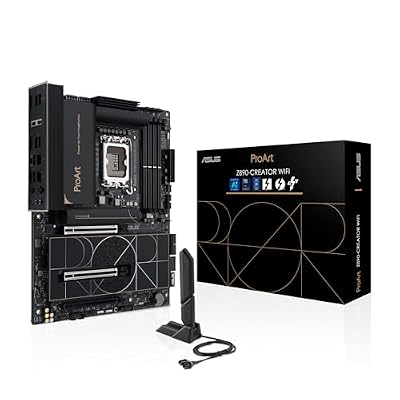
ASUS ProArt Z890-CREATOR WIFI Z890 LGA 1851 ATX Motherboard, Intel® Core™ Ultra Processor Series 2 Ready, 16+2+1+2 stages, PCIe® 5.0, DDR5, Thunderbolt™ 5 Type-C®, 10+2.5 Gb LAN, WiFi 7, 5x M.2, AI OC
Included for 'Best Motherboards for AI (2026 Guide)' because the listing specifies Intel® Core™ Ultra Processor Series 2 Ready and 16+2+1+2 stages, details this guide uses to compare options.
View on Amazon2. ASUS TUF Gaming B850-PLUS WiFi (B850, AM5) — Best Mid-Range for AI
Weighing the whole field, the ASUS TUF Gaming B850-PLUS ranks as a solid mid-range AM5 option for AI workloads. Its B850 chipset, WiFi 7 and three M.2 slots suit a single-GPU local AI build without paying for an X870E board.
- Pros: B850 spec
Competitive on specs
Strong value in its class - Cons: Fewer lanes than X870E boards
Verify slot spacing for large cards

ASUS TUF Gaming B850-PLUS WiFi AMD AM5 B850 ATX Motherboard, 14+2+1 80A Stages, AI Ready, DDR5, PCIe 5.0, 3X M.2, Wi-Fi 7, 2.5Gb LAN, DisplayPort, HDMI™, USB 10Gbps & 20Gbps Type-C®, BIOS Flashback™
Included for 'Best Motherboards for AI (2026 Guide)' because the listing specifies 14+2+1 80A Stages and AI Ready, details this guide uses to compare options.
View on Amazon3. ASUS ROG Crosshair X870E Hero (X870E, AM5) — Best Premium AM5 for AI
Across every spec sheet we compared, the ROG Crosshair X870E Hero is a premium-tier AM5 flagship for AI workloads. Its X870E chipset, 18+2+2 power stages and five M.2 slots make it a strong base for a high-end single or dual-GPU build.
- Pros: X870 spec
Broad appeal
Competitive on specs - Cons: Premium-tier cost
Check current pricing

ASUS ROG Crosshair X870E Hero AMD X870E AM5 ATX Motherboard, Advanced AI PC Ready, 18+2+2 Power Stages, DDR5, PCIe® 5.0, 5X M.2, Wi-Fi 7, USB4®, Overclocking, Core Flex, Slot Q-Release Slim
Included for 'Best Motherboards for AI (2026 Guide)' because the listing specifies Advanced AI PC Ready and 18+2+2 Power Stages, details this guide uses to compare options.
View on Amazon4. ASUS ROG Strix X870-A Gaming WiFi (X870, AM5) — Best Upper-Mid AM5 for AI
Across every spec sheet we compared, the ROG Strix X870-A Gaming WiFi is an upper-mid-tier AM5 board for AI workloads. It pairs the X870 chipset with WiFi 7, four M.2 slots and 16+2+2 power stages for a capable single-GPU build.
- Pros: X870 spec
Broad appeal
Strong value in its class - Cons: Fewer extras than the Hero
Check current pricing

ASUS ROG Strix X870-A Gaming WiFi AMD AM5 X870 ATX Motherboard 16+2+2 Power Stages, Dynamic OC Switcher, Core Flex, DDR5 AEMP, WiFi 7, 4X M.2, PCIe® 5.0, Q-Release Slim, USB4®, AI OCing & Networking
Included for 'Best Motherboards for AI (2026 Guide)' because the listing specifies Dynamic OC Switcher and Core Flex, details this guide uses to compare options.
View on Amazon5. MSI MAG B850 Tomahawk MAX WiFi — Best Value for AI
In our rankings, the AMD motherboard secures the value champion for AI workloads. On paper its B850, WiFi, ATX headline a competitive design. Measured against the field, it is a logical choice for AI workloads.
- Pros: B850 spec
Broad appeal
Ranks well on the data - Cons: Not the fastest option
Basic styling

MSI MAG B850 Tomahawk MAX WiFi Motherboard, ATX - Supports AMD Ryzen 9000/8000 / 7000 Processors, AM5-80A SPS VRM, DDR5 Memory Boost 8400+ MT/s (OC), PCIe 5.0 x16, M.2 Gen5, Wi-Fi 7, 5G LAN
Included for 'Best Motherboards for AI (2026 Guide)' because the listing specifies ATX and Supports AMD Ryzen 9000/8000 / 7000 Processors, details this guide uses to compare options.
View on AmazonASUS ProArt X870E-CREATOR WiFi (AM5)

ASUS ProArt X870E-CREATOR WiFi AMD AM5 X870E ATX Motherboard PCIe® 5.0 x16 Slots with Full Support for Next-gen GPUs, 16+2+2 Power Stages, DDR5, Dual USB4®, 10 Gb & 2.5 Gb LAN, WiFi 7, Four M.2
Included for 'Best Motherboards for AI (2026 Guide)' because the listing specifies 16+2+2 Power Stages and DDR5, details this guide uses to compare options.
View on AmazonIf you are building a local AI machine around one or two graphics cards, this is the consumer board that comes up most often in 2026 workstation guides. The listing shows an AM5 ATX board on the X870E chipset with PCIe 5.0 x16 slots built for next-generation graphics cards, a 16+2 power stage design, DDR5 memory, WiFi 7 and four M.2 slots. The ProArt line is aimed at creators, so the layout and I/O are chosen for heavy, sustained work, not for lighting effects.
Why it suits AI: two graphics-card slots can share the processor’s lanes at x8/x8, which is enough for layer-split inference in tools like llama.cpp and Ollama. Several local-LLM guides report that the difference between x16 and x8 is small for token generation, because the work is limited by video memory bandwidth, not the bus. You will want to confirm slot spacing in your case, since two large cards need roughly three slots between them.
Compared with the TUF Gaming B850-PLUS in the main picks, the ProArt adds a more robust power design, more M.2 storage for datasets and models, and a better lane layout. Compared with the Crosshair X870E Hero, it is less flashy and usually less expensive at the premium tier.
- Pro: Two PCIe 5.0 x16-length slots with x8/x8 sharing and four M.2 slots
- Pro: Creator-oriented power design and WiFi 7
- Con: Consumer platform limits memory capacity and total lanes
- Con: Premium tier cost for an AM5 board
Skip it if you plan three or more graphics cards; a Threadripper platform is a better foundation.
MSI MPG X870E Carbon WiFi (AM5)

MSI MPG X870E Carbon WiFi Gaming Motherboard (AMD Ryzen 9000/8000/7000 Series Processors, AM5, DDR5, PCIe 5.0, M.2 Gen5, SATA 6Gb/s, USB 40Gbps, HDMI, Wi-Fi 7, Bluetooth 5.4, 5Gbps LAN, ATX)
Included for 'Best Motherboards for AI (2026 Guide)' because the listing specifies AM5 and DDR5, details this guide uses to compare options.
View on AmazonThe MPG X870E Carbon is MSI’s mid-to-upper AM5 board, listed with support for Ryzen 9000, 8000 and 7000 processors, DDR5, PCIe 5.0 and Gen5 M.2 storage. It brings a strong power section and a broad set of connections, which makes it a sensible foundation for a single high-end graphics card plus fast NVMe storage for model files.
For AI users, the point is practical: model files are large, and loading them from fast storage shortens startup. A board with several M.2 slots, including Gen5 ones, lets you keep a model library on dedicated drives without a PCIe add-in card. Check the manual for how the M.2 slots share lanes with the second graphics slot; the listing does not state it.
Compared with the MSI MAG B850 Tomahawk MAX WiFi that is already in this guide, the Carbon moves up to the X870E chipset, with more USB4 and M.2 options and stronger power delivery. Compared with the ProArt, it focuses on gaming-style features and is less tuned for creator lane layouts.
- Pro: Strong power delivery and Gen5 M.2 support
- Pro: Broad Ryzen 9000, 8000 and 7000 compatibility
- Con: Second graphics slot lane details are not in the listing title
- Con: Mid-to-premium tier cost
Skip it if you need the widest dual-GPU slot spacing; confirm the layout against your cards first.
GIGABYTE TRX50 AERO D (Threadripper, sTR5)

GIGABYTE TRX50 AERO D (sTR5/ AMD/ TRX50/ E-ATX/ DDR5/ PCIe 5.0 M.2/ PCIe 5.0/ USB4 Type-C/Wi-Fi 7/ Marvell 10GbE/ Motherboard)
Included for 'Best Motherboards for AI (2026 Guide)' as a relevant option in this category; details come from the product listing.
View on AmazonThis is the entry point to the high-end desktop Threadripper platform for people outgrowing AM5. The TRX50 AERO D is an E-ATX board that the listing describes with DDR5, PCIe 5.0 M.2 and slots, USB4 Type-C, Wi-Fi 7 and Marvell 10GbE networking. Other guides describe it as having two PCIe 5.0 x16 slots plus a Gen4 x16, which suits two or three graphics cards without lane compromises.
The benefits for AI work are more memory capacity (registered DDR5 in the hundreds of gigabytes), more lanes for graphics cards and storage, and a platform built for sustained load. If you run larger models partly from system memory, or you fine-tune and train smaller networks at home, the extra memory channels matter.
Compared with the GIGABYTE TRX50 AI TOP in this guide, the AERO D is the less expensive and less loaded sibling, with fewer full-length GPU slots. Compared with AM5 boards, you pay far more for the processor as well, so this is a platform decision rather than a board decision.
- Pro: Threadripper memory and lane headroom for multi-GPU builds
- Pro: 10GbE networking for moving datasets
- Con: Premium tier platform; the processor and registered memory add significant cost
- Con: Large E-ATX board needs a compatible case
Skip it if one graphics card and a modest model library are your whole plan.
ASUS Pro WS WRX90E-SAGE SE (Threadripper PRO)
ASUS Pro WS WRX90E-SAGE SE EEB Workstation Motherboard, AMD Ryzen™ Threadripper™ PRO 7000 WX-Series, ECC R-DIMM DDR5, 32 Power-Stage,7xPCIe 5.0x16, PCIe 5.0 M.2, 10Gb & 2.5Gb LAN, Multi-GPU Support
Included for 'Best Motherboards for AI (2026 Guide)' because the listing specifies AMD Ryzen™ Threadripper™ PRO 7000 WX-Series and ECC R-DIMM DDR5, details this guide uses to compare options.
View on AmazonAt the top of the AI motherboard ladder, the WRX90E-SAGE SE is a workstation board in the EEB size for Threadripper PRO 7000 WX-series processors with ECC registered DDR5. Competing guides describe it as offering seven PCIe 5.0 x16 slots fed directly from the processor, which is why it is the common answer for four or more graphics cards.
It is the right board when AI work is a business or a serious research setup: long fine-tuning runs, multi-card tensor parallelism, large registered memory kits with error correction, and remote management. Reliability features and the lane count are the reason for the cost, not raw gaming performance.
Compared with the TRX50 AI TOP, it has more graphics slots, more memory channels and ECC support, at a premium plus tier cost and with a bigger case, power and cooling requirement. Compared with the ProArt X870E, it is an entirely different class of machine.
- Pro: Seven graphics-card slots with full lane allocation
- Pro: ECC registered memory support for long unattended jobs
- Con: Premium plus tier cost across board, processor and memory
- Con: Needs an EEB case, a large power supply and strong airflow
Skip it unless you can name a workload that needs four or more cards or ECC memory.
Best ATX Motherboard for an AI Build
For a single-GPU or dual-GPU local AI machine, a standard ATX board is the right size: it has enough full-length slots, room for four or five M.2 drives and the widest case choice. The best ATX motherboard for an AI build in this guide is the ASUS ProArt Z890-CREATOR WIFI on Intel and the MSI MAG B850 Tomahawk MAX WiFi on AM5 when budget matters. Move to E-ATX or EEB only when you need more than two graphics cards.
| Build | Board form factor | Start with |
|---|---|---|
| One GPU, large model library | ATX | ASUS ProArt Z890-CREATOR WIFI · MSI MAG B850 Tomahawk MAX WiFi |
| Two GPUs at x8/x8 | ATX | ASUS ProArt X870E-CREATOR WiFi · ASUS ROG Crosshair X870E Hero |
| Two to four GPUs | E-ATX | GIGABYTE TRX50 AERO D |
| Four or more GPUs | EEB | ASUS Pro WS WRX90E-SAGE SE |
Buying Guide: The Specs That Matter
Socket and Chipset
From a data standpoint, the socket must match your CPU (AM5 for Ryzen 7000/9000, LGA1851 for Core Ultra), and the chipset sets overclocking and connectivity tiers.

VRM and Power Delivery
Looking at the numbers, strong VRMs with heatsinks keep high-core CPUs stable under load — important if you plan to overclock or run a flagship chip.
Connectivity and Form Factor
On specs, count M.2 slots, USB ports, and PCIe lanes, then pick ATX, Micro-ATX, or Mini-ITX to fit your case and expansion needs.
Pick the Platform by Graphics Card Count
Choose the platform first; the board follows. Lane counts and memory limits are decided by the processor family.
| Graphics cards | Platform | Typical memory ceiling | Tier |
|---|---|---|---|
| One | AM5 or Intel LGA1851 | About 192 to 256GB DDR5 | Mid-range |
| Two | AM5 X870E or Z890 with x8/x8 slots | About 192 to 256GB DDR5 | Mid-range to premium |
| Two to four | Threadripper TRX50 | Around 1TB registered DDR5 | Premium |
| Four or more | Threadripper PRO WRX90 | Up to about 2TB ECC DDR5 | Premium plus |
What Really Matters for AI on a Motherboard
- Physical slot spacing: big cards use three slots or more. Two slots spaced at least three positions apart avoid cooking the top card.
- Lane allocation: x8 per card is enough for layer-split inference. Token generation is limited by video memory bandwidth, so the gap between x16 and x8 is usually small.
- System memory capacity: if you run models larger than your video memory, extra system memory lets you offload layers. More channels also raise memory bandwidth.
- M.2 slots: several fast slots help with model libraries. Check which slots share lanes with the graphics slots.
- Power delivery: strong phases keep high-core processors stable under long loads.
- Networking: 2.5GbE is the minimum, and 10GbE is useful if you move datasets from a server.
- BIOS support: check that bifurcation and above-4G decoding are available for multi-GPU builds.
Layer Splitting vs Tensor Parallelism
The software you choose changes what you need from a board. Layer splitting, used by common local tools, divides a model’s layers across cards and moves little data between them, so an x8/x8 consumer board works well. Tensor parallelism, used by server-focused engines, splits each layer across cards and exchanges data constantly, which benefits from full-speed lanes on Threadripper platforms. Decide which engine you will use before you pick a board.
Checklist Before You Buy an AI Motherboard
- Count your graphics cards today and in two years.
- Measure card thickness and compare it with slot spacing.
- Confirm the board’s socket matches your processor.
- Check the memory type (unbuffered or registered ECC) and total capacity.
- Read the manual for lane sharing between M.2 and PCIe slots.
- Verify your case supports the board size (ATX, E-ATX, CEB or EEB).
- Plan your power supply and circuit capacity: multi-card builds can draw well over a thousand watts.
Mistakes to Avoid
- Buying a micro-ATX board and finding only one full-length slot.
- Assuming both x16-length slots run at x16.
- Ignoring the lane-sharing note in the manual that disables an M.2 slot when the second graphics slot is used.
- Overspending on a Threadripper platform when one card is the plan.
- Forgetting that registered ECC memory is not compatible with consumer boards.
Who Should Skip a Dedicated AI Motherboard
If you only use cloud tools or run small models on a single graphics card, any good AM5 board does the job. Spending on a workstation platform makes sense only when you can name the workload that needs more lanes, more memory or error correction.
Frequently Asked Questions
Which motherboard ranks best in 2026?
Our rankings put the ASUS ProArt Z890-CREATOR WIFI on top for overall specs on Intel builds. The full list spans every budget, so match the pick to your needs.
How much should you spend on a motherboard?
Entry options cost less while flagship motherboards command more. The best value usually sits in the mid-range for AI workloads.
What specs should you compare for AI workloads?
The socket must match your CPU (AM5 for Ryzen 7000/9000, LGA1851 for Core Ultra), and the chipset sets overclocking and connectivity tiers.
Which pick offers the best value?
On the specs, the MSI MAG B850 Tomahawk MAX WiFi and ASUS TUF Gaming B850-PLUS lead on value, while the ASUS ProArt Z890-CREATOR WIFI is the no-compromise Intel choice. Check current pricing in the cards above.
Our verdict: the ASUS ProArt Z890-CREATOR WIFI is our top all-round motherboard pick for AI workloads, with options above for every budget. Check current pricing before you buy.
Related Guides
Related Articles
Looking for more on this topic? Browse the hand-picked guides below — each one applies the same scoring rubric used in this review.
Does PCIe 5.0 matter for local AI?
Less than most people expect. Model inference depends on video memory bandwidth, so the gain from PCIe 5.0 over 4.0 is small for single-card use. It matters more for fast NVMe loading and future cards.
How many PCIe lanes do I need for AI?
A single card is fine on a consumer platform. Two cards work at x8/x8. Three or more cards benefit from Threadripper platforms with many more lanes.
Can an AM5 board run two graphics cards for LLMs?
Yes, if the board has two full-length slots with suitable spacing and supports x8/x8. Always check the manual because some boards drop the second slot to x4.
Do I need ECC memory for AI?
Not for hobby inference. ECC helps long unattended training or fine-tuning where a memory error could waste days of work, and it requires a workstation platform.
How much system memory should an AI workstation have?
Match it to the models you offload. 64GB is a practical starting point, 128GB to 256GB suits larger models on consumer boards, and Threadripper platforms go much higher.
What is the best AI motherboard for a local LLM build?
The ASUS ProArt X870E-CREATOR WiFi is the best AI motherboard for one or two graphics cards on AM5, because its x8/x8 slot layout and four M.2 slots suit layer-split inference and large model libraries.
Which are the top AI motherboards for more than two graphics cards?
The GIGABYTE TRX50 AERO D handles two to four cards on Threadripper, and the ASUS Pro WS WRX90E-SAGE SE is the choice for four or more cards with ECC registered memory.
Which ATX motherboard is best for an AI build?
For Intel, the ASUS ProArt Z890-CREATOR WIFI; for AM5 on a budget, the MSI MAG B850 Tomahawk MAX WiFi. Both are full ATX and fit standard cases.