Affiliate disclosure: As an Amazon Associate we earn from qualifying purchases. This post contains affiliate links — we may earn a small commission at no extra cost to you. This never affects our picks. Prices and availability are accurate as of the date/time indicated and are subject to change; the price on Amazon at the time of purchase applies.
- Quick Comparison Table
- 1. GIGABYTE B850 AORUS Elite WIFI7: Best for a new AM5 build
- 2. MSI MAG B650 Tomahawk WiFi: Best for DDR5 Ryzen with solid I/O
- 3. ASUS ROG Strix B550-F Gaming WiFi II: Best for a loaded AM4 upgrade
- 4. MSI PRO B760-P WiFi DDR4: Best for Intel 12th to 14th Gen
- 5. GIGABYTE B550M K: Best for a compact budget AM4 build
- How to Choose
- Frequently Asked Questions
- About the Author
- Related Articles
Quick answer: The best motherboards depend on your CPU. GIGABYTE B850 AORUS Elite WIFI7 is the pick for a new AM5 build, MSI MAG B650 Tomahawk WiFi suits DDR5 Ryzen on a tighter plan, ASUS ROG Strix B550-F and GIGABYTE B550M K cover AM4 upgrades, and MSI PRO B760-P serves 12th to 14th Gen Intel.
A motherboard decision is really a socket decision, so this guide sorts five boards by platform instead of by an imaginary overall winner. We compare chipsets, memory type, expansion and networking from each listing’s published specs; we did not run our own benchmarks, and anything the title does not state is marked as not listed. Use the table to find your socket, read the trade-offs, then apply the checklist before you order.
Quick Comparison Table
| # | Model | Key specs (per listing) | Best for |
|---|---|---|---|
| 1 | GIGABYTE B850 AORUS Elite WIFI7 | AM5 ATX, DDR5, 14+2+2 power phase, 3x M.2, PCIe 5.0, WIFI7, 2.5GbE | New AM5 builds |
| 2 | ASUS ROG Strix B550-F Gaming WiFi II | AM4 ATX, DDR4, PCIe 4.0, WiFi 6E, 2.5Gb LAN, BIOS Flashback | Feature-rich AM4 upgrades |
| 3 | MSI PRO B760-P WiFi DDR4 | LGA 1700 ATX, DDR4, PCIe 4.0, WiFi 6E, 2.5Gbps LAN | Intel 12th/13th/14th Gen on DDR4 |
| 4 | MSI MAG B650 Tomahawk WiFi | AM5 ATX, DDR5, PCIe 4.0, WiFi 6E, 2.5Gbps LAN | Ryzen 7000/8000/9000 with solid I/O |
| 5 | GIGABYTE B550M K | AM4 Micro-ATX, DDR4, 2x M.2, PCIe 4.0, GbE LAN, 3+3 power phase | Compact budget AM4 builds |
1. GIGABYTE B850 AORUS Elite WIFI7: Best for a new AM5 build
Specs per the listing: AMD AM5 ATX, supports Ryzen 9000/8000/7000, DDR5, 14+2+2 power phase, 3x M.2, PCIe 5.0, USB-C, WIFI7, 2.5GbE LAN, EZ-Latch, 5-year warranty.
This is the board to pick if you want a current-generation AM5 foundation. The B850 chipset, PCIe 5.0 support and WIFI7 radio mean fewer reasons to replace the board when your next graphics card or SSD arrives. The 14+2+2 power-phase design is a better sign for sustained loads than the bare-bones layouts found on entry boards.
The cost of that future-proofing is paying for features you may not use today, such as a Wi-Fi 7 radio when your router is older. Memory support is DDR5 only, so you cannot reuse DDR4 sticks. A five-year warranty is listed in the title, which is reassuring, but read the maker page for the exact terms.
- Pros: PCIe 5.0 and WIFI7 for future upgrades; Strong power-phase layout for Ryzen 9000 class chips; Three M.2 slots and 2.5GbE LAN
- Cons: DDR5 only, so no reuse of older memory; Wireless and PCIe 5.0 features may go unused at first

GIGABYTE B850 AORUS Elite WIFI7 AMD AM5 ATX Motherboard, Support AMD Ryzen 9000/8000/7000 Series, DDR5, 14+2+2 Power Phase, 3X M.2, PCIe 5.0, USB-C, WIFI7, 2.5GbE LAN, EZ-Latch, 5-Year Warranty
Included for 'Best Motherboards for Ryzen and Intel Builds: 5 Picks by Platform' as a representative home product in this roundup; selection reflects the product set returned for this topic.
View on Amazon2. MSI MAG B650 Tomahawk WiFi: Best for DDR5 Ryzen with solid I/O
Specs per the listing: AM5 ATX, supports Ryzen 9000/8000/7000, DDR5, PCIe 4.0, M.2, SATA 6Gb/s, USB 3.2 Gen 2, HDMI/DP, Wi-Fi 6E, Bluetooth 5.3, 2.5Gbps LAN.
The Tomahawk is the sensible AM5 board for people who do not need PCIe 5.0. It lists PCIe 4.0, Wi-Fi 6E and 2.5Gbps LAN, which covers most gaming and creator needs today, and the video outputs help if you plan to start with a processor that has integrated graphics.
The limitation is exactly what is missing: no PCIe 5.0 listed, so if you want the newest SSD generation the AORUS board above has the edge. Check the maker page for VRM details, since the title does not list the phase count. For many 6-to-8-core Ryzen builds, though, this is a very comfortable middle path.
- Pros: Wi-Fi 6E, Bluetooth 5.3 and 2.5Gbps LAN included; HDMI and DisplayPort outputs for integrated graphics; Supports three Ryzen generations
- Cons: PCIe 4.0 only per the listing; VRM phase count is not listed

MSI MAG B650 Tomahawk WiFi Gaming Motherboard (AMD Ryzen 9000/8000/7000 Series Processors, AM5, DDR5, PCIe 4.0, M.2, SATA 6Gb/s, USB 3.2 Gen 2, HDMI/DP, Wi-Fi 6E, Bluetooth 5.3, 2.5Gbps LAN, ATX)
Included for 'Best Motherboards for Ryzen and Intel Builds: 5 Picks by Platform' as a representative home product in this roundup; selection reflects the product set returned for this topic.
View on Amazon3. ASUS ROG Strix B550-F Gaming WiFi II: Best for a loaded AM4 upgrade
Specs per the listing: AM4 ATX (3rd Gen Ryzen), DDR4, PCIe 4.0, WiFi 6E, 2.5Gb LAN, BIOS Flashback, HDMI 2.1, addressable RGB header with Aura Sync.
If you already own DDR4 and a Ryzen 5000 chip, an AM4 board keeps the upgrade bill sane. The ROG Strix B550-F brings WiFi 6E, 2.5Gb LAN and BIOS Flashback, which lets you update firmware without a working CPU, a genuinely useful feature when you drop a newer processor into an older board.
Remember the platform is at the end of its road: AM4 has no DDR5 and no PCIe 5.0, and new CPU launches target AM5. The listing says it supports 3rd Gen Ryzen; confirm 5000-series support on the maker page and update the BIOS before installing a newer processor.
- Pros: BIOS Flashback simplifies CPU upgrades; WiFi 6E and 2.5Gb LAN; Keeps existing DDR4 memory useful
- Cons: AM4 is a legacy platform; Confirm newer Ryzen support via BIOS version

Asus ROG Strix B550-F Gaming WiFi II AMD AM4 (3rd Gen Ryzen) ATX DDR4 Gaming Motherboard (PCIe 4.0, WiFi 6E, 2.5Gb LAN, BIOS Flashback, HDMI 2.1, Addressable RGB Header and Aura Sync)
Included for 'Best Motherboards for Ryzen and Intel Builds: 5 Picks by Platform' as a representative home product in this roundup; selection reflects the product set returned for this topic.
View on Amazon4. MSI PRO B760-P WiFi DDR4: Best for Intel 12th to 14th Gen
Specs per the listing: LGA 1700 ATX, supports 12th/13th/14th Gen Intel, DDR4, PCIe 4.0, M.2, 2.5Gbps LAN, USB 3.2 Gen2, HDMI/DP, Wi-Fi 6E, Bluetooth 5.3.
This board makes sense for an Intel upgrade path that keeps DDR4. The B760 chipset avoids paying for overclocking features, and the listing includes Wi-Fi 6E, 2.5Gbps LAN and both HDMI and DisplayPort, which is a full feature set for a work and gaming PC.
The compromises are the DDR4 ceiling and the non-overclocking chipset: if you plan to overclock a K-series CPU you will want a different class of board. Also confirm the BIOS version supports your exact processor, since 13th and 14th Gen chips may need an update on older stock.
- Pros: Supports three Intel generations; Wi-Fi 6E, Bluetooth 5.3 and 2.5Gbps LAN; DDR4 reuse lowers upgrade cost
- Cons: DDR4 means a performance ceiling vs DDR5; Not meant for heavy CPU overclocking

MSI PRO B760-P WiFi DDR4 ProSeries Motherboard - Supports 12th/13th/14th Gen Intel Processors, LGA 1700, DDR4, PCIe 4.0, M.2, 2.5Gbps LAN, USB 3.2 Gen2, HDMI/DP, Wi-Fi 6E, Bluetooth 5.3, ATX
Included for 'Best Motherboards for Ryzen and Intel Builds: 5 Picks by Platform' as a representative home product in this roundup; selection reflects the product set returned for this topic.
View on Amazon5. GIGABYTE B550M K: Best for a compact budget AM4 build
Specs per the listing: AM4 Micro-ATX, supports Ryzen 5000/4000/3000, DDR4, 3+3 power phase, 2x M.2, PCIe 4.0, USB 3.2 Gen 1, GbE LAN, Q-Flash.
The B550M K is a plain, small and affordable board for a modest Ryzen build. It gives you PCIe 4.0 and two M.2 slots, which is enough for a graphics card and a fast SSD, and Micro-ATX fits compact cases.
It is plain in ways that matter: a 3+3 power phase suits mid-range processors rather than high-core-count chips, and no Wi-Fi is listed, so you would add a card or adapter if you need wireless. Pair it with an efficient 6-core CPU and you avoid its limits.
- Pros: Compact Micro-ATX size; PCIe 4.0 and two M.2 slots; Q-Flash for simple BIOS updates
- Cons: 3+3 power phase limits high-end CPUs; No Wi-Fi listed

GIGABYTE B550M K AMD AM4 Micro-ATX Motherboard, Supports Ryzen 5000/4000/3000 Series Processors, DDR4, 3+3 Power Phase, 2X M.2, PCIe 4.0, USB 3.2 Gen 1, GbE LAN, Q-Flash
Included for 'Best Motherboards for Ryzen and Intel Builds: 5 Picks by Platform' as a representative home product in this roundup; selection reflects the product set returned for this topic.
View on AmazonHow to Choose
Start with the socket
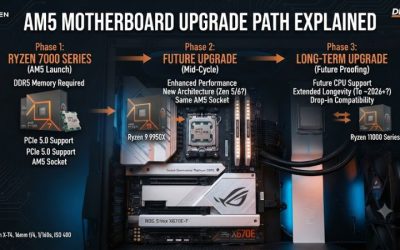
Your CPU decides the board. Ryzen 7000, 8000 and 9000 chips use AM5 with DDR5; Ryzen 3000, 4000 and 5000 use AM4 with DDR4; Intel 12th to 14th Gen uses LGA 1700. The boards in this list cover three of those paths. Never buy a board first and a processor second without checking the supported-CPU list on the maker page, and note any BIOS version required for newer chips.
Match memory and expansion
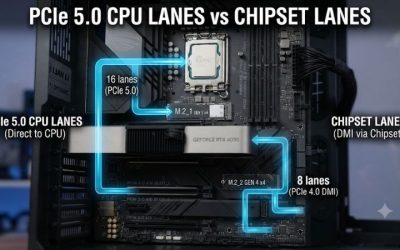
DDR4 and DDR5 are not interchangeable, so confirm which type your board needs. Count M.2 slots against the drives you want to run, and consider whether PCIe 5.0 matters. For most gaming builds today PCIe 4.0 is plenty; PCIe 5.0 is a nice extra if your SSD or GPU can use it.
Check power delivery and size
A heavy processor on a thin power-phase design can throttle, so higher-core-count CPUs deserve boards like the 14+2+2 layout above. Verify case form factor too: ATX needs a standard case, while Micro-ATX fits smaller ones but gives you fewer slots.
What to skip
Skip boards where the title does not name the socket or memory type, boards that need a BIOS update you cannot perform without an old CPU (unless Flashback is listed), and any model priced for features you will not use. Wireless and USB-C are easy to add later; the socket and memory type are not.
Frequently Asked Questions
Do I need WiFi 7 on a motherboard?
Only if your router and devices support it. Wi-Fi 6E is plenty for most homes. If you use wired Ethernet, the wireless radio is a bonus you may never touch, so weigh it against other board features.
Can I put a Ryzen 5000 CPU on the B550 boards?
The listings state support for AM4 Ryzen generations, but a BIOS update may be needed on older stock. Check the maker support page for the minimum BIOS version, and look for BIOS Flashback if you want a safer update path.
Is DDR5 worth it over DDR4?
For a new build, DDR5 on AM5 is the future-friendly choice. If you already own DDR4 and a compatible CPU, keeping DDR4 saves money. Pick based on what you already own and how long you plan to keep the platform.
Does Micro-ATX limit me?
It gives fewer expansion slots, but most gaming PCs only use a graphics card and a couple of SSDs. Confirm that the board has the M.2 slots and ports you need, and that your case supports Micro-ATX.
How many M.2 slots do I need?
Two is enough for most users: one for the system drive and one for games or projects. Three or more is useful for creators. Check how the slots share bandwidth with SATA ports on the maker manual.