🛒 Best Price Today on Amazon
Prime members get fast, free shipping on everything above, plus member-only deals. New members get a 30-day free trial — cancel anytime.
Choosing the best b760 motherboard means balancing memory compatibility, power delivery, storage, and connectivity without paying extra for features you may never use. Intel’s B760 platform remains relevant for LGA 1700 gaming builds, particularly when reusing existing components. The right board depends on your processor, case, budget, and whether you prefer DDR4 or DDR5 memory.
How to Choose a B760 Motherboard
Processor and memory compatibility should come first when comparing B760 motherboards. These boards use Intel’s LGA 1700 socket and support compatible 12th-, 13th-, and 14th-generation Core desktop processors, subject to the board’s CPU support list and BIOS version. DDR4 and DDR5 versions are separate products, so your memory kit must match the exact motherboard model.
Match the board to your processor
A Core i5 gaming build usually has different power-delivery requirements from a system running a high-end Core i7 or Core i9 under sustained workloads. Check the motherboard’s voltage regulator module (VRM), heatsinks, and CPU power connectors before choosing a processor. A stronger VRM design can help maintain appropriate operating conditions under heavy loads, although cooling and BIOS power limits also influence results.
For a mainstream gaming system, the MSI MAG B760M Mortar WiFi is worth considering because it combines a compact layout with substantial connectivity. Buyers pairing a high-end processor with a graphics-intensive workload should also consider case airflow and CPU cooling. B760 does not support CPU multiplier overclocking, so enthusiasts seeking that capability should compare Z790 instead.
Decide between DDR4 and DDR5
DDR4 boards can help builders reuse existing memory and redirect more of their budget toward a graphics card or larger SSD. DDR5 models suit buyers purchasing a new memory kit who want the bandwidth and upgrade choices associated with that memory generation. Neither option is automatically faster in every game; results depend on the processor, memory configuration, game engine, and graphics settings.
The MSI PRO B760-P WiFi DDR4 is a sensible option for a full-size system built around existing DDR4 memory. Buyers starting from scratch should compare a DDR5 board’s total cost with the price of a compatible memory kit. Never assume a DDR4 module will fit a DDR5 motherboard, even when both products use the LGA 1700 processor socket.
Check case size and expansion
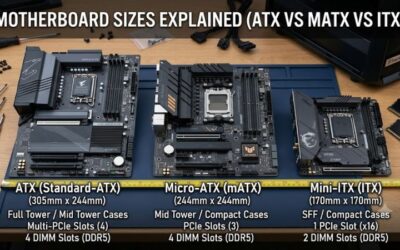
ATX boards generally offer more physical space for expansion cards and internal headers, while microATX models fit many smaller cases. Before buying, confirm the case supports the board’s form factor and provides enough room for the graphics card, CPU cooler, and cable connections. A compact board can be a practical choice for a budget gaming tower, provided its available slots and headers meet your needs.
The ASRock B760M Steel Legend WiFi is a strong candidate for a microATX build that needs onboard wireless networking and multiple M.2 storage connections. Compare the exact model’s expansion layout against your planned GPU, capture card, and SSD configuration. Physical slot availability does not always mean every connector can operate independently at its maximum advertised speed.
Prioritize the connections you actually use
Look at rear USB ports, front-panel USB headers, Ethernet, wireless networking, audio, and M.2 sockets. Wi-Fi is useful when running an Ethernet cable is impractical, but onboard wireless specifications differ between models. A 2.5Gb Ethernet port also needs compatible networking equipment and a suitable connection to deliver more than standard gigabit speeds.
The best b760 motherboard for a feature-rich gaming setup should offer the connections you need without forcing you to pay for unnecessary extras. Count your USB devices, confirm the number of usable M.2 sockets, and check whether the rear panel includes the right USB-C speed. Also verify that your chosen board includes a Wi-Fi module rather than assuming every version of a product family does.
Top Picks: The Best B760 Motherboards
The following recommendations target different gaming PC builds rather than assuming one motherboard suits everyone. Prices and stock vary by retailer and region, so compare current listings before ordering. The specifications below come from manufacturer documentation and independent motherboard coverage; no original PC Gaming Universe performance measurements are claimed.
| Product | Best For | Key Spec | Compatibility | Watch Out For |
| MSI MAG B760M Mortar WiFi | Best Overall | PCIe 5.0 GPU slot; 20Gbps rear USB-C | LGA 1700, DDR5, microATX | Two M.2 sockets |
| MSI PRO B760-P WiFi DDR4 | Best Value | Four DDR4 slots; 2.5Gb Ethernet | LGA 1700, DDR4, ATX | No DDR5 support |
| ASRock B760M Steel Legend WiFi | Best For Storage | Three PCIe 4.0 M.2 sockets; Wi-Fi 6E | LGA 1700, DDR5, microATX | Limited expansion slots |
| GIGABYTE B760 Gaming X AX | Best For ATX Builds | Three M.2 sockets; Wi-Fi 6E | LGA 1700, DDR5, ATX | PCIe 4.0 graphics slot |
Best Overall: MSI MAG B760M Mortar WiFi
The MSI MAG B760M Mortar WiFi is a compelling choice for a modern DDR5 gaming PC. MSI lists a PCIe 5.0 x16 graphics slot, two PCIe 4.0 M.2 sockets, 2.5Gb Ethernet, Wi-Fi, and a rear USB-C port supporting 20Gbps. Its microATX layout suits compact and mid-sized gaming systems that need fast peripheral connections without a full-size board.
Buy this model if you want modern connectivity and plan to use a compatible Intel processor with DDR5 memory. It also supports four memory modules and provides integrated wireless networking. Its main limitation is storage expansion: two M.2 sockets may be insufficient for someone planning several NVMe drives. Buyers needing more internal storage connections should compare the ASRock Steel Legend instead.
Best Value: MSI PRO B760-P WiFi DDR4
The MSI PRO B760-P WiFi DDR4 makes sense for builders who already own DDR4 memory and want to retain it in a new Intel system. Its ATX design includes four DDR4 slots, two M.2 sockets, Wi-Fi 6E, Bluetooth, and 2.5Gb Ethernet. The board supports compatible 12th-, 13th-, and 14th-generation Intel processors, subject to the relevant BIOS and CPU support list.
Choose this board when the total system budget matters more than adopting DDR5 immediately. Its connectivity is suitable for a general-purpose gaming PC, and the larger layout provides room for compatible expansion cards. The trade-off is its DDR4-only memory design and PCIe 4.0 primary graphics slot. Builders prioritizing DDR5 or PCIe 5.0 graphics connectivity should look elsewhere.
Best For Storage: ASRock B760M Steel Legend WiFi
The ASRock B760M Steel Legend WiFi stands out for its three PCIe 4.0 x4 M.2 sockets in a microATX design. It also includes four SATA connectors, a PCIe 5.0 x16 graphics slot, DDR5 support, Wi-Fi 6E, and 2.5Gb Ethernet. These features make it attractive to gamers who maintain a large library of installed games or use their desktop for creative work.
Consider this board if you want multiple internal NVMe drives without moving to a larger ATX motherboard. Its four DDR5 slots provide room for memory expansion, subject to supported module configurations. The limitation is physical expansion: microATX provides less space for additional cards than most ATX designs. Check the GPU’s dimensions and remaining slot clearance before installing other hardware.
Best For ATX Builds: GIGABYTE B760 Gaming X AX
The GIGABYTE B760 Gaming X AX is a full-size DDR5 motherboard aimed at builders who want more internal expansion room. Its manufacturer specification lists three PCIe 4.0 x4 M.2 connectors, four DDR5 memory slots, Wi-Fi 6E, and 2.5Gb Ethernet. The board supports compatible Intel processors using the LGA 1700 socket, making it suitable for a range of mainstream gaming configurations.
This option is worth considering when you want an ATX layout with multiple NVMe drives and integrated wireless networking. Gigabyte also lists memory overclocking support through Intel XMP, although achievable memory speeds depend on the CPU, modules, and configuration. Its primary graphics slot uses PCIe 4.0 rather than PCIe 5.0, so buyers who specifically require a newer graphics interface should compare alternatives.
FAQ
Is B760 good for gaming?
Yes, B760 is a capable gaming platform when paired with a compatible Intel processor, suitable memory, and a graphics card that meets your performance goals. Motherboard choice primarily affects connectivity, expansion, power delivery, and supported components rather than directly determining game frame rates.
Does B760 support DDR4 and DDR5?
The B760 chipset supports motherboards designed for either DDR4 or DDR5, but an individual motherboard supports only its specified memory generation. Check the complete model name and manufacturer memory specifications before purchasing RAM.
Can you overclock a CPU on a B760 motherboard?
No, B760 does not provide the CPU multiplier overclocking capability associated with Intel’s Z-series chipsets. Supported memory overclocking through XMP is available on many B760 boards, but memory compatibility and achievable speeds depend on the processor and modules.
Is B760 compatible with Intel Core i7 and Core i9 processors?
Yes, many B760 motherboards support compatible Core i7 and Core i9 processors from supported LGA 1700 generations, but exact CPU support depends on the board and BIOS. High-power processors can also require stronger VRM cooling, adequate case airflow, and a suitable CPU cooler.
Final Thoughts
The best b760 motherboard depends on your existing components and the features your gaming PC actually needs. Choose the MSI Mortar for fast connectivity, the MSI PRO for a DDR4 build, the ASRock for three M.2 drives, or the GIGABYTE for a full-size DDR5 system. Confirm CPU support, BIOS requirements, case fit, and memory compatibility before purchasing.