🛒 Best Price Today on Amazon
Prime members get fast, free shipping on everything above, plus member-only deals. New members get a 30-day free trial — cancel anytime.
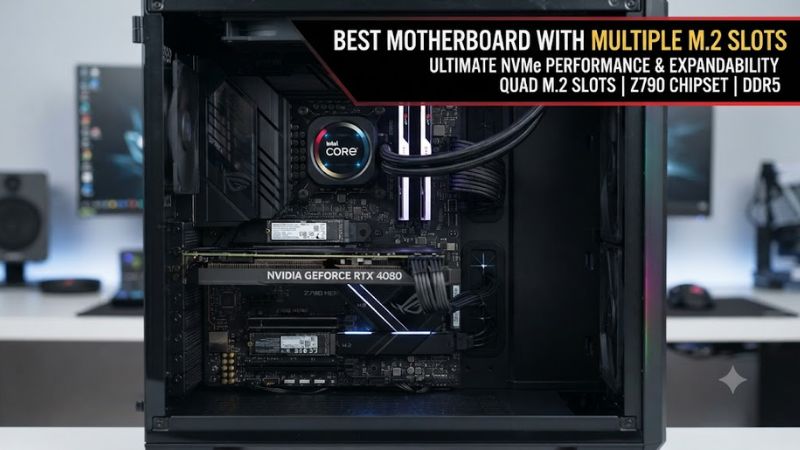
If you need a best motherboard with multiple m.2 slots, focus on slot count, PCIe generation, lane sharing, CPU support, and case fit rather than M.2 count alone. Current X870E and Z890 boards can provide four or five onboard M.2 slots, while some premium designs add expansion cards. Choose based on how many drives you will actually install.
How to Choose a Motherboard With Multiple M.2 Slots
The right board depends on four things: usable M.2 count, CPU and memory platform, PCIe lane allocation, and physical compatibility. A five-slot board is not automatically better if installing a second SSD reduces GPU slot bandwidth or disables another connector. For gaming systems, four useful onboard slots can be more practical than a larger theoretical total.
Check the M.2 Slot Count and PCIe Generation
A motherboard should have enough physical M.2 sockets for your planned drives, with at least one fast CPU-connected slot for the primary SSD. The ASUS ROG Crosshair X870E Hero has five M.2 sockets, including three PCIe 5.0 x4 slots and two chipset-connected PCIe 4.0 x4 slots, giving it substantial onboard storage capacity.
The MSI MPG X870E Carbon WiFi takes a simpler four-slot approach: two CPU-connected PCIe 5.0 x4 sockets and two chipset-connected PCIe 4.0 x4 sockets. That layout is easier to understand when building a gaming PC with one primary Gen5 drive and several Gen4 game libraries.
Match the CPU Socket and DDR5 Platform
Platform compatibility comes before storage features. X870E boards use AMD AM5 and DDR5, while Z890 boards use Intel LGA1851 and DDR5. The Gigabyte X870E Aorus Pro supports Ryzen 7000, 8000, and 9000 processors with four DDR5 DIMM slots, while MSI’s MEG Z890 Ace supports Intel Core Ultra processors on LGA1851 and four DDR5 slots.
This matters if you are upgrading an existing PC because neither platform accepts DDR4 memory on these current boards. A motherboard with many M.2 sockets still requires the correct CPU, memory type, BIOS support where applicable, and an ATX-compatible case. Both example boards use the standard ATX form factor.
Inspect Lane Sharing Before Filling Every Socket
Lane sharing is the most important detail beyond raw slot count. On the ROG Crosshair X870E Hero, using certain secondary M.2 sockets can change PCIe slot operation, while MSI’s MEG Z890 Ace can reduce primary PCIe slot bandwidth when particular secondary storage configurations are used. Check the manual before installing a full SSD set.
This is especially important for a gaming PC using a large graphics card. If your configuration needs several NVMe drives plus additional expansion cards, compare the motherboard’s PCIe configuration table rather than relying on the headline M.2 count. The storage specification and expansion-slot specification need to be considered together.
Verify Case, SSD and Power Compatibility
M.2 drives are usually compact, but motherboard clearance still matters because heatsinks, graphics cards, and other expansion hardware can occupy nearby space. The ROG Crosshair X870E Hero is an ATX board, and its five M.2 sockets support common Key-M formats, including 2280 drives.
Also check your power supply and case before buying. The Hero has a 24-pin motherboard connector, two 8-pin CPU power connectors, and an additional 8-pin PCIe power connector, while the exact requirements differ by board. Your case must support ATX, and the graphics card should leave adequate access to the M.2 heatsinks and latches.
Top Picks for Multiple M.2 Storage
The table below separates four current-generation options by use case rather than treating every M.2 slot as equivalent. Slot counts and interface details come from manufacturer specifications, while independent motherboard reviews provide context for the broader platform and feature set. Prices are intentionally omitted because they fluctuate by retailer and region.
| Product | Best For | Key Spec | Compatibility | Watch Out For |
| ASUS ROG Crosshair X870E Hero | Best Overall | 5 M.2; 3 PCIe 5.0 x4 | AM5, DDR5, ATX | Secondary M.2 use can affect PCIe allocation |
| MSI MPG X870E Carbon WiFi | Best Value | 4 M.2; 2 PCIe 5.0 x4 | AM5, DDR5, ATX | M.2_2 shares bandwidth with rear USB4 |
| Gigabyte X870E Aorus Pro | Best For AMD Storage Builds | 4 M.2; 3 CPU-connected | AM5, DDR5, ATX | Ryzen 8000 disables two CPU M.2 sockets |
| MSI MEG Z890 Ace | Best For Intel Builds | 5 M.2; Gen5 primary/secondary options | LGA1851, DDR5, ATX | Secondary M.2 configuration can affect PCIe lanes |
Best Overall: ASUS ROG Crosshair X870E Hero
The ROG Crosshair X870E Hero is suited to a high-end AMD gaming PC that needs five onboard M.2 sockets without relying on an add-in storage card. It supports Ryzen 7000, 8000, and 9000 processors, DDR5 memory, and five M.2 sockets, with three onboard slots supporting PCIe 5.0 x4.
Its weakness is configuration complexity. ASUS documents PCIe allocation changes when the secondary M.2 sockets are populated, so it is not the right choice if you want to install multiple drives without checking lane behavior. Buyers using only one or two SSDs may not need its storage capacity or premium feature set.
Best Value: MSI MPG X870E Carbon WiFi
The MPG X870E Carbon WiFi provides four M.2 sockets, with two CPU-connected slots supporting PCIe 5.0 x4 and two chipset-connected slots supporting PCIe 4.0 x4. It suits an AMD build that needs several NVMe drives while keeping the primary storage interfaces straightforward.
Its real limitation appears with M.2_2: MSI says that slot shares PCIe 5.0 x4 bandwidth with the rear USB 40Gbps Type-C connection. The BIOS can prioritize x4 storage bandwidth, but doing so disables those USB 40Gbps ports. Buyers who need both simultaneously should choose another layout.
Best For AMD Storage Builds: Gigabyte X870E Aorus Pro
The X870E Aorus Pro offers four M.2 connectors, including three CPU-connected sockets capable of PCIe 5.0 x4 and one chipset-connected PCIe 4.0 x4 socket. It supports Ryzen 7000, 8000, and 9000 processors, four DDR5 DIMMs, and up to 256GB of system memory.
The important caveat is processor-dependent storage support. Gigabyte states that the M2B_CPU and M2C_CPU sockets become unavailable with Ryzen 8000 Phoenix processors, so the full four-slot configuration is aimed at compatible Ryzen 9000 or 7000 systems. That makes CPU selection part of the storage plan.
Best For Intel Builds: MSI MEG Z890 Ace
For Intel systems, the MEG Z890 Ace has five M.2 sockets, including a CPU-connected PCIe 5.0 x4 slot and additional PCIe 4.0 and configurable PCIe 5.0 storage connections. It uses LGA1851, supports Intel Core Ultra processors, and accepts four DDR5 UDIMMs with up to 256GB of memory.
Its weakness is that five sockets do not mean five completely independent paths. MSI documents PCIe allocation changes when the fourth M.2 socket uses CPU lanes, and the board is physically an enthusiast-class ATX product. Buyers building a simpler Intel gaming PC may not use enough storage to justify that complexity.
FAQ: Multiple M.2 Motherboards
How many M.2 slots should a gaming motherboard have?
Four M.2 slots are enough for many gaming PCs, while five or more make more sense for users planning several NVMe drives. A single fast SSD can handle Windows and games, while additional slots are useful for separating game libraries, projects, or other large datasets.
The important distinction is usable capacity rather than the headline number. For example, the MSI MPG X870E Carbon WiFi has four M.2 slots, but the second CPU-connected slot shares bandwidth with rear USB4 connectivity.
Does having more M.2 slots improve gaming performance?
More M.2 slots provide storage expansion rather than automatically increasing gaming performance. An additional socket lets you add another SSD without replacing an existing drive, but frame rates still depend mainly on the CPU, GPU, memory configuration, game engine, and graphics settings.
PCIe generation can affect sequential storage performance, particularly for large file transfers, but games do not automatically become faster simply because a motherboard has more sockets. For a gaming build, capacity and convenient expansion are usually the main reasons to prioritize multiple M.2 slots.
Can all M.2 slots run at full speed at the same time?
All M.2 slots cannot be assumed to have independent full-speed bandwidth, because motherboard designs can share CPU or chipset lanes with PCIe slots, USB controllers, or other devices. The exact behavior must be checked in the board manual before installation.
The ASUS ROG Crosshair X870E Hero, for example, documents changes to PCIe slot operation when certain M.2 sockets are populated, while MSI documents a USB bandwidth trade-off on the MPG X870E Carbon WiFi. These details can matter more than the raw slot count.
Is PCIe 5.0 M.2 necessary for a gaming PC?
PCIe 5.0 M.2 is not necessary for most gaming PCs, although it can provide a faster storage interface for workloads that benefit from high sequential throughput. A PCIe 4.0 NVMe SSD remains a practical choice when capacity, price, or broader compatibility matters more.
A motherboard with multiple M.2 sockets can therefore be useful even when only the primary drive uses PCIe 5.0. Boards such as the X870E Aorus Pro and ROG Crosshair X870E Hero combine faster CPU-connected slots with additional chipset-connected storage, allowing different SSD generations in one system.
Final Thoughts
The best motherboard with multiple m.2 slots depends on how many SSDs you need and how those sockets share PCIe resources. ASUS offers five-slot AMD capacity, MSI balances four slots with strong connectivity, Gigabyte targets flexible Ryzen storage, and MSI’s Z890 Ace serves Intel Core Ultra systems. Always verify the manual before filling every socket.