🛒 Best Price Today on Amazon
Prime members get fast, free shipping on everything above, plus member-only deals. New members get a 30-day free trial — cancel anytime.
The best z390 motherboard depends on your processor, expansion needs, memory capacity, and budget. Intel’s Z390 platform remains relevant for upgrading an existing eighth- or ninth-generation gaming PC, but the chipset is discontinued. The smartest purchase is usually a compatible used board in good condition, rather than an expensive premium model.
How to Choose a Z390 Motherboard
Choosing a Z390 board starts with compatibility and condition, not gaming branding. These motherboards use Intel’s 300-series platform, support DDR4 memory, and target unlocked desktop processors from the eighth and ninth generations. Since availability is now largely dependent on the secondhand market, confirm the exact model, BIOS version, and included accessories before paying.
Processor and BIOS Compatibility
Check the manufacturer’s CPU support list before buying. Z390 boards use the LGA1151 socket for compatible Coffee Lake processors, including models such as the Core i7-9700K and Core i9-9900K. A physical socket match alone is insufficient: seventh-generation LGA1151 processors are not compatible with this chipset, and the exact CPU must appear in the board’s support documentation.
A board with an older BIOS may need an update before it can run a ninth-generation processor. This matters particularly when purchasing a used board without a supported older CPU available for updating. Ask the seller for the current BIOS version, and check whether the exact model offers a BIOS Flashback feature that can simplify recovery or updating.
Memory and Expansion Requirements
Z390 motherboards use DDR4, not DDR5. Most full-size ATX options provide four memory slots, but maximum capacity and supported memory speeds vary by model. Memory overclocking through XMP is supported, although the attainable speed depends on the processor’s memory controller, the installed modules, and the motherboard’s firmware.
For gaming builds, inspect the PCIe slot layout, M.2 storage connections, and SATA ports before choosing. Z390 uses PCIe 3.0 for its chipset connectivity, while the graphics card’s primary processor-connected slot also operates within the platform’s PCIe 3.0 capabilities. A newer PCIe 4.0 or 5.0 graphics card can generally operate in a compatible older slot, but at the supported link speed.
Power Delivery and Cooling
A motherboard’s voltage-regulator design and heatsinks matter when pairing it with a high-power processor such as the Core i9-9900K. A stronger board can help maintain appropriate operating conditions under sustained workloads, but the CPU cooler, case airflow, BIOS settings, and power limits remain important. Avoid judging power delivery by decorative heatsinks or gaming branding alone.
For a used board, examine the socket pins, VRM heatsinks, memory slots, and power connectors. Look for corrosion, damaged headers, missing M.2 screws, and signs of repair. Ask for evidence that the system reaches the BIOS and recognizes memory and storage. A lower-priced board that needs repair can cost more overall than a better-maintained alternative.
Form Factor and Connectivity
Match the board’s form factor to the case. ATX models require a case that supports ATX motherboards, while micro-ATX boards can fit compatible smaller cases and many ATX enclosures. Check the case specifications rather than assuming every motherboard will fit. Also confirm front-panel USB headers, fan connections, audio ports, and the rear I/O layout.
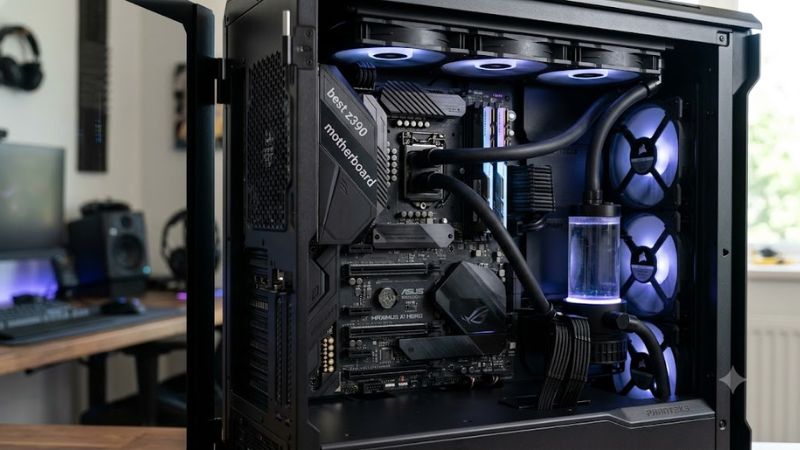
Wireless networking deserves special attention because not every Z390 board includes Wi-Fi. Some versions bundle wireless hardware while similarly named models omit it. For example, the ASUS ROG Maximus XI Hero Wi-Fi differs from the standard version in connectivity. Verify the exact model suffix and rear I/O before deciding whether a separate wireless adapter is necessary.
Top Picks: Four Z390 Motherboards Worth Considering
The best choice among these legacy boards depends on the price, condition, and features available from the seller. The following recommendations reflect documented specifications and established product positioning, not new comparative performance measurements. Intel lists Z390 as discontinued, so availability and pricing can vary substantially between retailers and used-market listings.
| Product | Best For | Key Spec | Compatibility | Watch Out For |
| GIGABYTE Z390 AORUS ELITE | Best Overall | ATX, dual M.2 | LGA1151, DDR4 | No integrated Wi-Fi |
| MSI MPG Z390 GAMING PRO CARBON | Best Value | ATX, dual M.2 | LGA1151, DDR4 | Wireless depends on version |
| ASUS ROG Maximus XI Hero (Wi-Fi) | Best Premium Features | ATX, Wi-Fi 5 | LGA1151, DDR4 | Premium used pricing |
| MSI MEG Z390 GODLIKE | Best Enthusiast Build | E-ATX, four M.2 | LGA1151, DDR4 | Large case and high cost |
GIGABYTE Z390 AORUS ELITE: Best Overall
The GIGABYTE Z390 AORUS ELITE is a sensible all-round option for a gaming PC built around a compatible eighth- or ninth-generation Intel processor. Its ATX layout and dual M.2 storage support provide practical expansion for a graphics card, NVMe SSDs, and additional peripherals without requiring an expensive flagship motherboard.
Buy it if you want a straightforward platform for a Core i5-9600K, Core i7-9700K, or compatible processor and find a well-maintained board at a reasonable price. Its main drawback is the lack of integrated Wi-Fi, so wireless networking may require an add-in card or USB adapter. Confirm the CPU support list and BIOS revision before purchase.
MSI MPG Z390 GAMING PRO CARBON: Best Value
The MSI MPG Z390 GAMING PRO CARBON is an ATX motherboard with dual M.2 connections, onboard Gigabit Ethernet, and support for compatible eighth- and ninth-generation Intel processors. Its combination of storage expansion, gaming-oriented styling, and standard desktop connectivity makes it a practical candidate for upgrading an existing DDR4 system.
Consider it when the price is lower than comparable AORUS or ROG alternatives and the board’s condition is satisfactory. The standard model does not include integrated Wi-Fi, so check the precise model name before purchasing. Buyers who need wireless connectivity without an adapter should compare the cost of a wireless-equipped alternative.
ASUS ROG Maximus XI Hero (Wi-Fi): Best Premium Features
The ASUS ROG Maximus XI Hero (Wi-Fi) targets enthusiasts who want an ATX board with integrated wireless networking, two M.2 connections, and a more feature-rich rear I/O. It supports compatible eighth- and ninth-generation Intel processors and DDR4 memory, making it suitable for a premium system that is being maintained rather than replaced.
Buy this model if its connectivity, firmware options, and expansion layout justify the price difference over more affordable Z390 boards. The weakness is its potentially high secondhand asking price, especially when sellers treat older premium hardware as collectible. Compare the complete feature set and condition rather than paying extra for the ROG name alone.
MSI MEG Z390 GODLIKE: Best Enthusiast Build
The MSI MEG Z390 GODLIKE is an enthusiast-focused E-ATX motherboard with four M.2 connections, four memory slots, and support for up to 128 GB of DDR4 according to MSI’s specifications. It is aimed at elaborate builds requiring substantial storage expansion and extensive onboard features, rather than budget gaming systems.
Choose it only if you specifically need its extra connectivity and have a compatible E-ATX case. Its size can rule out smaller enclosures, and the premium secondhand price may be difficult to justify for ordinary gaming. Before buying, confirm the case’s motherboard support, the board’s condition, and whether all required accessories are included.
FAQ
Is a Z390 motherboard still worth buying in 2026?
A Z390 motherboard can still be worth buying in 2026 if you already own a compatible Intel eighth- or ninth-generation processor and need to replace a failed board. Because the platform is discontinued, compare the used price with the cost of moving to a newer CPU and motherboard platform before committing to the repair.
Which CPU is compatible with a Z390 motherboard?
Z390 motherboards support compatible eighth- and ninth-generation Intel desktop processors, including models such as the Core i5-9600K, Core i7-9700K, and Core i9-9900K. Compatibility depends on the motherboard’s CPU support list and, in some cases, its BIOS version. Seventh-generation processors are not compatible despite sharing the LGA1151 socket designation.
Does a Z390 motherboard support DDR5 memory?
No, a Z390 motherboard requires DDR4 memory. DDR5 modules use a different physical layout and are not interchangeable with DDR4 DIMM slots. When upgrading an existing system, check the motherboard’s memory specifications and supported capacities, and verify that the chosen memory kit is suitable for the processor and board.
Can a Z390 motherboard run a modern graphics card?
Yes, a Z390 motherboard can generally run a modern graphics card that supports PCIe backward compatibility. The platform uses PCIe 3.0 connectivity, so a newer card may operate at a lower interface generation than on a newer system. Also verify the graphics card’s physical clearance, power supply requirements, and available power connectors before installation.
Final Thoughts
The best z390 motherboard is usually the best-maintained compatible board you can find at a sensible price. The GIGABYTE Z390 AORUS ELITE suits a straightforward gaming build, while MSI and ASUS alternatives offer different connectivity and expansion options. Check BIOS support, DDR4 compatibility, case fit, and the seller’s return policy before purchasing this discontinued platform.