🛒 Best Price Today on Amazon
Prime members get fast, free shipping on everything above, plus member-only deals. New members get a 30-day free trial — cancel anytime.
Motherboard sizes explained (ATX vs mATX vs ITX) starts with three physical dimensions and the trade-offs behind them. ATX offers more room for expansion, Micro-ATX balances space with flexibility, and Mini-ITX targets compact builds. The right choice depends on your case, upgrade plans, and required connections, not simply the size of your graphics card or processor.
What Motherboard Sizes Really Come Down To
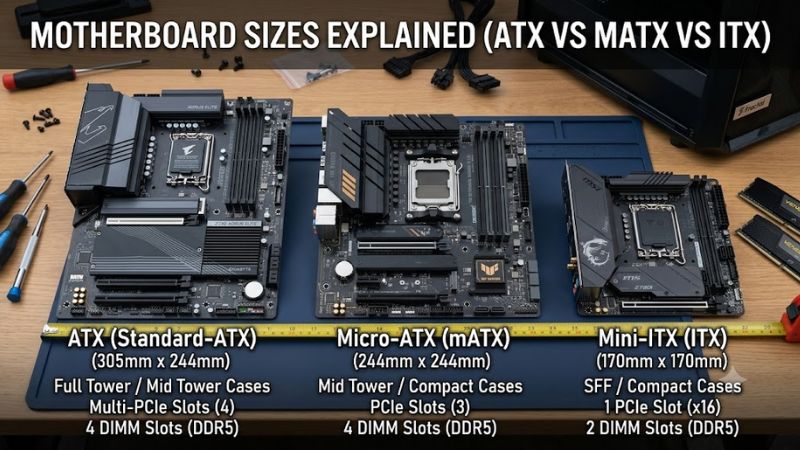
Motherboard form factor describes a board’s physical dimensions and mounting layout, while also influencing how much space manufacturers have for memory slots, PCIe connections, storage, and headers. ATX measures 305 × 244 mm, Micro-ATX measures up to 244 × 244 mm, and Mini-ITX measures 170 × 170 mm. These standards help match a motherboard to a compatible case.
ATX: More Room for Expansion
ATX suits gaming PCs that need several expansion devices, additional internal connections, or room for future upgrades. A standard ATX board measures 305 × 244 mm and commonly provides seven expansion-slot positions, although the number and arrangement of usable connectors depend on the particular model. Larger boards can also offer more room for M.2 storage, fan headers, and rear connectivity.
That additional space can make cable routing and component installation more comfortable in a suitably sized tower. However, ATX does not automatically mean better gaming performance, stronger power delivery, or more storage connections. Those features depend on the individual motherboard design. Before buying, check the CPU socket, chipset, memory generation, PCIe configuration, and available connectors rather than relying on board size alone.
Micro-ATX: A Practical Middle Ground
Micro-ATX, commonly written as mATX, reduces the board’s maximum footprint to 244 × 244 mm. Its shorter layout typically leaves fewer expansion positions than full ATX, but many boards still include four desktop DIMM slots and multiple storage connections. That makes mATX a useful option for gaming systems with one graphics card and ordinary expansion needs.
When comparing motherboard sizes explained for a first gaming build, Micro-ATX deserves attention because it can fit compatible compact or mid-tower cases without requiring a Mini-ITX layout. Prices vary by chipset, connectivity, and manufacturer, so a smaller board is not always cheaper. Review the actual slot arrangement, M.2 placement, and fan headers to avoid sacrificing a feature you expect to use later.
Mini-ITX: Compact Without Losing Desktop-Class Options
Mini-ITX measures 170 × 170 mm and is designed for small-form-factor computers. Standard boards typically have two desktop memory slots and one full-length PCIe expansion slot. That single slot is normally sufficient for a discrete graphics card, but it leaves little room for additional PCIe cards such as capture devices or dedicated network adapters.
A compact build can take up less desk space and be easier to transport, but component selection requires more planning. The case must accommodate the graphics card, CPU cooler, power supply, and intended storage arrangement. Small cases may also limit radiator dimensions and airflow. Mini-ITX boards can cost more than some larger alternatives with comparable features, so consider the entire build budget rather than the motherboard alone.
What Smaller Boards Do Not Automatically Change
Motherboard dimensions alone do not determine frame rates, image quality, or loading times. Two boards supporting the same processor, memory configuration, and graphics card can deliver similar gaming performance when their operating conditions are comparable. Differences may arise from CPU power limits, firmware, memory settings, cooling, or other board-specific features rather than the form factor itself.
The same distinction applies to PCIe and memory support. A Mini-ITX board can support a modern processor and fast storage, while an ATX board may use an older socket or memory generation. Check the specifications of each candidate. Neither a larger PCB nor a newer-looking layout guarantees that a component will work with your existing system.
How to Choose a Motherboard Size: Step by Step
Start with the case you intend to use, then select a board that fits your processor platform and provides the connections your build needs. The motherboard sizes explained comparison below summarizes the main trade-offs without assuming that every board of a particular form factor has identical features. Manufacturer specifications should determine the final choice.
| Setting | Where to Check | Effect | Risk |
| Form factor | Case specifications | Determines physical board fit | Board may not fit the mounting layout |
| CPU socket and chipset | Motherboard and CPU specifications | Determines processor compatibility and supported features | Unsupported processor or missing features |
| RAM generation and slots | Motherboard memory specifications | Determines compatible memory and upgrade options | Buying incompatible DDR4 or DDR5 memory |
| PCIe, M.2 and headers | Motherboard manual | Determines expansion and storage options | Missing connections or blocked slots |
Step 1: Confirm the Case Fits
Check the case manufacturer’s supported motherboard formats before choosing a board. Many ATX cases also accept Micro-ATX and Mini-ITX motherboards, but smaller cases generally cannot accommodate full-size ATX boards. A shared mounting standard does not mean every case supports every form factor, so verify the exact compatibility list.
Also check graphics card length, card thickness, CPU cooler height, radiator support, and power supply dimensions. These clearances are separate from motherboard compatibility. A case may support an ATX board yet lack room for a particularly long graphics card or a large radiator. Review the case manual and component specifications before ordering.
Step 2: Match the Processor and Memory
Choose a motherboard with a socket and chipset compatible with your intended CPU. Check the manufacturer’s CPU support list and any required BIOS version, particularly when upgrading an existing system. The board’s form factor does not determine whether it supports a specific Intel or AMD processor, and physical compatibility alone is insufficient.
Next, confirm memory generation, supported capacities, and the number of DIMM slots. DDR4 and DDR5 are not interchangeable, and motherboard support depends on the particular model. Mini-ITX commonly provides two DIMM slots, while ATX and Micro-ATX often provide four. Check the manual for supported memory configurations before purchasing RAM.
Step 3: Plan Expansion and Storage
Count the components you plan to install beyond the graphics card. A capture card, dedicated sound card, or additional PCIe network adapter may require an expansion slot that a Mini-ITX motherboard cannot provide alongside a conventional graphics card. Micro-ATX may offer sufficient room for modest expansion, while ATX gives builders more flexibility in many configurations.
For storage, inspect the number and placement of M.2 connectors, SATA ports, and any shared bandwidth restrictions. Some M.2 slots disable particular SATA ports or operate differently depending on the installed CPU. A smaller board can still offer multiple NVMe drives, but the exact layout matters more than the label printed on the product box.
Step 4: Check Cooling, Power, and Connections
Review the motherboard’s CPU power delivery, fan headers, pump headers, and rear I/O before finalizing the build. These details affect practical installation and cooling options, especially in compact cases. Confirm that the power supply has the connectors required by the motherboard and graphics card, and that the case provides enough room to route the cables.
A smaller case can make airflow management more demanding because the available space for fans, radiators, and cable routing is limited. That does not mean Mini-ITX systems must run hot; results depend on component power, cooler selection, case design, and fan placement. Use manufacturer clearance figures and cooling guidance instead of assuming that a smaller board automatically creates a thermal problem.
Frequently Asked Questions
Is ATX better than Micro-ATX for gaming?
ATX is not inherently faster than Micro-ATX for gaming. When compatible boards use comparable CPUs, memory configurations, and graphics cards under similar operating conditions, form factor alone does not establish a meaningful performance advantage. ATX is more useful when you need additional expansion slots, headers, or storage connections, while Micro-ATX can suit a simpler gaming build.
Can a Micro-ATX motherboard fit in an ATX case?
A Micro-ATX motherboard fits in many ATX cases because their mounting layouts are designed to accommodate the smaller standard. However, you should verify the specific case’s supported form factors and mounting points before installation. The reverse is not generally true: a Micro-ATX-only case may lack the mounting space needed for a full-size ATX motherboard.
Does Mini-ITX support a full-size gaming graphics card?
Mini-ITX can support a full-size gaming graphics card when the motherboard slot, case clearances, and power supply meet the card’s requirements. The motherboard’s single PCIe expansion slot is normally used for the GPU, so additional PCIe cards may not be practical. Check card length, thickness, power connectors, and airflow restrictions in the selected case.
Which motherboard size should a first-time PC builder choose?
Micro-ATX is a sensible starting point for many first-time PC builders who want a conventional gaming tower without extensive expansion requirements. ATX is worth considering when you anticipate adding cards or storage, while Mini-ITX is appropriate when compact dimensions are a priority. In every case, verify the CPU socket, memory generation, case fit, and required connectors first.
Final Thoughts
Motherboard sizes explained (ATX vs mATX vs ITX) comes down to space, compatibility, and expansion needs. ATX suits builds that benefit from additional connections, Micro-ATX balances flexibility with a smaller footprint, and Mini-ITX prioritizes compact dimensions. Compare the exact motherboard and case specifications before buying to avoid clearance issues and unnecessary compromises.