🛒 Best Price Today on Amazon
Prime members get fast, free shipping on everything above, plus member-only deals. New members get a 30-day free trial — cancel anytime.
Choosing the best am4 motherboard means balancing CPU compatibility, memory support, storage connectivity, and price rather than chasing the most expensive board. AMD’s AM4 platform remains useful for DDR4-based gaming PCs and Ryzen upgrades, particularly when you already own compatible components. B550 is a practical starting point for many builds, but the right choice depends on your case and processor.
How to Choose an AM4 Motherboard
A good motherboard should support your processor, provide adequate power delivery, and include the connections you actually need. B550 models are generally the most versatile starting point for gaming systems, while A520 boards can reduce costs and X570 models may suit builds requiring additional chipset connectivity. Compare the complete feature set and CPU support list before ordering.
CPU Compatibility and BIOS Support
The first requirement is the AM4 socket, but socket compatibility alone does not establish that every Ryzen processor will work. Check the manufacturer’s CPU support list for the exact motherboard model and revision, including the minimum BIOS version required by your processor. This is especially important when upgrading to a later Ryzen 5000-series CPU on older stock.
The MSI MAG B550 Tomahawk MAX WiFi is a strong candidate for builders seeking a feature-rich ATX platform, while the MSI B550M PRO-VDH WiFi targets more affordable, compact systems. Both belong to the B550 family, but their connectivity and physical layouts differ. Confirm CPU support and BIOS readiness before buying either board.
Memory and Storage Requirements
AM4 motherboards use DDR4 memory, not DDR5. A DDR5 kit purchased for an AM5 system cannot be reused in an AM4 motherboard, so include memory costs when comparing upgrade paths. Memory speed support also depends on the CPU, BIOS, DIMM configuration, and the board’s specifications. Advertised overclocked memory speeds are not automatic operating guarantees.
B550 can provide PCIe 4.0 connectivity for a compatible graphics card and primary NVMe SSD when the processor and motherboard slot support it. Other slots and M.2 connections may use PCIe 3.0, depending on the board. Read the manual for lane sharing and SATA-port restrictions before installing multiple drives or expansion cards.
Case Size, Power Delivery, and Cooling
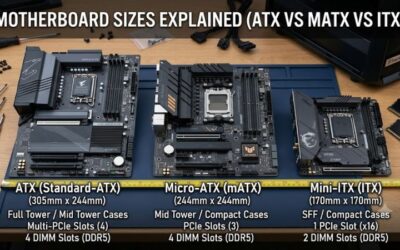
Match the motherboard form factor to your case. ATX boards need an ATX-compatible case, while Micro-ATX boards fit compatible Micro-ATX and larger cases. Mini-ITX is intended for compact builds and requires a suitable case and cooling arrangement. Check mounting support, GPU clearance, radiator space, and front-panel connectors before committing to a layout.
Power delivery matters most when pairing a board with a higher-power Ryzen processor or sustaining demanding workloads. A capable VRM heatsink design can help manage heat, but the processor’s official support list and independent motherboard reviews offer more useful guidance than marketing labels alone. Also confirm fan headers, CPU cooler clearance, and whether wireless networking is built in.
Top Picks: Best AM4 Motherboards for Gaming
The recommendations below prioritize documented features, independent editorial reviews, and different build requirements rather than claiming that a motherboard automatically increases gaming frame rates. The MSI MAG B550 Tomahawk MAX WiFi is the all-round choice, while the other boards suit tighter budgets, conventional ATX builds, or compact PCs. Verify current stock and regional pricing before purchase.
| Product | Best For | Key Spec | Compatibility | Watch Out For |
| MSI MAG B550 Tomahawk MAX WiFi | Best Overall | Two M.2 slots; 2.5GbE | AM4, DDR4, ATX | Requires ATX case |
| MSI B550M PRO-VDH WiFi | Best Value | Four DDR4 slots; two M.2 slots | AM4, DDR4, Micro-ATX | Wi-Fi AC, gigabit LAN |
| GIGABYTE B550 AORUS ELITE V2 | Best For Expansion | Dual M.2; 2.5GbE | AM4, DDR4, ATX | No built-in Wi-Fi on standard version |
| ASUS ROG Strix B550-I Gaming | Best For Small PCs | Two M.2 slots; Wi-Fi 6 | AM4, DDR4, Mini-ITX | Two memory slots |
Best Overall: MSI MAG B550 Tomahawk MAX WiFi
The MSI MAG B550 Tomahawk MAX WiFi is the strongest all-round option for a gaming PC that needs extensive connectivity and room for future component changes within the AM4 platform. Its documented features include four DDR4 memory slots, two M.2 sockets, six SATA ports, 2.5Gb Ethernet, Wi-Fi 6E, and a Flash BIOS button. These features suit gaming and general productivity builds.
Its main weakness is the cost of choosing a more feature-rich ATX board when a cheaper model may cover the same essentials. The Tomahawk makes most sense for someone who needs integrated wireless networking, multiple storage drives, or easier firmware recovery. A budget builder who only needs one SSD and wired networking should compare less expensive alternatives first.
Best Value: MSI B550M PRO-VDH WiFi
The MSI B550M PRO-VDH WiFi is a sensible choice for a budget gaming system that still needs integrated wireless networking. Its Micro-ATX layout, four DDR4 memory slots, two M.2 sockets, gigabit Ethernet, and Wi-Fi AC cover common gaming requirements without the larger footprint of an ATX motherboard. A BIOS Flash button can also help with supported firmware-update procedures.
The compromise is its more basic networking and expansion feature set compared with premium B550 boards. Buyers seeking 2.5Gb Ethernet or newer Wi-Fi standards should compare the total cost of a board upgrade against adding separate networking hardware. This model is best for a cost-conscious Ryzen build, not someone prioritizing maximum connectivity or a large collection of expansion cards.
Best For Expansion: GIGABYTE B550 AORUS ELITE V2
The GIGABYTE B550 AORUS ELITE V2 is a compelling option for builders who want a conventional ATX layout, dual M.2 storage, four memory slots, and 2.5Gb Ethernet. Gigabyte also documents Q-Flash Plus support, which provides a firmware-update route that can be useful when a processor requires a newer BIOS. PCIe 4.0 availability depends on the processor and the specific slot.
Its main drawback is that the standard model does not include built-in Wi-Fi, so wireless users may need a separate adapter or expansion card. Do not confuse the AORUS ELITE V2 with similarly named Wi-Fi variants, since connectivity can differ. It is a good fit for wired gaming setups with multiple drives, but less attractive when wireless networking must be included from the start.
Best For Small PCs: ASUS ROG Strix B550-I Gaming
The ASUS ROG Strix B550-I Gaming is designed for Mini-ITX systems where motherboard dimensions matter more than expansion capacity. Its documented features include two DDR4 memory slots, two M.2 sockets, four SATA ports, Wi-Fi 6, and 2.5Gb Ethernet. This combination makes it useful for compact gaming builds that still require fast storage and integrated networking.
The primary compromise is the limited memory expansion: ASUS lists support for up to 64GB, and the board has only two DIMM slots. Mini-ITX cases also leave less room for cable routing, cooling hardware, and additional cards. Choose this model when a compact enclosure is a firm requirement; a Micro-ATX or ATX board is generally more flexible for larger systems.
FAQ
These answers address the compatibility, gaming performance, chipset, and upgrade questions that matter most before purchasing an AM4 motherboard. Manufacturer CPU-support lists and manuals should take priority over generic socket claims, particularly when buying older stock or upgrading an existing PC.
What is the best AM4 motherboard for gaming?
The MSI MAG B550 Tomahawk MAX WiFi is the best all-round choice in this guide for a feature-rich AM4 gaming PC. Its storage options, integrated wireless networking, and 2.5Gb Ethernet make it versatile for gaming and everyday workloads. However, a motherboard alone usually has little effect on frame rates when competing boards operate correctly with the same CPU, memory, and graphics card.
Independent reviews can help assess power delivery, firmware behavior, and board-level performance, but their results depend on the test system and conditions. For example, Tom’s Hardware’s MSI MAG B550 Tomahawk review includes benchmark comparisons using a Ryzen 9 3900X and DDR4 memory. Those results are specific to that test setup, not a universal gaming benchmark for every AM4 board.
Will an AM4 motherboard support every Ryzen processor?
No, an AM4 motherboard does not automatically support every Ryzen processor with that socket. Compatibility depends on the exact board, its hardware revision, the manufacturer’s CPU-support list, and the installed BIOS version. Some processors require firmware updates before the system can boot correctly.
Before buying, check the motherboard manufacturer’s CPU list and minimum BIOS requirement for your exact processor. If the board has a supported BIOS Flashback or Flash BIOS feature, you may be able to update its firmware without an already compatible CPU installed. Follow the manufacturer’s procedure and use the firmware file intended for the precise model and revision.
Is B550 better than X570 or A520?
B550 is the most balanced starting point for many AM4 gaming builds because it offers CPU overclocking support and PCIe 4.0 connectivity with compatible processors and slots. X570 targets systems that need more chipset-connected expansion, while A520 is a simpler option without chipset-supported CPU overclocking. The practical differences depend on the board’s actual connections and layout.
Choose X570 when its additional expansion capability addresses a real requirement, such as multiple high-speed devices or a more demanding add-in-card configuration. Choose A520 when cost matters more than advanced expansion. B550 generally offers the most straightforward balance for a mainstream Ryzen gaming system, but a discounted older board can still be appropriate for an existing build.
Should you buy AM4 or upgrade to AM5?
AM4 is worth considering when you already own a compatible Ryzen CPU and DDR4 memory or when a complete AM4 system costs substantially less than an equivalent AM5 build. A motherboard replacement can extend an existing PC’s useful life without requiring new memory. Compare the combined price of the board, CPU, and any required cooling or storage changes rather than judging the motherboard in isolation.
AM5 is the more appropriate starting point when you want a newer processor platform and a longer potential upgrade path. It requires a compatible AM5 motherboard and DDR5 memory, so the initial system cost can be higher. For a new build, compare total platform prices and the performance of the processors you intend to use before choosing between generations.
Final Thoughts
The best am4 motherboard depends on your existing processor, case, memory, storage plans, and networking needs. The MSI MAG B550 Tomahawk MAX WiFi is the strongest all-round choice here, while the MSI B550M PRO-VDH WiFi offers a more budget-conscious route. Check CPU support, BIOS readiness, and current pricing before buying, and compare AM5 if building a completely new PC.