🛒 Best Price Today on Amazon
Prime members get fast, free shipping on everything above, plus member-only deals. New members get a 30-day free trial — cancel anytime.
Choosing the best b450 motherboard for a gaming PC means balancing processor compatibility, memory support, storage, and upgrade costs. AMD’s B450 platform remains relevant for budget builds using compatible Ryzen processors and DDR4 memory, especially when buying used hardware. The key is finding a board that fits your existing components without overspending.
How to Choose a B450 Motherboard
The right B450 motherboard depends on your processor, case, storage requirements, and available budget. These boards use AMD’s AM4 socket and DDR4 memory, but their CPU support, expansion slots, and firmware capabilities vary. Check the manufacturer’s processor support list and BIOS requirements before buying, particularly if you plan to install a Ryzen 5000-series CPU.
Processor and BIOS Compatibility
Start by confirming that your exact processor appears on the motherboard manufacturer’s CPU support list. B450 boards launched before several Ryzen 5000 processors, so some combinations require a BIOS update. The MSI B450 Tomahawk MAX II includes a Flash BIOS button, which can simplify firmware recovery or updating without an installed CPU.
A compatible socket alone does not establish compatibility with every AM4 processor. Check the required BIOS version, the board revision where applicable, and the manufacturer’s update instructions. If you are reusing an older Ryzen CPU, confirm that the board supports it before purchasing; otherwise, an apparently inexpensive replacement can require additional components or servicing.
Memory Capacity and DDR4 Speed
All four recommendations use DDR4 rather than DDR5, making them suitable for many existing AM4 gaming systems. The MSI B450 Tomahawk MAX II and Gigabyte B450 AORUS Elite V2 both list four memory slots and support up to 128GB, while actual operating speeds depend on the processor, firmware, and installed memory configuration.
For a gaming build, check the motherboard’s qualified memory list if you plan to use a high-speed kit. Advertised overclocked memory speeds are not guaranteed operating speeds for every CPU and DIMM combination. Reusing compatible DDR4 memory can reduce upgrade costs, but a B450 motherboard cannot accommodate a DDR5 kit from a newer platform.
Storage, Expansion, and Connectivity
Count your drives before choosing a board. The Gigabyte B450 AORUS Elite V2 has two M.2 sockets, but they offer different PCIe capabilities: one supports PCIe 3.0 x4 or x2, while the other supports PCIe 3.0 x2. The ASRock B450M Pro4 R2.0 combines an NVMe-capable M.2 socket with a second M.2 socket for SATA storage.
Check which SATA ports become unavailable when an M.2 drive is installed, along with the number of rear USB ports, fan headers, and expansion slots. B450 is an older platform, so its main graphics slot generally operates at PCIe 3.0 rather than the newer standards found on current motherboards. That distinction matters when comparing long-term platform features, not just gaming performance.
Case Size and Upgrade Budget
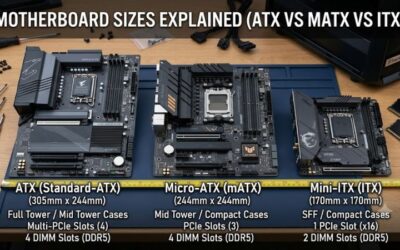
Motherboard dimensions must match the case. The MSI B450 Tomahawk MAX II and Gigabyte B450 AORUS Elite V2 are ATX boards, while the ASRock B450M Pro4 R2.0 uses the smaller micro-ATX format. Confirm the case’s supported motherboard sizes and available clearance before ordering, especially when reusing a compact enclosure or an older prebuilt system.
Also inspect the power supply, CPU cooler, graphics card clearance, and front-panel connectors. These motherboards use standard ATX motherboard power connections, but your PSU must still provide the connectors required by the complete system. Compare the total cost of the board, any needed BIOS service, and other replacement parts rather than judging value by motherboard price alone.
Top Picks: Four B450 Motherboards for Gaming
These recommendations cover different build priorities rather than claiming a universal performance winner. The best choice depends on local availability, board condition, processor support, and the price of competing AM4 options. Since B450 is an older chipset, verify the exact model and revision before purchasing; newer AM4-compatible products may offer different features.
| Product | Best For | Key Spec | Compatibility | Watch Out For |
| MSI B450 Tomahawk MAX II | Best Overall | Four DDR4 slots; one M.2 socket | ATX, AM4 | Only one M.2 socket |
| ASRock B450M Pro4 R2.0 | Best Value | Two M.2 sockets; micro-ATX | AM4, DDR4 | Regional availability varies |
| Gigabyte B450 AORUS Elite V2 | Best For Multiple SSDs | Two M.2 sockets; four DIMM slots | ATX, AM4 | Second M.2 socket runs at PCIe 3.0 x2 |
| ASUS ROG Strix B450-F Gaming II | Best For Expansion | Four DDR4 slots; DisplayPort and HDMI | ATX, AM4 | No onboard Wi-Fi listed in the specifications |
MSI B450 Tomahawk MAX II — Best Overall
The MSI B450 Tomahawk MAX II is a practical choice for a conventional ATX gaming tower built around a compatible Ryzen processor. Its four DIMM slots support up to 128GB of DDR4 memory, and the board provides one M.2 socket alongside six SATA connectors. The rear panel includes USB Type-A and Type-C connectivity.
Its Flash BIOS button is particularly useful when preparing firmware for a supported processor that needs an update. However, the board has only one M.2 socket, so builders planning several internal NVMe drives may prefer a different model. It is also an older PCIe 3.0 platform, making it less attractive for a new build priced close to newer alternatives.
ASRock B450M Pro4 R2.0 — Best Value
The ASRock B450M Pro4 R2.0 suits a cost-conscious build where case size and storage flexibility matter. Its micro-ATX layout fits many smaller compatible cases, and its storage configuration includes an Ultra M.2 socket supporting PCIe 3.0 x4 with supported processors plus a second M.2 socket for SATA drives. It also offers HDMI, DVI-D, and D-Sub display outputs.
The compromise is that this model has four SATA connectors, and its smaller layout offers fewer expansion possibilities than some full-size boards. ASRock lists support for Ryzen 2000, 3000, 4000 G-Series, 5000, and 5000 G-Series desktop processors, subject to CPU-specific support details. Buy it when its verified local price and condition justify choosing an older micro-ATX platform.
Gigabyte B450 AORUS Elite V2 — Best For Multiple SSDs
The Gigabyte B450 AORUS Elite V2 is a strong candidate for gaming PCs that need multiple internal drives. It provides two M.2 sockets, six SATA connectors, four DDR4 DIMM slots, and a full-size ATX layout. Its main M.2 socket supports PCIe 3.0 x4 with compatible hardware, while the second socket operates at PCIe 3.0 x2.
That second socket is the important limitation: it does not offer the same interface bandwidth as the primary slot. The board also has a PCIe 3.0 main graphics slot and a secondary slot with reduced bandwidth. Check the CPU support list and board revision before buying, particularly if the seller cannot confirm the installed BIOS or provide a return option.
ASUS ROG Strix B450-F Gaming II — Best For Expansion
The ASUS ROG Strix B450-F Gaming II targets users who want a full-size board with a range of expansion and display connections. It supports compatible AM4 Ryzen processors, four DDR4 DIMM slots, and up to 128GB of memory. Its rear display connections include DisplayPort and HDMI, although their functionality depends on the processor’s integrated graphics capabilities.
The main drawback is its age: buyers should not assume it offers the PCIe generation, connectivity, or upgrade flexibility of newer platforms. ASUS specifies support for Ryzen 5000, 5000 G-Series, 4000 G-Series, and earlier listed AM4 processor families, with CPU-specific qualifications. Choose it when expansion needs and a competitive purchase price outweigh the appeal of a newer motherboard.
Frequently Asked Questions About B450 Motherboards
B450 remains useful for budget gaming systems, but the value depends on the price of the motherboard, the processor you already own, and the availability of compatible alternatives. These answers address the most important purchase and upgrade considerations for an AM4 build.
Is B450 Still Worth Buying for Gaming?
Yes, B450 can still be worth buying for an affordable AM4 gaming PC, especially if you already own compatible DDR4 memory and a Ryzen processor. A suitable board can keep replacement costs down while supporting a discrete graphics card and NVMe storage. Compare the complete upgrade cost with newer platforms before committing.
Which Ryzen Processors Work With B450?
Many B450 boards support selected Ryzen 1000 through 5000-series desktop processors, but support varies by model and BIOS version. Ryzen 5000 compatibility is particularly important to confirm before upgrading. Consult the manufacturer’s CPU support list for the exact processor and required firmware, and follow the board-specific update procedure.
Does a B450 Motherboard Support DDR5 or PCIe 4.0?
No, B450 motherboards use DDR4 memory and generally provide PCIe 3.0 graphics connectivity. Certain storage and expansion configurations operate at lower PCIe generations or lane widths, depending on the board and processor. A DDR5 memory kit cannot be installed in these boards, and PCIe 4.0 capabilities should not be assumed.
What Should I Check Before Buying a Used B450 Board?
Check the exact model, PCB revision, CPU support, BIOS version, socket condition, memory slots, storage connectors, and rear I/O ports. Ask for clear photographs and confirmation that the board powers on reliably. Also verify the seller’s return policy and whether the board includes essential accessories, since missing parts or firmware issues can reduce its apparent savings.
Final Thoughts
The best b450 motherboard is the one that fits your existing AM4 components and costs less than a worthwhile platform upgrade. The MSI suits conventional ATX builds, ASRock offers a compact option, Gigabyte provides two M.2 sockets, and ASUS offers another full-size alternative. Verify BIOS support, board condition, and local pricing before buying.