🛒 Best Price Today on Amazon
Prime members get fast, free shipping on everything above, plus member-only deals. New members get a 30-day free trial — cancel anytime.
ATX vs Micro ATX vs Mini ITX which should you choose depends mainly on case size, expansion needs, cooling space, and the platform you plan to build around. The motherboard size itself does not determine gaming performance, but it strongly affects how many components you can install and how easily the rest of the system fits together.
Quick answer: Our top pick in 2026 is the Setting — our #1 rated choice. See the full ranked comparison, alternatives and buying advice below.
What ATX, Micro ATX, and Mini ITX Really Come Down To
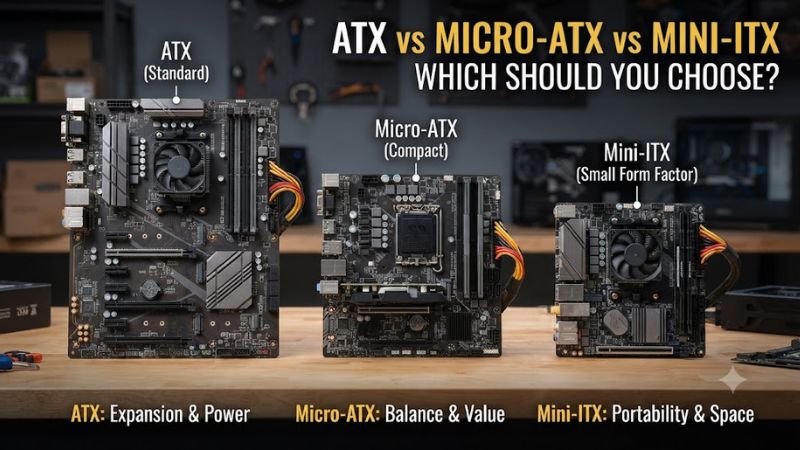
ATX, Micro ATX, and Mini ITX are physical motherboard standards rather than performance levels. ATX measures 305 × 244 mm, Micro ATX measures up to 244 × 244 mm, and Mini ITX measures 170 × 170 mm. The smaller formats reduce board area and expansion space, while larger formats generally provide more room for memory, PCIe cards, storage connections, and headers.
Physical Size Changes the Case You Can Use
For ATX vs Micro ATX vs Mini ITX which should you choose, start with the case rather than the motherboard. An ATX case can commonly accept smaller boards, while a Micro ATX case cannot accommodate a full ATX board. Mini ITX cases impose the tightest restrictions, so the case specification should be checked before selecting every other component.
ATX uses a 305 × 244 mm board, Micro ATX uses a 244 × 244 mm envelope, and Mini ITX uses a 170 × 170 mm envelope. These dimensions describe the board standard, not the total PC volume, because GPU length, CPU cooler height, radiator support, cable space, and PSU dimensions also determine the finished system size.
Expansion Space Is the Main Hardware Trade-Off
The expansion difference is substantial. Intel lists standard ATX with seven expansion slots, Micro ATX with up to four, and Mini ITX with one full-size PCIe slot. ATX also commonly provides four DIMM slots, while Mini ITX typically uses two, making the smaller format less flexible for expansion even when the CPU and GPU are otherwise compatible.
That matters if the system may gain a capture card, sound card, high-speed network adapter, additional storage controller, or other PCIe device. A gaming PC using one graphics card and motherboard-connected storage may not need ATX, while a workstation-style gaming system with several add-in devices can benefit from its additional physical space.
Cooling Depends More on the Build Than the Board
ATX vs Micro ATX vs Mini ITX which should you choose is also a case-and-cooling question. A larger motherboard can make component placement easier, but motherboard size alone does not determine CPU temperature or graphics performance. The case’s airflow, cooler clearance, radiator support, GPU dimensions, and fan arrangement remain important variables.
Mini ITX deserves more planning because compact cases have less physical room for cables, radiators, CPU coolers, and graphics cards. That does not make every Mini ITX system thermally unsuitable; current boards can support modern desktop platforms, including AM5 and LGA1851, but the specific case and cooling hardware must support the intended components.
What Does Not Help When Choosing a Form Factor
A common mistake is treating motherboard size as a direct gaming-performance setting. ATX does not automatically make a CPU or GPU faster, and switching to Mini ITX does not inherently reduce frame rates. The meaningful differences are physical compatibility, expansion capacity, connector access, and the constraints imposed by the selected case.
It is also unnecessary to choose ATX simply because a future upgrade might happen someday. A better approach is to identify the devices, memory capacity, storage connections, and case you realistically expect to use. If those requirements fit Micro ATX, the smaller board can satisfy the same gaming platform without requiring unused expansion space.
How to Choose the Right Size Step by Step
For ATX vs Micro ATX vs Mini ITX which should you choose, make the decision in this order: confirm the case, confirm the CPU platform, count expansion requirements, then check cooling and power-supply clearance. Current AMD B850 boards are available in ATX, Micro ATX, and Mini ITX designs, while Intel LGA1851 boards are also available across these form factors.
| Setting | Where to Check | Effect | Risk |
| Case motherboard support | Case specifications | Determines which board sizes physically fit | Board may not mount if the case is too small |
| CPU socket and memory type | Motherboard specifications | Determines processor and RAM compatibility | Wrong socket or DDR generation prevents normal installation |
| PCIe, DIMM, and M.2 requirements | Motherboard specifications | Determines expansion and storage capacity | Insufficient slots can force later replacements |
| Cooler, GPU, and PSU clearance | Case and component specifications | Determines whether the complete system fits | Compact layouts can create clearance conflicts |
Start With the Case, Not the Motherboard
When deciding ATX vs Micro ATX vs Mini ITX which should you choose, the case is the first physical constraint. Check its supported motherboard sizes, maximum GPU length, CPU-cooler height, radiator locations, and PSU format. MSI, for example, lists a current compact case supporting Micro ATX and Mini ITX while using an ATX-format power supply, showing why these specifications must be checked separately.
If the case is already purchased, its motherboard-support list should override assumptions based on the case’s marketing category. A “mini tower” can support Micro ATX, while another compact case may accept only Mini ITX. The motherboard, graphics card, cooler, and PSU therefore need to be checked against the same case specification before purchase.
Confirm the CPU Platform and Memory Type
Form factor does not determine CPU socket or memory generation. Current ASUS examples show AMD B850 motherboards in ATX, Micro ATX, and Mini ITX formats, with DDR5 support, while Intel B860 and Z890 boards use LGA1851 and DDR5. This demonstrates that board size and platform compatibility are separate specifications.
For a new build, select the processor platform first, then choose a motherboard of the required size within that platform. Check the exact socket, chipset, memory type, BIOS requirements, and supported CPU list for the individual board. Do not assume two boards with identical dimensions support the same processor or RAM simply because they share a form factor.
Count the Expansion and Storage You Actually Need
The practical answer to ATX vs Micro ATX vs Mini ITX which should you choose often comes from counting slots rather than comparing motherboard labels. ATX gives the most expansion room, Micro ATX reduces the number of positions while retaining a relatively compact footprint, and Mini ITX generally provides one full-size PCIe slot and typically two DIMM slots.
Write down the graphics card, PCIe cards, M.2 drives, SATA devices, and memory capacity you expect to use. Then compare those requirements with the exact motherboard layout. Current Mini ITX boards can still include multiple M.2 sockets and modern connectivity, so board-specific specifications matter more than assuming every small board has the same feature set.
Check Cooler, GPU, and PSU Clearance Together
A motherboard can fit a case while the complete PC still fails a clearance check. Compare the CPU cooler height, radiator dimensions, graphics-card length and thickness, PSU dimensions, and cable-routing space against the case specifications. This is especially important in Mini ITX systems, where several component dimensions can interact in a confined layout.
The PSU connector standard is a separate consideration from motherboard size. ATX, Micro ATX, and Mini ITX describe board dimensions and mounting geometry, while the case determines which PSU form factors it accepts. Check the exact motherboard power connectors and GPU power requirements together with the PSU specification rather than assuming a smaller motherboard needs a smaller PSU.
FAQ
The short answer to ATX vs Micro ATX vs Mini ITX which should you choose is that the right size follows the case, expansion requirements, platform, and physical clearance of the complete PC. None of the three standards automatically determines gaming performance, and modern platforms are available in multiple form factors.
Is ATX faster than Micro ATX for gaming?
ATX is not inherently faster than Micro ATX for gaming because motherboard form factor describes physical layout rather than CPU or GPU performance. Two boards using the same processor platform can deliver similar gaming performance when their CPU, GPU, memory, firmware configuration, and cooling conditions are otherwise appropriate.
The important difference is expansion capacity and board layout. ATX commonly provides more PCIe positions and room for connectors, while Micro ATX reduces the physical footprint. Choose between them according to the devices and case you need rather than expecting a frame-rate increase from the larger board.
Is Micro ATX compatible with an ATX case?
Micro ATX is generally compatible with ATX cases that explicitly support the smaller form factor. Intel notes that Micro ATX remains compatible with mounting holes in larger ATX cases, while ATX cases commonly list support for multiple board sizes in their specifications.
The reverse is not true: a Micro ATX case cannot be assumed to accept a full ATX motherboard. Always check the manufacturer’s motherboard-support list because the case’s internal layout, standoff positions, cable space, and expansion-slot arrangement determine actual compatibility.
Does Mini ITX use the same CPU and GPU as ATX?
Mini ITX can use the same CPU and GPU classes as ATX when the specific motherboard, case, cooler, and power supply support those components. Current Mini ITX boards exist for AMD B850 and Intel LGA1851 platforms, showing that compact form factor does not require a separate CPU architecture.
The physical limitations are more important. Mini ITX normally has one full-size PCIe slot and typically two DIMM slots, while the case may impose strict GPU, cooler, radiator, PSU, and cable-clearance limits. Check every component’s dimensions rather than assuming compatibility from the motherboard size alone.
Which motherboard size should a compact gaming PC use?
A compact gaming PC can use Micro ATX or Mini ITX, depending on the case and required expansion. Micro ATX occupies less board area than ATX while retaining more expansion potential than Mini ITX, whereas Mini ITX is intended for substantially smaller systems and usually requires tighter component planning.
If the case accepts Micro ATX and you need additional PCIe or DIMM capacity, its larger board envelope may simplify the build. If the case is specifically designed around Mini ITX, the smaller standard is appropriate, but the complete parts list should be checked for GPU, cooler, PSU, storage, and cable-clearance constraints before buying.
Final Thoughts
ATX vs Micro ATX vs Mini ITX which should you choose comes down to the PC you are actually building, not a universal performance hierarchy. Start with case support, confirm CPU and RAM compatibility, count expansion needs, then verify cooling, GPU, and PSU clearance. That sequence reduces fit problems while keeping the form factor aligned with the system’s purpose.
Ready to decide? Our #1 pick for 2026 is the Setting.
Live price & availability on Amazon.