🛒 Best Price Today on Amazon
Prime members get fast, free shipping on everything above, plus member-only deals. New members get a 30-day free trial — cancel anytime.
For a best workstation motherboard for editing and gaming, the key is balancing creator I/O with gaming-oriented PCIe and CPU support. Current choices range from AM5 and LGA1851 creator boards to Threadripper platforms, so socket, memory type, expansion layout, storage and case size should come before cosmetic features.
How to Choose a Workstation Motherboard
The right board depends on how heavily editing and gaming share the same system. Mainstream creator boards are easier to pair with Ryzen or Core Ultra CPUs, while Threadripper platforms add memory channels and PCIe capacity for heavier projects. A practical shortlist should therefore cover compatibility, expansion, storage and connectivity rather than simply counting power phases.
CPU and Socket Compatibility
Socket compatibility is the first filter because a motherboard determines which processor families can be installed. The ProArt X870E-Creator WiFi uses AM5 for Ryzen 9000, 8000 and 7000 desktop CPUs, while the ProArt Z890-Creator WiFi uses LGA1851 for Core Ultra Series 2.
For a best workstation motherboard for editing and gaming, the CPU platform also affects memory and PCIe behavior. AM5 boards use DDR5 and dual-channel memory, while Threadripper TRX50 and WRX90 boards use ECC RDIMM DDR5 and more memory bandwidth. Choose the processor first, then verify the motherboard CPU support list and BIOS requirements.
PCIe Expansion
PCIe layout matters when one system must handle a graphics card plus capture, storage or other expansion hardware. The X870E-Creator offers two PCIe 5.0 x16 slots with x16 or x8/x8 operation, while the Z890-Creator provides the same basic x16 or x8/x8 arrangement.
Threadripper boards go further. The TRX50 AERO D has two PCIe 5.0 x16 slots plus a PCIe 4.0 x16 slot, while the WRX90E-SAGE SE provides seven PCIe 5.0 x16 slots. That difference matters when editing expands into multiple GPUs, high-speed storage adapters or professional capture hardware.
Storage and Networking
Editors often benefit from separating operating-system, project and scratch storage, making M.2 capacity useful. The X870E-Creator has four M.2 slots, including two PCIe 5.0 x4 connections, while the Z890-Creator provides five M.2 slots with one PCIe 5.0 x4 connection.
Networking can also influence a best workstation motherboard for editing and gaming when footage sits on a NAS. The X870E-Creator and Z890-Creator each combine 10Gb Ethernet with 2.5Gb Ethernet, while the TRX50 AERO D adds the same dual-wired arrangement plus Wi-Fi 7.
Case and Platform Requirements
Case compatibility becomes more important as the platform grows. The X870E-Creator and Z890-Creator use standard ATX dimensions, while the TRX50 AERO D is E-ATX and the WRX90E-SAGE SE is an EEB workstation board. A suitable case, CPU cooler, PSU and GPU clearance must therefore be checked before purchase.
The memory requirement changes too. The two ProArt boards use conventional DDR5 DIMMs, whereas TRX50 AERO D requires ECC Registered DDR5 and WRX90 boards use ECC Registered DDR5 across eight memory slots. These platforms are not drop-in alternatives for ordinary desktop DDR5 kits.
Top Picks for Editing and Gaming
The table below separates creator-focused ATX boards from Threadripper options. The first two suit systems where gaming remains a major workload, while the latter two make more sense when CPU-heavy editing, multiple expansion cards or very large memory configurations justify a workstation platform.
| Product | Best For | Key Spec | Compatibility | Watch Out For |
| ASUS ProArt X870E-Creator WiFi | Best Overall | 10GbE, 4 M.2, dual USB4 | AM5, DDR5, ATX | No ECC RDIMM platform |
| ASUS ProArt Z890-Creator WiFi | Best Value | 5 M.2, dual TB5, 10GbE | LGA1851, DDR5, ATX | Dual-channel memory |
| GIGABYTE TRX50 AERO D | Best For Threadripper gaming/editing | 10GbE, 4 M.2, PCIe 5.0 | sTR5, ECC RDIMM, E-ATX | Quad-channel only |
| ASUS Pro WS WRX90E-SAGE SE | Best For multi-GPU workstations | 7 PCIe 5.0 x16, 2TB ECC RDIMM | sTR5, ECC RDIMM, EEB | Very large platform |
ASUS ProArt X870E-Creator WiFi
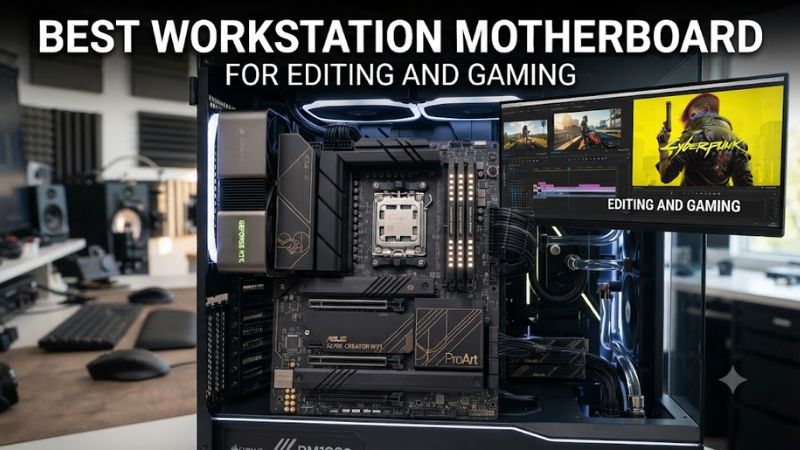
The ASUS ProArt X870E-Creator WiFi is the balanced choice for a best workstation motherboard for editing and gaming when the system uses a Ryzen desktop CPU. It supports AM5 Ryzen 9000, 8000 and 7000 processors, four DDR5 DIMMs up to 256GB, two PCIe 5.0 x16 slots and four M.2 sockets.
Its real weakness is that it is a creator-oriented desktop board rather than an ECC RDIMM workstation platform. Independent testing also found that ECC memory support was absent despite ECC being available on some X870 boards. It should not be chosen when registered ECC memory is a core requirement.
ASUS ProArt Z890-Creator WiFi
The ASUS ProArt Z890-Creator WiFi is the value-oriented Intel option in this group, especially for editors who want modern external connectivity without moving to a Xeon workstation platform. It supports LGA1851 Core Ultra Series 2 CPUs, DDR5, five M.2 sockets, 10GbE, 2.5GbE and Wi-Fi 7.
Its standout feature for editing is connectivity: two rear Thunderbolt 5 ports plus another USB4/Thunderbolt port can simplify fast external storage and displays. The limitation is platform memory architecture, with four dual-channel DDR5 DIMM slots rather than the larger ECC RDIMM capacity available on Threadripper PRO systems.
GIGABYTE TRX50 AERO D
The GIGABYTE TRX50 AERO D fits users who want Threadripper-class CPU resources without moving all the way to WRX90. It supports Threadripper 9000 and 7000 families, four ECC RDIMM slots up to 1TB, quad-channel memory, two PCIe 5.0 x16 slots and one PCIe 4.0 x16 slot.
For a best workstation motherboard for editing and gaming, its compromise is the four-channel memory design compared with WRX90. It also uses E-ATX dimensions, so a normal ATX case cannot be assumed compatible. Its strengths are the 10GbE plus 2.5GbE networking, Wi-Fi 7, four M.2 slots and USB4 connectivity.
ASUS Pro WS WRX90E-SAGE SE
The ASUS Pro WS WRX90E-SAGE SE is aimed at systems where expansion matters more than conventional desktop simplicity. It supports Threadripper PRO 9000 and 7000 WX processors, up to 2TB of ECC RDIMM DDR5 and seven PCIe 5.0 x16 slots, making it suited to multi-GPU editing, rendering and other heavily expanded systems.
The drawback is platform scale. ASUS lists a $1,299.99 store price, and the board needs an sTR5 Threadripper PRO processor, ECC RDIMM memory, an appropriate EEB-compatible case and substantial cooling and power hardware. A gaming-focused build usually does not need this level of expansion.
FAQ
The best workstation motherboard for editing and gaming depends mainly on whether the build uses a mainstream desktop CPU or a Threadripper platform. The ProArt X870E-Creator and Z890-Creator target mixed creator and gaming systems, while TRX50 and WRX90 boards target higher expansion and memory requirements.
Is a workstation motherboard good for gaming?
Yes, a workstation motherboard can support gaming effectively when its CPU, GPU and memory platform are appropriate for the games being played. An independent X870E-Creator comparison used 1080p, lowest graphics settings and an AMD Radeon RX 7900 XT, recording 233 FPS in Cyberpunk 2077, 264 FPS in Assassin’s Creed Mirage and 145 FPS in Horizon Forbidden West.
Those figures describe a complete test system rather than motherboard-only performance, so they should not be treated as a universal FPS result. The source compared the X870E-Creator against two other X870E boards under the same test conditions, making the data useful for context but not as a guarantee for another CPU, GPU or game configuration.
How much RAM should an editing and gaming workstation have?
A 64GB DDR5 configuration is a practical starting point for a mixed editing and gaming PC, while heavier professional workloads can justify more memory. The motherboard determines the available capacity and memory type, so desktop ProArt boards and Threadripper PRO platforms should be considered separately.
The X870E-Creator supports up to 256GB of DDR5 across four DIMM slots, while the WRX90E-SAGE SE supports up to 2TB of ECC RDIMM DDR5. Those capacities serve very different workloads, so buying a larger workstation platform solely for maximum RAM can add considerable cost and hardware requirements.
Does a workstation motherboard need ECC memory?
No, ECC is not mandatory for every editing and gaming PC, but it becomes relevant when memory error correction and very large professional workloads are priorities. The ProArt X870E-Creator supports ECC and non-ECC unbuffered DIMMs, while the TRX50 AERO D and WRX90 platform use ECC Registered DDR5.
Memory compatibility still depends on the CPU and module configuration. ASUS and GIGABYTE both direct users to their respective memory support lists, so the exact DIMM kit should be checked against the board before purchase, especially when using higher capacities or registered memory.
Is Threadripper worth it for editing and gaming?
Threadripper makes sense when editing workloads benefit from substantially more CPU resources, memory bandwidth or PCIe expansion than a mainstream desktop platform provides. TRX50 offers four-channel ECC RDIMM memory and multiple full-length PCIe slots, while WRX90 expands to eight-channel memory and seven PCIe 5.0 x16 slots.
For a best workstation motherboard for editing and gaming, the deciding factor is therefore the workload rather than the socket name. A single-GPU gaming and editing PC can stay on AM5 or LGA1851, while multi-GPU, huge-memory or expansion-heavy workflows provide a clearer reason to move to Threadripper PRO.
Final Thoughts
The best workstation motherboard for editing and gaming is the one that matches the CPU platform, memory type, PCIe layout and storage plan instead of simply offering the largest specification sheet. For mixed workloads, ProArt boards provide strong connectivity, while TRX50 and WRX90 suit progressively larger professional systems.