Affiliate disclosure: As an Amazon Associate we earn from qualifying purchases. This post contains affiliate links — we may earn a small commission at no extra cost to you. This never affects our picks. Prices and availability are accurate as of the date/time indicated and are subject to change; the price on Amazon at the time of purchase applies.
- Quick Comparison Table
- 1. MSI MPG X870E Carbon WiFi: Best for high-end AM5 builds
- 2. GIGABYTE B850 AORUS Elite WIFI7: Best for the best all-round AM5 value
- 3. ASUS ROG Strix B850-A Gaming WiFi: Best for feature-rich AM5 with four M.2 slots
- 4. GIGABYTE Z790 Eagle AX: Best for Intel 12th to 14th Gen builds that want DDR5
- 5. ASUS TUF Gaming B650-PLUS WiFi: Best for budget-minded AM5 with DDR5
- How to Choose
- Frequently Asked Questions
- About the Author
- Related Articles
Quick answer: The Gigabyte B850 AORUS Elite WIFI7 is the best DDR5 motherboard for most builds. The MSI X870E Carbon suits flagship AM5 systems, the ASUS ROG Strix B850-A adds a fourth M.2 slot, the Gigabyte Z790 Eagle AX serves Intel, and the ASUS TUF B650-PLUS keeps AM5 affordable.
This guide compares five DDR5 motherboards that cover the main ways to build a modern gaming PC: three AM5 tiers, one more budget AM5 board, and one for Intel 12th to 14th Gen. We focus on socket, chipset, storage slots and networking, since those decide compatibility and upgrade room. Comparisons use each listing’s published specifications; we did not run our own benchmarks, so confirm details on each maker’s page.
Quick Comparison Table
| # | Model | Key specs (per listing) | Best for |
|---|---|---|---|
| 1 | MSI MPG X870E Carbon WiFi | AM5, X870E, DDR5, PCIe 5.0, M.2 Gen5, Wi-Fi 7, 5Gbps LAN, ATX | high-end AM5 builds |
| 2 | GIGABYTE B850 AORUS Elite WIFI7 | AM5, B850, DDR5, 14+2+2 power phase, 3x M.2, PCIe 5.0, Wi-Fi 7, 2.5GbE | the best all-round AM5 value |
| 3 | ASUS ROG Strix B850-A Gaming WiFi | AM5, B850, DDR5 AEMP, 14+2+2 power stages, 4x M.2, Wi-Fi 7, 2.5G LAN | feature-rich AM5 with four M.2 slots |
| 4 | GIGABYTE Z790 Eagle AX | LGA 1700, Z790, DDR5, 12+1+1 power phase, 3x M.2, PCIe 5.0, Wi-Fi 6E, 2.5GbE | Intel 12th to 14th Gen builds that want DDR5 |
| 5 | ASUS TUF Gaming B650-PLUS WiFi | AM5, B650, DDR5, 14 power stages, PCIe 5.0 M.2, Wi-Fi 6, 2.5Gb Ethernet | budget-minded AM5 with DDR5 |
1. MSI MPG X870E Carbon WiFi: Best for high-end AM5 builds
Specs per the listing: AM5 socket for Ryzen 9000/8000/7000, DDR5, PCIe 5.0, M.2 Gen5, SATA 6Gb/s, 40Gbps USB, HDMI, Wi-Fi 7, Bluetooth 5.4, 5Gbps LAN, ATX form factor.
The X870E Carbon is the top of the AM5 options here. The listing stacks the features enthusiasts ask for: PCIe 5.0 and Gen5 M.2 storage, 40Gbps USB, Wi-Fi 7 and a 5Gbps wired port. If you plan to pair a flagship Ryzen with a fast graphics card and a Gen5 SSD, this board is built to avoid compromise.
That feature list is also why it costs the most in this guide. Many builds never use 5Gbps networking or a second Gen5 drive, so the board makes sense mainly if you will use the headroom or want the longest upgrade runway. Check the maker page for M.2 slot count and VRM details, which the title does not list.
- Pros: Gen5 storage and PCIe 5.0; Wi-Fi 7 and 5Gbps LAN; 40Gbps USB
- Cons: Highest cost of the group; features many builds will not use; M.2 slot count not in the title

MSI MPG X870E Carbon WiFi Gaming Motherboard (AMD Ryzen 9000/8000/7000 Series Processors, AM5, DDR5, PCIe 5.0, M.2 Gen5, SATA 6Gb/s, USB 40Gbps, HDMI, Wi-Fi 7, Bluetooth 5.4, 5Gbps LAN, ATX)
Included for 'Best DDR5 Motherboards for AM5 and Intel Gaming Builds' as a representative home product in this roundup; selection reflects the product set returned for this topic.
View on Amazon2. GIGABYTE B850 AORUS Elite WIFI7: Best for the best all-round AM5 value
Specs per the listing: AM5 for Ryzen 9000/8000/7000, DDR5, 14+2+2 power phase, three M.2 slots, PCIe 5.0, USB-C, Wi-Fi 7, 2.5GbE LAN, EZ-Latch, five-year warranty listed, ATX.
For most buyers, B850 is the AM5 chipset to start with, and this Gigabyte board shows why. It lists a 14+2+2 power phase design, three M.2 slots, PCIe 5.0 and Wi-Fi 7, covering what a mid-to-high-end Ryzen build needs without X870E-level extras.
The tool-free EZ-Latch design speeds up graphics card and drive installs, which is handy if you build often. The listing mentions a five-year warranty; confirm terms with the maker. It is the strongest everyday pick in this guide for anyone who wants a balanced board and a clear upgrade path.
- Pros: Three M.2 slots; Wi-Fi 7 and 2.5GbE; tool-free latches; listing mentions a five-year warranty
- Cons: Not the top chipset; which M.2 slots run at PCIe 5.0 speed is not listed

GIGABYTE B850 AORUS Elite WIFI7 AMD AM5 ATX Motherboard, Support AMD Ryzen 9000/8000/7000 Series, DDR5, 14+2+2 Power Phase, 3X M.2, PCIe 5.0, USB-C, WIFI7, 2.5GbE LAN, EZ-Latch, 5-Year Warranty
Included for 'Best DDR5 Motherboards for AM5 and Intel Gaming Builds' as a representative home product in this roundup; selection reflects the product set returned for this topic.
View on Amazon3. ASUS ROG Strix B850-A Gaming WiFi: Best for feature-rich AM5 with four M.2 slots
Specs per the listing: AM5, B850 chipset, 14+2+2 power stages, DDR5 with AEMP, 2.5G LAN, Wi-Fi 7 with Q-Antenna, four M.2 slots, PCIe 5.0, 20Gbps USB Type-C, ATX.
The ROG Strix B850-A offers a fourth M.2 slot where the Gigabyte above has three, which matters for builders who like to keep a game library and a scratch drive on separate NVMe sticks. It also lists AEMP memory profiles, ASUS’s one-step method for loading rated DDR5 speeds.
Strix boards usually carry a styling premium, so compare it with the Gigabyte if you do not need the extra slot. The listing gives you the power stage count and port list, but not the audio codec or rear I/O detail, so check the maker page if those matter for your setup.
- Pros: Four M.2 slots; AEMP memory profile support; Wi-Fi 7 and 2.5G LAN
- Cons: Styling premium over similar B850 boards; audio and rear I/O detail not listed; ATX only

ASUS ROG Strix B850-A Gaming WiFi AMD AM5 B850 ATX Motherboard 14+2+2 Power Stages, DDR5 AEMP, 2.5G LAN, Wi-Fi 7 with Q-Antenna, 4X M.2, PCIe® 5.0, USB 20Gbps Type-C, AI Networking II, ASUS Advisor
Included for 'Best DDR5 Motherboards for AM5 and Intel Gaming Builds' as a representative home product in this roundup; selection reflects the product set returned for this topic.
View on Amazon4. GIGABYTE Z790 Eagle AX: Best for Intel 12th to 14th Gen builds that want DDR5
Specs per the listing: LGA 1700 for Intel Core 14th/13th/12th Gen, DDR5, 12+1+1 power phase, three M.2 slots, PCIe 5.0, USB-C 3.2, Wi-Fi 6E, 2.5GbE, Q-Flash, EZ-Latch, ATX.
Not everyone is buying AM5. If you already own, or plan to buy, a 12th to 14th Gen Intel processor, this Z790 board pairs it with DDR5 memory. The listing confirms three M.2 slots, PCIe 5.0 and Wi-Fi 6E, a very sensible feature set for the platform.
The caveat is platform age. LGA 1700 is a mature socket, so it suits a value-conscious build with an existing chip and not a long upgrade path. For a fresh build with new silicon, the AM5 boards above are the more future-facing choice.
- Pros: Supports Intel 12th to 14th Gen with DDR5; three M.2 slots; Wi-Fi 6E and 2.5GbE
- Cons: Older socket with a shorter upgrade path; Wi-Fi 6E rather than Wi-Fi 7; not for newer Intel chips

GIGABYTE Z790 Eagle AX LGA 1700 ATX Motherboard, Support Intel Core 14th/13th/12th Gen, DDR5, 12+1+1 Power Phase, 3X M.2, PCIe 5.0, USB-C 3.2, WIFI6E, 2.5GbE, Q-Flash, EZ-Latch, RGB Fusion
Included for 'Best DDR5 Motherboards for AM5 and Intel Gaming Builds' as a representative home product in this roundup; selection reflects the product set returned for this topic.
View on Amazon5. ASUS TUF Gaming B650-PLUS WiFi: Best for budget-minded AM5 with DDR5
Specs per the listing: AM5 for Ryzen 9000/8000/7000, B650 chipset, 14 power stages, PCIe 5.0 M.2, DDR5, Wi-Fi 6, 2.5Gb Ethernet, USB4 support, Aura Sync, ATX.
B650 is the earlier AM5 chipset, and the TUF Gaming B650-PLUS shows it is still a good fit for a straightforward build. It keeps the pieces that matter, DDR5, a PCIe 5.0 M.2 slot and 2.5Gb Ethernet, while using Wi-Fi 6 in place of newer wireless.
It is the most affordable route into AM5 in this guide. You give up some of the extra M.2 slots and the latest wireless standard, but for a gaming PC with one fast SSD it covers the essentials. Check the BIOS version out of the box if you plan to use the newest Ryzen 9000 chips.
- Pros: Entry AM5 platform with DDR5; PCIe 5.0 M.2; 2.5Gb Ethernet
- Cons: Older B650 chipset; Wi-Fi 6 rather than Wi-Fi 7; may need a BIOS update for the newest Ryzen chips

ASUS TUF Gaming B650-PLUS WiFi AMD B650 AM5 Ryzen™ Desktop 9000 8000 and 7000 ATX Motherboard, 14 Power Stages, PCIe® 5.0 M.2, DDR5 Memory, WiFi 6 and 2.5 Gb Ethernet, USB4® Support Aura Sync
Included for 'Best DDR5 Motherboards for AM5 and Intel Gaming Builds' as a representative home product in this roundup; selection reflects the product set returned for this topic.
View on AmazonHow to Choose
Start with the socket and chipset
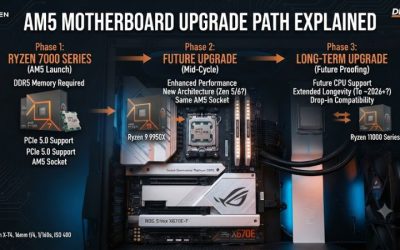
The socket must match your processor. AM5 takes Ryzen 9000, 8000 and 7000, and every AM5 board in this guide uses DDR5. LGA 1700 takes Intel 12th to 14th Gen. Within a platform, the chipset tier sets the extras: X870E for maximum features, B850 for the balanced default, and B650 for a leaner build. Read the processor support line in each listing before you add a board to your cart.
Count M.2 slots and PCIe lanes
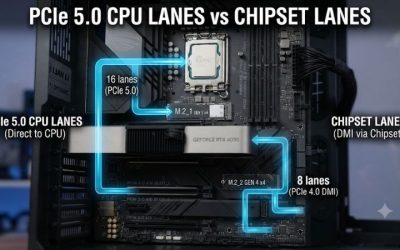
One NVMe drive is enough for many gaming PCs, but a second slot is useful insurance. If you want a Gen5 drive, confirm which slot runs at Gen5 speed, because some boards give that speed to only one slot. Remember that using some M.2 or SATA ports can disable others on certain boards, which the maker’s manual documents.
Check memory support and form factor
All boards here take DDR5, but supported speeds differ, so confirm the rated speed of your kit against the board’s memory support list. ATX boards give you more slots and ports; if you have a compact case, check that it takes ATX before you buy. An mATX or ITX board needs a matching case and usually has fewer M.2 slots.
Do not overpay for features you will not use
Wi-Fi 7, 5Gbps LAN and 40Gbps USB matter only if you own gear that uses them. A solid B850 or B650 board with a good power design is enough for most mid-range processors. Spend the savings on a better graphics card or SSD, and skip boards that omit basics like the chipset or memory type in the listing.
Frequently Asked Questions
Is DDR5 required on these boards?
Yes. Every board in this guide uses DDR5 and will not accept DDR4 sticks. DDR5 and DDR4 modules are physically different, so a DDR4 kit will not fit.
Which chipset should I pick for AM5?
B850 suits most gaming builds, X870E is for maximum expansion, and B650 is the lower-cost choice. All take current Ryzen processors, so choose based on slots and ports.
Do I need Wi-Fi 7?
Only if your router supports it. Wi-Fi 6 or 6E is fine for most homes, and wired Ethernet is more reliable for online gaming.
Will an older motherboard need a BIOS update?
Possibly. Boards sold before a processor launched can need an update to recognize it. Check the maker’s CPU support list for your exact chip.
Can I use the Z790 board with newer Intel chips?
No. The listing supports Intel 12th, 13th and 14th Gen on LGA 1700. Newer Core Ultra chips use a different socket and board.