🛒 Best Price Today on Amazon
Prime members get fast, free shipping on everything above, plus member-only deals. New members get a 30-day free trial — cancel anytime.
For a modern case, the best motherboard with usb c front panel header needs more than a Type-C socket. The header speed, charging support, CPU platform, DDR5 memory layout, PCIe lanes, and case connector all matter. Current AM5 and LGA1851 boards offer 20Gbps front Type-C options, but their rear I/O and lane sharing differ.
How to Choose a Motherboard With Front USB-C
A useful starting point is the header itself: check whether the board has a dedicated internal USB Type-C connector and identify its rated speed. Current boards commonly expose 10Gbps or 20Gbps front Type-C, while the case must provide a matching internal cable. A faster rear USB-C port does not substitute for a front-panel header.
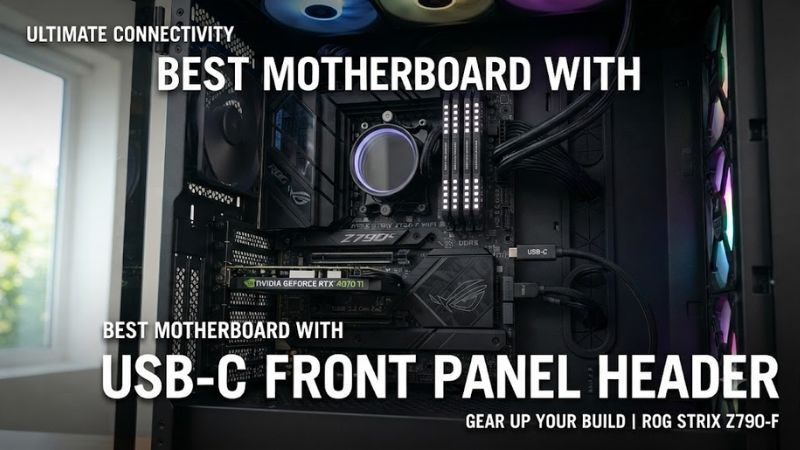
Check the USB-C Header Speed
For the best motherboard with usb c front panel header, 20Gbps is the clearest target when your case includes a high-speed front Type-C port. MSI’s MAG X870 Tomahawk WiFi and B850 Tomahawk MAX WiFi both provide a 20Gbps internal Type-C connector. This is useful for external SSDs and other high-bandwidth devices.
A 10Gbps header can still be appropriate for a case whose front connector is limited to 10Gbps. Do not assume that every Type-C connector reaches 20Gbps simply because the plug is reversible. The case specification and motherboard manual should agree on the connector type and advertised transfer rate before you build.
Match the CPU Platform and Memory
The best motherboard with usb c front panel header must also match the processor and memory you plan to install. AM5 boards such as X870 and B850 use DDR5 and support Ryzen 7000, 8000, and 9000 families on current models, while Z890 boards use LGA1851 and DDR5 for compatible Intel Core Ultra processors.
This makes platform selection more important than the USB feature alone. An AM5 board cannot accept an LGA1851 processor, and these current boards do not provide DDR4 memory support. Memory speed also varies by CPU and DIMM configuration, so use the manufacturer’s CPU and memory support lists rather than treating the advertised maximum as a guaranteed operating speed.
Check Case Clearance and Internal Cabling
A front Type-C header only helps if the case has the corresponding internal cable and enough physical room for the connection. ATX boards such as the MAG X870 Tomahawk WiFi measure 304.8 × 243.84 mm, so the case needs ATX motherboard support as well as suitable GPU, cooler, and cable clearance.
Cable routing matters around the motherboard’s right edge because front USB-C connectors are commonly positioned there. MSI places its 20Gbps Type-C header on the right side of both Tomahawk examples, while other headers occupy nearby areas. Before buying, confirm that your case cable reaches the header without sharp bends or interference from storage hardware.
Consider Rear USB4 and Lane Sharing
A board can have an excellent front USB-C header while using different controllers and lanes for rear high-speed ports. The MAG X870 Tomahawk WiFi, for example, has a 20Gbps front Type-C connector and two rear 40Gbps Type-C ports, but reviews note bandwidth sharing involving USB4 and certain M.2 slots. That matters for storage-heavy builds.
For a best motherboard with usb c front panel header, therefore, count the whole I/O design rather than one connector. A gamer with one front SSD may care mainly about the header speed, while a creator using several NVMe drives and USB4 devices should inspect the motherboard block diagram and manual for shared lanes before choosing the platform.
Top Picks
| Product | Best For | Key Spec | Compatibility | Watch Out For |
| MSI MAG X870 TOMAHAWK WIFI | Best Overall | Front USB-C 20Gbps; rear USB4 40Gbps | AM5, DDR5, ATX | M.2/USB4 lane sharing |
| MSI MAG B850 TOMAHAWK MAX WIFI | Best Value | Front USB-C 20Gbps; 5G LAN | AM5, DDR5, ATX | No native rear USB4 |
| ASUS TUF GAMING X870-PLUS WIFI | Best For Front Charging | Front USB-C 20Gbps; up to 30W PD | AM5, DDR5, ATX | Rear high-speed USB mix is less extensive |
| ASUS TUF GAMING Z890-PLUS WIFI | Best For Intel | Front USB-C 20Gbps; up to 15W-class output | LGA1851, DDR5, ATX | Intel-only platform |
MSI MAG X870 TOMAHAWK WIFI — Best Overall
The MSI MAG X870 TOMAHAWK WIFI is a strong fit for buyers who want the best motherboard with usb c front panel header without giving up fast rear connectivity. Its internal front Type-C reaches 20Gbps, while the rear I/O includes two 40Gbps Type-C ports, Wi-Fi 7, 5G LAN, four M.2 slots, and a PCIe 5.0 x16 graphics slot.
Its main weakness is platform complexity rather than the front connector. Independent reviews identify lane-sharing limits involving USB4 and M.2_2, while another expansion slot can share resources with M.2_3. Buyers running several NVMe drives should map their storage first. It is not the ideal choice for someone who needs every high-speed slot simultaneously.
MSI MAG B850 TOMAHAWK MAX WIFI — Best Value
The MSI MAG B850 TOMAHAWK MAX WIFI targets AM5 builders who want a best motherboard with usb c front panel header while spending less on chipset-level connectivity. It has one internal 20Gbps Type-C connector, four front 5Gbps Type-A ports, Wi-Fi 7, 5G LAN, four M.2 slots, and PCIe 5.0 support.
The compromise is rear connectivity: unlike the X870 Tomahawk, this B850 model does not provide native 40Gbps USB4 ports. Tom’s Hardware also notes that the board’s secondary M.2 configuration and lower-bandwidth expansion options reflect its B850 positioning. Choose it if front Type-C matters more than rear USB4.
ASUS TUF GAMING X870-PLUS WIFI — Best For Front Charging
The ASUS TUF GAMING X870-PLUS WIFI is suited to a best motherboard with usb c front panel header search where charging matters alongside data transfer. ASUS specifies a front USB 20Gbps connector with PD fast charging support up to 30W, making it useful for compatible phones and accessories connected through a case’s front Type-C port.
Its platform is AM5 with DDR5, so it suits Ryzen-based systems rather than Intel LGA1851 builds. The main trade-off is the less extensive rear high-speed USB arrangement compared with boards carrying multiple USB4 ports. Buyers focused primarily on rear USB4 should compare the X870 Tomahawk instead of choosing on front charging alone.
ASUS TUF GAMING Z890-PLUS WIFI — Best For Intel
For an Intel build, the ASUS TUF GAMING Z890-PLUS WIFI provides the best motherboard with usb c front panel header among these four for a straightforward current LGA1851 configuration. Its internal I/O includes one USB 20Gbps Type-C connector, alongside a 5Gbps header and two USB 2.0 headers, with DDR5 memory support.
The important limitation is compatibility: this board uses LGA1851 and is intended for compatible Intel Core Ultra processors, so it cannot be transferred into an AM5 Ryzen build. Its front Type-C power output is also specified at up to 5V/3A, while the ASUS X870-PLUS offers higher stated PD capability.
FAQ
Does a motherboard need a USB-C header for a front USB-C port?
Yes, a motherboard needs a compatible internal USB Type-C header to connect a case’s front USB-C port directly. The connector’s rated speed must also match the case and motherboard specifications; a rear USB-C port cannot replace the internal header for the front-panel cable.
For a best motherboard with usb c front panel header, verify the case manual as carefully as the motherboard manual. Some cases include both 5Gbps USB-A and faster Type-C cables, so one case may require multiple internal headers. Connecting the wrong cable or using an incompatible header can prevent the front port from operating correctly.
Is 20Gbps front USB-C better for gaming?
A 20Gbps front USB-C header provides higher potential transfer bandwidth than a 10Gbps header, but it does not directly increase game FPS. Its benefit is more apparent when moving large files or using fast external storage that can approach the available interface bandwidth.
For gaming PCs, the practical advantage is convenience and peripheral bandwidth rather than rendering performance. A 10Gbps front port remains adequate for many ordinary USB devices, so paying more for 20Gbps makes the most sense when the case and external devices can use that speed.
Does front USB-C speed depend on the PC case?
Yes, the case must have a front Type-C port and an internal cable compatible with the motherboard’s header. A motherboard offering 20Gbps cannot make a case’s lower-speed front connector operate beyond its own specification. The complete connection is limited by the relevant hardware components.
This is why a best motherboard with usb c front panel header should be selected together with the case rather than independently. Check the case’s front-I/O specification, internal connector, and cable length, then confirm that the motherboard provides the matching internal header and speed.
Which platform supports these current motherboard picks?
The MSI MAG X870 and B850 Tomahawk models and ASUS TUF X870-PLUS WIFI use AMD AM5 with DDR5, while the ASUS TUF Z890-PLUS WIFI uses Intel LGA1851 with DDR5. Gigabyte’s current X870 and B850 specifications likewise list AM5 and DDR5, while its Z890 models use LGA1851 and DDR5.
Choose the CPU platform first, then compare the front USB-C implementation within that platform. The motherboard cannot be treated as a universal USB-C adapter because socket, memory type, PCIe layout, M.2 sharing, and case form-factor compatibility all remain part of the build decision.
Final Thoughts
The best motherboard with usb c front panel header depends on whether you prioritize 20Gbps front transfer, charging, rear USB4, or a specific CPU platform. MSI’s X870 Tomahawk offers broad USB connectivity, B850 Tomahawk MAX lowers the platform tier, ASUS adds strong front charging, and Z890 covers Intel builds. Verify the case cable before ordering.