Affiliate disclosure: As an Amazon Associate we earn from qualifying purchases. This post contains affiliate links — we may earn a small commission at no extra cost to you. This never affects our picks. Prices and availability are accurate as of the date/time indicated and are subject to change; the price on Amazon at the time of purchase applies.
- Quick Comparison Table
- 1. Gigabyte B650 AORUS Elite AX: Best for all-round gaming builds
- 2. ASUS ROG Strix B650-A Gaming WiFi: Best for feature-rich, storage-heavy builds
- 3. MSI MAG B650 Tomahawk WiFi: Best for sustained workloads
- 4. ASRock B650M Pro RS: Best for compact cases
- 5. MSI B650 Gaming Plus WiFi: Best for straightforward mainstream builds
- How to Choose
- Frequently Asked Questions
- About the Author
- Related Articles
Quick answer: The best B650 motherboards here start with the Gigabyte B650 AORUS Elite AX as the all-round pick. The ASUS ROG Strix B650-A suits feature-heavy builds, the MSI MAG B650 Tomahawk WiFi suits sustained loads, the ASRock B650M Pro RS suits small cases, and the MSI B650 Gaming Plus WiFi suits simple builds.
This guide compares five B650 boards for the AM5 socket, covering full-size ATX and one micro-ATX option. B650 is the mainstream chipset for Ryzen 7000, 8000 and 9000 desktop processors, so it pairs DDR5 memory with a strong feature set without the cost of higher-tier chipsets. Comparisons use each listing’s published specs. We did not run our own benchmarks, so power-delivery and overclocking comments stay general.
Quick Comparison Table
| # | Model | Key specs (per listing) | Best for |
|---|---|---|---|
| 1 | Gigabyte B650 AORUS Elite AX | ATX, DDR5, 14+2+1 phases, PCIe 5.0 M.2, WiFi 6E, 2.5GbE | All-round gaming builds |
| 2 | ASUS ROG Strix B650-A Gaming WiFi | ATX, DDR5, 12+2 stages, 3x M.2, PCIe 4.0, WiFi 6E, 2.5G LAN | Feature-rich, storage-heavy builds |
| 3 | MSI MAG B650 Tomahawk WiFi | ATX, DDR5, PCIe 4.0, WiFi 6E, Bluetooth 5.3, 2.5Gbps LAN | Sustained workloads |
| 4 | ASRock B650M Pro RS | Micro ATX, DDR5 up to 7200+ (OC), 2.5G LAN, BIOS Flashback | Compact cases |
| 5 | MSI B650 Gaming Plus WiFi | ATX, DDR5, PCIe 4.0, WiFi 6E, Bluetooth 5.3, 2.5Gbps LAN | Straightforward mainstream builds |
1. Gigabyte B650 AORUS Elite AX: Best for all-round gaming builds
Specs per the listing: AM5, ATX, DDR5, 14+2+1 power phase, PCIe 5.0 M.2, USB-C 3.2 Gen 2, WiFi 6E, 2.5GbE, EZ-Latch, Q-Flash, RGB Fusion; supports Ryzen 9000, 8000 and 7000 series.
The AORUS Elite AX covers what most builders want: a generous power-phase count for the class, a PCIe 5.0 M.2 slot for a fast drive, built-in wireless and 2.5GbE. The tool-less EZ-Latch design speeds up GPU and M.2 installation, which is welcome in a tight case. Because it lists support for three Ryzen generations, it is a flexible base for a mid-range processor today with room to upgrade later. Confirm BIOS support for your exact CPU on the maker page.
- Pros: strong power design for the class; PCIe 5.0 M.2; WiFi 6E and 2.5GbE; tool-less latches
- Cons: RGB branding not to everyone’s taste; BIOS update may be needed for newest CPUs

GIGABYTE B650 AORUS Elite AX AMD AM5 ATX Motherboard, Support Ryzen 9000/8000/7000 Series, DDR5, 14+2+1 Power Phase, PCIe 5.0 M.2, USB-C 3.2 Gen 2, WIFI6E, 2.5GbE, EZ-Latch, Q-Flash, RGB Fusion
Included for 'Best B650 Motherboards for Ryzen AM5 Builds in 2026' as a representative home product in this roundup; selection reflects the product set returned for this topic.
View on Amazon2. ASUS ROG Strix B650-A Gaming WiFi: Best for feature-rich, storage-heavy builds
Specs per the listing: AM5, ATX, DDR5, 12+2 power stages, three M.2 slots, PCIe 4.0, 2.5G LAN, WiFi 6E, USB 3.2 Gen 2×2 Type-C, Aura Sync.
The ROG Strix B650-A is the choice if you plan to add several NVMe drives, since it lists three M.2 slots. The USB 3.2 Gen 2×2 Type-C port offers faster external storage speeds than standard Gen 2, and Aura Sync ties lighting into the wider ASUS ecosystem. It runs PCIe 4.0 for the graphics slot, which is entirely adequate for current cards. Expect a slightly more premium feel and software suite than the plainer boards below.
- Pros: three M.2 slots; Gen 2×2 USB-C; WiFi 6E; broad ASUS software and BIOS tools
- Cons: PCIe 4.0 only for the primary slot; styling is gamer-oriented

ASUS ROG Strix B650-A Gaming WiFi AMD B650 AM5 Ryzen™ Desktop 9000 8000 & 7000 ATX motherboard, 12 + 2 power stages, DDR5, 3x M.2 slot, PCIe® 4.0, 2.5G LAN, WiFi 6E, USB 3.2 Gen 2x2 Type-C®, Aura Sync
Included for 'Best B650 Motherboards for Ryzen AM5 Builds in 2026' as a representative home product in this roundup; selection reflects the product set returned for this topic.
View on Amazon3. MSI MAG B650 Tomahawk WiFi: Best for sustained workloads
Specs per the listing: AM5, ATX, DDR5, PCIe 4.0, M.2, SATA 6Gb/s, USB 3.2 Gen 2, HDMI/DP, Wi-Fi 6E, Bluetooth 5.3, 2.5Gbps LAN.
The Tomahawk line has long been the sensible mid-tier MSI option, aimed at builders who want solid cooling on the board and dependable behaviour under long loads such as rendering or compiling. The listing highlights HDMI and DisplayPort outputs, useful if you start with a Ryzen processor that has integrated graphics before adding a card. Bluetooth 5.3 and Wi-Fi 6E cover wireless needs. Specific VRM details are not in the listing title, so check the maker page if you plan a high-core-count CPU.
- Pros: video outputs for iGPU use; Wi-Fi 6E and Bluetooth 5.3; well-regarded MAG line
- Cons: VRM details not listed; PCIe 4.0 only

MSI MAG B650 Tomahawk WiFi Gaming Motherboard (AMD Ryzen 9000/8000/7000 Series Processors, AM5, DDR5, PCIe 4.0, M.2, SATA 6Gb/s, USB 3.2 Gen 2, HDMI/DP, Wi-Fi 6E, Bluetooth 5.3, 2.5Gbps LAN, ATX)
Included for 'Best B650 Motherboards for Ryzen AM5 Builds in 2026' as a representative home product in this roundup; selection reflects the product set returned for this topic.
View on Amazon4. ASRock B650M Pro RS: Best for compact cases
Specs per the listing: AM5 socket, Micro ATX, DDR5 7200+ (OC) MHz, 256GB memory support, M.2 Key E for WiFi, SATA3 6.0 Gb/s, 2.5G LAN, BIOS Flashback; supports Ryzen 7000, 8000 and 9000.
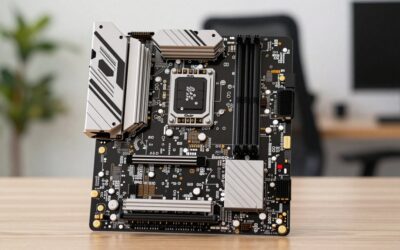
This is the only micro-ATX board in the set, and it suits smaller towers where full ATX will not fit. BIOS Flashback lets you update firmware without a CPU installed, a genuinely useful feature when a new processor needs a newer BIOS. It lists an M.2 Key E slot for a WiFi card rather than including wireless itself, so budget separately if you need it. Expansion is more limited than on ATX boards, which is the normal compromise at this size.
- Pros: compact form factor; BIOS Flashback; 2.5G LAN; high-speed memory rating
- Cons: WiFi module not included; fewer slots than ATX boards

Asrock B650M Pro RS AMD Socket AM5 Ryzen 7000/8000/9000 Series DDR5 7200+ (OC) MHz 256GB M.2 Key E for WiFi SATA3 6.0 Gb/s Micro ATX Motherboard 2.5G LAN BIOS Flashback
Included for 'Best B650 Motherboards for Ryzen AM5 Builds in 2026' as a representative home product in this roundup; selection reflects the product set returned for this topic.
View on Amazon5. MSI B650 Gaming Plus WiFi: Best for straightforward mainstream builds
Specs per the listing: AM5, ATX, DDR5, PCIe 4.0, M.2, SATA 6Gb/s, USB 3.2 Gen 2, HDMI/DP, Wi-Fi 6E, Bluetooth 5.3, 2.5Gbps LAN.
The Gaming Plus WiFi is the plain, no-fuss entry that still includes the essentials: wireless, 2.5Gbps networking and display outputs. It lacks the extra styling and some of the premium features of the boards above, which is exactly why it appeals to builders who care about the processor and graphics card more than the board. Pair it with a mid-range Ryzen chip and a good cooler and it does the job. Check the maker page for M.2 and USB port counts before buying.
- Pros: includes Wi-Fi 6E and 2.5Gbps LAN; video outputs; simple, clean build
- Cons: fewer premium extras; port counts not in the title

MSI B650 Gaming Plus WiFi Gaming Motherboard (AMD Ryzen 9000/8000/7000 Series Processors, AM5, DDR5, PCIe 4.0, M.2, SATA 6Gb/s, USB 3.2 Gen 2, HDMI/DP, Wi-Fi 6E, Bluetooth 5.3, 2.5Gbps LAN, ATX)
Included for 'Best B650 Motherboards for Ryzen AM5 Builds in 2026' as a representative home product in this roundup; selection reflects the product set returned for this topic.
View on AmazonHow to Choose
Confirm socket, memory and CPU support first
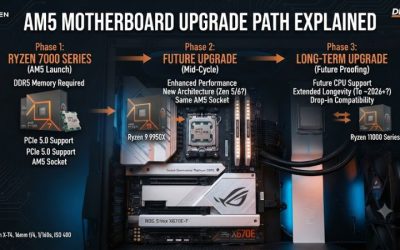
Every board here uses the AM5 socket and DDR5 memory only, so older DDR4 kits will not fit. Check the CPU support list on the maker page for your exact processor and note whether a BIOS update is needed. If a Ryzen 9000 chip is on your list, a board with BIOS Flashback, such as the ASRock listed here, removes the risk of needing a temporary older CPU.
Pick the form factor your case allows
ATX boards give more M.2 slots, PCIe slots and USB headers, while micro ATX saves space and is fine for one GPU and one or two drives. Check your case specifications for supported board sizes before you choose, because a board that does not fit cannot be returned to fix the build.
Count the storage and connectivity you need
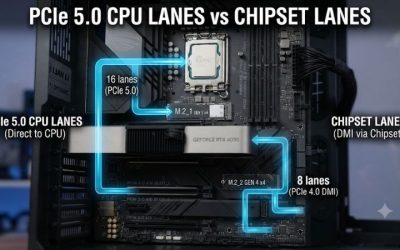
If you want more than two NVMe drives, look for three M.2 slots, as on the ASUS board. A PCIe 5.0 M.2 slot is useful for the fastest drives but not required for good everyday performance. Built-in Wi-Fi saves buying an adapter, and 2.5Gbps LAN is worth having if you have a faster home network.
Do not overpay for power delivery you will not use
For mainstream Ryzen 5 and Ryzen 7 processors at stock settings, mid-range B650 boards are plenty. Heavier all-core workloads on high-core-count chips justify a stronger VRM such as the AORUS or Tomahawk class. Skip higher chipsets unless you specifically need more PCIe 5.0 lanes, as B650 already covers the common needs.
Frequently Asked Questions
Is B650 good for gaming?
Yes. B650 supports DDR5, fast NVMe storage and modern graphics cards, and gaming performance is driven mostly by the CPU and GPU rather than the chipset. It is the common mainstream choice for AM5 gaming builds.
Do these boards support Ryzen 9000?
The listings name Ryzen 9000, 8000 and 7000 support, but a BIOS update may be required out of the box. BIOS Flashback, listed on the ASRock board, can handle that without a CPU installed.
Can I use DDR4 memory on a B650 board?
No. AM5 boards are DDR5-only, so you need DDR5 memory kits. Look at the maker’s memory support list for speed and capacity guidance.
Do I need a PCIe 5.0 M.2 slot?
Not for most users. A PCIe 4.0 NVMe drive is fast for gaming and general work. A PCIe 5.0 slot only helps if you buy a drive that uses it and handle large sequential transfers.
What is the difference between B650 and B650E?
B650E generally guarantees PCIe 5.0 for the graphics slot as well as storage, whereas B650 boards may offer PCIe 5.0 only for M.2. Check each board’s specification page for details.