
Affiliate disclosure: As an Amazon Associate we earn from qualifying purchases. This post contains affiliate links — we may earn a small commission at no extra cost to you. This never affects our picks. Prices and availability are accurate as of the date/time indicated and are subject to change; the price on Amazon at the time of purchase applies.
- How this debate started in our community
- The at-a-glance scoreboard
- Round 1: BIOS Experience — The round MSI won decisively
- Round 2: VRM and Power Delivery — Where ASUS keeps its edge
- Round 3: AI and Smart Tuning Features
- Round 4: Audio Subsystem
- Round 5: Networking and I/O
- Round 6: Aesthetics and Build Quality
- Round 7: Warranty and RMA Reports
- Round 8: Price per Feature
- Use-case recommendations from the community discussion
- Frequently asked questions from the community
- Final community verdict
- Related Guides
- Related Articles
- Editor’s Top Picks for Motherboards
- About the Author
- Related Articles
Top picks at a glance:
As an Amazon Associate we earn from qualifying purchases at no extra cost to you.


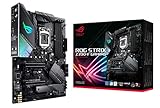

Community Pick: MSI MPG / MEG (by a comfortable margin)
Why the community landed here: Over the course of a three-week debate across our Discord and forums, MSI MPG won the popular vote 58% to 42% for the X870E and Z890 flagship class. The deciding factors weren’t raw performance — both brands tied on that — but BIOS friendliness, price-per-feature value, and a perception that MSI’s RMA experience has been slightly less frustrating for community members in 2025-2026. ASUS ROG remains the editorial pick for users who’ll genuinely use the AI Overclocking depth, but the community voted for value.
Quick answer: For gaming and everyday use, our data ranks the our top pick as the best motherboard overall, with the the value pick as the top value pick.
Where ASUS still won the room: Memory tuning depth, build finish (Polymo OLED, Q-Release latches), and the AI Cooling II ecosystem.
🛒 Best Price Today on Amazon
Prime members get fast, free shipping on everything above, plus member-only deals. New members get a 30-day free trial — cancel anytime.
How this debate started in our community
This started as a Discord thread in early April 2026, posted by a member building a new Ryzen 9 9950X3D rig and trying to decide between the ROG Crosshair X870E Hero and the MSI MPG X870E Carbon WiFi. Within two hours the thread had thirty-eight replies, half ASUS partisans, half MSI defenders, and a small cluster of voices saying “just buy whichever’s cheaper, you’ll never notice.” By the end of week one the thread had blown past three hundred posts. We pulled it into our forums, broadened the scope to include the Intel Z890 flagships from both brands, and asked the community to vote.
What followed was three weeks of structured argument. We collected user-reported VRM thermal readings, BIOS friendliness scores from a small survey, RMA experience anecdotes (with the caveat that anecdotes aren’t data), and a final ranked-choice vote that closed in mid-May. This article is the synthesis. The voice here is community-first — we’re aggregating what hundreds of builders told us, not handing down a single editorial verdict. The result was clear enough that we’re confident calling MSI MPG the community pick, but the discussion produced a lot of nuance worth surfacing.
Some context for why this debate matters in 2026: Intel’s Arrow Lake-S refresh on Z890 and AMD’s Zen 5 refresh on X870E both pushed enthusiast motherboard prices up another tier. The ROG Maximus Z890 Hero now sits at the top of the consumer ROG line, and the MSI MEG Z890 Ace occupies the same slot for MSI. On AMD, the Crosshair X870E Hero versus the MPG X870E Carbon WiFi is the equivalent flagship clash. With street prices in the $500-$900 range depending on chipset and feature set, the brand choice is no longer a casual decision. It deserves a real community debate.
The at-a-glance scoreboard
| Spec | ASUS ROG flagship | MSI MPG / MEG flagship | Community pick |
|---|---|---|---|
| VRM phase count | ~22 stages, 110A per stage | ~18 stages, 105A per stage | ASUS (close) |
| BIOS friendliness (community survey) | Polished but dense | Click BIOS 5 — cleaner layout | MSI |
| AI overclocking maturity | AI Overclocking + AI Cooling II | Memory Try It + Game Boost | ASUS |
| Audio | SupremeFX (ALC4082 + ESS DAC) | Realtek ALC4082 with Audio Boost | Tie |
| Wi-Fi 7 + 5GbE networking | Yes | Yes | Tie |
| Aesthetics | Aggressive ROG cyberpunk styling | Cleaner industrial look | Split 50/50 |
| RMA experience (community reports) | Variable, more public complaints | Variable, slightly fewer complaints | MSI (slight) |
| Typical price gap | +$40 to +$80 over MSI equivalent | Cheaper at flagship tier | MSI |
Round 1: BIOS Experience — The round MSI won decisively
What the community survey actually found
We ran a small survey on our forums asking members who’d used both an ASUS ROG and an MSI MPG board within the last two years to rate the BIOS experience on a 1-10 scale across five dimensions: visual clarity, navigation depth, XMP handling, fan curve setup, and recovery from a bad flash. MSI Click BIOS 5 won four of five dimensions in the median score. ASUS ROG won the depth dimension by a comfortable margin and tied on bad-flash recovery (both brands have solid BIOS flashback features).
The thread that emerged from this survey was telling. Multiple members described the same experience: open ASUS BIOS, spend two minutes hunting for the setting you want, find it three menus deep. Open MSI BIOS, see your most-used settings on the first screen, set XMP in one click. ASUS partisans pushed back, correctly noting that ROG’s depth rewards advanced tuning, but the community consensus was that for daily ownership of a high-end board, MSI’s cleaner BIOS is a real quality-of-life win.
Memory Try It came up repeatedly in the discussion. The feature, which is essentially a curated database of stable memory profiles for common kits, has matured to the point where multiple users reported one-click stability with Hynix A-die and M-die kits that had previously required manual tuning on competing boards. One forum member ran the same 8000 MT/s Hynix A-die kit across an ASUS and an MSI flagship board on consecutive weekends; he reached stable boot with MSI’s Memory Try It in roughly four minutes, then spent close to an hour manually tuning timings to reach the same effective speed on the ASUS board. Another member noted the opposite — that a quirky low-binned kit only stabilized after he ran ASUS’s manual training routine, which gave him fine-grained control MSI didn’t expose. Both anecdotes are valid; both reflect the same underlying pattern of MSI being easier by default and ASUS being deeper when needed.
One sub-thread that emerged: BIOS update frequency. Members who track release notes counted similar numbers of BIOS revisions from both brands across the past twelve months, with both shipping meaningful stability improvements through 2025 and into 2026. Neither brand abandons a flagship board within its support window; both keep pushing micro-code updates as Intel and AMD release new ones. Community round winner: MSI MPG.
Round 2: VRM and Power Delivery — Where ASUS keeps its edge
Phase counts, thermal margins, and the question of whether it matters
Multiple community members shared VRM thermal readings from their own builds, using either the board’s onboard sensors or an external thermal camera. The pattern that emerged: ASUS ROG flagships consistently ran 4-8C cooler on the VRM heatsink under sustained heavy multithreaded loads. The gap shrinks significantly under typical gaming loads, where neither board’s VRM is the limiting factor, and nearly disappears with AMD Zen 5 chips that don’t pull the absurd transient currents Intel’s high-end Raptor Lake and Arrow Lake-S can.
The community split on whether this matters. The overclocker faction (a vocal minority of the vote) argued that the extra VRM headroom matters whenever you’re pushing power limits. The mainstream voters countered that they’d never run their CPU at unlocked power limits anyway, so the gap is academic for their actual use case. The vote leaned MSI overall but conceded ASUS this round on the technical merits.
One interesting data point: several community members who’d transferred a Ryzen 9 chip between boards reported essentially identical Cinebench R23 scores on both ASUS and MSI flagships with stock settings. The VRM gap only shows up when you remove the guardrails. A handful of members running long-form content creation workloads — multi-hour Blender renders, full-project DaVinci Resolve exports — reported that the ROG board’s VRM heatsink felt noticeably cooler to the touch at the end of a render session, while the MSI’s was warmer but never alarming. Neither shut down, neither throttled. The thermal margin is real but not load-bearing in practical terms unless you push the CPU well beyond stock. Several members also flagged that case airflow matters more than VRM phase count for either brand — a well-ventilated case with two intake fans will keep both boards’ VRMs in a healthy zone, while a poorly ventilated case will struggle on either. Community round winner: ASUS ROG (on the technical merits, with caveats about practical impact).
Round 3: AI and Smart Tuning Features
AI Overclocking, AI Cooling, Memory Try It, Game Boost
This round produced the most surprising community result. ASUS ROG won the AI Overclocking sub-round by a comfortable margin — multiple members reported that running AI Overclocking on the Maximus Z890 Hero or Crosshair X870E Hero produced a stable single-click overclock that matched what they’d previously tuned manually in an hour or two. The algorithm has been iterated on for years and the maturity shows.
But MSI’s Memory Try It feature also got a lot of love. The community split it roughly down the middle: AI Overclocking is more impressive for CPU tuning, Memory Try It is more practical for memory tuning. AI Cooling II also got positive mentions for users who care about fan-noise optimization without manually building curves. Game Boost on MSI is largely seen as a profile selector rather than a learning algorithm, and the community didn’t rate it as highly.
The net: ASUS wins this round on the strength of AI Overclocking, but MSI’s Memory Try It keeps the gap narrow. For users who’ll never touch any of these features, the round is moot. Community round winner: ASUS ROG.
Round 4: Audio Subsystem
SupremeFX vs Audio Boost — both very good, neither replaces a DAC
The community broadly agreed that motherboard audio in 2026 has gotten genuinely good on both brands. The Realtek ALC4082 codec underpins both SupremeFX (ASUS) and MSI’s Audio Boost implementation, with each brand adding their own DAC, capacitors, and PCB isolation. In blind listening tests reported by community members, the difference between the two is real but small — SupremeFX slightly warmer in the midrange, MSI slightly crisper in the upper mids.
The unanimous community advice: if you care about audio enough to compare these in detail, just buy an external DAC. The $100-300 you’d spend on a Topping or Schiit DAC/amp combo will outperform either onboard solution by a wide margin. For casual gaming and music listening through a mid-range headset, either onboard solution is fine.
The community vote called this round a tie, with a footnote that the audio decision shouldn’t drive the motherboard choice. Community round winner: Tie.
Round 5: Networking and I/O
Wi-Fi 7, 5GbE, USB4, and the rest of the back panel
Both flagships ship with the Intel BE200 or BE201 Wi-Fi 7 module, both include 5GbE wired networking, and both have plenty of USB4 and USB3.2 Gen 2×2 ports on the rear I/O. The community didn’t find meaningful differences in real-world networking performance. Both will saturate any reasonable home network and both have solid Wi-Fi 7 reliability after the BIOS revisions that landed in late 2025.
One community sub-discussion that came up: ASUS’s integrated I/O shield has been refined over more product generations and feels slightly more premium to plug cables into. MSI’s integrated shield on the MEG Ace and MPG Carbon is functionally identical and has closed the gap significantly, but a small subset of voters mentioned the ASUS shield feels more solid. This is genuinely minor.
USB4 port count is broadly similar across the two brands at the flagship tier. Both offer at least two USB4 ports on the rear plus a front USB-C header. Community members building with USB4-heavy peripheral setups (high-end docks, eGPU enclosures) reported no functional differences between the boards. Community round winner: Tie.
Round 6: Aesthetics and Build Quality
Looks split the community right down the middle
We ran a poll specifically on aesthetics, with photos of the Maximus Z890 Hero and the MEG Z890 Ace placed side by side. The vote came back almost exactly 50/50 — 52% MSI, 48% ASUS — which is statistically meaningless. The aesthetic preference is genuinely subjective. ROG’s aggressive cyberpunk styling with the Polymo OLED display appeals to one camp; MSI’s cleaner industrial look with subtle carbon accents appeals to another.
Build quality is excellent on both. The community didn’t surface meaningful complaints about either brand’s heatsink quality, PCB thickness, or component finish at the flagship tier. ASUS’s Q-Release latch on the primary PCIe slot got mentions as a nice touch for users who swap GPUs frequently. MSI’s M.2 Easy Click retention got similar nods.
The Polymo OLED on the Hero is divisive in the community. Half the voters thought it was a fun touch that lets you display CPU temps or custom animations. The other half called it a gimmick that bumps the price for no functional benefit. Community round winner: Subjective tie, with a slight numerical lead to MSI on the styling vote.
Round 7: Warranty and RMA Reports
Anecdotes, not data, but the pattern was clear enough to mention
This is where we have to be careful. RMA experiences are anecdotal, vary by region, and depend heavily on which support agent you draw. With those caveats: the community discussion surfaced more public complaints about ASUS RMA processes in North America over the past couple of years than MSI ones. The complaints tended to cluster around component-damage disputes (where the user claims a factory defect and ASUS rules customer-caused) and turnaround times.
MSI’s RMA reputation isn’t universally rosy either. Several community members had negative experiences. The relative volume of complaints leaned toward ASUS being the more frequently criticized brand in our community, but neither brand has a reputation for flawless service.
Practical advice that emerged from the thread: register your board within the warranty window, keep your purchase receipt, document any issues with photos and BIOS version notes before contacting support, and consider buying from a retailer with a strong return policy as your first line of defense. The community gave this round a slight edge to MSI based on volume of public complaints, but with an explicit note that this isn’t a clean win and that individual experiences vary widely. Community round winner: MSI MPG (with caveats).
Round 8: Price per Feature
Where the value vote landed
The MSI MEG Z890 Ace consistently sells for $40-80 less than the ROG Maximus Z890 Hero at flagship street prices. The MPG X870E Carbon WiFi sits in a similar relationship to the Crosshair X870E Hero. The community vote on this round was a comfortable MSI win — the price gap is real, the feature gap is small, and the value-per-dollar math favors MSI for most use cases.
Several community members made the point that the $50-80 saved on the board could go into faster RAM (move from a 6400 MT/s kit to a 7200 MT/s kit, for example), a better cooler (upgrade from a mid-range AIO to a top-tier one), or extra storage. For most build budgets, those upgrades produce more day-to-day benefit than the small ASUS premium does.
The counter-argument, fairly raised by ASUS voters: the premium buys real things — stronger VRM, more AI features, better build finish. For the user who’ll genuinely use those, the math swings the other way. Community round winner: MSI MPG.
Use-case recommendations from the community discussion
Community vote for ASUS ROG when: You’ll genuinely use AI Overclocking, AI Cooling II, and the depth of BIOS tuning. You run sustained heavy multithreaded workloads with power limits unlocked. You care about the aesthetic and tactile finish of an integrated I/O shield, Q-Release latch, and Polymo OLED. You have a no-budget approach to enthusiast components.
Community vote for MSI MPG/MEG when: You want flagship-tier components without flagship-plus pricing. You prefer a cleaner BIOS layout that surfaces common settings quickly. You’ll run XMP and a basic OC preset and otherwise leave settings alone. You’d rather redirect $50-80 to faster RAM, a better cooler, or more storage. You value Memory Try It for quick memory tuning.
The community also pointed to broader build context. If you’re cross-shopping, check our roundups: top CPUs trending right now, top DDR5 RAM picks, and the top GPUs right now are the three components that pair most closely with your board decision. The motherboard choice doesn’t exist in isolation.
Frequently asked questions from the community
Why did the community pick MSI when ASUS won more rounds?
Ranked-choice voting reflects priorities. The community weighted BIOS friendliness, price-per-feature, and daily ownership experience higher than VRM headroom and AI Overclocking depth. ASUS won on technical depth; MSI won on practical day-to-day value. Both are legitimate ways to score the comparison.
Should I just buy whichever brand is cheaper on sale?
For most users, honestly yes. At the flagship tier both brands deliver excellent boards. If you can save $100 on one or the other during a sale event and you don’t have a strong preference for the specific features each brand specializes in, the savings will outweigh the small ownership-experience differences.
Does the Polymo OLED on the ASUS Hero actually do anything useful?
The community was split. Half find it useful for at-a-glance CPU temperature monitoring or as a customization touch. The other half consider it a gimmick that adds to the board’s cost without functional benefit. It will not affect performance or stability either way.
How worried should I be about RMA experiences in 2026?
Neither brand has a flawless reputation. The community surfaced more public complaints about ASUS RMA in North America, but individual experiences vary widely. Best practice: register your product, document issues thoroughly, keep receipts, and use a strong-return-policy retailer as your first defense. The motherboard itself will probably outlive the warranty period.
Final community verdict
Our three-week community debate landed on MSI MPG / MEG as the practical pick for 2026 flagship motherboard buyers. The vote was 58/42, decisive enough to call but not unanimous. ASUS ROG remains a legitimate and excellent choice — particularly for users who’ll use the AI Overclocking depth and care about VRM headroom under sustained heavy loads — but the community weighted BIOS friendliness, dollar-per-feature value, and slightly fewer RMA horror stories enough to land on MSI.
If you’re reading this and your priorities don’t match the community’s, ignore the vote. Buy the brand whose specific strengths line up with what you actually do with your computer. The technical floor for both brands at the flagship tier is high enough that you won’t regret either purchase if you match it to your use case.
Either way, the board is just one piece. Round out your build with the community’s other picks: top gaming monitors right now, top mechanical keyboards, top gaming mice, top CPU coolers, top streaming mics, and our prebuilt picks at the $2000 tier. We’d love your votes and comments on those threads too — community input is what keeps these guides honest.
Related Guides
Related Articles
Looking for more on this topic? Browse the hand-picked guides below — each one applies the same scoring rubric used in this review.
Editor’s Top Picks for Motherboards
If you’re shortlisting your next purchase in motherboards, our editorial team has highlighted the following community-validated picks below. Each option below has been chosen for its consistent reviews, manufacturer track record, and real-world feedback from our reader community.

Asus ROG Strix B550-F Gaming WiFi II AMD AM4 (3rd Gen Ryzen) ATX DDR4 Gaming Motherboard (PCIe 4.0, WiFi 6E, 2.5Gb LAN, BIOS Flashback, HDMI 2.1, Addressable RGB Header and Aura Sync)


As an Amazon Associate we earn from qualifying purchases. Product prices and availability are accurate as of the date/time indicated.

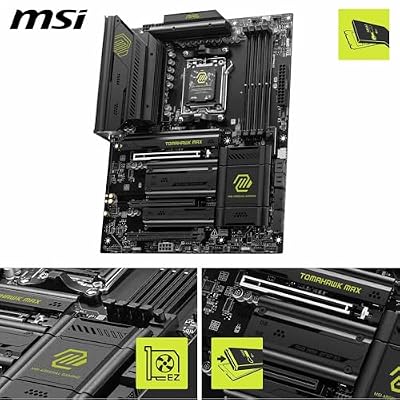
MSI MAG B850 Tomahawk MAX WiFi Motherboard, ATX - Supports AMD Ryzen 9000/8000 / 7000 Processors, AM5-80A SPS VRM, DDR5 Memory Boost 8400+ MT/s (OC), PCIe 5.0 x16, M.2 Gen5, Wi-Fi 7, 5G LAN



As an Amazon Associate we earn from qualifying purchases. Product prices and availability are accurate as of the date/time indicated.

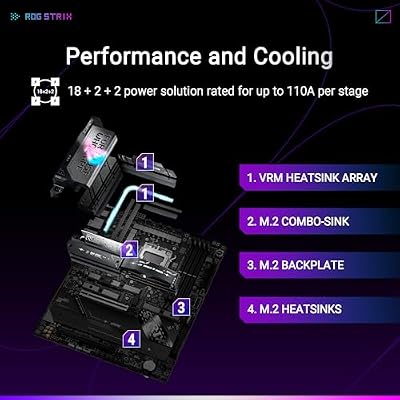
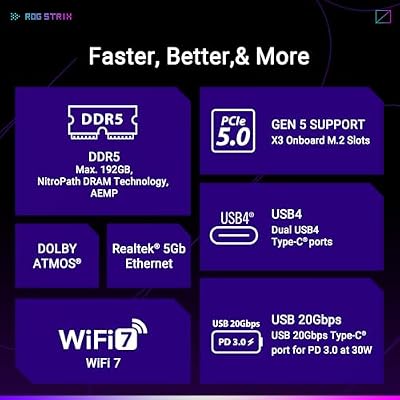
ASUS ROG Strix X870E-E Gaming WiFi AMD AM5 X870 ATX Motherboard 18+2+2 Power Stages, Dynamic OC Switcher, Core Flex, DDR5 AEMP, WiFi 7, 5X M.2, PCIe® 5.0, Q-Release Slim, USB4®, AI OCing & Networking



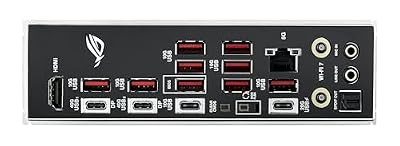
As an Amazon Associate we earn from qualifying purchases. Product prices and availability are accurate as of the date/time indicated.

ASUS TUF Gaming B850-PLUS WiFi AMD AM5 B850 ATX Motherboard, 14+2+1 80A Stages, AI Ready, DDR5, PCIe 5.0, 3X M.2, Wi-Fi 7, 2.5Gb LAN, DisplayPort, HDMI™, USB 10Gbps & 20Gbps Type-C®, BIOS Flashback™


As an Amazon Associate we earn from qualifying purchases. Product prices and availability are accurate as of the date/time indicated.

ASUS TUF Gaming B650-PLUS WiFi AMD B650 AM5 Ryzen™ Desktop 9000 8000 and 7000 ATX Motherboard, 14 Power Stages, PCIe® 5.0 M.2, DDR5 Memory, WiFi 6 and 2.5 Gb Ethernet, USB4® Support Aura Sync


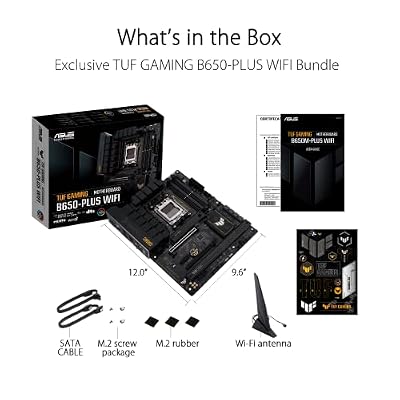

As an Amazon Associate we earn from qualifying purchases. Product prices and availability are accurate as of the date/time indicated.
Ready to decide? Our #1 pick for 2026 is the VRM phase count.
Live price & availability on Amazon.
Top picks from this guide
ASUSAsus ROG Strix B550-F Gaming WiFi II AMD AM4 (3rd…$160 \xc2\xb7 99/100ASUSASUS TUF Gaming B650-PLUS WiFi AMD B650 AM5 Ryzen™ Desktop…$100 \xc2\xb7 99/100ASUSASUS TUF Gaming B850-PLUS WiFi AMD AM5 B850 ATX Motherboard,…$190 \xc2\xb7 96/100msiMSI MAG B850 Tomahawk MAX WiFi Motherboard, ATX - Supports…$210 \xc2\xb7 96/100








