Affiliate disclosure: As an Amazon Associate we earn from qualifying purchases. This post contains affiliate links — we may earn a small commission at no extra cost to you. This never affects our picks. Prices and availability are accurate as of the date/time indicated and are subject to change; the price on Amazon at the time of purchase applies.
- Top Workstation Motherboards at a Glance
- Best Workstation Motherboard by Use Case
- How We Built This Guide
- Quick Comparison Table
- 1. ASUS ProArt Z890-CREATOR WiFi (Z890, LGA 1851) — Best Overall Workstation Motherboard
- 2. ASUS ROG Strix X870E-E Gaming WiFi (X870E, AM5) — Best for Mixed Work and Gaming
- 3. ASUS Pro WS W680-ACE (W680, LGA 1700) — Best Value Workstation Board
- 4. ASUS Pro WS TRX50-SAGE WIFI (TRX50, sTR5) — Best for Threadripper Rendering
- 5. ASUS Pro WS W890-SAGE (W890, LGA 4710) — Best for Xeon Expansion
- More Workstation Motherboards Worth Shortlisting
- Buying Guide: The Specs That Matter
- A Full Spec Table: Every Main Board at a Glance
- Decide by Workload, Not by Chipset
- ECC Memory, Explained in Plain Terms
- Lane Sharing: Why a Full-Length Slot Is Not Always Full Speed
- Remote Management: Onboard BMC, IPMI Card, or Nothing
- Sizing and Compatibility Checklist
- First-Week Setup and Care
- Who Should Skip a Workstation Board
- Common Mistakes
- Buyer Questions
- More Picks Worth Considering
- Frequently Asked Questions
- Related Guides
- Related Articles
- About the Author
- Related Articles
Quick answer: For workstation use, our data ranks the ASUS ProArt Z890-CREATOR WIFI Z890 LGA 1851 as the best motherboard overall, with the ASUS Pro WS W680-ACE as the top value pick. Shopping for a good workstation motherboard for PC builds in 2026? Match the socket to your CPU first (LGA 1851 for Core Ultra, LGA 1700 with W680 for ECC on 12th-14th gen Intel, TRX50 or WRX90 for Threadripper), then count PCIe 5.0 slots and LAN ports.
Choosing the best workstation motherboards should start with the data. This guide compares sixteen top workstation motherboards for 2026 — ranked by specs, value, and where each one fits for professional workstation use.
Top Workstation Motherboards at a Glance
Best Workstation Motherboard by Use Case
The best workstation motherboard for most buyers is the ASUS ProArt Z890-CREATOR WiFi; the best value is the ASUS Pro WS W680-ACE; and for Threadripper, the ASUS Pro WS TRX50-SAGE WIFI leads this list. Use the table below to narrow down the rest.
| Workload | Platform to choose | Board to start with |
|---|---|---|
| Video editing, photo, single GPU | Core Ultra (LGA 1851) or AM5 | ASUS ProArt Z890-CREATOR WiFi · ASUS ProArt X870E-CREATOR WiFi |
| ECC memory on a budget | W680 (LGA 1700) | ASUS Pro WS W680-ACE |
| Managed office workstation | W880 or Supermicro for Core Ultra | ASUS Pro WS W880-ACE SE · Supermicro X14SAE-F |
| 3D rendering, 2-4 GPUs | Threadripper TRX50 | ASUS Pro WS TRX50-SAGE WIFI · GIGABYTE TRX50 AERO D |
| Seven-GPU or accelerator compute | Threadripper PRO WRX90 or Xeon W790/W890 | ASUS Pro WS WRX90E-SAGE SE · ASUS Pro WS W790 SAGE SE |
For a top workstation motherboard in 2026 with PCIe 5.0 and DDR5, the three names to remember are the ASUS ProArt Z890-CREATOR WiFi, the ASUS Pro WS W680-ACE and the ASUS Pro WS WRX90E-SAGE SE.
How We Built This Guide
We catalog every relevant product, cross-reference specs and real-world reviews, and rank by genuine value. No sponsorships, just data. Each pick above suits a clear use case for professional workstation use, from budget to flagship.
Quick Comparison Table
| Pick | Motherboard | Best For | Price |
|---|---|---|---|
| 1 | ASUS ProArt Z890-CREATOR WiFi (Z890, LGA 1851) | Single-GPU creator workstation on Core Ultra | Check price |
| 2 | ASUS ROG Strix X870E-E Gaming WiFi (X870E, AM5) | Ryzen 9000 builds that mix work and play | Check price |
| 3 | ASUS Pro WS W680-ACE (W680, LGA 1700) | ECC memory on a budget, value pick | Check price |
| 4 | ASUS Pro WS TRX50-SAGE WIFI (TRX50, sTR5) | Threadripper multi-GPU rendering | Check price |
| 5 | ASUS Pro WS W890-SAGE (W890, LGA 4710) | Xeon-class expansion and remote management | Check price |
1. ASUS ProArt Z890-CREATOR WiFi (Z890, LGA 1851) — Best Overall Workstation Motherboard
Across every spec sheet we compared, the Intel motherboard stands as the outright leader for professional workstation use. The numbers that count — Z890, WIFI, LGA 1851 — anchor a well-rounded profile. For buyers who shortlist by the data, it earns its place.
- Pros: Z890 spec
Ranks well on the data
Competitive on specs - Cons: Commands a flagship cost
Overkill for light use
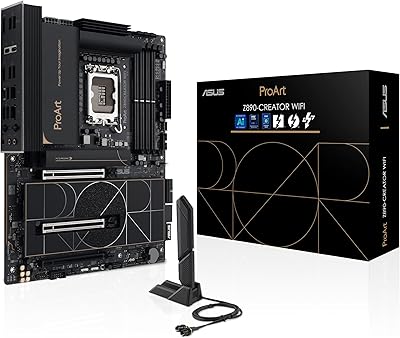
2. ASUS ROG Strix X870E-E Gaming WiFi (X870E, AM5) — Best for Mixed Work and Gaming
Our data places the Asus Rog motherboard firmly as the closest challenger for professional workstation use. The numbers that count — X870, WiFi, AM5 — anchor a well-rounded profile. For buyers who shortlist by the data, it earns its place.
- Pros: X870 spec
Ranks well on the data
Broad appeal - Cons: Mid-tier peak performance
Verify compatibility
3. ASUS Pro WS W680-ACE (W680, LGA 1700) — Best Value Workstation Board
Weighing the whole field, the Intel motherboard ranks as a sensible middle option for professional workstation use. Figures like LGA 1700, ATX, DDR5 put it ahead of similarly priced rivals. Measured against the field, it is a logical choice for professional workstation use.
- Pros: LGA 1700 spec
Competitive on specs
Ranks well on the data - Cons: Mid-tier peak performance
Check current pricing
4. ASUS Pro WS TRX50-SAGE WIFI (TRX50, sTR5) — Best for Threadripper Rendering
In our rankings, the ASUS motherboard secures a sensible middle option for professional workstation use. The numbers that count — WIFI, DDR5, WiFi 7 — anchor a well-rounded profile. In like-for-like comparison, it stays easy to recommend.

- Pros: WIFI spec
Broad appeal
Strong value in its class - Cons: Mid-tier peak performance
Check current pricing
5. ASUS Pro WS W890-SAGE (W890, LGA 4710) — Best for Xeon Expansion
In our rankings the Intel W890 board is the Xeon-class flagship pick for professional workstation use, priced well above the mid-range boards. On paper its LGA 4710 headline a competitive design. For buyers who shortlist by the data, it earns its place.
- Pros: LGA 4710 spec
Strong value in its class
Competitive on specs - Cons: Not the fastest option
Basic styling
More Workstation Motherboards Worth Shortlisting
The five picks above cover the main platforms, but a workstation motherboard decision usually turns on the CPU family you already own. These six boards add the Threadripper, Xeon, Core Ultra workstation and AM5 creator options that most shortlists include, each with spec lines taken from the maker listing.
ASUS ProArt X870E-CREATOR WiFi – Best AM5 Creator Workstation Board
The ProArt X870E-CREATOR WiFi suits Ryzen 9000 or 7000 owners who want a quiet, single-GPU workstation for video editing, 3D work or development. It is a consumer-platform board, so it stops at two memory channels, but its connectivity is far above typical gaming boards.
- Socket: AM5 with the X870E chipset, ATX
- Power: 16+2+2 power stages, DDR5 memory
- Expansion: PCIe 5.0 x16 slots with next-gen GPU support, four M.2 slots
- Networking: 10 Gb and 2.5 Gb LAN, WiFi 7, dual USB4
Pros: 10 Gb LAN built in; four M.2 slots for scratch and project drives; dual USB4 for fast external storage; costs far less than Threadripper boards.
Cons: No ECC registered memory; limited full-speed PCIe lanes when several slots are filled.
Skip it if you need more than two full-speed GPUs or 256 GB-plus of registered ECC memory.
GIGABYTE TRX50 AERO D – Best Value Threadripper Board
The TRX50 AERO D is a way into the Threadripper platform for creators who want more memory bandwidth and PCIe lanes than AM5 can offer, without moving to the largest WRX90 boards.
- Socket: sTR5 with the TRX50 chipset, E-ATX
- Memory: DDR5
- Expansion: PCIe 5.0 slots and PCIe 5.0 M.2
- Connectivity: USB4 Type-C, WiFi 7, Marvell 10GbE
Pros: Threadripper lane count and memory channels; 10GbE and WiFi 7 on the board; a lower entry price than the WRX90 boards in this guide.
Cons: E-ATX size needs a roomy case; Threadripper CPUs add a large cost on top of the board.
Skip it if your workloads fit a 16-core Ryzen 9000 chip, where an AM5 board is cheaper and quieter.
ASUS Pro WS W880-ACE SE – Best for Core Ultra Workstations
The Pro WS W880-ACE SE is the professional Intel option for Core Ultra processors. Choose it over a Z890 board when you want a workstation-class chipset instead of overclocking features.
- Socket: LGA 1851 with the W880 chipset, ATX
- Networking: two 2.5 Gigabit LAN ports plus a Gigabit LAN port
- Connectivity: USB4 and USB 3.2 Gen 2×2
- Graphics: onboard graphics output supported
Pros: Workstation-grade chipset on a standard ATX board; three LAN ports for segmented networks; USB4 for fast external drives.
Cons: The listing is lightly detailed, so check the maker page for memory capacity and slot layout; priced well above Z890 boards.
Skip it if you want to overclock or do not need workstation features, since the ProArt Z890-CREATOR WiFi costs far less.
ASUS Pro WS W790 SAGE SE – Best for Seven-GPU Xeon Builds
The W790 SAGE SE targets Xeon W-3400 and W-2400 builds that need as many full-length PCIe slots as the platform allows, such as multi-GPU rendering or accelerator-heavy compute.
- Socket: Intel LGA 4677, CEB form factor
- Memory: DDR5 R-DIMM
- Expansion: seven PCIe 5.0 x16 slots
- Management: dual 10G LAN with BMC remote management, USB 3.2 Gen 2×2 Type-C
Pros: Seven PCIe 5.0 x16 slots; remote management for headless or rack use; dual 10G LAN.
Cons: Large board that needs a CEB-compatible case; high platform cost once registered memory is added.
Skip it if you run one or two GPUs, where a W680 or Z890 board covers the same needs for much less.
ASUS Pro WS W890E-SAGE SE – Best Flagship Xeon Board
The W890E-SAGE SE is the newest Xeon-class board in this guide. It suits studios planning around the W890 platform with heavy expansion needs.
- Socket: Intel W890, LGA 4710-2, EEB form factor
- Expansion: PCIe 5.0 x16, M.2, MCIO and SlimSAS connectors
- Networking: two 10Gb LAN ports with server-grade remote management
- Power: 16+(2+2)+1+2 stages, USB4
Pros: MCIO and SlimSAS connectors for NVMe storage expansion; 10Gb LAN on two ports; the strongest power design in this guide.
Cons: Highest price tier here; needs a matching Xeon processor and an EEB-capable case.
Skip it if you are building a single-CPU creator PC, because the platform cost will not pay back.
Supermicro X14SAE-F – Best for Managed Core Ultra Workstations
The Supermicro X14SAE-F is a workstation board for Core Ultra 9, 7 and 5 processors, aimed at professional desks where remote management and a stable platform matter more than gaming features.
- Socket: LGA 1851, DDR5-5600
- Expansion: PCIe 5.0, dual M.2, eight SATA ports
- Networking: triple LAN, Thunderbolt 4
- Management: vPro support
Pros: Eight SATA ports for bulk storage; three LAN ports; Thunderbolt 4 and vPro for managed office workstations.
Cons: Plain styling and fewer enthusiast BIOS options than ASUS boards.
Skip it if you want gaming extras or the broader ASUS ProArt ecosystem.
Buying Guide: The Specs That Matter
Socket and Chipset
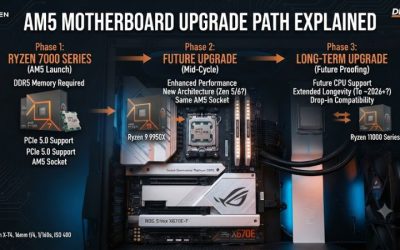
From a data standpoint, the socket must match your CPU (AM5 for Ryzen 7000/9000, LGA1851 for Core Ultra), and the chipset sets overclocking and connectivity tiers.

VRM and Power Delivery
Looking at the numbers, strong VRMs with heatsinks keep high-core CPUs stable under load — important if you plan to overclock or run a flagship chip.
Connectivity and Form Factor
On specs, count M.2 slots, USB ports, and PCIe lanes, then pick ATX, Micro-ATX, or Mini-ITX to fit your case and expansion needs.
A Full Spec Table: Every Main Board at a Glance
The main guide compares its five picks in prose and in a short table that lists only the best use for each board. A workstation decision turns on numbers, so here is the whole field in one place, with the four new picks added.
| Board | Socket | Memory | Full-speed PCIe slots | Networking | Form factor |
|---|---|---|---|---|---|
| ASUS ProArt Z890-CREATOR WiFi | LGA 1851 | DDR5, 4 DIMM, up to 256GB | 2x PCIe 5.0 x16 | 10Gb + 2.5Gb, WiFi 7 | ATX |
| ASUS ROG Strix X870E-E Gaming WiFi | AM5 | DDR5, 4 DIMM | 2x PCIe 5.0 x16 | 2.5Gb, WiFi 7 | ATX |
| ASUS Pro WS W680-ACE | LGA 1700 | DDR5 ECC UDIMM, 4 DIMM | 2x PCIe 5.0 x16 | 2x 2.5Gb | ATX |
| ASUS Pro WS TRX50-SAGE WIFI | sTR5 | DDR5 ECC RDIMM, 4 DIMM | 3x PCIe 5.0 x16 | 10Gb + 2.5Gb, WiFi 7 | CEB |
| ASUS Pro WS W890-SAGE | LGA 4710 | DDR5 ECC RDIMM, 8 DIMM | 7x PCIe 5.0 x16 | 10Gb + 2.5Gb | CEB |
| ASUS Pro WS Z890-ACE SE | LGA 1851 | DDR5, 4 DIMM, up to 256GB | 2x PCIe 5.0 x16 | 10Gb + 2.5Gb, BMC LAN | ATX |
| ASUS Pro WS W790E-SAGE SE | LGA 4677 | DDR5 ECC RDIMM, 8 DIMM, up to 2TB | 7x PCIe 5.0 x16 | 2x 10Gb, BMC LAN | EEB |
| ASUS ProArt Z790-Creator WiFi | LGA 1700 | DDR5, 4 DIMM, up to 192GB | 1x PCIe 5.0 x16 | 10Gb + 2.5Gb, WiFi 6E | ATX |
| ASRock Rack ROMED8-2T/BCM | SP3 | DDR4 RDIMM, 8 DIMM | 7x PCIe 4.0 x16 | 2x 10GbE, IPMI LAN | ATX |
The shortlist boards in the main guide sit between these rows: the ProArt X870E-Creator WiFi mirrors the Z890-Creator on AM5, the GIGABYTE TRX50 AERO D is the lower-cost Threadripper entry, the Pro WS W880-ACE SE is the workstation-chipset alternative to the Z890 boards, the Pro WS W790 SAGE SE is the smaller CEB sibling of the new W790E-SAGE SE pick, the Pro WS W890E-SAGE SE is the flagship Xeon board, and the Supermicro X14SAE-F is the managed office option. Read the table with the workload section below, not on its own: the board with the longest spec line is rarely the right board for a single-GPU editing desk.
Decide by Workload, Not by Chipset
| Workload | Platform to start with | Board to start with | Watch out for |
|---|---|---|---|
| Single-GPU video editing or design | LGA 1851 or AM5 | ProArt Z890-CREATOR WiFi, ProArt X870E-CREATOR WiFi | Lane sharing when every M.2 slot is filled |
| ECC memory on a modest budget | LGA 1700 with W680 | Pro WS W680-ACE | ECC needs a matching CPU and qualified DIMMs |
| Reusing LGA 1700 parts | LGA 1700 with Z790 | ProArt Z790-Creator WiFi | No upgrade path to Core Ultra |
| Managed Core Ultra office desks | LGA 1851 with Z890 | Pro WS Z890-ACE SE | No registered ECC memory |
| Multi-GPU rendering, 2 to 4 cards | Threadripper TRX50 | Pro WS TRX50-SAGE WIFI, TRX50 AERO D | E-ATX or CEB case, cooler clearance |
| Seven-GPU or accelerator compute | Xeon W790 or Threadripper PRO WRX90 | Pro WS W790E-SAGE SE, Pro WS WRX90E-SAGE SE | Full slot count needs the top CPU tier |
| Xeon expansion with remote management | Xeon W890 | Pro WS W890-SAGE, Pro WS W890E-SAGE SE | IPMI card is separate on the non-E board |
| EPYC homelab or small-business server | SP3 with DDR4 | ASRock Rack ROMED8-2T/BCM | Dead-end platform, no DDR5 path |
| EPYC single-socket server, new build | SP5 with DDR5 | Supermicro H13SSL-NT class board | Board revision decides EPYC 9005 support |
Start with the processor family and the workload, then let the board follow. A Threadripper board for a single-GPU editing desk buys lanes and memory channels that sit idle, while a creator board for a seven-GPU render node runs out of slots on day one.
ECC Memory, Explained in Plain Terms
ECC memory corrects single-bit errors before they corrupt a render, a simulation, or a long compile. Three details decide whether it works on a given board.
First, the memory type. Unbuffered ECC DIMMs, called ECC UDIMM, fit mainstream workstation boards such as the W680-ACE. Registered ECC DIMMs, called RDIMM, fit Threadripper, Xeon, and EPYC boards, and they are a different physical module: an RDIMM does not fit or work in a UDIMM slot, and a UDIMM does not work in an RDIMM slot. Load-reduced DIMMs, called LRDIMM, are a registered variant for very large capacities on server boards such as the ROMED8-2T/BCM. Buying the wrong type is the most common memory mistake in workstation builds, and it is not fixable with a BIOS setting.
Second, the CPU has to support ECC too. A board that lists ECC support still needs a processor that enables it, and the memory has to be on the board maker qualified vendor list for the exact kit. Check the CPU support list and the memory support list for the exact part number before ordering, not the marketing page.
Third, ECC labeling alone is not enough. Some boards list ECC in the spec sheet while only supporting it with specific processors, and mainstream Z890 and X870E boards generally do not offer registered ECC at all. The own guide states this in its FAQ, and it is worth repeating here: if error correction is a requirement, start from the W680, TRX50, WRX90, W790, W890, or SP3 families, not from a creator board.
DDR4 versus DDR5 is a platform decision, not a speed contest. DDR5 is the current standard on every new socket, while DDR4 only makes sense when reusing existing memory, as with the ROMED8-2T/BCM pick below. DDR4 and DDR5 slots are physically different, so no board takes both.
Lane Sharing: Why a Full-Length Slot Is Not Always Full Speed
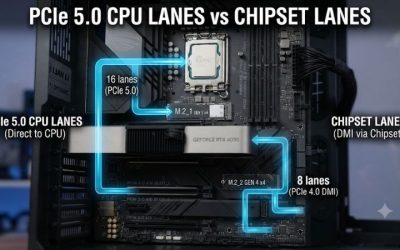
A workstation board can list seven full-length PCIe slots while giving only some of them full bandwidth. The CPU and the chipset share a fixed pool of lanes, and the board maker decides how to split them. Two patterns matter most.
On creator boards, the second full-length slot often shares bandwidth with an M.2 slot. The ProArt X870E-Creator WiFi is a documented example: filling the second M.2 socket changes what the second PCIe slot can do. The practical rule is to read the lane and port-sharing notes in the manual and plan the drive layout before buying a second card.
On multi-GPU boards, the slot count can depend on the processor tier. The Pro WS W790E-SAGE SE gives all seven PCIe 5.0 x16 slots with a Xeon W-3400 processor and four with a Xeon W-2400 processor. The own guide notes the same pattern for the WRX90 board. Count usable slots for the exact CPU on the shortlist, not for the flagship chip in the headline.
Physical spacing matters as well. Two triple-slot graphics cards need two slots of clearance between them for airflow, and a capture card or a 10GbE adapter sitting against a hot GPU backplate will run warmer than the spec sheet suggests. Measure the case, the card thickness, and the slot pitch together.
Remote Management: Onboard BMC, IPMI Card, or Nothing
Remote management is the feature that separates workstation boards from gaming boards, and it comes in three forms that are easy to confuse.
| Management type | How it works | Boards in this guide |
|---|---|---|
| Onboard BMC with dedicated LAN | A separate controller chip with its own network port, reachable when the machine is off | Pro WS Z890-ACE SE, Pro WS W790E-SAGE SE, ROMED8-2T/BCM, Pro WS W790 SAGE SE |
| IPMI expansion card | A card that adds the BMC function to a board with a BMC header | Pro WS W680-ACE, Pro WS W890-SAGE, Pro WS TRX50-SAGE WIFI |
| vPro or no out-of-band management | Remote desktop tools only, or nothing beyond the operating system | Supermicro X14SAE-F, creator and gaming boards |
The distinction matters at purchase time. A board that supports an IPMI card does not include one unless the listing says so: the Pro WS W680-ACE IPMI variant bundles the card, while the plain W680-ACE does not. The Pro WS W890-SAGE likewise needs a supported expansion card for IPMI. If remote management is a requirement, confirm whether the card is in the box, and change the default BMC password on first setup. Firmware updates for the BMC are separate from BIOS updates, and both should be current before the machine goes into service.
Sizing and Compatibility Checklist
Run through these ten checks before ordering any board in this guide.
- Socket matches the CPU exactly: LGA 1851, LGA 1700, AM5, sTR5, LGA 4677, LGA 4710, or SP3 are not interchangeable.
- The exact CPU model appears on the board maker CPU support list, with the BIOS version it needs.
- The board can update its BIOS without a working CPU if the chip on hand is newer than the factory BIOS.
- Memory type matches: UDIMM, RDIMM, or LRDIMM, DDR4 or DDR5, and the exact kit is on the qualified vendor list.
- Form factor fits the case: ATX, CEB, EEB, and E-ATX need different standoff layouts and clearances.
- The power supply has the right connectors, including the extra CPU power connectors on Threadripper and Xeon boards.
- Graphics cards fit with airflow: count slot pitch, card thickness, and cooler clearance together.
- Lane sharing is mapped: know which M.2 slots share bandwidth with which PCIe slots before populating everything.
- Networking matches the rest of the network: a 10GbE port only helps when the switch, cabling, and storage can use it.
- Remote management is confirmed: onboard BMC, bundled IPMI card, or separate card, and the dedicated LAN port is cabled.
First-Week Setup and Care
Update the BIOS first, before installing the operating system, and use the board maker download page for the exact model and revision. Memory training on a fully populated workstation board can take several minutes on the first boot, especially with eight RDIMM slots filled; let it finish rather than power-cycling the machine. Install chipset drivers before graphics and network drivers, then the BMC firmware and its management software if the board has one.
Set fan curves for sustained loads rather than short bursts, since workstation work holds high core counts at full load for hours. Check that every M.2 drive and every populated PCIe slot is detected, and that the link speeds match the manual. Keep the BIOS and BMC firmware on a regular update schedule, and keep a note of the board revision and the BIOS version that shipped with it, since both decide which processors the board accepts.
Who Should Skip a Workstation Board
Most single-GPU editing, design, and development builds do not need a workstation board. A mainstream creator board such as the ProArt Z890-CREATOR WiFi or the ProArt X870E-CREATOR WiFi covers one GPU, several NVMe drives, and fast networking for far less than a Threadripper or Xeon platform. Gaming builds should skip workstation boards entirely: the extra lanes and ECC support add nothing to frame rates, and the workstation chipset gives up overclocking features that gaming boards include.
Skip the multi-GPU platforms unless the workload genuinely uses more than two cards, more than 192GB of memory, or registered ECC. The platform cost is the board plus the processor plus registered memory plus a larger case and power supply, and that total only pays back when the extra capacity is actually used. A workstation board is a platform commitment, not a single component choice.
Common Mistakes
Buying a board for the wrong socket is the most expensive mistake, and it happens most often with LGA 1700 and LGA 1851, which look similar and take different processors. Buying registered memory for a UDIMM board, or unbuffered memory for an RDIMM board, is the second most common mistake, and it is caught only when the machine fails to boot. Filling every M.2 slot without reading the lane-sharing notes is third: the last drive can silently disable a PCIe slot or run at reduced speed.
Assuming an IPMI card is included is fourth, followed by ordering a CEB or EEB board for an ATX-only case. Skipping the CPU support list is sixth, especially for EPYC boards where a newer processor generation needs a specific board revision. Finally, judging a board by its slot count alone ignores power delivery, cooling, and memory capacity, which decide whether a workstation stays stable under a full-day render.
Buyer Questions
Should I choose EPYC, Threadripper, or Xeon for a workstation?
It depends on the workload. EPYC suits single-socket servers and homelabs where core count and memory capacity matter most. Threadripper suits multi-GPU rendering and simulation on a desktop, with more lanes than mainstream platforms. Xeon W suits studios that want Intel validation, ECC memory, and remote management in one platform. For a single-GPU creator desk, none of the three beats a mainstream Core Ultra or Ryzen board on value.
Is there a DDR7 workstation motherboard in 2026?
No. The boards in this guide use DDR5, and Threadripper, Xeon, and EPYC boards add ECC registered DDR5 support. DDR4 survives only on previous-generation platforms such as SP3.
Do I need PCIe 5.0 on a workstation motherboard?
It helps for current NVMe drives and next-generation graphics cards, and it matters most on multi-GPU boards where bandwidth is shared. Most creative and development workloads still run well on PCIe 4.0 bandwidth, so choose PCIe 5.0 if the board will stay in service for several GPU generations.
Does ECC memory work on any board that lists it?
No. ECC needs a board, a processor, and a memory kit that all support the same ECC type, and the exact kit should appear on the board maker qualified vendor list. Registered ECC and unbuffered ECC are different module types and are not interchangeable.
What is the difference between an IPMI card and an onboard BMC?
An onboard BMC is a controller chip built into the board with its own network port. An IPMI card adds the same function to a board that has a BMC header but no onboard controller. Some listings bundle the card and some do not, so check the box contents before ordering.
More Picks Worth Considering
ASUS Pro WS Z890-ACE SE
The Pro WS Z890-ACE SE is the managed Core Ultra board the main guide lacks. It runs LGA 1851 Core Ultra Series 2 processors on the Z890 chipset in an ATX frame, so it fits tower cases while adding remote management the creator boards skip. Two PCIe 5.0 x16 slots run at x16 or x8/x8, four M.2 slots cover system and scratch drives, and networking pairs a 10Gb port with a 2.5Gb port plus a dedicated 1Gb port for the onboard BMC. A Thunderbolt 4 port and a front-panel USB 20Gbps header cover external storage. It takes unbuffered DDR5 across four DIMM slots, with no registered ECC, so it suits single-GPU creator and office workstations. It does not fit anyone who needs ECC memory or more than two graphics cards. Match model Pro WS Z890-ACE SE with the ASIN, because the similar Pro WS W880-ACE SE is a different board.
ASUS Pro WS W790E-SAGE SE

The W790E-SAGE SE is the Xeon W flagship for builds that need seven graphics or accelerator cards at once. It runs Xeon W-3400 and W-2400 processors on the LGA 4677 socket in a large EEB frame, with seven PCIe 5.0 x16 slots when a W-3400 chip is fitted, and four with a W-2400 chip. Memory is eight-channel DDR5 ECC RDIMM up to 2TB, so large datasets and long renders stay in memory instead of spilling to disk. Dual 10G LAN from Intel X710 controllers, three M.2 slots, SlimSAS connectors, and an onboard AST2600 BMC with its own dedicated LAN port cover networking, storage, and remote management. It does not fit single-GPU builds, small cases, or modest budgets, and the EEB footprint needs a case built for it. Match model Pro WS W790E-SAGE SE with the ASIN and UPC 197105123519, because some listings shorten the name and drop the letter E.
ASUS ProArt Z790-Creator WiFi

The ProArt Z790-Creator WiFi is the value route into a creator workstation for anyone who owns LGA 1700 parts. It runs 12th, 13th, and 14th generation Intel Core processors on the Z790 chipset in an ATX frame, with 16+1 teamed power stages and DDR5 support up to 192GB across four DIMM slots. Two Thunderbolt 4 ports, 10Gb plus 2.5Gb Ethernet, WiFi 6E, four M.2 slots, and a front-panel USB 3.2 Gen 2×2 Type-C connector with charging cover the connectivity an editing or design build needs. It is an older socket, so there is no upgrade path to Core Ultra processors, and it has no ECC support and no onboard BMC. It does not fit new builds where a current platform matters, or multi-GPU work that needs workstation-class lanes. Match model ProArt Z790-CREATOR WIFI with the ASIN, because the Z890-Creator WiFi in the main guide is the newer LGA 1851 board.
ASRock Rack ROMED8-2T/BCM
The ROMED8-2T/BCM is the budget route into EPYC for homelabs and small-business servers that already own DDR4 memory. It runs EPYC 7003 and 7002 processors, including the 3D V-Cache Milan-X models, on the SP3 socket in a standard ATX frame. Eight DDR4 slots take RDIMM, LRDIMM, and NVDIMM-N modules, and seven PCIe 4.0 x16 slots leave room for graphics, storage, and network cards at once. Dual 10GbE comes from a Broadcom controller on this BCM variant, and remote management runs through an ASPEED BMC with IPMI. Storage covers two M.2 slots, two OCuLink connectors, and ten SATA ports. It is a previous-generation platform, so there is no path to EPYC 9004 or DDR5, and PCIe 4.0 trails the newer boards on bandwidth. Match model ROMED8-2T/BCM with the ASIN, because the base ROMED8-2T uses a different 10GbE controller.
Frequently Asked Questions
Which motherboard ranks best in 2026?
Our rankings put the ASUS ProArt Z890-CREATOR WiFi on top for overall specs and value in a single-GPU workstation. The full list spans every budget, so match the pick to your needs.
How much should you spend on a motherboard?
Entry options cost less while flagship motherboards command more. The best value usually sits in the mid-range for professional workstation use.
What specs should you compare for professional workstation use?
The socket must match your CPU (AM5 for Ryzen 7000/9000, LGA1851 for Core Ultra), and the chipset sets overclocking and connectivity tiers.
Which pick offers the best value?
On the data, the ASUS Pro WS W680-ACE (W680, LGA 1700) leads on value because it adds ECC support and two PCIe 5.0 x16 slots at a mid-range tier, while the ASUS ProArt Z890-CREATOR WiFi is the no-compromise single-GPU choice. Check live pricing above.
In short: the ASUS ProArt Z890-CREATOR WiFi is our top motherboard pick for professional workstation use, with options above for every budget. Check live Amazon pricing before you buy.
Related Guides
Related Articles
Looking for more on this topic? Browse the hand-picked guides below — each one applies the same scoring rubric used in this review.
Is there a DDR7 workstation motherboard in 2026?
No, DDR7 does not exist yet; the top workstation motherboards in 2026 use DDR5, and Threadripper and Xeon boards add ECC registered DDR5 (R-DIMM) support.
Do I need PCIe 5.0 on a workstation motherboard?
It helps but is rarely required: PCIe 5.0 matters for current NVMe drives and next-generation GPUs, yet most creative and development workloads run well on PCIe 4.0 bandwidth. Choose it if you plan to keep the board for several GPU generations.
What is the difference between a workstation motherboard and a gaming motherboard?
Workstation boards add ECC memory support, more PCIe lanes, 10Gb networking and remote management (BMC), while gaming boards focus on overclocking, RGB and audio features.
Which workstation motherboard is best for Threadripper?
The ASUS Pro WS WRX90E-SAGE SE suits seven-slot builds, the ASUS Pro WS TRX50-SAGE WIFI suits mid-range Threadripper builds, and the GIGABYTE TRX50 AERO D is the lower-cost entry to the TRX50 platform.
Do workstation motherboards support ECC memory?
Many do: W680, W790, W890, TRX50 and WRX90 boards support ECC, while mainstream Z890 and X870E boards generally do not offer registered ECC. Check the memory support list for the exact DIMM type before buying.