Affiliate disclosure: As an Amazon Associate we earn from qualifying purchases. This post contains affiliate links — we may earn a small commission at no extra cost to you. This never affects our picks. Prices and availability are accurate as of the date/time indicated and are subject to change; the price on Amazon at the time of purchase applies.
- Quick Comparison Table
- 1. GIGABYTE GS25F2A 24.5-inch: Best for fast 1080p esports play
- 2. GIGABYTE M27Q2 27-inch QHD: Best for a flexible all-round 1440p monitor
- 3. Samsung 32-inch Odyssey G5 (G51F): Best for a larger 32-inch QHD screen
- 4. MSI MAG 274QRFW X32: Best for very high refresh rates at 1440p
- 5. LG 27GX704A-B UltraGear OLED: Best for OLED contrast and speed
- How to Choose
- Frequently Asked Questions
- About the Author
- Related Articles
Quick answer: The GIGABYTE M27Q2 is our top pick among the best monitors under 500 for its 1440p IPS panel and KVM extras. The GS25F2A suits esports, the Samsung G5 suits a big screen, the MSI MAG 274QRFW suits 320Hz speed and the LG OLED suits contrast.
This guide compares five of the best monitors under 500 for gaming, from a 24.5-inch 240Hz screen to a 27-inch OLED. We picked a mix of panel types, sizes and refresh rates so you can match a screen to your graphics card and desk. Every comparison uses each listing’s published specs; we did not run our own benchmarks.
Quick Comparison Table
| # | Model | Key specs (per listing) | Best for |
|---|---|---|---|
| 1 | GIGABYTE GS25F2A 24.5-inch | 24.5-inch IPS, 1920×1080, 240Hz, 1ms GTG, FreeSync Premium | fast 1080p esports play |
| 2 | GIGABYTE M27Q2 27-inch QHD | 27-inch IPS, 2560×1440, 200Hz-OC 210Hz, 1ms GTG, Type-C, KVM | a flexible all-round 1440p monitor |
| 3 | Samsung 32-inch Odyssey G5 (G51F) | 32-inch, QHD, 180Hz, 1ms MPRT, FreeSync | a larger 32-inch QHD screen |
| 4 | MSI MAG 274QRFW X32 | 27-inch, 2560×1440, 320Hz, 0.5ms, FreeSync Premium, G-SYNC Compatible | very high refresh rates at 1440p |
| 5 | LG 27GX704A-B UltraGear OLED | 27-inch OLED, QHD, 240Hz, 0.03ms, DisplayHDR TrueBlack 400, HDMI 2.1 | OLED contrast and speed |
1. GIGABYTE GS25F2A 24.5-inch: Best for fast 1080p esports play
Specs per the listing: 24.5-inch SuperSpeed IPS panel, FHD 1920×1080, 240Hz, 1ms GTG, AMD FreeSync Premium, HDMI and DisplayPort, tilt-adjustable stand.
This is the sharpest value for competitive games where frame rate beats resolution. A 240Hz refresh rate on a 24.5-inch IPS panel suits fast shooters, and the small screen size keeps pixel density high at 1080p. FreeSync Premium covers variable refresh on compatible cards.
To get anything from 240Hz you need a graphics card that can actually push those frames, otherwise the refresh rate is wasted. The stand only tilts, so you cannot adjust height; plan a monitor arm if your desk setup needs it. For single-player games with rich visuals, a higher-resolution monitor below is the better fit.
- Pros: 240Hz refresh rate; IPS panel; FreeSync Premium; HDMI and DisplayPort
- Cons: 1080p resolution only; tilt-only stand; small 24.5-inch screen

GIGABYTE GS25F2A 24.5" SuperSpeed FHD IPS Gaming Monitor | Black, FHD 1920x1080, 240Hz, 1ms GTG, AMD FreeSync Premium, HDMI, DP, Tilt Adjustable
Included for 'Best Monitors Under 500 for Gaming: 1080p to OLED' as a representative home product in this roundup; selection reflects the product set returned for this topic.
View on Amazon2. GIGABYTE M27Q2 27-inch QHD: Best for a flexible all-round 1440p monitor
Specs per the listing: 27-inch SuperSpeed IPS, QHD 2560×1440, 200Hz (210Hz overclocked), 1ms GTG, AMD FreeSync Premium, G-Sync Compatible, USB Type-C, KVM, HDMI, DisplayPort, height and tilt adjustable.
The M27Q2 balances sharpness and speed. A 27-inch 1440p IPS panel at 200Hz is a sweet spot for modern graphics cards, and the extras are a real help: a USB Type-C port, a built-in KVM switch to share a keyboard and mouse between two computers, and a height-adjustable stand.
The KVM and Type-C features make it equally useful for a gaming PC and a work laptop. The limit is panel technology: it is an IPS LCD, so black levels will not match an OLED. If contrast matters more than versatility, look at the OLED model further down.
- Pros: 1440p at 200Hz; Type-C and KVM; height-adjustable stand; G-Sync Compatible
- Cons: Standard IPS contrast; overclock rating of 210Hz may not be needed; speaker details not listed

GIGABYTE M27Q2 27" SuperSpeed IPS QHD AMD Freesync Premium Gaming Monitor | Black, QHD 2560x1440, 200HZ-OC 210Hz, 1ms GTG, G-Sync Compatible, Type-C, KVM, HDMI, DP, Height and Tilt Adjustable
Included for 'Best Monitors Under 500 for Gaming: 1080p to OLED' as a representative home product in this roundup; selection reflects the product set returned for this topic.
View on Amazon3. Samsung 32-inch Odyssey G5 (G51F): Best for a larger 32-inch QHD screen
Specs per the listing: 32-inch QHD, 180Hz, 1ms MPRT response, AMD FreeSync, model LS32FG510ENXZA. Panel type is not listed in the title.
If you want a bigger canvas, the Odyssey G5 offers 32 inches at QHD and 180Hz. That is a lot of screen for games and for productivity windows side by side. The brand has a long record in gaming monitors, and the listing gives the model code so you can look up the maker’s full spec sheet.
Spreading QHD across 32 inches lowers pixel density compared with a 27-inch panel, so text and fine detail look a little softer. Panel type and adjustability are not in the title, so check the maker page. It is best for people who sit a little farther back.
- Pros: Large 32-inch screen; QHD at 180Hz; FreeSync support; clear model code for lookup
- Cons: Lower pixel density than 27-inch QHD; panel type not listed; adjustability not listed

Samsung 32" Odyssey G5 (G51F) QHD 180Hz Gaming Monitor | Featuring QHD Screen, 180Hz Refresh Rate, 1ms Response Time (MPRT), and AMD FreeSync (LS32FG510ENXZA)
Included for 'Best Monitors Under 500 for Gaming: 1080p to OLED' as a representative home product in this roundup; selection reflects the product set returned for this topic.
View on Amazon4. MSI MAG 274QRFW X32: Best for very high refresh rates at 1440p
Specs per the listing: 27-inch 2560×1440 QHD, 320Hz, 0.5ms, AMD FreeSync Premium, NVIDIA G-SYNC Compatible, HDR Ready, HDMI, VGA port, VESA mount, tilt stand, white finish.
At 320Hz, this is a monitor for people chasing the smoothest possible motion in fast games. Combined with a 27-inch QHD resolution it gives you sharpness and speed in one screen. The 0.5ms response time and support for both FreeSync Premium and G-SYNC Compatible cover both brands of graphics card.
Very few games will hit 320 frames per second at 1440p without a powerful graphics card, so make sure your system can take advantage. The stand tilts only, and HDR is described as ready rather than certified, so do not buy it for HDR alone. The white finish is a nice match for light-coloured desk setups.
- Pros: 320Hz at 1440p; 0.5ms response; both FreeSync Premium and G-SYNC Compatible; VESA mount
- Cons: Needs a strong GPU to use the refresh rate; tilt-only stand; HDR is described as ready only
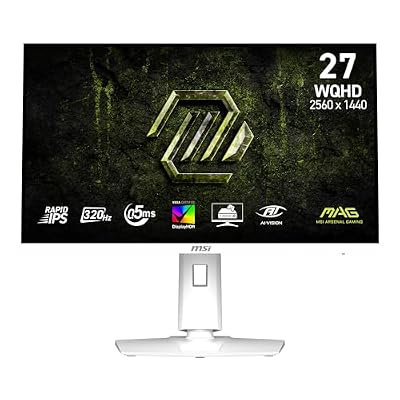
msi MAG 274QRFW X32 27-inch 2560 x 1440 (QHD) Gaming Monitor, 320Hz, AMD FreeSync Premium, NVIDIA G-SYNC Compatible, HDR Ready, HDMI, VGA Port, VESA, Tilt, 0.5ms, White
Included for 'Best Monitors Under 500 for Gaming: 1080p to OLED' as a representative home product in this roundup; selection reflects the product set returned for this topic.
View on Amazon5. LG 27GX704A-B UltraGear OLED: Best for OLED contrast and speed
Specs per the listing: 27-inch QHD OLED, 240Hz, 0.03ms response, NVIDIA G-Sync Compatible, AMD FreeSync Premium Pro, VESA DisplayHDR TrueBlack 400, HDMI 2.1, DisplayPort.
OLED panels change what a gaming monitor looks like. Pixels turn fully off for true black, which gives dark scenes a depth that LCD panels cannot match, and the 0.03ms response time is far quicker than any IPS listing here. The VESA DisplayHDR TrueBlack 400 certification suits that panel type well.
OLED has trade-offs worth knowing: bright static images such as taskbars and HUD elements can leave a risk of image retention over very long periods, so enable the screen’s protection features and vary your content. If you mostly work with spreadsheets for hours a day, an IPS model may be a safer choice.
- Pros: True blacks and fast response; 240Hz at 1440p; DisplayHDR TrueBlack 400; HDMI 2.1 and DisplayPort
- Cons: Static content can burn in over time; text clarity differs from IPS; less suitable for long office work

LG 27GX704A-B 27-inch Ultragear QHD (2650x1440) OLED Gaming Monitor 240Hz, 0.03ms, NVIDIA G-Sync Compatible, AMD FreeSync Premium Pro, VESA Display HDR TrueBlack400, HDMI 2.1, DisplayPort, Black
Included for 'Best Monitors Under 500 for Gaming: 1080p to OLED' as a representative home product in this roundup; selection reflects the product set returned for this topic.
View on AmazonHow to Choose
Choose resolution and size together
A 24.5-inch 1080p screen and a 27-inch 1440p screen have similar pixel density, which is why both look sharp. A 32-inch 1440p screen is larger but softer. For competitive games, smaller and faster is often better. For mixed gaming and everyday use, 27-inch 1440p is the most flexible choice. Measure your desk depth before buying a 32-inch screen, since you will want to sit farther back.
Refresh rate: more is not always better
Refresh rate only helps if your graphics card can reach it. A system pushing 100 to 140 frames per second in your games benefits little from a 320Hz screen but gains a lot from a 180Hz to 200Hz one. If you play esports titles at high frame rates, the higher ceiling is worth paying for. Look for adaptive sync support, FreeSync or G-SYNC Compatible, to avoid tearing.
Panel technology: IPS, VA or OLED
IPS panels, such as the GIGABYTE models, give good colour and viewing angles. OLED, as on the LG, gives true black and extremely fast response but carries retention considerations. VA panels offer higher contrast than IPS but vary in motion clarity. The Samsung listing does not give panel type, so check the maker page if that matters to you.
Ports, stand and extras
Count your inputs. HDMI 2.1 matters if you game on a console or a recent graphics card. A DisplayPort input is the best choice for high refresh rates on PC. USB Type-C and KVM features, as on the M27Q2, can replace a dock for a laptop. A stand that adjusts height saves you from buying a separate arm. Skip any monitor listing that does not state its resolution and refresh rate clearly.
Frequently Asked Questions
Is 1440p worth it over 1080p?
For 27-inch screens, yes. The extra sharpness is easy to see for text and detail. It does need a stronger graphics card, so check what your system can handle.
Do I need 240Hz or higher?
Only if your graphics card can reach those frame rates in the games you play. For most players, 144Hz to 200Hz is a better value. Higher refresh rates mainly help competitive shooters.
Is OLED safe for gaming?
Yes, with sensible use. Enable the monitor’s pixel-protection features, avoid leaving static images on screen for many hours, and vary your content. IPS is safer for static office work.
FreeSync or G-SYNC Compatible?
Both reduce screen tearing. Many monitors support both, as the LG and MSI listings do. Check the listing against your graphics card brand.
Does a 32-inch monitor need more GPU power?
At the same resolution, no. Screen size does not change the pixel count. QHD on 32 inches has the same pixel count as on 27 inches. Resolution and refresh rate drive the load.