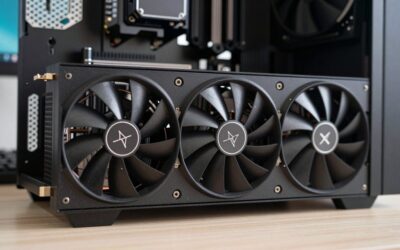
Shopping for a gaming laptop in 2026 means wading through a flood of specs — GPU tiers, refresh rates, VRAM sizes, and processor generations that all claim to be “built for gaming.” Pick the wrong machine and you end up with stutters in modern titles, thermal throttling mid-session, or a graphics card that’s already outdated the moment a new AAA release drops.
This guide breaks down six standout options, from dedicated RTX gaming rigs to budget-friendly integrated-graphics laptops and a capture card for streamers, so you can match your gameplay goals and budget to the right hardware.



🎮 Get More From Your Setup — Free
Prime Gaming gives you free PC games every month, in-game loot, and a free Twitch channel sub — plus fast free shipping on all the gear above. New members get a 30-day free trial.
Watch: Best Laptop Video Card For Gaming — Video Review
How to Choose a Laptop Video Card For Gaming (2026)
- GPU tier: A dedicated GPU like the RTX 4050 or RTX 5060 handles modern AAA titles far better than integrated graphics like Radeon or Vega, which are best for esports and lighter workloads.
- VRAM capacity: 6GB or more is recommended for 1080p/1440p gaming at high settings; less VRAM means you’ll need to dial back textures and resolution in newer games.
- Display refresh rate: A 144Hz or 165Hz panel lets your GPU’s frame output actually matter — a fast card paired with a 60Hz screen wastes potential.
- CPU and RAM balance: A powerful GPU can be bottlenecked by a weak CPU or insufficient RAM; look for at least 16GB RAM and a recent-generation multi-core processor.
- Cooling and sustained performance: Check for laptops with robust thermal designs, since GPUs throttle under heat and long gaming sessions will expose weak cooling fast.
The Best Laptop Video Card For Gaming (2026)s Reviewed
HP Victus Gaming Laptop (RTX 4050)
The Victus pairs a capable RTX 4050 with a 13th-gen i5-13420H and 144Hz display, delivering smooth 1080p performance in most current titles without the premium price tag of flagship gaming laptops. With 32GB RAM and a 1TB SSD, it also handles multitasking and large game libraries with ease.
ASUS ROG Strix G16 (RTX 5060)
This is the clear performance leader here, combining a next-gen RTX 5060 with a 165Hz 16:10 display and Wi-Fi 7 for a genuinely future-proof high-refresh gaming experience. The i7-14650HX and 16GB DDR5 keep pace with demanding AAA titles at high settings, making it the pick for serious gamers who want headroom for years to come.
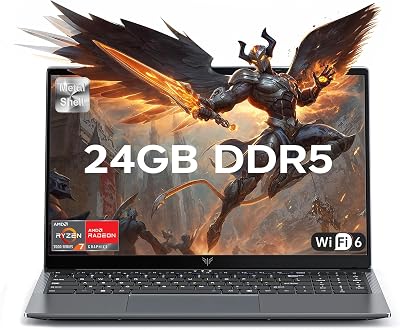
AMD Gaming Laptop (Ryzen 7 5700U)
Built around integrated AMD Radeon graphics rather than a discrete GPU, this laptop is best suited to esports titles, indie games, and casual play rather than demanding AAA gaming. Its 8-core/16-thread Ryzen 7 processor and WiFi 6 make it a solid value pick for gamers on a tighter budget.
KAIGERR Gaming Laptop (Ryzen 7 5825U, Radeon RX Vega 8)
The Vega 8 integrated graphics won’t compete with dedicated GPUs, but the Ryzen 7 5825U’s strong multi-core performance makes this a capable dual-purpose machine for light gaming alongside creative and business work. It’s a sensible choice if gaming is secondary to productivity.
NIMO AI-Creator-Laptop (Radeon 660M)
With a Ryzen 5 6600H and Radeon 660M graphics, the NIMO leans toward video editing and multitasking rather than heavy gaming, though its FHD IPS panel and fast charging make it a decent secondary device for casual titles. The 2-year warranty adds peace of mind for buyers wary of budget hardware.
Frequently Asked Questions
Do I need a dedicated GPU to play modern games on a laptop?
For AAA titles at decent settings, yes — integrated graphics like Radeon Vega or 660M struggle with demanding games, while dedicated GPUs like the RTX 4050 or 5060 are built specifically for gaming workloads.
How much VRAM do I actually need in 2026?
6GB is a reasonable minimum for 1080p gaming, but 8GB or more gives you comfortable headroom for 1440p and future titles with higher-resolution textures.
Is a high refresh rate display worth it if my GPU is mid-range?
Yes, within reason — a 144Hz panel paired with an RTX 4050 still lets you benefit from higher frame rates in esports and less demanding titles, even if you can’t max out settings in every AAA game.
Can a capture card improve my gaming setup?
A device like the Guermok 4K capture card doesn’t boost gaming performance directly, but it’s essential if you plan to stream or record gameplay in high quality without taxing your main GPU.
Final Thoughts
For most gamers, the ASUS ROG Strix G16 is the top pick thanks to its RTX 5060 and 165Hz display, while the HP Victus offers excellent value with its RTX 4050 for those on a tighter budget. If gaming is secondary to work or study, the AMD Ryzen-based laptops are worth considering instead.