🛒 Best Price Today on Amazon
Prime members get fast, free shipping on everything above, plus member-only deals. New members get a 30-day free trial — cancel anytime.
If you need the best graphics card under 250, the current-generation choices are mainly Intel Arc B580, Arc B570 and NVIDIA GeForce RTX 5050, but U.S. street prices can exceed their launch prices, so check the actual listing before buying.
How to Choose a Budget Gaming GPU
For the best graphics card under 250, start with VRAM because modern games can exceed 8GB at higher textures and resolutions. Intel’s Arc B580 has 12GB, the B570 has 10GB, while the RTX 5050 has 8GB. Tom’s Hardware’s B580 testing used 1080p medium plus 1080p, 1440p and 4K Ultra settings across its gaming suite.
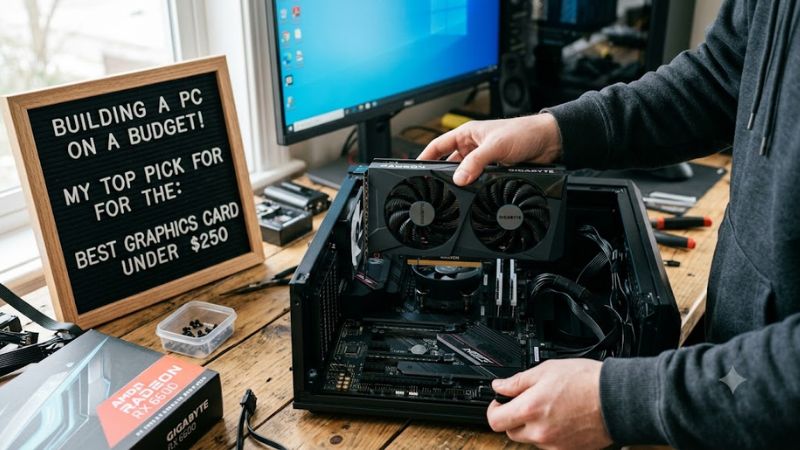
Check VRAM Before Core Counts
The best graphics card under 250 should match the resolution and texture settings you actually use. The Arc B580’s 12GB GDDR6 and 456GB/s bandwidth give it more memory headroom than the B570’s 10GB and RTX 5050’s 8GB. That matters most when higher-resolution textures or demanding game engines push memory usage upward.
Tom’s Hardware measured the B580 about 10% ahead of the RTX 4060 at 1440p Ultra in its 17-game rasterization suite, while the gap narrowed to about 3% at 1080p Ultra. Those figures come from native-resolution testing, without mixing in upscaling or frame-generation results.
Match the GPU to Your Resolution
For a best graphics card under 250 purchase, 1080p is the most predictable target, while 1440p depends more heavily on the game and graphics preset. The B570 is positioned around 1080p, whereas Intel lists the B-series for 1080p-to-1440p gaming. RTX 5050 reviews likewise focus primarily on 1080p.
Tom’s Hardware’s B570 raster suite covered 16 games at 1080p Ultra, 1080p Medium and 1440p Ultra, with 4K Ultra included mainly as a reference. Its B570 results were roughly comparable with the RTX 3060 class, while the B580 provided additional performance and memory capacity.
Verify PSU and PCIe Requirements
Power requirements can separate an apparently affordable GPU from a straightforward upgrade. The B-series guide calls for a 600W PSU and PCIe 8-pin cable, while NVIDIA specifies 550W system power for the RTX 5050 reference configuration. Partner-card requirements can differ, so the exact model matters.
Intel Arc B-series cards also depend on Resizable BAR or Smart Access Memory for optimal performance. Intel lists compatible platforms spanning several recent Intel and AMD CPU generations, with UEFI and the appropriate motherboard support required. Older systems should therefore be checked before choosing the Arc route.
Check Case Clearance and Current Price
A best graphics card under 250 recommendation should include the physical card, not just the GPU chip. Intel’s B580 Limited Edition measures 272 × 115 × 44 mm, while the Gigabyte RTX 5050 OC Low Profile measures 182 × 69 × 36 mm. Small-form-factor buyers therefore need to check the specific card rather than the GPU name.
Price also needs context in September 2026. The B580 launched at $249, but current listings can sit above that figure, while the B570 and RTX 5050 have also appeared at different street prices. Treat $249 or $219 figures as launch/MSRP references unless the current retailer listing confirms the price.
Top Picks
The table below treats “under $250” as the launch/MSRP tier rather than promising that every card remains below $250 today. Four current-generation products are included, with the fourth being a compact RTX 5050 variant because current-generation desktop GPU families in this price class are limited.
| Product | Best For | Key Spec | Compatibility | Watch Out For |
| Intel Arc B580 | Best Overall | 12GB GDDR6, 456GB/s | PCIe 3.0+ x16 slot, ReBAR, 600W PSU | Street price can exceed $250 |
| Intel Arc B570 | Best Value | 10GB GDDR6, 380GB/s | PCIe 3.0+ x16 slot, ReBAR, 600W PSU | Slower than B580 |
| NVIDIA GeForce RTX 5050 | Best For NVIDIA features | 8GB GDDR6, 320GB/s | PCIe 5.0 x8, 550W PSU, 8-pin | 8GB can constrain demanding games |
| Gigabyte RTX 5050 OC Low Profile 8G | Best For SFF PCs | 8GB GDDR6, 128-bit | PCIe 5.0 x8, 550W PSU | Same 8GB limitation |
Intel Arc B580
The Arc B580 fits buyers seeking the best graphics card under 250 with more than 8GB of memory. It has 12GB GDDR6, a 192-bit bus, 456GB/s bandwidth and 190W board power. Tom’s Hardware measured it ahead of the RTX 4060 by about 10% at 1440p Ultra and 3% at 1080p Ultra in its raster suite.
Buyers should have a compatible motherboard with Resizable BAR enabled and enough case space for the card. The weakness is price availability: the $249 launch figure is no longer a reliable description of every U.S. retail listing. Do not buy it solely because an old article calls it a $249 card; verify today’s listing first.
Intel Arc B570
The Arc B570 targets a lower entry point while retaining 10GB GDDR6. Tom’s Hardware measured it at roughly RTX 3060-class raster performance, with the B570 averaging about 18% behind the B580 at 1080p Ultra and about 22% behind it at 1440p Ultra in the same review suite.
The B570 suits buyers who can accept lower performance for a lower price tier, but it should not be treated as a smaller B580 with identical capability. Its 10GB memory and 380GB/s bandwidth are reduced, and Intel’s Arc platform requirements still apply. A 600W PSU and ReBAR-capable system are sensible compatibility checks.
NVIDIA GeForce RTX 5050
The RTX 5050 is the straightforward choice for buyers who specifically want NVIDIA’s current desktop software and feature stack at the entry level. It has 2,560 CUDA cores, 8GB GDDR6, a 128-bit bus, 320GB/s bandwidth and 130W total graphics power, with NVIDIA specifying a 550W system-power requirement.
Independent reviews place it around RTX 4060-class performance in many 1080p raster workloads, but the 8GB framebuffer is a recurring limitation in demanding games. Tom’s Hardware also found cases where 8GB prevented Multi Frame Generation from functioning as intended because memory capacity was already heavily used.
Gigabyte RTX 5050 OC Low Profile 8G
This compact RTX 5050 variant is aimed at small-form-factor systems where ordinary dual-slot cards may not fit. The Gigabyte model measures 182 × 69 × 36 mm, uses 8GB GDDR6 on a 128-bit interface, connects through PCIe 5.0 x8 and calls for a 550W-or-higher PSU with an 8-pin PCIe connection.
Its real weakness is not the cooler size but the same 8GB memory capacity found on the standard RTX 5050. It makes sense for a compact PC that specifically needs a low-profile card, but buyers with normal ATX or microATX cases should compare full-size options instead of paying extra for dimensions they do not need.
FAQ
Is $250 still enough for a new current-generation GPU?
Yes, but the answer depends on MSRP versus today’s street price. The Arc B580 launched at $249, the B570 at $219 and the RTX 5050 at $249, but current listings can exceed those figures. A $250 budget should therefore be treated as a target rather than a guaranteed shelf price.
The distinction matters because a GPU can remain current-generation while no longer selling below its launch price. For example, current price-history data shows substantial movement for the B570, while market reporting has placed B580 listings above its original MSRP. Check the exact retailer listing on the day you publish or purchase.
Is 8GB VRAM enough for 1080p gaming?
Yes, 8GB can handle many 1080p games, but it is not a universal guarantee for Ultra textures, heavy ray tracing or newer memory-intensive releases. The RTX 5050’s 8GB configuration can become restrictive, particularly when additional features require more local memory.
For buyers comparing the best graphics card under 250, 10GB or 12GB provides more capacity, but VRAM alone does not determine performance. The B570 and B580 still depend on game engine behavior, drivers, CPU performance and graphics settings, so capacity should be considered alongside the rest of the system.
Does an Intel Arc GPU require Resizable BAR?
Intel requires Resizable BAR or Smart Access Memory for optimal performance on Arc B-series graphics. Intel’s current compatibility guide lists supported Intel and AMD processor platforms and explains that UEFI boot mode, Above 4G Decoding and Re-Size BAR Support may need to be enabled in firmware.
This makes platform checking important before choosing an Arc card. A recent desktop with a supported CPU and motherboard is generally the intended configuration, while an older system should be checked against Intel’s compatibility information before purchase rather than assuming PCIe slot compatibility is sufficient.
Which resolution should these GPUs target?
1080p is the safest common target for this price class, while the Arc B580 has stronger evidence for 1440p use when settings are appropriate. Intel positions the B-series around 1080p-to-1440p gaming, and independent B580 testing shows its relative advantage growing at 1440p Ultra compared with 8GB competitors.
Benchmark results should always retain their resolution and settings. Tom’s Hardware used 1080p Medium plus 1080p, 1440p and 4K Ultra in its B580 and B570 suites, while different reviews can use different games, CPUs, presets or upscaling. Those datasets should not be merged into one artificial FPS average.
Final Thoughts
The best graphics card under 250 depends on whether you prioritize VRAM capacity, NVIDIA features, compact dimensions or the lowest entry price. The Arc B580 and B570 offer 12GB and 10GB respectively, while RTX 5050 models emphasize NVIDIA’s software stack. Current street prices should decide whether the original MSRP tier still applies.