🛒 Best Price Today on Amazon
Prime members get fast, free shipping on everything above, plus member-only deals. New members get a 30-day free trial — cancel anytime.
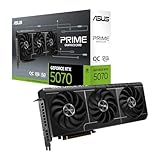
The ASUS Prime GeForce RTX 5070 12GB OC Edition is the best overall pick for 1440p gaming in this group, because it pairs the RTX 5070’s 12GB of GDDR7 with a 2.5-slot cooler that fits a wide range of cases, including smaller builds. The RTX 5070 is NVIDIA’s Blackwell mid-high-end card, with 6,144 CUDA cores, a 192-bit memory bus and about 250W of board power, and it targets 1440p at high settings with DLSS 4 support. Two of the six listings are actually RTX 5070 Ti cards, a tier above, and they are marked below as step-up runner-ups for buyers who want 16GB of memory.
Quick List
- ASUS Prime RTX 5070 OC – best for a balanced, SFF-friendly 1440p build
- MSI RTX 5070 Ti Gaming Trio OC Plus – best step-up with 16GB for demanding 1440p and 4K (RTX 5070 Ti, runner-up)
- PNY RTX 5070 Ti Slim OC – best compact dual-slot step-up card (RTX 5070 Ti, runner-up)
- ASUS Prime RTX 5070 White OC – best for white-themed builds
- NVIDIA RTX 5070 Founders Edition – best for a reference-design card from NVIDIA itself
- ASUS TUF Gaming RTX 5070 OC – best for a robust, larger cooler and durable components
Which One Is Right for You?
| If you… | Choose |
|---|---|
| want the most flexible RTX 5070 for different case sizes | ASUS Prime RTX 5070 OC |
| plan a white or light-colored build | ASUS Prime RTX 5070 White OC |
| want a stock-style card straight from NVIDIA’s own design | NVIDIA RTX 5070 Founders Edition |
| care most about a heavy-duty cooler and component quality | ASUS TUF Gaming RTX 5070 OC |
| want 16GB of memory and have a 750W or larger PSU | MSI RTX 5070 Ti Gaming Trio OC Plus |
| need 16GB in a slim dual-slot form for a small case | PNY RTX 5070 Ti Slim OC |
If your target is 1440p and your budget points at the RTX 5070 class, the four RTX 5070 cards are the right shortlist, and the differences between them are mostly cooler size, looks and factory clocks. The two RTX 5070 Ti models are a different product tier, so consider them only if you want more memory and speed than the 5070 provides.

ASUS Prime GeForce RTX 5070 12GB GDDR7 OC Edition Gaming Graphics Card | SFF-Ready, PCIe 5.0, HDMI/DP 2.1, 2.5-slot, Axial-tech Fans, Dual BIOS
Included for '6 Best RTX 5070 Graphics Cards for 1440p (October 2026) Expert Picks' because the listing specifies SFF-Ready and PCIe 5.0, details this guide uses to compare options.
View on Amazon
MSI NVIDIA GeForce RTX 5070 Ti 16G Gaming Trio OC Plus Graphics Card - 16 GB GDDR7 (28 GB/s, 256-bit), PCIe 5.0 - TRI FROZR 4 (3 x STORMFORCE Fans) - RGB - HDMI 2.1b, DisplayPort 2.1b
Included for '6 Best RTX 5070 Graphics Cards for 1440p (October 2026) Expert Picks' because the listing specifies 16 GB GDDR7 (28 GB/s and 256-bit), details this guide uses to compare options.
View on Amazon
PNY NVIDIA GeForce RTX™ 5070 Ti Slim OC Dual-Fan Dual-Slot Graphics Card | 16GB GDDR7, 256-bit, Boost: 2572 MHz, SFF-Ready, PCIe® 5.0, HDMI®/DP 2.1, 2-Slot, NVIDIA Blackwell Architecture, DLSS 5
Included for '6 Best RTX 5070 Graphics Cards for 1440p (October 2026) Expert Picks' because the listing specifies 16GB GDDR7 and 256-bit, details this guide uses to compare options.
View on Amazon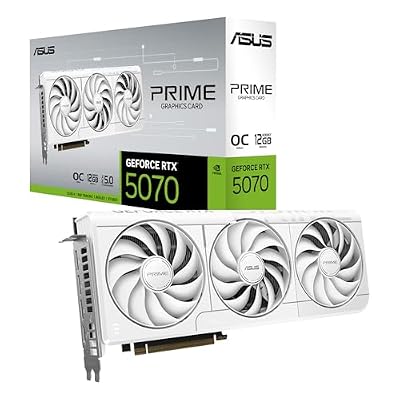
ASUS Prime GeForce RTX 5070 12GB GDDR7 White OC Edition Gaming Graphics Card
Included for '6 Best RTX 5070 Graphics Cards for 1440p (October 2026) Expert Picks' as a relevant option in this category; details come from the product listing.
View on Amazon
NVIDIA - GeForce RTX 5070 12GB GDDR7 Graphics Card - Graphite Grey
Included for '6 Best RTX 5070 Graphics Cards for 1440p (October 2026) Expert Picks' because the listing specifies GeForce RTX 5070 12GB GDDR7 Graphics Card and Graphite Grey, details this guide uses to compare options.
View on Amazon
ASUS TUF Gaming GeForce RTX 5070 12GB GDDR7 OC EditionGaming Graphics Card | PCIe 5.0, HDMI/DP 2.1, 3.125-slot, Military-grade Components, Protective PCB Coating, Axial-tech Fans
Included for '6 Best RTX 5070 Graphics Cards for 1440p (October 2026) Expert Picks' because the listing specifies PCIe 5.0 and HDMI/DP 2.1, details this guide uses to compare options.
View on AmazonAll 6 Picks in Detail
1. ASUS Prime GeForce RTX 5070 12GB OC Edition – Best All-Rounder
As an Amazon Associate we earn from qualifying purchases at no extra cost to you.

The Prime is ASUS’s no-frills line, and this OC Edition is described as SFF-ready, with PCIe 5.0, HDMI and DisplayPort 2.1, a 2.5-slot design and Axial-tech fans. It suits 1440p gamers who want a well-supported card without a huge cooler. The truncated listing appears to reference a dual BIOS switch, so confirm that on the product page.
- GPU: GeForce RTX 5070, 12GB GDDR7
- Interface: PCIe 5.0
- Outputs: HDMI and DisplayPort 2.1
- Cooler: 2.5-slot, Axial-tech fans
- Factory clock: OC Edition; exact boost clock confirm on listing
It makes sense in a wide range of mid-tower cases, since a 2.5-slot card leaves room beside it for airflow. The OC Edition runs a little above NVIDIA’s reference clocks, which in practice means a small gain rather than a different class of performance, so do not pay a large premium for the label alone. Check card length and your case’s GPU clearance before buying.
This card also suits people moving up from a GTX 16 or RTX 20 series GPU, where the jump to DLSS 4, hardware ray tracing and GDDR7 is large. Pair it with a modern CPU so the processor does not hold the card back at 1440p, and keep an eye on the power connector arrangement described in the full listing.
Pros
- Compact enough for many small and mid-size cases
- Modern outputs for high-refresh 1440p monitors
Cons
- 12GB can become tight with maximum textures and ray tracing in the heaviest new games
- Power connector arrangement: confirm on listing
It is the sensible default, while the TUF below adds a bigger cooler and the White edition changes only the color.
2. MSI GeForce RTX 5070 Ti 16G Gaming Trio OC Plus – Step-Up Runner-Up (RTX 5070 Ti)

This is not an RTX 5070. It is a GeForce RTX 5070 Ti with 16GB of GDDR7 on a 256-bit bus, a step up in performance and memory that fits buyers who want longer-term headroom at 1440p or who also game at 4K. The listing names a TRI FROZR 4 cooler with three fans and PCIe 5.0. The 5070 Ti is rated at higher board power than the 5070, so check your PSU.
- GPU: GeForce RTX 5070 Ti, 16GB GDDR7
- Memory bus: 256-bit, 28 Gbps per the listing
- Interface: PCIe 5.0
- Cooler: TRI FROZR 4, three fans
- Card size and power connector: confirm on listing
The larger frame helps with cooling and noise but needs space, so measure your case. The extra 4GB of memory is the main reason to choose this tier, since it offers more room for high-resolution textures and ray tracing than the 12GB class.
Because the 5070 Ti sits so close to a premium tier, buyers should decide whether the extra capability is useful for them. If your monitor is 1440p at 144 Hz or 165 Hz and you play mainstream titles, the added cost and power draw may go unused. If you edit video, run local AI tools or want 4K as an option, the additional memory is more clearly valuable.
Pros
- 16GB of memory suits future games and creative work
- Triple-fan cooler is designed for quiet operation
Cons
- Larger and more power-hungry than an RTX 5070
- More card than a 1440p-only buyer may need
Compared with the PNY Ti, it trades compactness for a larger cooler.
3. PNY GeForce RTX 5070 Ti Slim OC – Compact Step-Up Runner-Up (RTX 5070 Ti)

Another RTX 5070 Ti rather than an RTX 5070. PNY lists 16GB of GDDR7 on a 256-bit bus, a boost clock of 2572 MHz, a dual-fan dual-slot cooler, SFF-ready design and PCIe 5.0. It is the pick for someone who wants 16GB in a compact case that cannot take a three-fan, 3-slot card.
- GPU: GeForce RTX 5070 Ti, 16GB GDDR7
- Memory bus: 256-bit
- Boost clock: 2572 MHz per the listing
- Cooler: dual-fan, dual-slot
- Outputs and power connector: confirm on listing
Thin coolers move less air, so expect more fan noise and higher temperatures than a big triple-fan card at the same power. For small cases that is a fair trade. Look at the clearance around the card as well, since a slim card still needs fresh air.
Small-form-factor builders should confirm the card length and the power connector position before ordering, because a short card with a side-mounted plug can need extra space for the cable bend. Also confirm that the case has airflow directly in front of the fans, since a slim card relies on a steady supply of cool air.
Pros
- Dual-slot width fits compact cases
- 16GB of memory with a modest footprint
Cons
- Smaller cooler may run louder under sustained load
- Higher power demand than any 5070
It is the small-case alternative to the MSI Trio and the only slim card in the list with 16GB.
4. ASUS Prime GeForce RTX 5070 12GB White OC Edition – Best for White Builds

This is the Prime RTX 5070 in a white shroud. The listing is short, naming the 12GB of GDDR7 and the OC Edition, so confirm the slot width, outputs and fan details on the product page. The Prime design is generally aimed at compact and mid-size builds, which makes the white version a neat match for light-colored cases.
- GPU: GeForce RTX 5070, 12GB GDDR7
- Edition: OC Edition, white shroud
- Interface: PCIe 5.0 (expected for the RTX 5070; confirm on listing)
- Cooler and slot width: confirm on listing
- Outputs: confirm on listing
Choose it when appearance matters, since the performance should be close to the standard Prime. If your build is not white-themed, the black version is the simpler choice. Pay attention to the cable color too, because white cards often reveal black cables in clear-sided cases.
Cosmetics matter more here than raw capability, so plan the whole build around the color scheme: white case panels, white fans and light cables show off the card well. Remember that RGB lighting and color are secondary to cooling, so make sure the case airflow is good before anything else.
Pros
- Looks the part in a white build
- Same RTX 5070 silicon and memory as the black Prime
Cons
- Listing details are sparse
- Same 12GB limit as the other RTX 5070 cards
Compared with the black Prime, it is a cosmetic choice, not a performance one.
5. NVIDIA GeForce RTX 5070 12GB Founders Edition – Best Reference Design

The Founders Edition is NVIDIA’s own design of the RTX 5070, in a graphite grey finish, and it follows the reference specifications: 12GB of GDDR7 on a 192-bit bus and a rated board power of about 250W. It is the pick for builders who want the standard card rather than a partner model. It uses a single 16-pin connector, so the PSU needs a suitable cable or adapter.
- GPU: GeForce RTX 5070, 12GB GDDR7
- Memory bus: 192-bit
- Board power: about 250W (NVIDIA specification)
- Power connector: single 16-pin, per NVIDIA’s reference design
- Dimensions and slot width: confirm on listing
The compact design makes it easy to fit in many cases, and the clocks are at reference levels. Because the title does not describe the cooler or the outputs, check the product page for details before relying on any assumption.
The Founders Edition is a good choice if you like the idea of the card NVIDIA itself designed, and it tends to hold its appeal in compact systems. Check availability and the exact product page before relying on it, since reference cards are often produced in smaller numbers than partner models.
Pros
- Reference specification from the chip designer
- Compact build suits small and mid-size cases
Cons
- No factory overclock
- Requires the 16-pin power connector
Next to the ASUS Prime, it gives up a little factory speed in exchange for the reference design.
6. ASUS TUF Gaming GeForce RTX 5070 12GB OC Edition – Best for a Heavy-Duty Cooler

The TUF Gaming is ASUS’s durability-focused line. The listing describes a 3.125-slot design, PCIe 5.0, HDMI and DisplayPort 2.1 and military-grade components. It suits builders with a roomy case who want lower fan noise and a robust card, and it is the physically largest RTX 5070 in this list.
- GPU: GeForce RTX 5070, 12GB GDDR7
- Interface: PCIe 5.0
- Outputs: HDMI and DisplayPort 2.1
- Cooler: 3.125-slot design
- Build: military-grade components per the listing
The big cooler gives more thermal headroom than the 2.5-slot Prime, which usually means a quieter card, but the 3.125-slot width blocks neighboring slots and needs a case with wide clearance. Check the case’s maximum card length and thickness first.
This card is the most comfortable fit for a large airflow case with spare slots, and it is a good choice if you plan to keep it for several years. Confirm that the case supports a card of this thickness, and that no expansion card, such as a capture card, needs the slot directly below it.
Pros
- Large cooler for cooler, quieter operation
- Durable build quality
Cons
- Too wide for many small cases
- Same 12GB of memory as the cheaper RTX 5070 cards
It is the opposite of the PNY slim card: big and quiet where the PNY is compact.
Specs Compared
| Model | GPU | Memory | Slot size | Cooler / edition | Interface |
|---|---|---|---|---|---|
| ASUS Prime RTX 5070 OC | RTX 5070 | 12GB GDDR7 | 2.5-slot | Axial-tech fans, OC | PCIe 5.0 |
| MSI RTX 5070 Ti Gaming Trio OC Plus | RTX 5070 Ti | 16GB GDDR7, 256-bit | confirm on listing | TRI FROZR 4, three fans | PCIe 5.0 |
| PNY RTX 5070 Ti Slim OC | RTX 5070 Ti | 16GB GDDR7, 256-bit | Dual-slot | Dual fan, boost 2572 MHz | PCIe 5.0 |
| ASUS Prime RTX 5070 White OC | RTX 5070 | 12GB GDDR7 | confirm on listing | White, OC | confirm on listing |
| NVIDIA RTX 5070 Founders Edition | RTX 5070 | 12GB GDDR7 | confirm on listing | Reference design, Graphite Grey | confirm on listing |
| ASUS TUF Gaming RTX 5070 OC | RTX 5070 | 12GB GDDR7 | 3.125-slot | OC, military-grade components | PCIe 5.0 |
How We Chose These
This guide is built from research, not from handling the cards. We started with the six graphics cards in the current catalog, read each product name and specification field, and sorted them by which GPU they actually carry. We then compared the stated memory, slot size and cooler against NVIDIA’s published specifications for the RTX 5070 and RTX 5070 Ti and the manufacturers’ product pages for ASUS, MSI and PNY. Because two listings are RTX 5070 Ti models, we kept them in the list but labeled them as step-up runner-ups. Any detail the listing does not state is marked for confirmation on the product page.
What to Look For
Why 12GB is usually enough for 1440p
At 1440p, most current games run comfortably within 12GB when you use high settings and upscaling such as DLSS. The RTX 5070’s 192-bit bus and fast GDDR7 give about 672 GB/s of memory bandwidth, which keeps the GPU fed at this resolution. The limit shows up in a small number of titles with maximum textures, ray tracing and frame generation all enabled, where memory use can approach or pass 12GB. If you often play those settings or plan to keep the card for many years, the 16GB of an RTX 5070 Ti is a reasonable upgrade.
Card size, slots and clearance
Cooler design is the main difference between partner cards. A 2.5-slot card like the Prime fits most cases, while a 3.125-slot TUF can block the slot below it and needs a case with wide clearance. Measure three things: the card’s length against your case’s maximum, the thickness against the space to the next slot, and the clearance between the card and the front fans or radiator. A card that physically fits but has no air gap runs hotter and louder.
Power supply and connectors
NVIDIA lists a 650W system power supply for the RTX 5070 and about 750W for the RTX 5070 Ti. Many partner cards use the 16-pin connector, and some use two 8-pin plugs through an adapter. Use the cable or adapter that came with the card or PSU, push the plug in fully until it clicks, and avoid a sharp bend right behind the connector. A rule of thumb: add the card’s board power to your CPU’s maximum power, add 100 to 150W for the rest, and choose a PSU rated at least 20 percent above that total.
Factory overclocks and what they mean
An OC Edition card runs a boost clock a few percent above the reference. In real games that is usually a gain of a frame or two rather than a meaningful change, so choose the card for its cooler, size and looks first. The better question is whether the cooler holds the card at its boost clock quietly. Larger coolers, such as the TUF and Trio designs, generally do that more easily than slim cards.
A worked example: a 1440p, 165 Hz monitor with an RTX 5070 and DLSS set to quality at high settings targets a frame rate near the monitor’s limit in many modern titles. Dropping a few settings, or using frame generation, closes the gap in the heaviest games. If you want the same experience with more settings turned up, step up to the 5070 Ti.
DLSS 4, frame generation and what they change
The RTX 50 series supports DLSS 4, which includes multi frame generation on the newest cards. These features render fewer pixels and generate extra frames with AI, so they raise smoothness without raising raw GPU load. They do add some latency, and they work only in supported games. For 1440p, DLSS upscaling in quality mode is the most useful setting, since it keeps the image sharp while cutting render cost. Treat frame generation as a bonus for the heaviest games, not as a replacement for a card with enough raw capability.
Pairing the card with a monitor and CPU
A 1440p monitor at 144 to 240 Hz is the natural partner for an RTX 5070. At a 60 Hz panel the card has more power than it needs, and at 4K it begins to struggle in demanding games. On the CPU side, a modern six to eight core processor is enough for 1440p, because the GPU is the limit at this resolution. A weak or old CPU can hold back frame rates in games that lean heavily on the processor, so factor it into your budget. Check that your motherboard has a PCIe x16 slot and that its BIOS is up to date, even though the card works in older PCIe generations at reduced bandwidth.
Questions
Is the RTX 5070 good for 1440p gaming?
Yes, it is designed for 1440p at high settings and can use DLSS upscaling and frame generation to raise frame rates. Very demanding games with ray tracing may need some settings reduced. The 12GB of memory is enough for most current titles at this resolution.
Is 12GB of VRAM enough for 1440p?
For most games it is, particularly with DLSS enabled. A few new titles at the highest texture settings can exceed it. If you keep a card for many years, 16GB gives extra margin.
RTX 5070 or RTX 5070 Ti for 1440p?
The RTX 5070 handles 1440p well, while the 5070 Ti adds performance and 16GB of memory. Choose the Ti if you want higher settings, 4K gaming on the side or longer-term headroom. It needs a stronger PSU and more case space.
What power supply do I need for an RTX 5070?
NVIDIA recommends a 650W system power supply for the RTX 5070. Choose a quality unit with the right connectors for your card. A 750W supply gives extra margin with a high-end CPU.
Does the Founders Edition perform differently from partner cards?
The GPU is the same, so performance is similar, and factory-overclocked partner cards run a little faster. The real differences are cooler size, noise, looks and connectors. Compare those details on each product page.
Will an RTX 5070 fit a small case?
Many will, especially the 2.5-slot Prime and the dual-slot PNY Ti. The TUF at 3.125 slots needs more room. Check the card’s length and thickness against your case before buying.
Update History
- October 20, 2026 – Initial publication; product set drawn from current catalog listings.
- Check the product page for current specifications and availability before buying.
Sources
- Manufacturer product and specification pages for NVIDIA, ASUS and PNY
- Retailer listing titles and specification fields for the six cards
- PCI-SIG public summaries of the PCIe 5.0 interface