🛒 Best Price Today on Amazon
Prime members get fast, free shipping on everything above, plus member-only deals. New members get a 30-day free trial — cancel anytime.
The best graphics card for valorant for most 1080p players is the RTX 5060; it can target 240–360Hz, the RX 9060 XT adds more VRAM, AMD is viable, and CPU speed still matters heavily. This guide compares current cards using published specifications and third-party Valorant figures rather than hands-on review.
How to Choose a Graphics Card for Valorant
Choose the card around four things: the refresh rate you want to feed, the CPU paired with it, the power and slot limits of your case, and whether Valorant is your only demanding game. Riot lists much lower hardware requirements than these modern GPUs, so buying far beyond your target can shift spending toward the processor or monitor instead.
Match the Monitor Refresh Rate
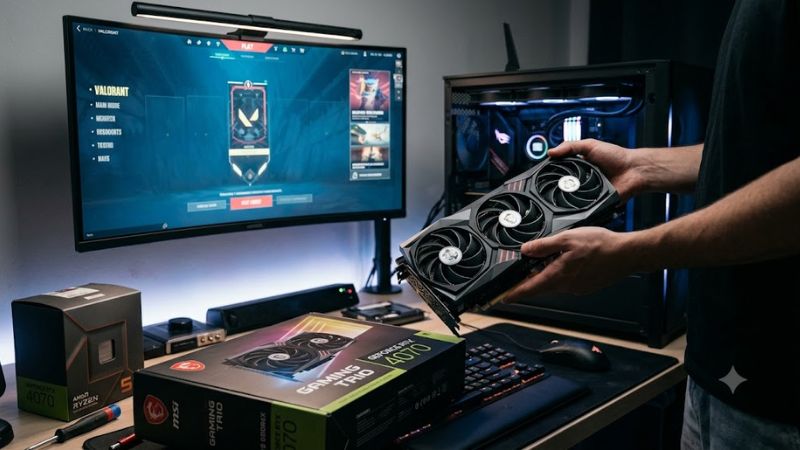
Monitor refresh rate should set the first budget boundary. A 144Hz display does not require the same GPU target as a 360Hz panel, and Valorant can expose CPU limits at low settings. The practical goal is to sustain the display’s refresh target without paying for rendering capacity your processor cannot feed.
For 360Hz play, a faster GPU can provide additional headroom, but the difference between current midrange cards narrows when the processor becomes the limiter. Published CheckFPS figures pair an Intel Core i5-13400 with the RTX 5060 and show 500 FPS at 1080p Low, illustrating why CPU capacity matters at esports settings.
Balance the CPU and GPU
The best graphics card for valorant should be matched to a processor capable of supplying high frame rates. At 1080p Low, the workload can become CPU-limited before a modern GPU reaches its rendering ceiling. That makes a balanced system more useful than chasing the largest graphics processor.
CheckFPS’s RTX 5060 figures use an Intel Core i5-13400 and report 500 FPS at 1080p Low, while its estimated bottleneck data shows CPU limitation at that setting. The same source reports 344 FPS at 1080p Ultra, demonstrating how strongly the workload changes with settings and resolution.
Check Platform Compatibility
Your platform must have a compatible PCIe slot, adequate power delivery, and physical clearance for the exact board partner card. The RTX 5060 uses 8GB GDDR7 and NVIDIA lists 550W system power, while AMD’s RX 9060 XT 16GB uses 160W board power with a 450W minimum PSU recommendation. Check the exact card length before ordering.
Intel Arc B580 needs more specific platform attention: Intel lists a full-size PCIe 3.0-or-newer x16 slot, Resizable BAR enabled, a 600W minimum PSU, and UEFI/GPT configuration for its supported setup. The reference B580 is 272mm long, although partner cards can differ.
Size VRAM for Your Library
Memory capacity matters more when Valorant is only one game in your library. The RTX 5060 has 8GB GDDR7, while the RX 9060 XT comes in 16GB and 8GB versions. For Valorant itself, the larger pool is not a direct FPS guarantee, but it can give a multi-game PC more room for higher-resolution textures elsewhere.
For a mixed library, the choice changes because newer games can use much more VRAM and shader capacity than Valorant. Tom’s Hardware’s 2026 hierarchy places the RTX 5060 and RX 9060 XT 8GB in a similar 1080p raster class, while the 16GB RX 9060 XT offers more memory for broader use.
Top Picks for Valorant
These four current-generation cards cover different use cases without treating Valorant FPS as the only measure. Independent figures below use specified CPUs and settings, so they are reference points rather than universal results; your processor, driver, map activity, memory, and monitor target can change the outcome.
| Product | Best For | Key Spec | Compatibility | Watch Out For |
| NVIDIA GeForce RTX 5060 — Best Overall | 1080p high-refresh builds | 8GB GDDR7, 3,840 CUDA cores | PCIe Gen 5, 550W system power | 8GB VRAM |
| AMD Radeon RX 9060 XT 16GB — Best Value | Mixed 1080p/1440p gaming | 16GB GDDR6, 160W | PCIe 5.0 x16, 450W PSU | Extra VRAM does not guarantee more Valorant FPS |
| NVIDIA GeForce RTX 5060 Ti 16GB — Best For Mixed Libraries | NVIDIA-focused multi-game PCs | 16GB GDDR7, 4,608 CUDA cores | PCIe Gen 5, 600W system power | Higher cost for a light esports workload |
| Intel Arc B580 — Best For Intel Builds | 1080p/1440p value builds | 12GB GDDR6, 190W TBP | PCIe 4.0 x8, 600W PSU, ReBAR | Platform configuration matters |
NVIDIA GeForce RTX 5060: Best Overall
For the best graphics card for valorant, RTX 5060 is a straightforward 1080p esports choice that also provides NVIDIA’s current feature set. NVIDIA lists 8GB GDDR7, 3,840 CUDA cores, 145W total graphics power, and a 550W system recommendation. Its main weakness is the 8GB capacity for demanding games outside Valorant.
Buy it when your target is 144Hz to 360Hz at 1080p and your CPU is already suited to high frame rates. CheckFPS reports 344 FPS at 1080p Ultra and 500 FPS at Low with a Core i5-13400, using native rendering. Do not buy it solely for Valorant if your other games need substantially more VRAM.
AMD Radeon RX 9060 XT 16GB: Best Value
For buyers comparing the best graphics card for valorant, RX 9060 XT 16GB suits players who want a Valorant-capable card plus more memory for a wider game library. AMD specifies 16GB GDDR6, 160W typical board power, PCIe 5.0 x16, and a 450W minimum PSU. Its weakness is that extra VRAM does not automatically raise Valorant FPS when the CPU is limiting.
Choose this model when 1440p gaming or texture-heavy titles matter alongside esports. CheckFPS reports 344 FPS at 1080p Ultra and 303 FPS at 1440p Ultra with a Core i5-13400, while Tom’s Hardware places the 16GB model among current 1080p raster options. Skip the extra memory if your library is almost entirely Valorant.
NVIDIA GeForce RTX 5060 Ti 16GB: Best For Mixed Libraries
For the best graphics card for valorant in a mixed library, RTX 5060 Ti 16GB suits users who want NVIDIA’s current midrange platform with more memory than the RTX 5060. NVIDIA lists 16GB GDDR7 for the 16GB configuration, 4,608 CUDA cores, and 180W total graphics power. Its weakness is cost: Valorant alone may not use enough GPU capacity to justify the step up.
Buy it when the same PC will also run heavier games, create content, or drive higher resolutions. CheckFPS reports 344 FPS at 1080p Ultra and 303 FPS at 1440p Ultra with its Core i5-13400 reference system. It is a poor fit for a narrowly Valorant-only build where the CPU is already the constraint.
Intel Arc B580: Best For Intel Builds
For the best graphics card for valorant on Intel, Arc B580 is an alternative when you want 12GB VRAM and a lower official starting price than the other cards here. Intel specifies 12GB GDDR6, 190W TBP, PCIe 4.0 x8, and a 600W minimum PSU. Its main caution is platform sensitivity, so current drivers and a suitable system matter.
Buy it when the board and PSU fit and you want a current Intel option for 1080p or 1440p esports. A CheckFPS configuration using a Core i5-13400 estimates 315 FPS at 1080p Ultra and 500 FPS at Low. Do not choose it simply for Valorant if your existing system cannot meet its power or platform needs.
FAQ
Valorant does not require a high-end GPU by modern standards, so the useful question is how much headroom your monitor and other games need. Riot’s published advanced tier targets 144 FPS with a GTX 1050 Ti, Radeon R7 370, or Arc A310, which is far below today’s midrange cards.
Does Valorant Need a Powerful Graphics Card?
Does Valorant need a powerful graphics card? No, not for basic play. Riot lists an advanced 144 FPS tier using hardware that is far older and slower than the current cards in this guide. That means a modern GPU should be selected around your refresh target and wider PC workload, not the game’s minimum requirement.
At competitive 1080p settings, the CPU can become the limiting component. CheckFPS estimates that a Core i5-13400 leaves the RTX 5060 and RX 9060 XT heavily CPU-limited at Low settings, while FPSBench results also show very high frame rates with older CPU/GPU pairings. Results vary by system, so treat them as references.
Is NVIDIA Required for Valorant?
Is NVIDIA required for Valorant? No. AMD and Intel cards can run the game at high frame rates, and the RX 9060 XT and Arc B580 both have published high-FPS results. NVIDIA may still matter to a buyer who specifically wants its software ecosystem, but that is a feature preference rather than a game requirement.
Can an 8GB card handle Valorant? Yes, the game’s published requirements are far below that memory level, and current 8GB cards can produce high frame rates. The more relevant question is what else you play: a 16GB card gives more memory capacity for other workloads, but capacity alone should not be treated as a Valorant FPS multiplier.
Does 1440p Change the Recommendation?
Does 1440p change the recommendation? It can if you also play visually heavier games, but Valorant remains light enough that modern midrange GPUs can post high frame rates. CheckFPS records 303 FPS at 1440p Ultra for the RTX 5060 and RX 9060 XT 16GB on its Core i5-13400 reference system.
For a 1440p mixed library, memory and broader raster performance deserve more weight than they do in a pure esports build. Tom’s Hardware’s 2026 hierarchy places the RX 9060 XT 16GB above the RTX 5060 in aggregate raster tiers, while individual Valorant results remain close because the game can become CPU-limited.
Do You Need DLSS, FSR, or XeSS for Valorant?
Do you need DLSS, FSR, or XeSS for Valorant? No. The game can reach high frame rates natively on current GPUs, especially at 1080p. Upscaling can be useful at higher resolutions or when another game needs it, but it should not be presented as a necessary fix for Valorant performance on a modern system.
Keep the graphics settings, resolution, and benchmark source consistent when comparing cards. A native 1080p Low result is not directly interchangeable with a 1440p Ultra result or an estimate using a different CPU. For this reason, the figures in this guide are labeled by resolution, preset, and source.
Final Thoughts
For 1080p systems, the best graphics card for valorant is generally found in the RTX 5060 or RX 9060 XT class, while 16GB models make more sense when the PC also serves heavier games. Match the GPU to your CPU, monitor, PSU, and case rather than buying on model name alone. Check partner-card dimensions and connectors before ordering.