🛒 Best Price Today on Amazon
Prime members get fast, free shipping on everything above, plus member-only deals. New members get a 30-day free trial — cancel anytime.
Quick answer: For most people in 2026, the best gpu for gaming is the 1080p at 144 Hz, tight budget — our #1 rated choice. See the full ranked comparison, alternatives and buying advice below.
Currency Check
Verified as of October 2026: the current NVIDIA generation is the RTX 50 series (Blackwell) and the current AMD generation is the Radeon RX 9000 series (RDNA 4); both are on shelves. Not verified: the RTX 50 Super refresh. Press reports say the hardware exists but the launch is on hold over the cost of 3GB GDDR7 memory modules, and NVIDIA has not announced it. Treat any Super card as a rumor, not something you can buy. Street prices swing weekly, so this guide ranks by performance class rather than quoting any figures.
The best GPU for gaming in 2026 depends on your monitor: pick an RTX 5060 Ti or RX 9060 XT class card for 1080p, an RTX 5070 or RX 9070 class card for 1440p, and an RTX 5070 Ti or better for 4K with upscaling. VRAM matters as much as raw speed, so 8GB models are now a deliberate budget compromise rather than a default. Below, the cards are grouped by resolution and budget tier, with the worked sizing steps and three example boards that fit these tiers.

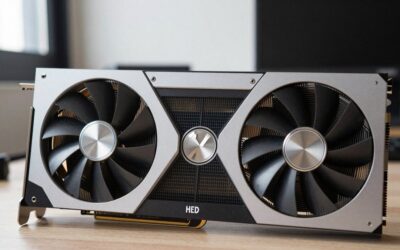
ASUS Prime GeForce RTX 5070 12GB GDDR7 OC Edition Gaming Graphics Card
Included for 'Best GPU for Gaming in 2026: Ranked by Resolution and Budget' as a relevant option in this category; details come from the product listing.
View on Amazon
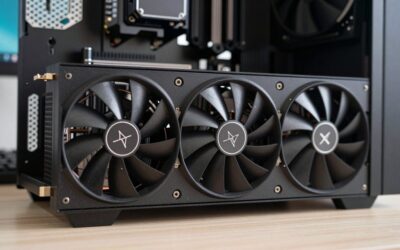
PNY NVIDIA GeForce RTX™ 5070 Ti Epic-X RGB™ OC Triple-Fan Graphics Card | 16GB GDDR7, 256-bit, Boost Speed: 2640 MHz, PCIe® 5.0, HDMI®/DP 2.1, NVIDIA Blackwell Architecture, DLSS 4.5
Included for 'Best GPU for Gaming in 2026: Ranked by Resolution and Budget' because the listing specifies 16GB GDDR7 and 256-bit, details this guide uses to compare options.
View on Amazon
PNY NVIDIA GeForce RTX™ 5070 Ti OC Triple-Fan Graphics Card
Included for 'Best GPU for Gaming in 2026: Ranked by Resolution and Budget' as a relevant option in this category; details come from the product listing.
View on AmazonQuick Verdict
| Your situation | Our verdict |
|---|---|
| 1080p at 144 Hz, tight budget | RTX 5060 class is enough for most current games, but choose a 16GB card (RTX 5060 Ti 16GB or RX 9060 XT 16GB) if you keep GPUs for four or more years. |
| 1440p at 144 to 165 Hz, balanced build | RTX 5070 is the safe NVIDIA pick; the RX 9070 and RX 9070 XT trade ray tracing strength for 16GB of VRAM. |
| 1440p ultrawide or high-refresh with heavy ray tracing | RTX 5070 Ti. The extra memory bus width and 16GB buffer give headroom the 12GB tier lacks. |
| 4K gaming with DLSS or FSR upscaling | RTX 5070 Ti is the entry point; RTX 5080 or RX 9070 XT-class cards are more comfortable. |
| Money is no object, 4K at high refresh | RTX 5090 is the only card in this generation with 32GB, but it needs a serious power supply and case. |
| Waiting for RTX 50 Super | Do not plan around it. No launch is confirmed, and the reported delay has no official end date. |
How the Tiers Break Down
1080p and entry level
At 1080p, the main question is VRAM, not shader count. The RTX 5060 ships with 8GB of GDDR7 on a 128-bit bus and a 145 W board power rating, which makes it easy to power and cool. The RTX 5060 Ti exists in 8GB and 16GB versions; the 16GB model is the one that ages better because texture-heavy games keep asking for more memory. AMD’s RX 9060 XT also comes in 8GB and 16GB variants, and Intel’s Arc B580 offers 12GB at the budget end. Verified from the Steam survey: 1080p is still the single most common resolution among Steam users, though 1440p is gaining quickly.
What depends on the exact model: whether a given 5060 Ti or 9060 XT listing is the 8GB or the 16GB version. The names are nearly identical, so read the memory line in the listing before buying.
1440p: the sweet spot
This is where most buyers should land. The RTX 5070 has 12GB of GDDR7 on a 192-bit bus and a 250 W rating. Major outlets position it as the mainstream 1440p choice, with strong ray tracing and DLSS 4 Multi Frame Generation as its selling points, and 12GB of VRAM as its main limit. The Radeon RX 9070 XT carries 16GB of GDDR6 on a 256-bit bus with a 304 W rating, and the RX 9070 sits below it at 220 W. Reviewers generally find the RX 9070 XT ahead of the RTX 5070 in rasterized games and behind it in ray tracing and upscaler maturity, though the gap depends on the game and driver version.
High-refresh 1440p and 4K
The RTX 5070 Ti steps up to 16GB of GDDR7 on a 256-bit bus at 300 W, and NVIDIA recommends a 750 W power supply for it. The RTX 5080 keeps the 16GB buffer with a 360 W rating, and the RTX 5090 jumps to 32GB at 575 W. At native 4K with high settings and ray tracing, every card below the 5090 leans on upscaling or frame generation to hold a smooth frame rate. That is a normal part of 4K gaming in 2026, not a flaw in any one card.
NVIDIA or AMD: the software side
The hardware choice also decides your upscaler. DLSS 4 with Multi Frame Generation is exclusive to RTX 50 cards for the multi-frame mode. AMD’s FSR 4 is machine-learning based and runs on RDNA 4 (RX 9000) cards, but it is supported in fewer games than DLSS. If you play mostly esports titles, this matters little. If you play new single-player releases with ray tracing, it matters a lot.
Specification table
| Card | VRAM | Memory bus | Board power |
|---|---|---|---|
| GeForce RTX 5060 | 8GB GDDR7 | 128-bit | 145 W |
| GeForce RTX 5060 Ti | 16GB GDDR7 (8GB version also exists) | 128-bit | 180 W |
| GeForce RTX 5070 | 12GB GDDR7 | 192-bit | 250 W |
| GeForce RTX 5070 Ti | 16GB GDDR7 | 256-bit | 300 W |
| GeForce RTX 5080 | 16GB GDDR7 | 256-bit | 360 W |
| Radeon RX 9070 | 16GB GDDR6 | 256-bit | 220 W |
| Radeon RX 9070 XT | 16GB GDDR6 | 256-bit | 304 W |
These are reference figures from the manufacturers’ published specifications as relayed by hardware outlets. Partner boards with factory overclocks can draw more, and one published review measured an RX 9070 XT drawing more than its rated figure, so plan power with margin.
How to Decide
Work through this checklist in order. Each step narrows the field.
- Start with the monitor. A 1080p panel rarely justifies more than an RTX 5060 Ti class card. A 1440p panel at 144 Hz or above is the natural home for the RTX 5070 and RX 9070 tier. A 4K panel pushes you to the RTX 5070 Ti or above.
- Check VRAM against how long you keep a card. Rule of thumb: 8GB is fine for a two-year plan at 1080p, 12GB is comfortable at 1440p for now, and 16GB is the safer choice for anything you intend to keep past four years.
- Size the power supply. Rule of thumb: add the card’s board power to roughly 150 to 200 W for the rest of a mid-range system, then leave 20 to 30 percent headroom. A 250 W card plus a 65 W to 125 W CPU lands comfortably on a 650 W unit, which matches NVIDIA’s guidance for the RTX 5070 tier. A 300 W card pairs with 750 W.
- Measure the case. Many partner boards run 2.5 to more than 3 slots thick. Measure the clearance between the motherboard’s top PCIe slot and the front fan mount in millimeters, and compare it with the card length on the listing. Leave at least 10 to 15 mm of spare room.
- Match the CPU. A card that is far faster than the processor wastes money at 1080p. At 1440p and 4K the GPU does more of the work, so a mid-range modern CPU is usually enough.
- Decide how much you care about ray tracing and frame generation. If it is a priority, lean NVIDIA. If you mainly want raw speed per slot and more VRAM, an RX 9070 class card deserves a look.
Worked example: a player with a 1440p, 165 Hz monitor, a 6-core CPU and a 650 W power supply has a clean match with a 12GB RTX 5070 class card. The same player with a 4K television should step to the 16GB RTX 5070 Ti and upgrade the power supply to 750 W.
Products That Fit
The boards below are examples that fit the situations above, not a ranking. Confirm the exact model, length and connector on the listing before ordering.
ASUS Prime GeForce RTX 5070 12GB – the balanced 1440p build
As an Amazon Associate we earn from qualifying purchases at no extra cost to you.

This is the straightforward 1440p pick for a player with a 144 to 165 Hz monitor and a 650 W power supply. It uses the mainstream RTX 5070 chip, so it benefits from DLSS 4 and the NVIDIA feature set without the heat and power demands of the Ti tier. The Prime line is ASUS’s no-frills design, which tends to suit compact and mid-tower cases better than the thickest coolers.
- 12GB GDDR7 memory, OC edition (per the listing name)
- Gaming graphics card based on the RTX 5070 (reference board power 250 W)
- Exact card length, slot width and connector: confirm on listing
Caveat: 12GB of VRAM is adequate at 1440p today but is the first spec to feel tight if you plan to run maximum texture settings at 4K or keep the card for many years.
PNY GeForce RTX 5070 Ti Epic-X RGB OC – 4K with upscaling

For a player moving to a 4K monitor or a high-refresh ultrawide, the RTX 5070 Ti tier is where the 16GB buffer and 256-bit bus show their value. This PNY version has a triple-fan cooler and RGB lighting, which suits a windowed case where looks matter. It is a good match for builders who want upscaling and frame generation headroom rather than native 4K at every setting.
- 16GB GDDR7, 256-bit memory interface
- Boost speed listed at 2640 MHz
- PCIe 5.0 interface, HDMI and DisplayPort 2.1 outputs (per the listing)
- Triple-fan OC design; thickness and length: confirm on listing
Caveat: NVIDIA’s guidance for this tier is a 750 W power supply, and a triple-fan board is a physically large card. Measure your case first.
PNY GeForce RTX 5070 Ti OC Triple-Fan – the same tier without the RGB

This is the alternative to the Epic-X version for buyers who want the RTX 5070 Ti performance class in a plainer package. It suits a 1440p high-refresh or 4K-with-upscaling build where lighting is not a priority. Compare the two PNY listings side by side, because the main differences are likely cooler styling, clocks and lighting rather than the core chip.
- RTX 5070 Ti graphics card with 16GB GDDR7 (reference figure for this tier)
- Triple-fan OC design (per the listing name)
- Boost clock, dimensions and power connector: confirm on listing
Caveat: because this is the same tier as the Epic-X board above, it only makes sense if the listing is the better fit for your case or budget. It is not a step up in capability.
Common Mistakes
- Buying a 5060 Ti or 9060 XT without checking whether the listing is the 8GB or 16GB version.
- Ignoring the power supply. A new card on an old 450 W unit is a common cause of crashes under load.
- Skipping a case-clearance check. A 3-slot card can block the lower PCIe slot and press against the front fans.
- Pairing a very fast GPU with a 1080p 60 Hz monitor, which leaves most of its speed unused.
- Assuming a rumored card, such as an RTX 50 Super model, will arrive soon and lower the price of the current ones.
- Treating one month of the Steam survey as proof that a card is best. It shows what people own, not what is best.
Buy Now or Wait?
- Buy now if your current card cannot run your games acceptably. Waiting on an unannounced product has no confirmed payoff.
- Wait only if you can live with your current card for several months and want to see whether the reported Super refresh appears, which no one has confirmed.
- Wait for a better listing if the board you want costs well above the launch recommendation for its tier; street pricing moves.
- Buy the 16GB variant when it is the sensible choice and you will keep the card four years or more.
Questions
Is 8GB of VRAM enough for gaming in 2026?
For 1080p at medium to high settings, usually yes. Valve’s survey still shows 8GB cards are among the most common in use. If you play new releases at high texture settings or want a card to last four years, 12GB or 16GB is the safer choice.
Is the RX 9070 XT better than the RTX 5070?
It depends on what you play. The RX 9070 XT has 16GB of VRAM and generally leads in rasterized games, according to major reviewers, while the RTX 5070 is ahead in ray tracing, power efficiency and upscaler support. Check the specific games you play.
Do I need a 750 W power supply for an RTX 5070 Ti?
NVIDIA recommends 750 W for the RTX 5070 Ti, and that is the sensible target. A good-quality 650 W unit may work in a low-power system, but you give up the headroom that protects against transient power spikes.
Should I wait for the RTX 50 Super cards?
There is nothing to wait for at the moment, only reports. Outlets such as VideoCardz and Tom’s Hardware say the cards are built but on hold over memory costs, and NVIDIA has not confirmed them. Buy for the games you play today.
Can any single GPU do native 4K at every setting?
Only the very top of the stack gets close. For most buyers, 4K gaming means using DLSS or FSR upscaling, which delivers a good image quality at a lower internal resolution. That is how the RTX 5070 Ti and RTX 5080 are meant to be used.
Does PCIe 5.0 matter for these cards?
Not much in practice. The RTX 50 and RX 9000 cards use PCIe 5.0, but they work in PCIe 4.0 slots with little real-world difference for most games. Some 8-lane cards, such as the lower-end models, are a little more sensitive to older slots, so check if you are on PCIe 3.0.
Update History
- October 14, 2026 – Initial publication.
- Check the product page for current specifications and availability before buying.
Sources and Methodology
This guide combines published manufacturer specifications as relayed by hardware outlets, press coverage of the RTX 50 Super delay, Valve’s published survey figures and the product listing fields for each example board. This is a research-based guide, not a product test report, and no performance numbers are quoted because they depend on the game, settings and driver.
- Tom’s Hardware GPU coverage and the RTX 50 Super reporting
- VideoCardz and TechPowerUp reporting on the Super delay
- Corsair hardware explainers for RTX 50 and RX 9070 specifications
- Valve’s Steam Hardware and Software Survey, September 2026
- Retailer listing fields for each example board
Ready to decide? Our #1 pick for 2026 is the 1080p at 144 Hz, tight budget.
Live price & availability on Amazon.