Table of Contents
- Quick Answer
- Huntsman V3 Pro TKL
- Keychron K2 HE
- G PRO X 60 Lightspeed
- Alloy Origins 60
- RK61
- How to Choose
- Who Should Skip
- FAQ
- Conclusion
- Product and ASIN Reference
Fortnite rewards fast, repeatable key presses more than almost any other shooter. Building, editing and weapon swaps chain together in fractions of a second, so the keyboard matters: rapid trigger and adjustable actuation shorten the delay between a decision and the action on screen, and a compact layout leaves room for wide mouse swings.
The five boards below cover the main ways players buy for Fortnite. The Razer Huntsman V3 Pro TKL is the premium analog pick, the Keychron K2 HE brings Hall Effect switches and wireless in a 75 percent frame, the Logitech G PRO X 60 Lightspeed is the compact wireless option, the HyperX Alloy Origins 60 is the mid-range mechanical board, and the RK61 covers the budget tier.
As an Amazon Associate, we earn from qualifying purchases.
Quick Answer
The Razer Huntsman V3 Pro TKL is the best gaming keyboard for Fortnite for most competitive players, with analog optical switches, adjustable actuation and Rapid Trigger for fast edits and resets. The Keychron K2 HE is the wireless Hall Effect alternative, the Logitech G PRO X 60 Lightspeed suits small desks, and the RK Royal Kludge RK61 is the budget pick.
Razer Huntsman V3 Pro TKL

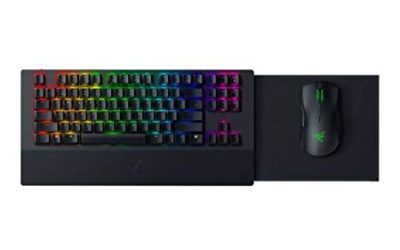
The Huntsman V3 Pro TKL is the flagship pick and the only board here with fully analog optical switches. Each key reports how far it is pressed, so the actuation point can be set anywhere between 0.1 mm and 4.0 mm, with adjustments made on the board itself using the LED array beside the media keys. Movement keys can sit at a hair trigger for instant direction changes while build keys stay deeper to avoid accidental walls mid-fight.
Rapid Trigger resets keys dynamically as they travel upward, which is exactly what edit plays reward: release a key and it stops registering almost immediately, so the next input lands with less dead time. Snap Tap prioritizes the most recent directional input when both strafe keys are held. The tenkeyless frame leaves more desk room for mouse sweeps, the doubleshot PBT keycaps resist shine, and the magnetic leatherette wrist rest suits long sessions. This is the premium pick for players who want per-key control over how their keyboard responds.
Specs
- Layout: Tenkeyless, wired
- Switches: Razer Analog Optical Switches Gen-2
- Actuation range: 0.1 mm to 4.0 mm, adjustable per key
- Features: Rapid Trigger, Snap Tap, onboard adjustment with LED indicators
- Polling rate: 1,000 Hz wired
- Keycaps: Doubleshot PBT
- Extras: Magnetic leatherette wrist rest, detachable USB-C cable
Keychron K2 HE
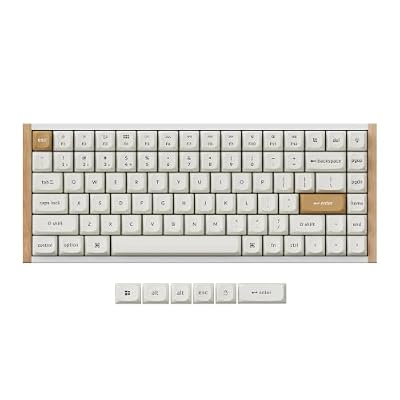
The K2 HE is the mid-range pick for players who want Hall Effect performance without a cable. It pairs Gateron Double-Rail Magnetic switches with a 75 percent layout that keeps the function row and arrow keys, which Fortnite players use for inventory and map checks. Adjustable actuation runs from 0.2 to 3.8 mm in 0.1 mm steps, and Rapid Trigger means edit keys reset as soon as they start rising, not at a fixed point.
It connects over 2.4 GHz wireless, Bluetooth 5.2 or USB-C, with 1,000 Hz polling on the dongle and wired modes. The Launcher web app and QMK support handle remapping, actuation tuning and features such as Snap Action and an analog mode that reads key travel like a controller trigger. The aluminum frame has wood side accents, the OSA PBT keycaps suit long sessions, and the 4,000 mAh battery keeps the cable away for days of play.
Specs
- Layout: 75 percent, 84 keys
- Switches: Gateron Double-Rail Magnetic, hot-swappable within the double-rail magnetic family
- Actuation: Adjustable from 0.2 to 3.8 mm in 0.1 mm increments
- Features: Rapid Trigger, Snap Action, Analog Mode
- Connection: 2.4 GHz wireless at 1,000 Hz polling, Bluetooth 5.2, USB-C wired
- Battery: 4,000 mAh
- Build: Aluminum frame with wood side accents, OSA PBT keycaps
Logitech G PRO X 60 Lightspeed

The G PRO X 60 Lightspeed is Logitech’s compact answer for small desks and travel setups. The 60 percent frame drops the function row, arrow keys and number pad into layers, freeing a large strip of desk for low-sensitivity mouse movement, the style most Fortnite players use for build fights. GX optical switches actuate with light rather than metal contacts, in tactile or linear versions, so presses register fast and consistently.
KEYCONTROL is the differentiator here. Through G HUB, every key can hold layered commands across five layers, so build pieces, edit binds and weapon slots sit under one hand position instead of stretching across a bigger board. Lightspeed wireless keeps latency at wired levels, Bluetooth covers a second device, and USB wired mode works while charging. Logitech rates the battery at up to 65 hours, dual-shot PBT keycaps keep legends readable, LIGHTSYNC RGB runs per key, and a carrying case is included.
Specs
- Layout: 60 percent
- Switches: GX optical, tactile or linear
- Connectivity: Lightspeed 2.4 GHz wireless, Bluetooth, USB wired
- Battery life: Up to 65 hours
- Keycaps: Dual-shot PBT
- Lighting: LIGHTSYNC per-key RGB
- Software: G HUB with KEYCONTROL, five customizable layers
- Extras: Volume roller, carrying case included
HyperX Alloy Origins 60

The Alloy Origins 60 takes a simpler route to the same desk space: a full aircraft-grade aluminum body that gives the small frame a dense, planted feel during fast build sequences. Its HyperX Red mechanical switches are linear, actuate at 1.8 mm, and are rated for 80 million keystrokes.
Practical details carry the rest of the design. The exposed LED layout makes the per-key RGB look brighter than on boards where the housing hides the diode, the detachable USB-C cable plugs in at an angle to save depth, and secondary functions are printed on the keycap fronts so the layer is easy to learn. Three tilt angles come from the two-stage feet, onboard memory holds three profiles, and NGENUITY software handles macros and lighting. There is no rapid trigger here, so this is the mid-range pick for players who value build quality and a familiar switch feel over analog features.
Specs
- Layout: 60 percent
- Switches: HyperX Red mechanical, linear, 1.8 mm actuation, rated for 80 million keystrokes
- Connectivity: Wired USB-C, detachable cable
- Keycaps: Double-shot PBT
- Body: Aircraft-grade aluminum
- Dimensions: 296 x 105.5 x 36.9 mm
- Extras: Onboard memory for three profiles, two-stage tilt feet
RK Royal Kludge RK61

The RK61 is the budget-tier way into a compact Fortnite setup, and it gives up surprisingly little for the tier. The white version in this listing ships with RK Red linear switches in hot-swappable sockets, so switches can be pulled and replaced without soldering. It connects three ways: 2.4 GHz wireless, Bluetooth, or wired over USB-C, making it easy to move between a gaming PC and a laptop on the same small desk.
The built-in battery is rated at 1,450 mAh, RGB backlighting runs through the board, and the RK software handles remapping and macros, so build and edit binds can be moved to comfortable keys just as on the premium boards. The frame is plastic rather than aluminum and the keycaps are not PBT, the expected trade-offs at this tier. What you keep is the important part: a true 61-key layout at 292 mm wide that frees the same mouse space as the boards above it.
Specs
- Layout: 60 percent, 61 keys
- Switches: RK Red mechanical, linear, hot-swappable
- Connectivity: 2.4 GHz wireless, Bluetooth, wired USB-C
- Battery: 1,450 mAh built-in
- Backlighting: RGB
- Dimensions: 292 x 102 x 40 mm
How to Choose
Start with switch technology, because it decides how Fortnite feels. Analog optical and Hall Effect switches, in the Razer and Keychron boards here, add adjustable actuation and rapid trigger. Shallow actuation makes movement and edit keys fire sooner, and rapid trigger lets a key reset the moment it starts rising, which tightens repeated edits. Standard mechanical and optical switches cannot do this, but they cost less and feel familiar.
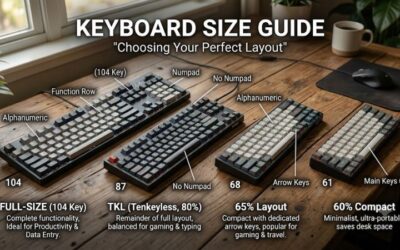
Layout is the second call. A 60 percent board frees the most mouse room and suits players comfortable putting arrows, function keys and media controls on a layer. A 75 percent board keeps physical arrows and a function row in a frame only slightly wider, which helps if you also type or stream on the same desk. Tenkeyless is the middle ground: every commonly bound key, with the number pad removed.
Connectivity comes third. Wired boards never need charging and keep a small desk simple. Wireless boards clear the cable entirely, which matters on shallow desks, but they add a dongle and a battery. Finally, weigh the extras: PBT keycaps resist shine, onboard memory keeps binds when you switch computers, and layered remapping matters more in Fortnite than in most games because build and edit binds decide how much of the board you actually use.
Who Should Skip
Skip compact and analog boards if your Fortnite play is casual and your current full-size keyboard feels fine. Rapid trigger and adjustable actuation help most in ranked modes where edits and resets decide fights; in casual lobbies the gains are small, and the premium tiers buy features you may never tune.
Also skip the 60 percent layout if you rely on dedicated arrow keys, a function row or a number pad for work, school or other games on the same machine. Layers work, but they slow down tasks built on those keys. And if you dislike tuning software, the flagship analog boards ask for setup time before they feel right; a simple mechanical board like the Alloy Origins 60 is the better fit.
FAQ
Does rapid trigger actually help in Fortnite?
It helps most with editing and resetting. Rapid trigger lets a key stop registering the moment it starts to rise instead of at a fixed reset point, so repeated edit inputs and quick direction changes feel more immediate. The benefit is real but incremental: it sharpens inputs you already make rather than replacing practice.
Is a 60 percent keyboard big enough for Fortnite?
Yes, for most players. Fortnite’s core binds fit on the main cluster, and layered keys cover arrows and the function row. The smaller frame also frees mouse room, which matters for low-sensitivity aim. If you dislike layers, a 75 percent board like the Keychron K2 HE keeps physical arrow keys in a still-compact frame.
Are Hall Effect and analog optical switches the same thing?
They solve the same problem differently. Hall Effect switches sense key position with magnets, while analog optical switches sense it with light. Both allow adjustable actuation and rapid trigger. The practical differences are software, switch feel and layout, so pick by the board around the switch rather than the sensing method alone.
Can these keyboards be used on console?
Fortnite on PlayStation and Xbox supports keyboard and mouse input in matches, and standard USB and Bluetooth keyboards generally work for gameplay. Features that depend on PC software, such as layered remapping and rapid trigger settings, are configured on a PC, and some settings are stored on the board while others need the software running. Check each maker’s stated platform support before buying.
Conclusion
For Fortnite, the decision comes down to switch speed and layout. The Razer Huntsman V3 Pro TKL offers the deepest analog control, the Keychron K2 HE adds wireless Hall Effect performance with physical arrow keys, and the Logitech G PRO X 60 Lightspeed is the compact wireless pick for small desks. The HyperX Alloy Origins 60 covers mid-range build quality, and the RK Royal Kludge RK61 makes the compact layout accessible at the budget tier.
Product and ASIN Reference
| Product | ASIN |
|---|---|
| Razer Huntsman V3 Pro TKL | B0CG7BWG7J |
| Keychron K2 HE | B0DCVSBSQG |
| Logitech G PRO X 60 Lightspeed | B0BRSSGBCN |
| HyperX Alloy Origins 60 | B08XBQ79MN |
| RK Royal Kludge RK61 | B07PBC15N8 |