🛒 Best Price Today on Amazon
Prime members get fast, free shipping on everything above, plus member-only deals. New members get a 30-day free trial — cancel anytime.
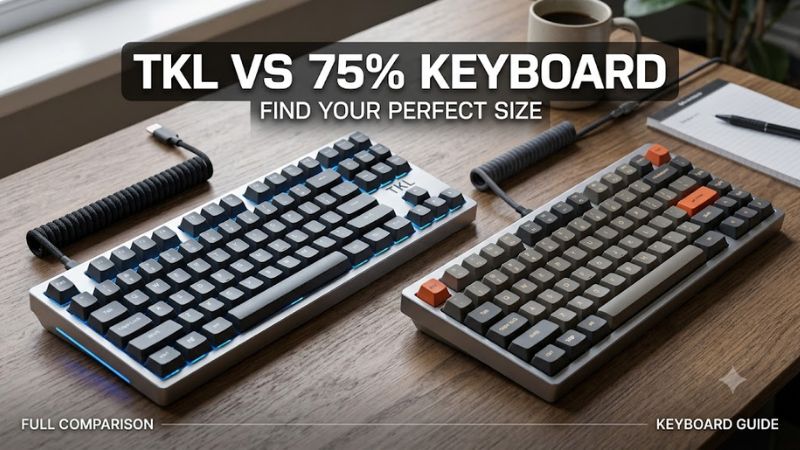
Evaluating a tkl vs 75 keyboard decision requires looking at physical dimensions and key placement. A tenkeyless board drops the numpad while keeping standard key spacing and isolated arrows. A 75% model condenses the function row and navigation cluster to save desk space. Both options deliver high performance for modern desktop setups.
How to Choose Compact Gaming Keyboards
Selecting the right form factor depends on your desk area and daily typing habits. Understanding a tkl vs 75 keyboard trade-off involves comparing spatial clearances, key legend standards, navigation cluster spacing, and platform connectivity. Examining these four structural criteria ensures your desktop perimeter supports both rapid gaming inputs and routine productivity tasks.
Desk Space Savings and Mouse Movement Area
A tenkeyless chassis spans roughly 14 inches wide, leaving moderate room for mouse movement across small surfaces. Choosing a 75 percent model cuts horizontal width down to 12.5 inches by removing blank gaps between key clusters. Comparing a tkl vs 75 keyboard highlights how those two saved inches reduce arm strain during broad low-sensitivity mouse swipes in fast tactical shooters.
Compact dimensions also keep your hands positioned in line with your shoulders, promoting better posture during extended gaming sessions. While a tenkeyless footprint frees substantial room compared to a full-size board, a condensed 75 percent frame maximized desk surface efficiency. Choosing between them comes down to whether your mouse pad area demands every possible millimeter of clearance.
Keycap Compatibility and Customization Options
Tenkeyless keyboards use standardized keycap sizes across all modifier keys, spacebars, and navigation blocks. This traditional sizing makes fitting third-party custom keycap sets straightforward without searching for rare key widths. Standard 1.25u bottom row modifier keys match almost every aftermarket keycap set available in retail stores, simplifying aesthetic modifications over time.
Conversely, 75 percent keyboards rely on a compressed right shift key measuring 1.75u and single-unit alt, fn, and ctrl keys. Upgrading keycaps on a compressed layout requires buying custom kits that include specialized row profiles for vertical navigation columns. Enthusiasts must verify keycap stem profiles and bottom row keycap units before purchasing replacement sets for compact frames.
Navigation Cluster Spacing and Muscle Memory
Tenkeyless designs maintain isolated arrow keys and a traditional six-key navigation block separated by physical spacing. Players transitioning from standard full-size layouts retain muscle memory for commands like Insert, Home, Delete, and Page Up. Evaluating a tkl vs 75 keyboard shows that separated key clusters reduce accidental keystrokes during intensive gaming commands or heavy document editing.
In contrast, 75 percent layouts place arrow keys directly against the main alphanumeric cluster and compress navigation keys into a single vertical right column. Eliminating empty spacing creates a sleek profile, but it demands an adjustment period to avoid hitting up-arrow when reaching for the shift key. Users who rely heavily on dedicated media keys or isolated directional clusters often prefer separated rows.
System Compatibility and Platform Integration
Modern mechanical keyboards connect via USB-C cables, low-latency 2.4 GHz wireless receivers, or Bluetooth wireless links. High-performance gaming models feature up to 8000 Hz polling rates, sending key registration data to the processor every 0.125 milliseconds. System compatibility requires USB 3.0 ports and updated driver software on Windows 11 or macOS workstations to manage per-key RGB lighting effects.
Hardware options like hot-swappable switch sockets accept both 3-pin and 5-pin mechanical switches without requiring soldering tools. Onboard memory chips store custom key remaps, macros, and actuation points directly on the board hardware. Cross-platform toggle switches on the rear frame allow rapid switching between Windows and macOS key mapping layers without reopening configuration software applications.
Top Picks for Compact Keyboards
Selecting a specific model requires matching your desk space requirements with specialized switch tech and connectivity modes. The following tkl vs 75 keyboard choices highlight top-performing options across distinct price points and feature sets. Each board provides verified polling performance, sturdy build construction, and full compatibility across modern Windows and macOS desktop platforms.
| Product | Best For | Key Spec | Compatibility | Watch Out For | | SteelSeries Apex Pro TKL | Best Overall | Adjustable Hall Effect Switches | Windows 11, macOS, USB-C | ABS Keycaps on base model | | Keychron V3 Max | Best Value | 1000 Hz 2.4GHz Wireless, QMK/VIA | Windows 11, macOS, Linux | Plastic chassis construction | | Lemokey P1 Pro | Best Custom 75% | CNC Aluminum, Gasket Mount | Windows 11, macOS, Linux | Heavy 1650g total weight | | ASUS ROG Azoth | Best Wireless 75% | 8000 Hz Polling, OLED Screen | Windows 11, macOS, USB-C | High retail price point |
SteelSeries Apex Pro TKL
The SteelSeries Apex Pro TKL is designed for competitive gamers who demand ultra-fast switch responsiveness and full layout familiarity. It features magnetic OmniPoint switches with adjustable per-key actuation ranging from 0.1mm to 4.0mm and a 1000 Hz polling rate. The spacious tenkeyless layout keeps navigation keys separate, making it ideal for players who want rapid gaming triggers without learning compressed key positions.
An integrated smart OLED screen displays system metrics and allows setting adjustments directly on the device without launching background desktop software. The aluminum top frame provides structural stability, though stock ABS keycaps on base configurations can develop shine under heavy daily use. Gamers who require a dedicated number pad for data entry should consider full-size options rather than tenkeyless chassis.
Keychron V3 Max
The Keychron V3 Max delivers excellent performance for users seeking an affordable tenkeyless keyboard with open-source software customization. It includes 2.4 GHz wireless and Bluetooth connectivity operating at a 1000 Hz polling rate, along with hot-swappable switch sockets and double-shot PBT keycaps. Weighing a tkl vs 75 keyboard option like this model highlights the advantage of standard keycap spacing for budget-focused typists.
Full QMK and VIA compatibility allows users to remap any key or program custom macros directly inside a standard web browser window. Acoustic dampening foam inside the ABS plastic body reduces internal resonance, producing a satisfying acoustics profile during fast typing sessions. However, the lightweight plastic frame lacks the rigid weight of premium aluminum models, making it less suitable for fixed enthusiast desk setups.
Lemokey P1 Pro
The Lemokey P1 Pro targets enthusiasts who want a premium 75 percent custom mechanical keyboard packed into a solid metal chassis. Built with a full CNC machined aluminum body weighing 1650 grams, it incorporates a gasket mount design with multiple acoustic foam dampening layers. It offers a 1000 Hz polling rate over 2.4 GHz wireless or wired USB-C connections, ensuring immediate input registration during intense online matches.
Cherry profile double-shot PBT keycaps resist oils, while 5-pin hot-swappable sockets let you swap mechanical switches without soldering. A programmable rotary knob provides quick volume and audio controls right above the compressed navigation column. Because of its substantial weight and tight key spacing, this 75 percent board is meant for stationary desk setups rather than portable travel between gaming tournaments.
ASUS ROG Azoth
The ASUS ROG Azoth is an elite 75 percent wireless gaming keyboard engineered for maximum performance and hardware customizability. It features pre-lubed mechanical switches, a multi-layer dampening gasket structure, and a vibrant color OLED display paired with a three-way control knob. Tri-mode connectivity delivers stable 2.4 GHz wireless performance with up to 1600 hours of battery life when lighting features are turned off.
When paired with the optional ROG Polling Rate Booster accessory, this model reaches an extreme 8000 Hz polling rate for near-instant response. Pre-lubed ROG PBT double-shot keycaps provide a durable textured surface, while hot-swappable sockets support easy switch replacements. Users looking for budget-friendly hardware or standard keycap set compatibility should consider alternative options due to its premium pricing.
Frequently Asked Questions
Navigating key layouts, switch choices, and hardware features often leads to practical questions regarding daily usability and gaming efficiency. Reviewing a tkl vs 75 keyboard comparison requires evaluating key retention, ergonomics, and custom keycap availability. The following direct answers address common buyer inquiries to help you pick the perfect compact layout for your gaming station.
Which Layout Provides More Desk Space for Gaming?
A 75 percent keyboard provides more desk space for gaming because its compressed frame measures roughly 12.5 inches wide compared to 14 inches for a tenkeyless layout. Evaluating a tkl vs 75 keyboard shows that saving approximately 1.5 inches gives low-DPI mouse users significantly more room for sweeping motions. This compact footprint prevents mouse collisions with the chassis edge during fast gaming flick shots.
While tenkeyless models free up substantial desk area compared to full-size keyboards, 75 percent designs optimize every millimeter by eliminating empty space around key blocks. Players who operate on narrow desks or small mouse pads will benefit directly from the reduced horizontal profile. The smaller footprint also makes packing your gaming gear into a backpack easier when travelling to LAN events or tournaments.
Is a TKL Keyboard Better for Daily Typing and Work?
A TKL keyboard is better for daily typing and work because it maintains standard spacing and isolated navigation keys that require no adjustment period. The traditional layout keeps keys like Delete, Home, and Page Up in familiar locations, ensuring fast navigation without looking down. Separated arrow keys prevent accidental mispresses during speed typing, data processing, or programming tasks on desktop computers.
In contrast, 75 percent boards compress navigation keys into a single vertical column and eliminate blank spaces between clusters. While this design saves desk space, typists must adapt to modified key placements and potential function layer combinations. Users who spend long hours writing or working with spreadsheets usually favor the predictable muscle memory provided by standard tenkeyless button locations.
Do 75 Percent Keyboards Lose Function Keys?
No, 75 percent keyboards do not lose function keys, as they retain a dedicated row of F1 through F12 keys positioned directly above the number row. Unlike 60 or 65 percent keyboards that force users to hold function modifiers to access F-keys, 75 percent models keep these keys physically accessible. Games that rely on fast function shortcuts for ability casting or camera groups maintain full input functionality.
The main distinction lies in key spacing, as 75 percent boards compress the function row tightly against the number keys without spacing gaps. Players who rely on touch orientation might occasionally press a number key instead of an F-key until muscle memory adapts. Overall, 75 percent boards deliver full function row capability while occupying significantly less desk space than traditional full-size boards.
Are Keycaps Harder to Find for 75 Percent Keyboards?
Yes, keycaps are harder to find for 75 percent keyboards because they require specific key sizes like a 1.75u right shift and 1u modifier keys. While tenkeyless boards use completely standardized keycap dimensions across every row, 75 percent layouts demand custom keycap kits that include extra non-standard key sizes. Buyers must check keycap set compatibility charts to ensure proper fitting before making a purchase.
Many modern aftermarket keycap sets now include modifier keys designed for 75 percent and 65 percent layouts in their base kits. However, budget keycap sets may only include standard bottom row keys meant for tenkeyless or full-size keyboards. Verifying legend profiles and unit sizes prevents purchasing keycap sets that fail to cover the compressed vertical navigation column on a 75 percent keyboard chassis.
Final Thoughts
Choosing between a tkl vs 75 keyboard depends on whether you prioritize standard keycap compatibility and familiar spacing or maximum desk surface efficiency. Tenkeyless boards offer instant muscle memory for typists and gamers alike, while 75 percent layouts provide extra mouse room without sacrificing function keys. Assess your desk space and typing needs to select the ideal form factor for your setup.