- Top Pick: Apple Magic Keyboard – US English , Bluetooth
- Best Value: TECKNET Wired Keyboard for MacOS Devices with Dual Interface, Slim Mac Keyboard, Comfortable Ergonomic Typing Angle & Stable Connection for PC/Laptop, Compatible with MacBook, iMac, Mac mini/Pro
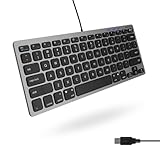
- Premium Choice: Macally Large Print Keyboard for Mac (Dual USB-C & USB-A) – Backlit Small Wired Keyboard, Compact Mini USB Keyboard with Quiet Scissor Switch Keys, Compatible with MacBook Air & Mac mini
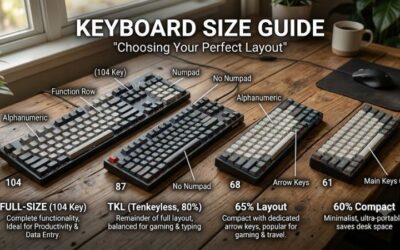
A mini Mac keyboard delivers the clean, minimalist typing experience Apple users love while reclaiming precious desk space. By trimming the numpad and tightening the layout, these compact boards keep your mouse closer, reduce clutter, and pair beautifully with a MacBook, iMac, or Mac mini setup. Small does not have to mean compromised.
From Apple’s own Magic Keyboard to feature-packed third-party alternatives, the mini Mac keyboard market offers something for every taste and budget. This review breaks down what to look for, how these compact boards perform in daily use, and which model best suits your Apple workflow.
As an Amazon Associate we earn from qualifying purchases at no extra cost to you.






🎮 Get More From Your Setup — Free
Prime Gaming gives you free PC games every month, in-game loot, and a free Twitch channel sub — plus fast free shipping on all the gear above. New members get a 30-day free trial.
Watch: Mini Mac Keyboard — Video Review
Design & Build
Compact Mac keyboards prioritize a small footprint without sacrificing proper Mac key layouts. Apple’s Magic Keyboard sets the standard with its slim aluminum body and low-profile scissor switches. Third-party options add versatility: the TECKNET Wired Keyboard offers a slim Mac layout with dual interfaces and a comfortable typing angle, while the Macally Large Print board combines a compact backlit design with quiet scissor keys and dual USB-C and USB-A connections. The premium Logitech MX Keys Mini, available in a dedicated Mac Space Grey version, brings a sculpted, illuminated minimalist design that feels genuinely upscale on any Apple desk.
Performance
Typing feel and connectivity define this category. The Apple Magic Keyboard and Logitech MX Keys Mini deliver crisp, quiet keystrokes and instant wireless pairing, with the MX Keys Mini adding smart backlighting that lights up as your hands approach. Wired options like the TECKNET provide dependable, lag-free input with no charging required, ideal for a stationary Mac mini. The Macally board’s backlighting and quiet switches suit dim rooms and shared spaces, while its dual connectors offer flexibility. Multi-device models such as the seenda combo let you switch between your Mac, iPhone, and iPad seamlessly, making them versatile hubs for Apple ecosystems.
Pros & Cons
- Space-saving layouts keep the mouse closer and desks tidy.
- Proper Mac key mapping with Command and Option keys.
- Backlit options like the MX Keys Mini aid low-light typing.
- Wired and wireless choices to fit any setup.
- No numpad makes heavy data entry less convenient.
- Premium models like the MX Keys Mini carry higher prices.
Alternatives to Consider
If you want the most refined typing experience, the Logitech MX Keys Mini for Mac in Space Grey is the standout, with smart backlighting and multi-device switching. Apple purists will gravitate to the Magic Keyboard for its seamless integration. Budget-minded users who prefer a wired connection should choose the TECKNET, while those who want backlighting at a lower price will like the Macally Large Print board. Anyone needing a matching mouse and multi-device flexibility should consider the seenda combo, which covers Mac, MacBook, and iPad.
Related Guides
- Best Buy Gaming Keyboards (2026)
- Best Wireless Gaming Keyboard And Mouse Combo (2026)
- Best RGB Gaming Keyboard (2026)
- Keychron k10 Keyboard (2026)
- Block Keyboard (2026)
Frequently Asked Questions
What makes a keyboard a mini Mac keyboard?
It combines a compact layout, usually without a numpad, with a proper Mac key arrangement. Boards like the MX Keys Mini and Magic Keyboard keep the footprint small while retaining Mac-specific functions.
Is a numpad-free keyboard a problem?
Only if you do heavy numeric entry. For most users, the tighter layout of a mini board like the TECKNET is a benefit, keeping the mouse closer and the desk uncluttered.
Does the MX Keys Mini work with Mac?
Yes. There is a dedicated MX Keys Mini for Mac in Space Grey with Mac-optimized keys, and the standard Graphite version is also fully Mac compatible.
Wired or wireless for a compact Mac keyboard?
Wireless models like the Magic Keyboard reduce clutter and allow device switching, while wired boards like the TECKNET never need charging. Choose based on whether portability or reliability matters more to you.
Verdict
A mini Mac keyboard is a smart upgrade for anyone who values a clean, efficient desk. The Logitech MX Keys Mini for Mac is our top pick for its premium feel and smart backlighting, while the Apple Magic Keyboard remains the choice for pure integration. Budget shoppers should look at the wired TECKNET or the backlit Macally board. Whichever you choose, you will gain desk space without giving up proper Mac functionality.