🛒 Best Price Today on Amazon
Prime members get fast, free shipping on everything above, plus member-only deals. New members get a 30-day free trial — cancel anytime.
Modern peripheral technology has shifted toward custom sensitivity and faster input detection across competitive PC titles. Adopting magnetic keyboard switches allows players to customize actuation points and prevent physical contact wear. Sensor-based detection alters how inputs register, offering dynamic control over movement and action triggers during demanding gameplay.
What Magnetic Keyboard Switches Really Come Down To
Understanding how analog sensors interpret physical distance forms the core foundation of contactless input design. Traditional mechanical keys rely on metal leaf contacts, whereas magnetic modules measure continuous field strength changes. This structural shift replaces fixed actuation points with flexible software adjustments for competitive gaming setups.
Continuous Analog Sensing and Magnetics
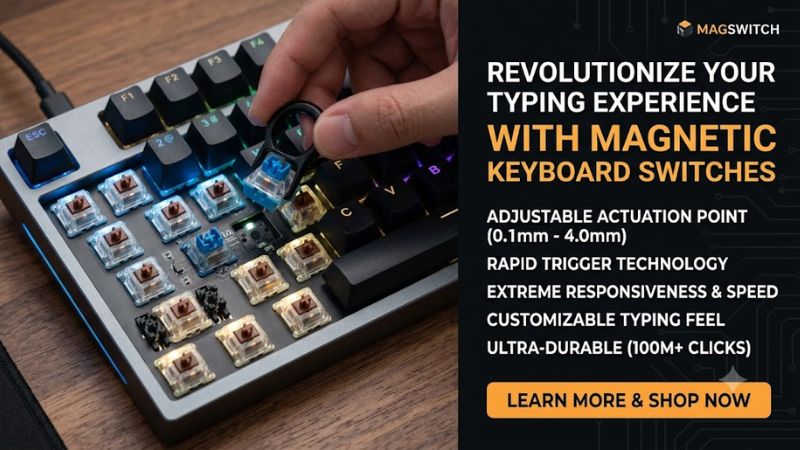
Hall Effect sensors detect the proximity of a small magnet housed inside the stem of the key switch. As the stem depresses, the sensor measures changes in voltage across the circuit board in real time. This analog stream provides exact position data across the entire travel distance rather than a basic binary signal.
Because position tracking is continuous, users gain fine control over key press registration. Software translates voltage shifts into millimeter distance measurements, enabling precise calibration for individual keys. This continuous sensing replaces traditional mechanical contacts with reliable magnetic field tracking.
Dynamic Actuation and Rapid Reset
Traditional switches require the stem to rise past a fixed reset point before registering another keystroke. Magnetic designs allow dynamic reset behavior, meaning the key reactivates as soon as it begins moving upward. This rapid reset enables faster repeated inputs without waiting for complete physical stem travel.
Configuring customized actuation points between 0.1mm and 4.0mm helps tailor responsiveness for specific games. Shallow settings benefit rapid movements in first-person shooters, while deeper travel reduces accidental presses during typing. The flexibility allows one keyboard to adapt to distinct operational profiles.
Contactless Longevity and Stem Stability
Without physical metal leaves scraping together inside the housing, contact degradation is practically avoided. The absence of physical bending parts extends total switch lifespan past 100 million actuations. Operational friction is reduced to stem slider guidance, creating a smooth vertical key travel motion.
Using magnetic keyboard switches ensures consistent key feel across every row on the desktop board. Standard mechanical boards can suffer from contact leaf fatigue over years of heavy use. Contactless magnetic sensors maintain uniform voltage output and consistent actuation behavior throughout extended gaming sessions.
Misconceptions About Latency and Software
A common misconception is that software processing introduces heavy latency during competitive match play. Onboard microcontrollers handle signal calculation instantly at hardware level before sending USB packets. High polling frequencies like 1000 Hz or 8000 Hz keep input delivery fast and direct to the operating system.
Another myth suggests that analog detection increases system processor load on modern desktop computers. Signal processing happens entirely inside the keyboard controller chip before reaching PC hardware. Background utility software only manages profile storage and lighting presets without consuming CPU performance.
How to Configure Magnetic Keyboard Switches: Step by Step
Configuring your setup involves adjusting actuation depth, dynamic resetting, and key mapping within desktop software. Tailoring these settings balances rapid key actuation against typing accuracy. The quick reference table below highlights primary setting parameters, software location, performance impact, and potential risk factors.
| Setting | Where | Effect | Risk |
| Actuation Point | Configuration Software | Changes key press depth required to trigger input | Setting too shallow causes accidental key triggers |
| Rapid Trigger | Sensitivity Tab | Resets key immediately upon upward stem travel | Requires reset to default if movement feels twitchy |
| Dual-Stage Actuation | Key Mapping Menu | Binds two actions to light and deep key presses | Confusing inputs if press depth is not mastered |
| Polling Rate | Device Settings | Increases system scan frequency up to 8000 Hz | High polling rates require modern CPU performance |
Adjusting Sensitivity Points Across the Board
Open your device management application and navigate to the actuation point configuration window. Set primary movement keys like WASD to a shallow depth between 0.5mm and 1.0mm for rapid directional changes. Set non-essential keys to 2.0mm or deeper to minimize misclicks during intense gaming moments.
Testing custom sensitivity in single-player modes helps verify whether the chosen depth feels natural. If key presses register accidentally while resting fingers on the keycaps, increase actuation travel by 0.2mm increments. Fine tuning ensures rapid response while maintaining accurate control over key actuation.
Enabling Dynamic Rapid Trigger Responses
Locate the rapid trigger settings tab within your driver software to enable dynamic reset distances. Set the release sensitivity to 0.1mm or 0.2mm so the key deactivates immediately upon lifting your finger. This feature allows instant repeated presses without returning the switch stem to its resting position.
Properly calibrated magnetic keyboard switches improve stopping power and counter-strafing precision in tactical shooters. If counter-strafing feels overly sensitive, increase the reset threshold slightly to prevent unintended cancellations. Reverting settings to default takes a single click in the software interface.
Mapping Dual-Stage Key Press Actions
Navigate to the advanced binding panel to configure dual-stage actuation functions for specific keys. Assign a primary function such as walking at a 1.0mm press depth, and a secondary action like running at 3.5mm depth. This dual setup combines two commands onto a single physical switch for streamlined control.
Practice key depth control in casual titles before utilizing dual actions in competitive gaming environments. Distinguishing between light and full key depressions requires muscle memory calibration over time. If inputs conflict, clear the secondary binding in the application settings to restore normal operation.
Calibrating Sensors and Polling Rates
Access hardware maintenance options within software to perform magnetic sensor calibration procedures. Calibration maps full key travel voltage ranges, correcting baseline drift caused by ambient temperature changes. Running this routine periodically ensures that millimeter measurements remain precise across all keys.
Adjust USB polling frequency based on your system hardware capacity and processor capabilities. Selecting 1000 Hz delivers broad stability on standard systems, while 8000 Hz offers minimal transmission delay on modern multi-core rigs. Connect the keyboard cable directly to a rear USB 3.0 port for clean power delivery.
Optimizing System Compatibility and Switch Maintenance
Integrating magnetic keyboards requires consideration of hardware connections, plate compatibility, and physical care. While magnetic switches offer exceptional durability, maintaining clean PCB surfaces and stable power delivery prevents sensor interference. Proper setup and basic maintenance maintain accurate analog tracking over years of daily usage.
Interface Requirements and USB Bandwidth
High polling rates demand sufficient bandwidth from host system USB controllers on modern motherboards. Connecting your device to a direct USB 3.0 or higher port ensures stable power output and reliable data transmission. Avoid unpowered external USB hubs, which can introduce voltage drops and intermittent input drops.
Configuring magnetic keyboard switches for high report rates requires pairing with efficient system processors. Mainstream processors easily manage high polling frequencies, but older systems may experience elevated CPU utilization. Reducing polling rate to 1000 Hz in software restores normal performance without losing speed.
Mechanical Hotswap Limits and Plate Fit
Standard mechanical hotswap sockets are incompatible with magnetic switches due to missing PCB sensors. Magnetic boards require dedicated printed circuit boards equipped with integrated Hall Effect sensors underneath each switch location. Always verify PCB specification compatibility before buying replacement switch sets.
Switch stem structure and magnet orientation must match the original board manufacturer design standards. Physical housing dimensions or stem magnet polarity variations can prevent correct sensor readings if incompatible switches are installed. Stick to verified compatible switch lines listed by your keyboard maker.
Software Profiles and Onboard Memory
Most modern peripheral hardware features onboard flash memory for storing personalized actuation profiles. Saving custom sensitivity configurations directly to onboard storage eliminates the need to run background software constantly. Your settings remain active across different desktop rigs or tournament machines.
Create distinct profiles for distinct activities, such as low sensitivity for typing and high speed for gaming. Toggling between profiles using hotkeys allows seamless transitions without opening driver software every time. Back up your profile files to local storage to protect settings during software updates.
Cleaning Techniques and Sensor Protection
Dust accumulation inside switch housings can affect smooth stem travel over prolonged operating periods. Use compressed air canisters to blow debris clear of keycap gaps without disassembling switch housings unnecessarily. Keeping ambient environments clean protects internal components from foreign debris accumulation.
Avoid exposing magnetic setups to extreme temperature fluctuations or external high-strength magnetic fields. Strong external magnets placed near the board surface can interfere with internal sensor voltage readings temporarily. Storing the board away from heavy speakers or magnetic trays maintains sensor calibration.
Final Thoughts
Adopting magnetic keyboard switches brings flexible sensitivity, dynamic reset response, and long-term hardware durability to modern gaming setups. Understanding sensor behavior and software configuration helps maximize performance in competitive titles. With proper calibration and maintenance, magnetic technology offers an effective upgrade path.