🛒 Best Price Today on Amazon
Prime members get fast, free shipping on everything above, plus member-only deals. New members get a 30-day free trial — cancel anytime.
Selecting the best keyboard for gaming depends on switch responsiveness, board size, and software control. Competitive multiplayer titles require fast key actuation and rapid reset times, whereas immersive role-playing titles benefit from quiet acoustic damping and ergonomic layouts. Choosing the correct model boosts overall accuracy.
How to Choose a Gaming Keyboard
Choosing input peripherals requires looking closely at sensor response times, key travel distance, structural casing materials, and system connections. A high performance keyboard must process keypresses without dropped signals or physical binding during rapid inputs. Modern gaming options use magnetic sensors to achieve instant actuation.
Switch Technology and Rapid Trigger
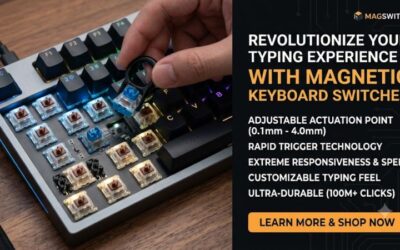
Magnetic Hall effect switches detect key position using magnetic field strength rather than physical metal contacts. This design enables adjustable actuation distances between 0.1 millimeter and 4.0 millimeters, which lets players register keypresses faster in fast-paced competitive games like Counter-Strike 2 on a 1440p monitor setup.
Rapid trigger technology resets the key signal as soon as the switch moves upward, removing the fixed reset distance of traditional mechanical switches. Gamers who need instant directional changes in tactical shooters will benefit most from this feature, which is built natively into high-performance models such as the Wooting 80HE board.
Form Factor and Desk Clearance
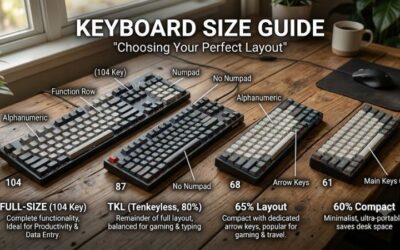
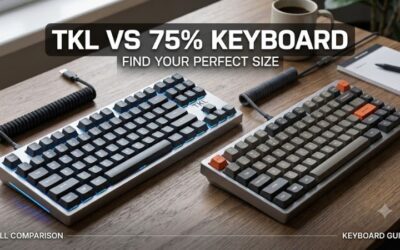
Keyboard layouts directly impact available desk space for mouse movement during intense low-sensitivity aiming. Compact form factors like 75 percent or tenkeyless remove the numeric keypad, creating a short distance between WASD hands and mouse placement. This ergonomic adjustment reduces shoulder strain during extended multiplayer sessions.
Players who need dedicated media controls or arrow keys can opt for tenkeyless options such as the SteelSeries Apex Pro TKL Wireless Gen 3 without sacrificing precious mouse pad area. Choosing smaller layouts frees desktop real estate for wider sweeping mouse movements while keeping key navigation shortcuts accessible through functional layers.
Hardware Controls and Onboard Storage
Onboard memory profiles allow users to store custom actuation points, lighting modes, and key remappings directly onto the peripheral hardware. This feature ensures that profile settings persist when switching between Windows 11 desktop systems and tournament PCs without relying on continuous background driver software installations.
Hardware control dials and dedicated macro buttons offer direct adjustments for volume, backlight brightness, and instant profile cycling during matches. Models like the Razer Huntsman V3 Pro include dedicated LED indicator displays and control knobs so players can modify actuation travel on the fly without minimizing active titles.
Platform Compatibility and Connection Modes
Hardware compatibility spans USB Type-A wired connections, 2.4 GHz wireless dongles, and Bluetooth protocols across multiple operating systems. Gamers using Windows PC platforms receive the lowest latency over 2.4 GHz wireless or high polling rate USB wired connections, while Bluetooth support extends basic functionality to tablet devices.
Custom aluminum construction and hot-swappable switch sockets cater to enthusiasts who want to change switch lubrications or keycap profiles. The Lemokey L3 features an aluminum chassis and open-source QMK firmware support, making it an ideal choice for users seeking heavy desktop stability alongside broad custom key remapping tools.
Top Picks
Identifying the best keyboard for gaming requires comparing switch mechanics, polling speed, chassis stiffness, and connection protocols. The table below outlines key specifications, target user profiles, platform compatibility, and potential drawbacks for four leading models on the market today to assist in your purchasing decision.
| Product | Best For | Key Spec | Compatibility | Watch Out For |
| Wooting 80HE | Best Overall | Lekker L60 v2 magnetic switches, 8000 Hz polling rate | Windows, macOS, Linux (USB Type-C) | High price and limited stock availability |
| Lemokey L3 | Best Value | Gateron Jupiter mechanical switches, 1000 Hz 2.4 GHz wireless | Windows, macOS, Linux (USB / 2.4GHz / Bluetooth) | Heavy 4.36 lb weight and bulky frame |
| SteelSeries Apex Pro TKL Wireless Gen 3 | Best For Competitive FPS | OmniPoint 3.0 magnetic switches, OLED display | Windows, macOS, Xbox, PlayStation (USB / 2.4GHz) | Software setup required for complex macros |
| Razer Huntsman V3 Pro | Best For Full-Size Control | Analog Optical Gen-2 switches, control dial | Windows 10/11 (USB Type-A) | Stiff wrist rest and large desk footprint |
Wooting 80HE
The Wooting 80HE represents the best keyboard for gaming when competing in high-stakes esports matches. It features Hall effect magnetic switches supporting an 8000 Hz polling rate alongside 0.1 millimeter rapid trigger sensitivity, delivering exceptionally low input latency for fast-paced titles on high refresh rate monitors.
Its primary limitation lies in its premium price point and high demand, which can lead to extended backorder wait times. Buyers who prefer a traditional wireless setup or full numeric keypad layout should consider alternative models, as this board operates exclusively over a detachable USB Type-C wired cable for low latency.
Lemokey L3
The Lemokey L3 stands out as a candidate for the best keyboard for gaming in the mid-range mechanical market. It features a solid CNC aluminum casing, hot-swappable Gateron Jupiter switches, and 2.4 GHz wireless connectivity with a 1000 Hz polling rate, making it a reliable mid-range option for home gaming setups.
However, its heavy 4.36-pound frame makes it impractical for portable gaming configurations or frequent travel. Gamers seeking rapid trigger magnetic actuation or lightweight plastic construction will find this model too bulky, meaning dedicated esports competitors should select a Hall effect alternative instead for optimal speeds.
SteelSeries Apex Pro TKL Wireless Gen 3
For players seeking wireless freedom, the SteelSeries Apex Pro TKL Wireless Gen 3 is a strong contender for the best keyboard for gaming on desktop setups. It utilizes OmniPoint 3.0 adjustable magnetic switches with 0.1 millimeter actuation, an integrated OLED display panel, and dual 2.4 GHz wireless or Bluetooth connectivity.
Setting up custom profiles requires navigating the SteelSeries GG software suite, which can feel cluttered to minimalist users. Players who never utilize rapid trigger technology or wireless modes may find the high price difficult to justify, making standard wired mechanical keyboards a more practical alternative for budget builds.
Razer Huntsman V3 Pro
Gamers who prefer full-size hardware may consider the Razer Huntsman V3 Pro as their best keyboard for gaming with maximum controls. It incorporates Razer Gen-2 Analog Optical switches with adjustable actuation ranges from 0.1 to 4.0 millimeters, per-key RGB backlighting, and textured double-shot PBT keycaps for extended durability.
Its expansive desk footprint and stiff leatherette wrist rest require significant space in front of your display monitor. Users with limited desk clearance or those who prefer compact 60 percent layouts should look elsewhere, as this full-size board takes up substantial space that could restrict wide mouse movements during gameplay.
FAQ
Understanding technical specifications helps clear up confusion when choosing the best keyboard for gaming setups. Below are straightforward responses to four common questions regarding switch types, polling rates, rapid trigger functions, and layout sizes to assist you in making an informed hardware purchase for your desktop.
Are magnetic Hall effect switches better for gaming than mechanical switches?
Yes, magnetic Hall effect switches offer faster response times and variable actuation points compared to standard mechanical switches. Because magnetic sensors track physical key travel without metal contacts, players can configure key sensitivity down to 0.1 millimeters for rapid inputs in competitive online titles like Valorant.
Mechanical switches rely on physical metal contacts that introduce debounce delays during signal registration. Magnetic switches avoid this mechanical contact delay entirely, permitting faster reset times and dynamic actuation features like rapid trigger, which significantly improves input accuracy during continuous rapid key tapping.
Does an 8000 Hz polling rate improve in-game response time?
An 8000 Hz polling rate reduces input latency by sending key state updates to your PC every 0.125 milliseconds. Standard 1000 Hz keyboards transmit data once every millisecond, making higher polling rates measurably faster on high refresh rate monitors running at 240 Hz or above when paired with powerful NVIDIA graphics hardware.
While the latency reduction is measurable, the real-world difference between 1000 Hz and 8000 Hz is subtle for casual players. Furthermore, maintaining an 8000 Hz polling rate increases background CPU overhead slightly on older system processors, meaning budget PCs may experience minor performance drops during heavy gaming loads.
How does rapid trigger technology work in competitive games?
Rapid trigger technology dynamically activates and deactivates a key based on travel distance rather than a fixed actuation point. The switch resets instantly as soon as it begins traveling upward, enabling players to repeat key inputs faster without waiting for the key stem to travel back above a static reset boundary during play.
This dynamic reset action is particularly beneficial in tactical first-person shooters where counter-strafing requires immediate directional stops. By cutting out physical switch travel delay, rapid trigger allows gamers to stop movement instantly, stabilize weapon crosshairs faster, and fire accurate shots before opponents can react.
Is a tenkeyless layout better for gaming than a full-size board?
A tenkeyless layout is better for gaming because it provides extra desk space for sweeping mouse movements. Removing the numeric keypad brings your mouse hand closer to your movement hand, improving shoulder ergonomics and allowing wider mouse pad clearance for low-sensitivity aiming in competitive multiplayer shooter titles.
Full-size keyboards remain useful for players who regularly use numeric keypads for productivity tasks or complex simulation macros. However, most action and shooting titles do not require a number pad, making compact form factors like tenkeyless or 75 percent boards the preferred choice for dedicated gaming configurations today.
Final Thoughts
Finding the best keyboard for gaming comes down to balancing switch response times, board footprint, and software features with your personal budget. High-refresh magnetic models offer competitive advantages in fast-paced shooters, while sturdy mechanical designs provide great tactile feedback and durability for everyday gaming tasks.