🛒 Best Price Today on Amazon
Prime members get fast, free shipping on everything above, plus member-only deals. New members get a 30-day free trial — cancel anytime.
Selecting the right physical dimensions for your desktop typing surface directly alters hand posture and mouse clearance during gaming sessions. This keyboard size guide breaks down standard form factors from 100 percent down to 60 percent mini boards. You can easily select an ideal physical layout for your desk setup.
What Keyboard Sizes Really Come Down To
Keyboard size selection depends on horizontal desk space, essential key clusters, and secondary layer shortcuts. Full-size layouts offer complete keys but limit mouse room, whereas smaller options improve arm ergonomics. Software remapping helps bridge key omissions, while arbitrary aesthetic trends do not improve play.
Horizontal Desk Footprint and Mouse Movement Space
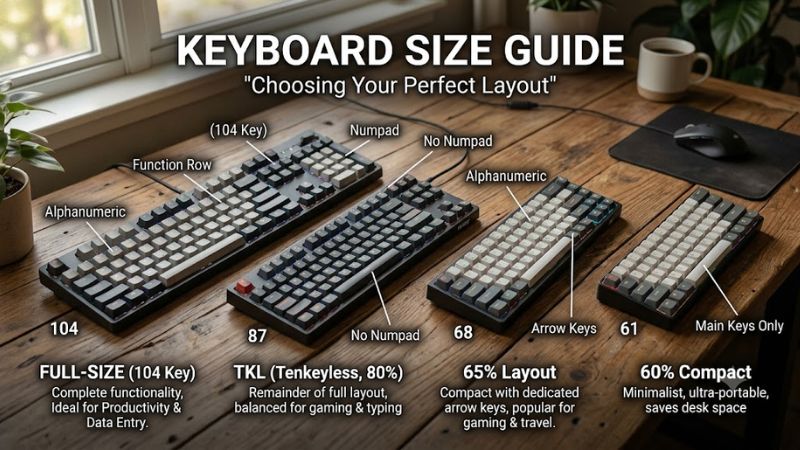
A comprehensive keyboard size guide clarifies how physical dimensions dictate your overall desktop ergonomic posture. Standard 104-key boards span 44 to 46 centimeters horizontally, which forces your mouse tracking hand far to the right. Removing the numeric pad shortens the chassis to 35 centimeters, creating extra sweep area.
Low mouse sensitivity in fast action games requires wide horizontal surface area for sweeping arm adjustments. When the chassis measures over 44 centimeters, right-handed players must extend their shoulder outward. Shorter form factors allow your arms to sit closer to shoulder width, reducing upper back tension over long gaming sessions.
Key Clusters and Direct Physical Accessibility
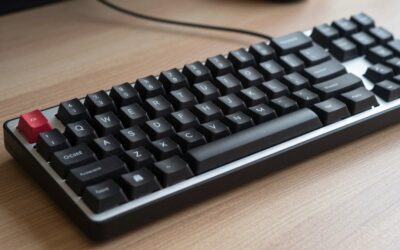
Physical key presence directly determines how rapidly you access specific commands without activating modifier keys. Full-size 100 percent and 80 percent tenkeyless units retain separate function rows, directional arrows, and navigation clusters. Physical spacing between these groups prevents accidental keypresses during gameplay.
Compact 75 percent keyboards condense these input clusters by removing open space between key groupings. While this design shrinks total board width down to roughly 31 centimeters, keys are tightly packed against one another. Players must adapt to closer key spacing to avoid striking adjacent keys during quick tactical movements.
Function Layers and Secondary Key Binding Shortcuts
Understanding secondary function layers is critical in any modern keyboard size guide analysis. Mini 60 percent boards omit dedicated function rows, arrow keys, and navigation blocks entirely. Missing physical inputs are accessed by pressing key combinations, such as Fn plus number keys to trigger corresponding F1 through F12 inputs.
Mastering key combinations requires muscle memory adjustment, as simple navigation commands demand two keypresses instead of one. Users who frequently execute spreadsheet calculations or complex programming macros often find layered shortcuts slower than dedicated keys. Gaming macros can be rebound in Windows software to ease this transition.
What Does Not Help When Choosing a Keyboard Form Factor
Selecting an extremely tiny keyboard purely for visual aesthetics will not increase your in-game reaction speeds. Shrinking key count removes physical buttons that certain titles require for inventory or vehicle controls. Forcing complex key combinations into fast matches can slow down input speed if muscle memory is not fully trained.
Relying on external software utilities to automate layer toggles does not eliminate physical hardware layout restrictions. System utilities cannot restore missing physical keys when playing games that prohibit background macro tools. Choosing a layout based strictly on desk measurements ensures lasting comfort without functional compromises.
How to Choose a Keyboard Size: Step by Step
Follow structured evaluation steps to match your physical desk environment with suitable input hardware. Measuring your mouse mat boundary and assessing daily software requirements prevents buying an awkward form factor. The evaluation table below details key specifications across four primary sizes for quick comparison.
| Setting | Where | Effect | Risk | | Full-size (100%) | Desk surface with 44 to 46 cm width | Retains 104 keys and dedicated numpad | Pushes mouse far right causing shoulder strain | | Tenkeyless (80%) | Desk surface with 35 to 38 cm width | Saves 8 cm width by removing numpad | Requires separate numpad for numeric entry | | Compact (75%) | Desk surface with 30 to 33 cm width | Retains F-row and arrows in tight grid | Squeezes key spacing and navigation cluster | | Mini (60%) | Desk surface with 28 to 30 cm width | Maximizes mouse area with 61 keys | Moves arrow and function keys to secondary layer |
Assess Your Available Desk Dimensions and Mouse Path
Consulting a detailed keyboard size guide helps you measure physical desktop clearance before buying hardware. Measure your desk surface width and allocate at least 40 centimeters for unrestricted mouse movement. If your total usable desk width is under 80 centimeters, a compact board prevents peripheral crowding.
Position your mouse pad and mark where your wrist rests naturally during extended gaming play. A standard full-size unit measuring 45 centimeters wide might force your mouse mat onto the desk edge. Choosing an 80 percent or 75 percent chassis reclaims 8 to 14 centimeters of lateral area, improving arm alignment.
Determine Your Need for Dedicated Function and Arrow Keys
Identify which games and desktop applications require direct physical access to dedicated key rows. Tactical simulation games and flight simulators frequently map essential flight commands to F1 through F12. Selecting a 75 percent or tenkeyless layout preserves these keys on the main layer without needing modifier holding.
If your gaming library consists primarily of first-person shooters, function rows see minimal usage. In these titles, weapon switching and movement rely on WASD, number keys, and mouse side buttons. Dropping to a 65 percent or 60 percent layout removes unnecessary physical rows, allowing closer mouse placement.
Map Out Key Shortcuts Across Daily Work and Gaming
Evaluating daily workflow requirements within this keyboard size guide workflow prevents unexpected productivity loss. If you perform frequent data entry or accounting tasks, the 17 keys on a dedicated numeric pad save time. Gamers who work on the same PC can consider a tenkeyless main board paired with a detachable USB numpad.
Text editing and software development rely heavily on arrow keys alongside Home, End, Delete, and Page Keys. A 65 percent layout preserves physical arrow keys and a vertical navigation strip while maintaining a small footprint. This middle ground avoids function layer toggles during document editing and web navigation.
Test Secondary Layer Binding Muscle Memory Transition
Before committing to a 60 percent mini layout, test holding Fn key shortcuts for common commands. Practice using Fn plus WASD or Fn plus IJKL for arrow movement to evaluate whether key combinations feel intuitive. Users unable to adapt to dual key combinations should choose a 65 percent or 75 percent layout instead.
Configure custom layer profiles using official companion software or open-source QMK firmware on Windows 11. Customizing secondary layer keymaps lets you place missing commands under comfortable rest positions. If primary bindings conflict with game shortcuts, revert changes inside the device management utility.
Frequently Asked Questions
Common questions regarding keyboard layout dimensions focus on ergonomic comfort, key accessibility, and game performance. Review these concise answers to clear up confusion between compact form factors and full-size options. Selecting the proper board size depends on your specific desktop space and typing preferences.
What Is the Best Keyboard Size for Competitive Gaming?
The tenkeyless 80 percent layout is the most practical choice for competitive gaming because it balances key availability with mouse space. Following our keyboard size guide recommendations, removing the numpad saves 8 centimeters of desk width. This reduction permits wider mouse sweeps without losing dedicated function keys.
First-person shooter players who prioritize raw desk real estate often choose 60 percent mini boards. With a total chassis width under 30 centimeters, mini keyboards allow extreme angle positioning on mouse pads. However, games requiring dedicated macro keys or function inputs benefit more from 75 percent or TKL layouts.
Is a 75 Percent Keyboard Better Than a Tenkeyless Layout?
A 75 percent keyboard is better for tight desk setups because it retains the function row while cutting width to 31 centimeters. Reference this keyboard size guide to see how compact grid layouts remove space between key clusters. You maintain 84 physical keys while saving roughly 4 centimeters over a standard TKL unit.
Tenkeyless keyboards remain preferable for users who dislike compressed key spacing and smaller modifier keys. TKL boards utilize standard keycap sizing across all rows, making aftermarket keycap replacement straightforward. Choosing between them depends on whether you prefer open cluster spacing or maximum space saving.
How Do You Access Arrow Keys on a 60 Percent Keyboard?
Arrow keys on a 60 percent keyboard are accessed by holding the Fn modifier key while pressing assigned letter keys like I, J, K, and L. As outlined in our keyboard size guide, secondary key functions are printed on the front faces of standard keycaps. This shortcut layer allows directional navigation without extra physical keys.
Many modern 60 percent models feature tap-to-arrow functionality via onboard firmware settings in Windows 11. Tapping bottom-right modifier keys functions as directional arrows, while holding them down executes standard modifier commands. Users who require constant arrow inputs usually prefer 65 percent boards with physical arrows.
Do Compact Keyboards Require Special Driver Software?
Compact mechanical keyboards do not require special driver software to perform standard key presses and layer functions on Windows PC systems. Basic layer shortcuts are processed directly by onboard hardware microcontrollers upon plugging into a USB port. Standard plug-and-play driver support handles core typing automatically.
Optional configuration software is only needed when remapping default key bindings or customizing RGB illumination patterns. Settings stored directly in onboard EEPROM memory persist across different computers without active background drivers. Reverting custom bindings is simple by triggering onboard factory reset key shortcuts.
Final Thoughts
Choosing the best form factor depends on balancing physical desk footprint against your daily typing requirements. Use this keyboard size guide to measure mouse clearance and select between 100 percent full-size, TKL, 75 percent, 65 percent, and 60 percent layouts. Matching chassis size to your workflow ensures long-term gaming comfort.