Wireless keyboards can work on Xbox, but the connection type decides everything. Xbox Series X|S and Xbox One have no Bluetooth keyboard support, so a wireless board only reaches the console through a 2.4 GHz USB dongle or a cable. Every pick below ships with a dongle, which the console treats like a wired keyboard in supported games.
The five boards span the ways people actually play on Xbox: the licensed Razer Turret bundles a mouse into a lapboard for couch play, the SteelSeries Apex Pro TKL Wireless Gen 3 brings esports-grade adjustable switches to a desk, two Corsair options cover compact desk and lapboard setups, and the RK Royal Kludge RK61 is the budget route.
As an Amazon Associate, we earn from qualifying purchases.
Table of Contents
- Quick Answer
- Razer Turret for Xbox One
- SteelSeries Apex Pro TKL Wireless Gen 3
- Corsair K65 Plus Wireless
- Corsair K63 Wireless Keyboard and Lapboard Combo
- RK Royal Kludge RK61
- How to Choose
- Who Should Skip
- FAQ
- Final Verdict
Quick Answer
For most Xbox players, the Razer Turret is the safest wireless pick: it is designed and licensed for Xbox, pairs its keyboard and mouse through one 2.4 GHz dongle, and adds a dedicated Xbox button. Desk players who want the fastest switches should choose the SteelSeries Apex Pro TKL Wireless Gen 3, while the Corsair K65 Plus Wireless is the flexible mid-range option and the RK61 covers budget setups.
Razer Turret for Xbox One

The Turret is the premium, everything-included option and the only board here built from the ground up for Xbox. Razer combines a tenkeyless mechanical keyboard and a wireless mouse in a single lapboard, and both devices share one 2.4 GHz USB dongle, so a couch setup needs exactly one console USB port. A dedicated Xbox button pulls up the dashboard, and the Chroma backlighting also works with Xbox Dynamic Lighting in supported games.
The keyboard half uses Razer Mechanical Green switches with a 50 g actuation force and an 80 million keystroke rating. The mouse rides on a magnetic mat that slides out from under the deck for play and retracts for storage, and its 5G optical sensor reaches a true 16,000 DPI with seven programmable buttons. Published battery figures run up to 43 hours for the keyboard and 50 hours for the mouse with lighting disabled. At 1,860 grams it is a substantial lapboard, but nothing else packages console keyboard and mouse play this completely.
Specs
- Layout: Tenkeyless lapboard with slide-out magnetic mouse surface
- Switches: Razer Mechanical Green, 50 g actuation, 80 million keystroke rating
- Mouse: 5G optical sensor, up to 16,000 DPI, 7 programmable buttons
- Connection: Single 2.4 GHz USB dongle for keyboard and mouse
- Battery: Up to 43 hours (keyboard) and 50 hours (mouse), lighting off
- Polling rate: 1,000 Hz
- Size: 390 by 194 mm, widening to 600 mm with the tray extended
- Published compatibility: Xbox One, Xbox Series X|S, PC
SteelSeries Apex Pro TKL Wireless Gen 3

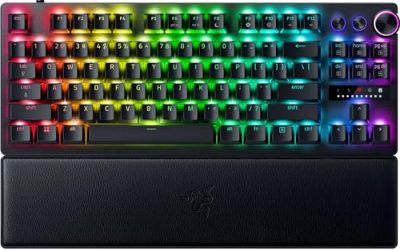
The Apex Pro TKL Wireless Gen 3 is the performance pick for a desk next to the console. Its OmniPoint 3.0 Adjustable HyperMagnetic switches let each key actuate anywhere from 0.1 to 4.0 millimeters across 40 levels, and Rapid Trigger resets a key the moment it changes direction, which suits fast strafing and repeated taps in shooters that accept keyboard input on Xbox. The switches are rated for 100 million keystrokes.
It connects three ways: Quantum 2.0 2.4 GHz wireless through the included dongle, Bluetooth for other devices, and a detachable USB-C cable. On Xbox the dongle or cable is the route to use, since the console ignores Bluetooth keyboards. SteelSeries rates battery life at up to 37.5 hours over 2.4 GHz and 45 hours over Bluetooth with default lighting. An OLED Smart Display and volume roller handle quick adjustments without software, and double-shot PBT keycaps resist shine.
Specs
- Switches: OmniPoint 3.0 Adjustable HyperMagnetic (Hall effect)
- Actuation range: 0.1 to 4.0 mm per key, 40 levels, with Rapid Trigger
- Connection: 2.4 GHz wireless, Bluetooth, detachable USB-C wired
- Battery: Up to 37.5 hours (2.4 GHz) and 45 hours (Bluetooth), default lighting
- Layout: Tenkeyless, 87 keys, aluminum top frame
- Display: OLED Smart Display with media roller
- Keycaps: Double-shot PBT
- Switch rating: 100 million keystrokes
Corsair K65 Plus Wireless

The K65 Plus Wireless is the mid-range all-rounder. Corsair publishes compatibility for PC, Mac, Xbox One, and Xbox Series X|S, and the board connects by 2.4 GHz SLIPSTREAM wireless, Bluetooth, or USB cable, so the dongle handles console duty while Bluetooth serves a laptop or tablet on the side. The 75 percent layout keeps the function row, arrow keys, and a rotary control dial while dropping the number pad, which leaves more room for a mouse beside the console.
Pre-lubricated Corsair MLX Red linear switches actuate at 45 g with a 1.9 mm actuation point, sit in a hot-swappable PCB so they can be swapped without soldering, and are rated for 70 million keystrokes. Two layers of sound dampening keep it quiet in a shared living room. Battery life is the headline: Corsair rates up to 266 hours with backlighting off from the 4,200 mAh cell, at a 1,000 Hz polling rate.
Specs
- Layout: 75 percent with rotary control dial
- Switches: Corsair MLX Red linear, pre-lubricated, hot-swappable
- Actuation: 45 g force, 1.9 mm actuation point, 4.0 mm travel
- Connection: 2.4 GHz SLIPSTREAM wireless, Bluetooth, USB wired
- Battery: Up to 266 hours with backlighting off, 4,200 mAh
- Keycaps: Dye-sub PBT
- Polling rate: 1,000 Hz
- Published compatibility: PC, Mac, Xbox One, Xbox Series X|S
Corsair K63 Wireless Keyboard and Lapboard Combo

The K63 combo is the mid-range couch alternative to the Turret. The tenkeyless K63 Wireless keyboard locks into a lapboard with a full-length memory foam cushion and a replaceable cloth mouse surface measuring about 10.4 by 8.3 inches, so a separate wireless mouse rides beside the board on your lap, stable without a desk.
The keyboard uses Cherry MX Red linear switches rated for 50 million keystrokes, with per-key blue LED backlighting rather than full RGB. It connects by 1 ms 2.4 GHz wireless, Bluetooth 4.2 LE, or USB cable, with 128-bit AES encryption on the wireless link. Battery ratings run up to 15 hours at standard brightness and 75 hours with backlighting off. Dedicated media keys round out a package aimed squarely at living-room play rather than a desk.
Specs
- Layout: Tenkeyless, 87 keys, mounted in a cushioned lapboard
- Switches: Cherry MX Red linear, 50 million keystroke rating
- Connection: 2.4 GHz wireless (1 ms), Bluetooth 4.2 LE, USB wired
- Battery: Up to 15 hours standard brightness, 75 hours backlighting off
- Mouse surface: Replaceable cloth pad, about 10.4 by 8.3 inches
- Lapboard size: About 26.4 by 10.9 inches, memory foam cushion
- Backlighting: Per-key blue LED
- Security: 128-bit AES wireless encryption
RK Royal Kludge RK61

The RK61 is the budget entry point, a 60 percent board that strips the layout to 61 keys to keep the footprint and the tier low. It connects three ways, by USB-C cable, 2.4 GHz dongle, or Bluetooth 5.0, and the dongle mode is what an Xbox setup uses. Dropping the function row and arrow keys into a secondary layer takes adjustment, but the compact deck leaves maximum room for mouse movement on a small stand or side table.
RK mechanical switches sit in a hot-swappable PCB, so a failed or unwanted switch pulls out without soldering, and the board carries RGB backlighting. The 1,450 mAh rechargeable battery is modest next to the Corsair and SteelSeries picks, which is the main trade at this tier: expect to charge far more often, or leave it cabled during long sessions. As a first keyboard for testing whether keyboard play suits your Xbox library, it keeps the commitment small.
Specs
- Layout: 60 percent, 61 keys
- Connection: USB-C wired, 2.4 GHz dongle, Bluetooth 5.0
- Battery: 1,450 mAh rechargeable
- Switches: RK mechanical, hot-swappable
- Backlighting: RGB
- Console route: Dongle or cable (Bluetooth does not pair with Xbox)
How to Choose
Start with the connection, because it rules boards in or out. Xbox consoles accept keyboard input over USB and over 2.4 GHz dongles that present as USB devices, but they do not pair with Bluetooth keyboards at all. A Bluetooth-only board will never connect; every pick here includes a dongle or a cable mode.
Next, check your games. Keyboard and mouse support on Xbox is switched on per title by each developer, so even a perfectly compatible board only works in games that enable it. Strategy titles, shooters, and MMOs are the usual supporters, while many console-first games stay controller-only. A keyboard still earns its place for dashboard navigation, store searches, and chat across the whole system.
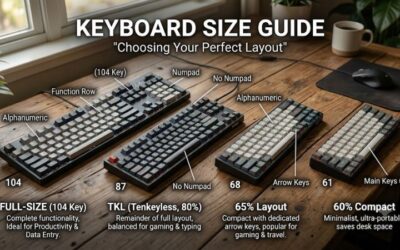
Then match the layout to the space. Couch players should look at lapboards: the Turret bundles its own mouse and surface, while the K63 combo leaves the mouse choice open. Desk players can choose freely, from the compact RK61 and 75 percent K65 Plus Wireless up to the tenkeyless Apex Pro TKL Wireless Gen 3. Finally, weigh battery ratings against lighting habits, since published figures assume backlighting is off or at default; heavy RGB use shortens every board’s runtime.
Who Should Skip
Skip a wireless keyboard if your Xbox library is mostly controller-only games, because no board adds keyboard support to a title whose developer left it out. Skip Bluetooth-focused boards entirely for console use, since the console cannot pair with them. Players who only need faster text entry for messages and searches can skip the gaming features too: any basic USB keyboard handles typing, and premium switches and lapboards only pay off inside supported games. Skip the premium tier if the console sits within cable reach of your desk, where a wired board removes battery management altogether.
FAQ
Do wireless keyboards work on Xbox Series X|S?
Yes, as long as they connect through a USB dongle or a cable. The console treats a 2.4 GHz receiver like a wired keyboard, so dongle-equipped boards such as the five above work in games that enable keyboard input, and for typing across the dashboard and store.
Why will my Bluetooth keyboard not pair with my Xbox?
Xbox consoles do not support Bluetooth keyboards or mice; there is no pairing menu for them. The fix is a board with a 2.4 GHz USB dongle or a wired mode. Bluetooth on a tri-mode board is still useful for a laptop, tablet, or phone, just not for the console itself.
Which Xbox games support keyboard and mouse?
Support is decided per game by its developer, and the list grows over time. Shooters, strategy games, and MMOs are the most common supporters. Check a game’s store page or settings menu for keyboard options before counting on it.
Is a lapboard worth it for couch Xbox play?
For couch play, yes. A lapboard such as the Razer Turret or the Corsair K63 combo gives the keyboard and mouse a stable, flat surface that a cushion or sofa arm cannot. Desk players gain nothing from the format and should put the budget toward switches instead.
Final Verdict
Wireless keyboard play on Xbox comes down to one rule: bring a dongle. The Razer Turret is the most complete answer, purpose-built and licensed for Xbox with its mouse and lapboard included. The SteelSeries Apex Pro TKL Wireless Gen 3 is the desk performance pick, the Corsair K65 Plus Wireless balances battery life and flexibility in the mid-range, the K63 combo covers the couch at a lower tier, and the RK61 keeps a first step into keyboard play firmly in budget territory.
Product and ASIN Reference
| Product | ASIN |
|---|---|
| Razer Turret for Xbox One | B07QXLC24V |
| SteelSeries Apex Pro TKL Wireless Gen 3 | B0DF2M53S9 |
| Corsair K65 Plus Wireless | B0CQ31VFT4 |
| Corsair K63 Wireless Keyboard and Lapboard Combo | B078233TKB |
| RK Royal Kludge RK61 | B07PBC15N8 |