Choosing a honeycomb gaming mouse is a decision about how the weight comes off. A perforated shell is the oldest trick for making a mouse light without shrinking it, and the listings divide cleanly once you read them closely: full-size ambidextrous shells, ergonomic shells for the right hand, wired models that skip the battery entirely, and wireless models that carry one. The holes also change cleaning, grip feel and how the mouse survives a dusty desk, so the shell is a practical choice, not just a style.
This guide covers five honeycomb mice for PC players: three from Glorious across its O and D shapes, the Cooler Master MM710 and the Redragon M725. Each pick was chosen from the product name and specifications on its Amazon product page, and every model here states its honeycomb shell in its own listing title rather than borrowing the label from a photograph.
Quick Picks
As an Amazon Associate we earn from qualifying purchases.
| Product | Best for | Key spec from title |
|---|---|---|
| Glorious Model O Wired Gaming Mouse, Matte Black | A player who wants the classic full-size honeycomb shape with a wired connection and a weight that still feels planted during slow, controlled aim movements. | 67 g, Pixart 3360 sensor, 12,000 DPI |
| Glorious Model D Wired Gaming Mouse, Matte Black | A right-handed palm-grip player with medium or large hands who wants honeycomb weight savings without giving up a sculpted ergonomic shell. | 68 g, ergonomic honeycomb shell, Pixart 3360 |
| Glorious Model O Wireless Gaming Mouse, Matte Black | A player who wants the Model O shape and honeycomb shell without a cable, and who plays long sessions between charges with the lighting turned down. | 69 g, BAMF sensor, 19,000 DPI, 2.4 GHz |
| Cooler Master MM710 Gaming Mouse, Matte Black | A fingertip or claw player with smaller hands who wants the lightest wired honeycomb mouse here and a cable soft enough not to fight the low weight. | 53 g, Pixart 3389 sensor, 16,000 DPI |
| Redragon M725 Honeycomb Shell Gaming Mouse, Black | A player who moves between a gaming PC and a laptop and wants one very light honeycomb mouse that pairs over Bluetooth at the desk and 2.4 GHz in game. | 49 g, tri-mode wireless, 8,000 DPI |
How to Choose
Wired or wireless decides what the holes must pay for
A wired honeycomb mouse spends its entire weight budget on shell and sensor, which is how the MM710 reaches 53 g. A wireless model must also carry a battery, so the perforations work harder: the Model O Wireless lands at 69 g and the tri-mode M725 at 49 g with a smaller body. Decide the connection first, because it sets the realistic weight floor, and a player who hates cables should compare wireless weights against each other rather than against wired figures they will never accept in practice.
Shape still matters more than the hole pattern
Honeycomb is a weight technique, not a shape. The Model O shells are ambidextrous and suit fingertip and claw grips; the Model D bends into a right-handed ergonomic shape that supports a palm grip. Two mice with identical sensors and near-identical weights can feel unrelated after an hour because of that difference. Choose the shell your hand already likes, then let the holes do their work; buying a shape you dislike because it is three grams lighter is the category’s classic false economy.
Sensor figures are the listings’, not a league table
The sensors here span the Pixart 3360 and 3389, Glorious’s BAMF and an unnamed sensor in the M725, with ceilings from 8,000 to 19,000 DPI. Every one of them tracks far beyond what a player uses at the desk, so the practical differences are the named-versus-unnamed specification and the polling and connection details, not the headline number. A listing that names its sensor gives you something verifiable; a listing that only gives a DPI ceiling is telling you where its priorities were.
Holes invite dust, so plan the cleaning
A perforated shell lets dust, skin flakes and desk debris reach the inside of the mouse, and the switches and sensor lens live in there. A can of compressed air every few weeks is the maintenance contract that comes with the weight saving, and players in dusty rooms or with pets shedding onto the desk should weigh it honestly. If the idea of blowing out your mouse monthly annoys you, a solid lightweight shell from the same brands is the better purchase, at a few grams’ cost.
The 5 Best Options
Glorious Model O Wired Gaming Mouse, Matte Black
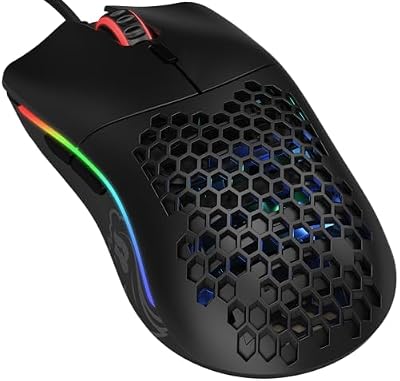
The Model O Wired is the honeycomb design that defined the category: a full-size ambidextrous shell drilled with holes, built around a Pixart 3360 sensor and Omron mechanical switches. At 67 g it is the heaviest pick in this guide, which some players will read as stability rather than a flaw, and its wired connection removes batteries and charging from the routine entirely. Six buttons, RGB lighting and a flexible cable complete a specification that has stayed competitive precisely because the shape suits palm and fingertip grips alike.
Specs
- Sensor: Pixart 3360 optical sensor
- Maximum sensitivity: 12,000 DPI
- Weight: 67 g
- Shell: honeycomb design (title)
- Shape: ambidextrous per listing field
- Switches: Omron mechanical switches, 20-million click rating per listing copy
- Buttons: 6
- Connection: wired USB
Best for: A player who wants the classic full-size honeycomb shape with a wired connection and a weight that still feels planted during slow, controlled aim movements.
Watch out for: Confirm the live offer and seller before ordering: this is an older listing carried through marketplace sellers at times, so check that the page you buy from is selling the Matte Black wired model.
Glorious Model D Wired Gaming Mouse, Matte Black

The Model D Wired takes the same perforated recipe and bends it into an ergonomic shape for the right hand. The listing positions it for medium to large hands, with a sculpted shell that supports the palm instead of asking the fingers to do all the holding, and the honeycomb cutouts bring the weight to 68 g despite the larger body. Under the shell it shares the family’s formula: a Pixart 3360 sensor, Omron switches, PTFE feet and six buttons, all wired so there is no battery weight to drill around.
Specs
- Sensor: Pixart 3360 optical sensor
- Maximum sensitivity: 12,000 DPI
- Weight: 68 g
- Shell: honeycomb design (title)
- Shape: ergonomic, right-handed; listing positions it for medium to large hands
- Switches: Omron switches
- Feet: PTFE feet
- Buttons: 6
- Connection: wired
Best for: A right-handed palm-grip player with medium or large hands who wants honeycomb weight savings without giving up a sculpted ergonomic shell.
Watch out for: Read the listing’s hand-size positioning before ordering if your hands are small: this is the medium-to-large shell in the Glorious range, and the smaller minus versions exist precisely for smaller hands.
Glorious Model O Wireless Gaming Mouse, Matte Black

The Model O Wireless answers the obvious objection to this category: why accept a cable to save weight when the holes could offset a battery instead? Glorious’s listing describes a lag-free 2.4 GHz connection, a BAMF sensor reaching 19,000 DPI and up to 71 hours of battery with the RGB off, in the same ambidextrous honeycomb shell as the wired original. It can also be used wired while charging, which covers the evening the battery runs out mid-session. For cable-averse players this is the guide’s natural first look.
Specs
- Sensor: BAMF sensor
- Maximum sensitivity: 19,000 DPI
- Weight: 69 g per listing title (a mirror spec field states 68 g — flagged)
- Shell: honeycomb design (title)
- Connection: 2.4 GHz wireless, plus wired use while charging
- Polling rate: up to 1,000 Hz
- Battery: up to 71 hours with RGB off per listing copy
- Buttons: 6
- Lighting: RGB
Best for: A player who wants the Model O shape and honeycomb shell without a cable, and who plays long sessions between charges with the lighting turned down.
Watch out for: Note the small weight disagreement before quoting a figure: the listing title says 69 g while a mirror spec field says 68 g, so treat the weight as about 69 g and check the live page if the gram matters to you.
Cooler Master MM710 Gaming Mouse, Matte Black

The MM710 is the lightest wired mouse in this guide at 53 g, and it gets there with the smallest shell of the five. Cooler Master’s listing pairs the honeycomb body with a Pixart 3389 sensor at 16,000 DPI and an Ultraweave cable designed to drag as little as possible, which matters more as the mouse gets lighter and every cable tug becomes a larger share of the force moving it. Omron switches with a 20-million press rating and an ambidextrous shape per the maker’s specification sheet finish a focused, older design.
Specs
- Sensor: Pixart 3389 optical sensor
- Maximum sensitivity: 16,000 DPI
- Weight: 53 g
- Shell: lightweight honeycomb shell (title)
- Cable: Ultralight Ultraweave cable
- Switches: Omron switches, 20-million press rating per maker’s specification sheet
- Shape: ambidextrous per specification sheet
- Connection: wired
Best for: A fingertip or claw player with smaller hands who wants the lightest wired honeycomb mouse here and a cable soft enough not to fight the low weight.
Watch out for: This is an older model and the listing captures behind it are dated, so confirm a live offer before ordering; if stock has dried up, the Model O Minus-sized shells are the nearest current alternative in spirit.
Redragon M725 Honeycomb Shell Gaming Mouse, Black

The Redragon M725 undercuts every other pick on weight: 49 g with a battery inside, because it connects three ways instead of one. Its listing states Bluetooth 5.1, 2.4 GHz wireless and USB-C wired modes, two side buttons and macro programmability, all in a honeycomb shell. The sensor figure is a more modest 8,000 DPI and the listing does not name the sensor model, which is the honest trade in this design: connection flexibility and the lowest weight in the guide, against a less documented sensor specification.
Specs
- Maximum sensitivity: 8,000 DPI (sensor model not stated in the listing data captured)
- Weight: 49 g
- Shell: honeycomb shell (title)
- Connectivity: tri-mode — Bluetooth 5.1, 2.4 GHz wireless, USB-C wired
- Side buttons: 2
- Macros: macro programmable per listing
- Model: M725
- Colour of this ASIN: Black
Best for: A player who moves between a gaming PC and a laptop and wants one very light honeycomb mouse that pairs over Bluetooth at the desk and 2.4 GHz in game.
Watch out for: Do not expect a named flagship sensor here: the listing gives a DPI ceiling without a sensor model, so buy it for the weight and tri-mode connection rather than for sensor pedigree.
Which One Fits Your Situation
You want the lightest possible wired setup
Take the Cooler Master MM710 at 53 g with its Ultraweave cable, sized for smaller hands and fingertip or claw grips. Its Ultraweave cable drags so little that the 53 g weight stays honest in play, and the small shell suits fingertip control during long sessions.
You palm grip with a medium or large right hand
Take the Glorious Model D Wired: it is the only ergonomic honeycomb shell here, and its listing positions it for exactly your hand size. The PTFE feet and wired connection keep it simple: no charging, no dongle, just a sculpted shell that disappears under the palm.
You refuse cables but love the Model O shape
Take the Glorious Model O Wireless for the same shell with a 2.4 GHz connection and up to 71 hours of battery with lighting off. The same shell can also run plugged in while it charges, so a flat battery never has to end a session early.
You split time between a PC and a laptop
Take the Redragon M725: Bluetooth for the laptop, 2.4 GHz for the gaming PC, and the lowest weight in this guide at 49 g. At 49 g it is also the easiest mouse here to throw in a laptop bag without noticing the extra weight.
Common Mistakes
- Choosing by the smallest weight number while ignoring shell size, then finding a 53 g mouse built for small hands cramping a large palm that the 68 g ergonomic model would have fitted properly.
- Assuming every honeycomb mouse is wireless-ready weight saving, when the wired models here are light partly because they carry no battery at all, and comparing their figures against wireless mice is not a fair contest.
- Never cleaning a perforated shell, letting dust build up around the switches and sensor until clicks feel inconsistent and tracking stutters, then blaming the sensor for a housekeeping problem.
- Quoting the Model O Wireless as a single exact weight when its own listing sources disagree by a gram, as flagged in its entry, and building a comparison on a figure the listing itself does not settle.
Frequently Asked Questions
Are honeycomb mice less durable than solid-shell mice?
The listings here do not claim a durability difference, and the shells are moulded with the perforations as part of the structure. The practical difference is maintenance: holes let dust in, so these mice want periodic cleaning with compressed air.
Which honeycomb mouse is the lightest in this guide?
The Redragon M725 at 49 g per its listing, and it is wireless. The lightest wired pick is the Cooler Master MM710 at 53 g. Both figures come from the products’ own Amazon listings. Both figures come from the products’ own Amazon listings, as does every weight quoted in this guide.
Is the Model O Wireless as fast as a wired mouse?
Its listing describes a lag-free 2.4 GHz connection with polling up to 1,000 Hz, matching the wired standard figure, and it can also be used plugged in while charging if you prefer a cable for a session. The honest limit is polling: the listing caps the wireless rate at the same 1,000 Hz figure the wired standard uses.
Do the holes make the mouse uncomfortable?
That depends on grip. Fingertip and claw players barely contact the perforated top, while palm players rest more skin on the shell. The ergonomic Model D is the safer pick if you palm grip and are unsure about the texture.