Rhythm games grade you in milliseconds. Whether it is a dense note highway in DJMAX Respect V, a fast chart in osu! or a boss track in Metal: Hellsinger, the judgment window rewards a display that draws each frame the instant it is ready. A slow panel adds display lag on top of your input, and motion blur smears the scrolling notes you read a beat ahead. Input lag, refresh rate and motion clarity matter more here than resolution or size.
This roundup picks five monitors built around that timing chain: two extreme-refresh esports panels at 540Hz and 500Hz, two 240Hz strobing specialists, and a 480Hz OLED with sharper QHD detail.
As an Amazon Associate, we earn from qualifying purchases.
Quick Answer
For rhythm games, input lag and motion clarity decide your timing accuracy, so high refresh rates and fast panels come first. The ASUS ROG Swift Pro PG248QP leads at 540Hz with ULMB 2 strobing, the Alienware AW2524HF answers with a 500Hz Fast IPS panel, and the BenQ ZOWIE XL2546X and ViewSonic XG2431 bring tuned strobing at 240Hz. The ASUS ROG Swift OLED PG27AQDP is the premium 480Hz pick.
Table of Contents
- ASUS ROG Swift Pro PG248QP
- Alienware AW2524HF
- BenQ ZOWIE XL2546X
- ViewSonic XG2431
- ASUS ROG Swift OLED PG27AQDP
- How to Choose
- Who Should Skip
- FAQ
- Final Verdict
ASUS ROG Swift Pro PG248QP

The PG248QP is the flagship pick for players who chase perfect judgments on the hardest charts. Its 24.1-inch Esports-TN panel runs at 1920 x 1080 with a 540Hz refresh rate via overclock, so each frame lasts under two milliseconds and the panel adds as little display lag as current hardware allows. The 0.2ms gray-to-gray response keeps fast-scrolling note streams separated at high approach rates.
The supporting features are aimed squarely at latency tuning. NVIDIA G-SYNC with ULMB 2 backlight strobing sharpens the note highway without the brightness penalty of older strobing modes, and the built-in NVIDIA Reflex Analyzer lets you measure end-to-end system latency rather than guessing. An ESS codec gives clean wired headphone output, which matters because rhythm players route audio wired to avoid wireless delay. The honest limits: TN viewing angles and color are ordinary, and 540Hz only pays off when your PC can feed very high frame rates.
Specs
- Screen size: 24.1 inches, flat
- Resolution: 1920 x 1080 (Full HD)
- Panel type: Esports-TN (E-TN)
- Refresh rate: 540Hz (overclocked)
- Response time: 0.2ms GtG
- HDR: DisplayHDR 400
- Adaptive sync: NVIDIA G-SYNC with ULMB 2
- Ports: 2x HDMI 2.0, 1x DisplayPort 1.4, USB hub
- Extras: NVIDIA Reflex Analyzer, ESS codec headphone output
Alienware AW2524HF

The AW2524HF takes the other route to the same goal: a Fast IPS panel at 480Hz native, overclockable to 500Hz over DisplayPort 1.4. The note highway stays fluid at extreme scroll speeds, while IPS viewing angles keep the picture consistent when you lean or stand, which TN panels can punish with color shift.
Dell rates the panel at 0.5ms gray-to-gray minimum response, with FreeSync Premium and VESA AdaptiveSync certification keeping frame delivery tear-free when a chart spikes in density. The 24.5-inch 1080p format is the competitive sweet spot: the full highway sits inside your central vision, so your eyes travel less between receptors. Note the connection detail: the full 500Hz needs DisplayPort, while HDMI tops out lower, and there is no strobing mode, so motion clarity relies on raw refresh rate alone.
Specs
- Screen size: 24.5 inches, flat
- Resolution: 1920 x 1080 (Full HD)
- Panel type: Fast IPS
- Refresh rate: 480Hz native, 500Hz overclocked via DisplayPort
- Response time: 0.5ms GtG (minimum)
- Color gamut: 99 percent sRGB
- Adaptive sync: AMD FreeSync Premium, VESA AdaptiveSync
- Ports: 2x DisplayPort 1.4, 1x HDMI 2.1, USB 3.2 hub
- Extras: ComfortView Plus low blue light, height/pivot stand
BenQ ZOWIE XL2546X

The XL2546X is the rhythm pick built around one feature: DyAc 2 backlight strobing. On a scrolling note highway, strobing turns a blur of approaching notes into distinct, countable objects, and ZOWIE’s implementation is the esports reference standard. The 24.5-inch Fast TN panel runs at 240Hz and 1920 x 1080, a combination almost any gaming PC can hold at a locked frame rate in rhythm titles, keeping frame pacing perfectly even.
ZOWIE’s supporting tools suit the genre more than they first appear. XL Setting to Share lets you copy a proven profile in seconds, the S Switch controller makes brightness and DyAc adjustments between songs painless, and Black eQualizer lifts dark backgrounds so pale notes stay readable on dim stages. The trade-offs are the familiar TN ones: color and viewing angles trail IPS and OLED, and 240Hz is the ceiling.
Specs
- Screen size: 24.5 inches, flat
- Resolution: 1920 x 1080 (Full HD)
- Panel type: Fast TN
- Refresh rate: 240Hz
- Response time: 1ms GtG
- Motion clarity: DyAc 2 backlight strobing
- Adaptive sync: Adaptive-Sync
- Ports: HDMI 2.0, DisplayPort 1.2, headphone jack
- Extras: S Switch controller, XL Setting to Share, Black eQualizer
ViewSonic XG2431

The XG2431 is the strobing specialist at a mid-range tier. Its 23.8-inch Fast IPS panel runs at 240Hz with PureXP+ backlight strobing, and it carries Blur Busters Approved 2.0 certification, meaning its strobe tuning was verified for clean, crosstalk-controlled motion clarity. Notes crossing the judgment line stay crisp instead of doubling, at 240Hz or at lower locked rates for console ports.
The IPS panel is the advantage over the ZOWIE for mixed use. Colors stay accurate for the anime artwork and video backgrounds rhythm games lean on, and viewing angles hold up for two-player sessions on shared-screen charts. ViewSonic rates response at 0.5ms with strobing engaged and adds FreeSync Premium and G-SYNC Compatible support. It tops out at 1080p and its HDR400 badge is a checkbox rather than a real HDR experience, but as a dedicated timing display it covers what the genre asks for.
Specs
- Screen size: 23.8 inches, flat
- Resolution: 1920 x 1080 (Full HD)
- Panel type: Fast IPS
- Refresh rate: 240Hz
- Response time: 0.5ms (MPRT with strobing), 1ms GtG
- Motion clarity: PureXP+ strobing, Blur Busters Approved 2.0
- HDR: DisplayHDR 400
- Adaptive sync: AMD FreeSync Premium, NVIDIA G-SYNC Compatible
- Ports: 2x HDMI 2.0, 1x DisplayPort, USB hub
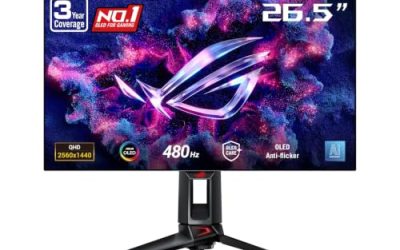
ASUS ROG Swift OLED PG27AQDP

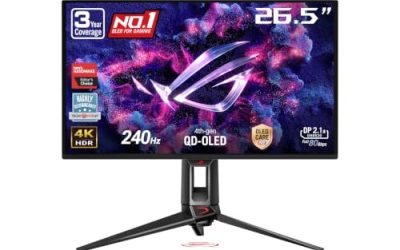
The PG27AQDP is the premium pick for rhythm players who also want resolution. Its 26.5-inch WOLED panel pairs 2560 x 1440 with a 480Hz refresh rate and 0.03ms gray-to-gray response, so pixel transitions are effectively instant and the note highway renders with both speed and fine detail. Smaller note elements and dense chord patterns stay legible at a glance, which is where QHD earns its place over the 1080p panels above.
OLED contrast suits the genre’s presentation. Per-pixel lighting keeps dark stages truly black, so bright notes pop with maximum separation, and the panel covers 99 percent of the DCI-P3 gamut with DisplayHDR 400 True Black certification. Two honest cautions: static judgment lines held on screen for very long sessions are the classic OLED burn-in scenario, and this premium-tier product asks for a strong GPU to feed 480Hz outside lightweight titles.
Specs
- Screen size: 26.5 inches, flat
- Resolution: 2560 x 1440 (QHD)
- Panel type: WOLED
- Refresh rate: 480Hz
- Response time: 0.03ms GtG
- HDR: DisplayHDR 400 True Black
- Color gamut: 99 percent DCI-P3
- Adaptive sync: NVIDIA G-SYNC Compatible
- Ports: 2x HDMI 2.1, 1x DisplayPort 1.4, USB hub
- Extras: custom heatsink, OLED Care+ features
How to Choose
Start with the timing chain, not the spec sheet headline. A high refresh rate helps twice: frames arrive more often, and each frame is drawn sooner after your input. At 240Hz a frame lasts about four milliseconds; at 480Hz that halves again. Most rhythm games include an offset calibration, which can cancel consistent lag, but it cannot fix blur or uneven frame pacing, so clarity features still matter.
Backlight strobing is the second decision. DyAc 2, PureXP+ and ULMB 2 flash the backlight between frames to make scrolling notes read as sharp, separate objects. Strobing usually disables variable refresh and costs brightness, so players who prefer VRR should pick a panel whose raw refresh stays clear without it, like the 500Hz Alienware or the 480Hz OLED.
Match the screen to your platform. PC rhythm titles such as osu!, DJMAX and EZ2ON can run at several hundred frames per second on modest hardware, so extreme-refresh panels are usable. Console rhythm games are capped at 120Hz at best, which makes any pick here more than fast enough over HDMI. Finally, 24 to 25 inches keeps the whole highway in central vision, while the 27-inch class QHD OLED suits players who split time between genres.
Who Should Skip
Skip the extreme-refresh models if your PC cannot hold very high frame rates in your main titles, because a fluctuating frame rate feels worse in a rhythm game than a lower locked one. Skip the TN panels if you mostly play casually for the music and artwork, since their color and viewing angles trail the IPS and OLED picks. Skip the OLED if your sessions run for many hours daily on one game with a static interface; the 240Hz strobing picks deliver most of the timing benefit. And if you play mainly on a living-room TV, a monitor upgrade is the wrong purchase entirely.
FAQ
Does a higher refresh rate really improve rhythm game scores?
It improves the conditions for scoring rather than the score itself. Higher refresh rates cut the time between your input and the result appearing on screen, and they space frames more evenly, so the highway scrolls smoothly and the judgment line behaves consistently. Players coming from 60Hz feel the difference immediately; gains beyond 240Hz are real but smaller, and calibration offsets can compensate for consistent lag.
Should I use backlight strobing or variable refresh for rhythm games?
For most rhythm games, strobing is the better choice. These titles are lightweight enough to hold a locked frame rate, which is the condition strobing needs, and the sharper note separation helps you read dense charts earlier. Variable refresh matters more when frame rates fluctuate. If a monitor offers both, try strobing at a locked 240Hz first and keep VRR for heavier games.
What size monitor is best for rhythm games?
The 24 to 25 inch class at 1080p is the competitive standard because the entire note highway fits inside your central field of view, so your eyes move less and read patterns faster. A 27-inch QHD screen works if you sit farther back or mix genres, but a large display can push outer lanes into peripheral vision.
Do I need a special cable or settings to get low lag on these monitors?
Use DisplayPort for the highest refresh rates, since several models cap HDMI well below their headline number, and enable the monitor’s game mode so image processing stays minimal. In game, run exclusive fullscreen where available, cap the frame rate at or just below the refresh rate for even pacing, and finish with the game’s own offset calibration, using wired headphones to keep audio latency out of the chain.
Final Verdict
For pure timing performance, the ASUS ROG Swift Pro PG248QP is the ceiling: 540Hz, ULMB 2 strobing and a latency analyzer in one panel. The Alienware AW2524HF is the better all-rounder at 500Hz with IPS angles and color. Strobing specialists on a saner budget should take the BenQ ZOWIE XL2546X for DyAc 2 or the ViewSonic XG2431 for certified PureXP+ clarity on IPS. Players who want one screen for rhythm and everything else should stretch to the ASUS ROG Swift OLED PG27AQDP, whose 480Hz QHD OLED panel leaves nothing on the table.
Product and ASIN Reference
| Product | ASIN |
|---|---|
| ASUS ROG Swift Pro PG248QP | B0CC7S6P3K |
| Alienware AW2524HF | B0CK3TG7P6 |
| BenQ ZOWIE XL2546X | B0CNSB97QN |
| ViewSonic XG2431 | B097S9SYM5 |
| ASUS ROG Swift OLED PG27AQDP | B0D7NXSQ44 |