Football games put a monitor through a wider range of jobs than most sports titles. In Madden NFL and EA Sports College Football, the pre-snap phase is a reading test: coverage shells, blitz tells and receiver leverage have to be legible at a glance, and extra horizontal width genuinely shows more of the formation. Once the ball is snapped, the job flips to timing — hitting a receiver in stride is a release-window test where input lag and motion clarity decide whether the throw leads the target or trails it.
The other half of the genre is slow and dense: Franchise and Dynasty modes bury you in roster grids and recruiting boards, so text sharpness matters as much as speed. The five picks span a 34-inch ultrawide built for pre-snap reads, two 4K panels for the broadcast look, a 360Hz QD-OLED for competitive timing, and a 360Hz TN specialist with motion processing. Every pick is judged on published specifications only.
As an Amazon Associate, we earn from qualifying purchases.
Quick Answer
For most football players, a 34-inch ultrawide like the LG UltraGear 34GN850-B is the best fit: the wider view shows more of the formation before the snap, and 144Hz keeps routes smooth after it. Players who want the broadcast look should pick the 4K Samsung Odyssey OLED G8, while competitive players chasing the lowest lag should pick the Alienware AW2725DF or the BenQ ZOWIE XL2566K.
Table of Contents
- LG UltraGear 34GN850-B
- Samsung Odyssey OLED G8
- GIGABYTE M32U
- Alienware AW2725DF
- BenQ ZOWIE XL2566K
- How to Choose
- Who Should Skip
- FAQ
- Final Verdict
LG UltraGear 34GN850-B

The 34GN850-B is the pre-snap pick. Its 34-inch Nano IPS panel stretches 3440 x 1440 across a 21:9 frame, and in football games that extra width is functional: wide receivers split to the numbers, a safety creeping down and a corner showing press all sit in the same view, so the pre-snap read carries more information than a 16:9 screen shows. The 1800R curve keeps the formation’s edges in focus.
Speed is well covered: 144Hz natively, overclockable to 160Hz, with a 1ms gray-to-gray response that keeps crossing routes and screen passes clean in motion. Color is a strength too — 98 percent of DCI-P3 with VESA DisplayHDR 400, so team colors separate clearly from similar-toned crowds. FreeSync Premium and G-SYNC compatibility keep frame pacing smooth on PC. The limits are the usual IPS ones: contrast is modest, so night-game blacks render as dark gray, and the HDMI ports are 2.0 rather than 2.1.
Specs
- Screen size: 34 inches, 1800R curved
- Resolution: 3440 x 1440 (UWQHD)
- Panel type: Nano IPS
- Refresh rate: 144Hz (160Hz overclock)
- Response time: 1ms GtG
- HDR: VESA DisplayHDR 400
- Color gamut: 98 percent DCI-P3
- Adaptive sync: FreeSync Premium, G-SYNC Compatible
- Ports: 2x HDMI 2.0, 1x DisplayPort 1.4, USB hub
Samsung Odyssey OLED G8

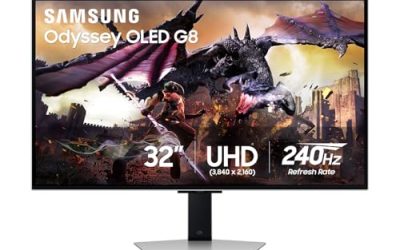
The Odyssey OLED G8 is the broadcast-presentation pick. Its 32-inch QD-OLED panel runs 3840 x 2160 at 240Hz, and per-pixel light control gives night games the look football titles keep chasing: stadium floodlights, white road uniforms and dark stands hold their separation in the same frame, with no backlight halo. For broadcast-camera players, it is the closest a monitor gets to a high-end TV presentation, at a desk-friendly size.
Response time is effectively instant at 0.03ms gray-to-gray, so a receiver breaking out of a route stays sharp without ghosting. Samsung’s glare-free coating helps in bright rooms, and OLED Safeguard Plus runs panel-care routines aimed at static elements — relevant here, because the score bug and play clock sit in the same corner all game. The 240Hz headroom is more than these games use, but it keeps frame pacing clean at 120Hz. The honest caveats are QD-OLED text fringing on dense franchise menus and the discipline OLED care requires with static overlays.
Specs
- Screen size: 32 inches, flat
- Resolution: 3840 x 2160 (4K UHD)
- Panel type: QD-OLED
- Refresh rate: 240Hz
- Response time: 0.03ms GtG
- HDR: VESA DisplayHDR True Black 400
- Color gamut: 99 percent DCI-P3
- Adaptive sync: FreeSync Premium Pro, G-SYNC Compatible
- Ports: 2x HDMI 2.1, 1x DisplayPort, USB hub
- Extras: Glare-free coating, OLED Safeguard Plus
GIGABYTE M32U

The M32U is the all-rounder for players who split time between the field and the front office. Its 31.5-inch Super Speed IPS panel runs 3840 x 2160 at 144Hz with a 1ms gray-to-gray response, and at this size 4K pixel density keeps Franchise and Dynasty text — roster grids, ratings, recruiting boards — crisp without scaling.
Connectivity is the other strength. Two HDMI 2.1 ports take full-spec console input alongside a PC, and the built-in KVM switch lets one keyboard and mouse serve two machines. FreeSync Premium Pro covers variable refresh, and the panel carries a VESA DisplayHDR 400 rating. The trade-offs are typical of IPS: contrast is unremarkable next to the OLED pick, so night games lose some depth, and the HDR rating adds tone mapping rather than real local-dimming punch.
Specs
- Screen size: 31.5 inches, flat
- Resolution: 3840 x 2160 (4K UHD)
- Panel type: Super Speed IPS
- Refresh rate: 144Hz
- Response time: 1ms GtG
- HDR: VESA DisplayHDR 400
- Color gamut: 90 percent DCI-P3
- Adaptive sync: FreeSync Premium Pro
- Ports: 2x HDMI 2.1, 1x DisplayPort 1.4, USB-C, USB hub
- Extras: KVM switch
Alienware AW2725DF

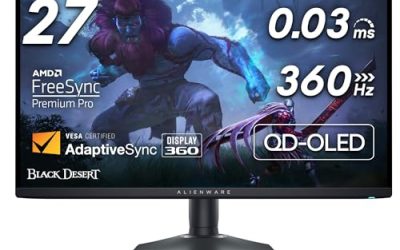
The AW2725DF is the competitive-timing pick. Its 26.7-inch QD-OLED panel pairs 2560 x 1440 with a 360Hz refresh rate and a 0.03ms gray-to-gray response — the lowest-lag, clearest-motion combination in this roundup. In football games that translates to throw timing: the release window on a dig route or a slant against press coverage is a handful of frames, and a 360Hz panel shows the receiver’s break with the least blur and delay of any pick here.
The 1440p resolution is a deliberate trade: it gives up the 4K sharpness franchise menus reward, and in return nearly any gaming GPU can drive very high frame rates. Color is excellent at 99.3 percent of DCI-P3, and Dell backs the panel with a three-year warranty that includes burn-in coverage — which matters for a genre with a persistent score bug. Players who live in Dynasty mode text will prefer the 4K picks; players who grind online head-to-head will prefer this one.
Specs
- Screen size: 26.7 inches, flat
- Resolution: 2560 x 1440 (QHD)
- Panel type: QD-OLED
- Refresh rate: 360Hz
- Response time: 0.03ms GtG
- HDR: VESA DisplayHDR True Black 400
- Color gamut: 99.3 percent DCI-P3
- Adaptive sync: FreeSync Premium Pro, VESA AdaptiveSync
- Ports: 2x HDMI 2.1, 1x DisplayPort 1.4, USB hub
- Extras: Three-year warranty including burn-in coverage
BenQ ZOWIE XL2566K

The XL2566K is the motion-clarity specialist. Its 24.5-inch Fast TN panel runs 1920 x 1080 at 360Hz, and its DyAc Plus backlight strobing is the headline feature: by flashing the backlight between frames, it cuts the blur that smears a receiver sprinting across the middle or a returner cutting upfield, so moving players stay readable in a way sample-and-hold panels cannot match at the same refresh rate. For timing-based play — leading a receiver, usering a linebacker through traffic — that clarity is the whole argument.
ZOWIE’s supporting tools suit the genre too. Black eQualizer lifts shadow detail so a dark-jersey defender does not disappear into a shaded sideline, and Color Vibrance pushes team-color separation. The costs should be stated plainly: 1080p is the softest image in this roundup, franchise text looks coarse next to the 4K picks, TN viewing angles and color trail IPS and OLED, and there is no meaningful HDR. It is a single-purpose screen for competitive players, and excellent at exactly that.
Specs
- Screen size: 24.5 inches, flat
- Resolution: 1920 x 1080 (Full HD)
- Panel type: Fast TN
- Refresh rate: 360Hz
- Response time: 0.5ms GtG (maker figure)
- Motion processing: DyAc Plus backlight strobing
- Color tools: Black eQualizer, Color Vibrance
- Adaptive sync: FreeSync-compatible variable refresh
- Ports: 3x HDMI 2.0, 1x DisplayPort 1.4
- Extras: Height, tilt and swivel stand; S Switch controller
How to Choose
Start with the read. If your losses come before the snap — misread coverages, a blitz you never saw — width and sharpness help most: the ultrawide shows more of the formation, and the 4K picks make coverage shells easier to pick out at standard camera distances.
If your losses come after the snap — throws a beat late, routes you cannot track through traffic — prioritize refresh rate and response time. Between the two 360Hz picks, the Alienware keeps OLED color and contrast, while the ZOWIE’s DyAc Plus strobing gives the clearest moving image and the softest menus.
Match the panel to your other hours. Franchise players spend real time in text-heavy menus, where 4K IPS is the most comfortable, worry-free option. OLED owners should use the panel-care features, because the score bug is static for hours. Finally, check ports: HDMI 2.1 matters for consoles at 4K, while PC players should run DisplayPort wherever offered.
Who Should Skip
Skip the high-refresh specialists if you play at 60 frames per second — a 360Hz panel cannot show frames the game never sends, and the 4K IPS picks will look better for the same role. Skip OLED if your sessions are marathon franchise sittings and you do not want to manage panel care. Skip the ultrawide if your desk is shallow or your capture setup assumes 16:9. And skip the ZOWIE if presentation matters at all: it is a competitive tool, not a showcase screen.
FAQ
Does an ultrawide monitor actually help in football games?
Yes, within limits. Football games render their gameplay cameras in the monitor’s aspect ratio, so a 21:9 screen shows more of the formation horizontally — wide splits and deep safeties enter the frame earlier. It does not change the simulation; it gives you more visual information for the same pre-snap read.
Is 120Hz enough for Madden and College Football?
For most players, yes. These games are not reaction shooters; their timing windows are generous compared with esports titles, and a clean 120Hz with low input lag covers them well. The 240Hz and 360Hz picks in this roundup buy margin — smoother route breaks and lower lag — rather than a different outcome, and they matter most to competitive online players.
Will the score bug burn into an OLED panel?
It can over long, repeated exposure, which is why this genre deserves the warning. Modern QD-OLED panels include pixel-refresh and panel-care routines, the Alienware pick carries burn-in warranty coverage, and varying your content between modes reduces risk. Players who leave the same broadcast overlay on screen for entire weekends should weigh the IPS picks instead.
Which pick is best for Franchise and Dynasty modes?
The GIGABYTE M32U. Its 4K IPS panel keeps dense roster and recruiting text sharp for long sessions, there is no burn-in management to think about, and the KVM switch suits players who keep a second machine at the desk. The ultrawide is the runner-up if you also play your games on the same screen.
Final Verdict
Football games reward two different screens: one that shows you more before the snap, and one that responds faster after it. The LG UltraGear 34GN850-B is the best single answer for most players — the wider formation view improves every pre-snap read while 144Hz keeps the play smooth. The Odyssey OLED G8 is the presentation pick, the M32U the franchise-mode workhorse, and the AW2725DF and XL2566K split the competitive vote between OLED contrast and strobed motion clarity. Pick by the phase of the game that costs you wins.
Product and ASIN Reference
| Product | ASIN |
|---|---|
| LG UltraGear 34GN850-B | B086XLLG28 |
| Samsung Odyssey OLED G8 (G80SD) | B0DHJ8B7TP |
| GIGABYTE M32U | B083GRVFXN |
| Alienware AW2725DF | B0CZSGWLD5 |
| BenQ ZOWIE XL2566K | B0B434LTLF |