🛒 Best Price Today on Amazon
Prime members get fast, free shipping on everything above, plus member-only deals. New members get a 30-day free trial — cancel anytime.
Choosing the best x870 motherboard means balancing connectivity, expansion, memory support, and price rather than chasing the most expensive model. AMD’s X870 and X870E platforms support Ryzen 7000, 8000, and 9000 desktop processors, DDR5 memory, and USB4. The right board depends on your case, storage plans, and upgrade priorities.
How to Choose an X870 Motherboard
Start with the features your gaming PC will actually use. X870 is designed for high-end AM5 systems, but different boards offer different storage layouts, networking, rear I/O, and power delivery. A more expensive model does not automatically deliver higher gaming frame rates with the same CPU, GPU, memory, and software configuration.
Match the Chipset to Your Expansion Needs
AMD X870 and X870E motherboards share the AM5 socket, DDR5 memory support, USB4, and PCIe 5.0 capabilities, but their available expansion resources differ. X870E provides more total chipset connectivity and more flexible PCIe expansion potential, making it attractive for systems with multiple fast drives or additional expansion cards.
For a conventional gaming PC with one graphics card and a small number of NVMe drives, a standard X870 board may offer everything necessary. Consider X870E when you need extra high-speed storage or more expansion options. The actual number of usable slots and their bandwidth depend on the individual motherboard and processor configuration.
Check CPU, Memory, and BIOS Compatibility
All four recommendations below use the AM5 socket and DDR5 memory, so they are unsuitable for older AM4 processors or DDR4 memory kits. AMD lists Ryzen 7000, 8000, and 9000 desktop processor families as supported by the X870 platform, although the motherboard’s CPU support list and installed BIOS version determine compatibility with a particular chip.
Memory speeds above standard JEDEC specifications depend on the processor’s memory controller, the DIMM configuration, and the motherboard firmware. AMD EXPO profiles can simplify memory configuration, but high advertised overclocked speeds are not guaranteed on every system. Check the manufacturer’s CPU and memory support lists before purchasing components.
Choose Storage and Connectivity for Your Workload
Count the M.2 slots you need, then check which support PCIe 5.0 and which share bandwidth with other connectors. A Gen5 SSD can deliver high sequential transfer rates in suitable workloads, but most games do not require one to load normally. A Gen4 drive may be a more economical choice if capacity matters more than peak throughput.
USB4, Wi-Fi 7, and faster Ethernet can also influence the buying decision. USB4 is useful for compatible high-speed external storage and docks, while Wi-Fi 7 requires a compatible router and network configuration to achieve its benefits. Wired Ethernet remains a practical option for stationary gaming PCs, particularly where network consistency matters.
Confirm Case Fit and Upgrade Space
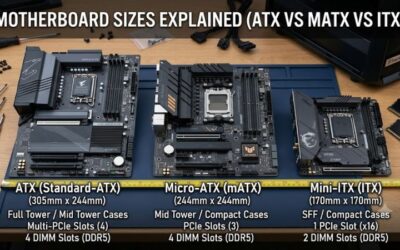
ATX boards suit many standard mid-tower cases, whereas E-ATX designs can require a wider chassis or additional clearance around cable openings. Verify the exact board dimensions against the case manufacturer’s specifications before ordering. Also check graphics-card clearance, front-panel USB headers, fan connectors, and the location of SATA ports if you plan to reuse older drives.
Power delivery and cooling deserve attention when pairing a board with a high-power Ryzen processor. A well-cooled voltage-regulator area and accessible heatsinks can help maintain sensible operating temperatures during sustained workloads. Choose based on your intended CPU, case airflow, and expansion needs rather than assuming that the largest heatsink or highest phase count will improve gaming performance.
Top Picks: The Best X870 Motherboards
These four motherboards target different budgets and build priorities. The recommendations reflect published specifications and independent editorial coverage, not PC Gaming Universe lab measurements. Exact retail prices and stock vary, so compare current listings before making a purchase.
| Product | Best For | Key Spec | Compatibility | Watch Out For |
| ASRock X870E Taichi | Best Overall | Dual USB4; two PCIe 5.0 x16 slots | AM5, DDR5, E-ATX case | Large board |
| MSI MAG X870 Tomahawk WiFi | Best Value | USB4; Wi-Fi 7 | AM5, DDR5, ATX case | Less expansion than some X870E models |
| ASUS ROG Crosshair X870E Hero | Best for Premium Builds | Dual USB4; PCIe 5.0 storage support | AM5, DDR5, ATX case | Premium pricing |
| MSI MPG X870E Carbon WiFi | Best for Storage and Connectivity | Dual USB4; multiple M.2 slots | AM5, DDR5, ATX case | Costs more than mainstream boards |
Best Overall: ASRock X870E Taichi
For enthusiasts who want substantial expansion without moving to an ultra-premium flagship.
The ASRock X870E Taichi combines a robust power-delivery design with extensive connectivity. Its published specifications include two PCIe 5.0 x16 slots, dual USB4 ports, Wi-Fi 7, and 5GbE networking. This feature mix makes it suitable for gaming systems that also handle content creation, fast storage, and demanding multitasking.
Its main drawback is the E-ATX form factor, which limits case compatibility compared with standard ATX boards. Buyers should verify internal chassis dimensions and cable access before committing to a build. It is a strong choice for an enthusiast who needs expansion flexibility, but unnecessary for a basic single-GPU gaming PC with modest storage requirements.
Best Value: MSI MAG X870 Tomahawk WiFi
For gamers who want modern connectivity without paying for an enthusiast flagship.
The MSI MAG X870 Tomahawk WiFi is a sensible starting point for a mainstream Ryzen gaming build. Its X870 chipset provides USB4, DDR5 support, and PCIe 5.0 capabilities, while the board’s ATX layout suits many conventional mid-tower cases. Wi-Fi 7 is also useful for compatible wireless networks where running Ethernet is inconvenient.
Its value depends on the current retail price and whether you need the additional expansion of X870E. A builder using one graphics card, one or two SSDs, and standard gaming peripherals may not benefit from paying more for a flagship model. However, buyers planning numerous high-speed drives or multiple expansion cards should compare available lanes and slot-sharing rules before choosing this board.
Best for Premium Builds: ASUS ROG Crosshair X870E Hero
For enthusiasts who prioritize connectivity, firmware features, and a high-end build experience.
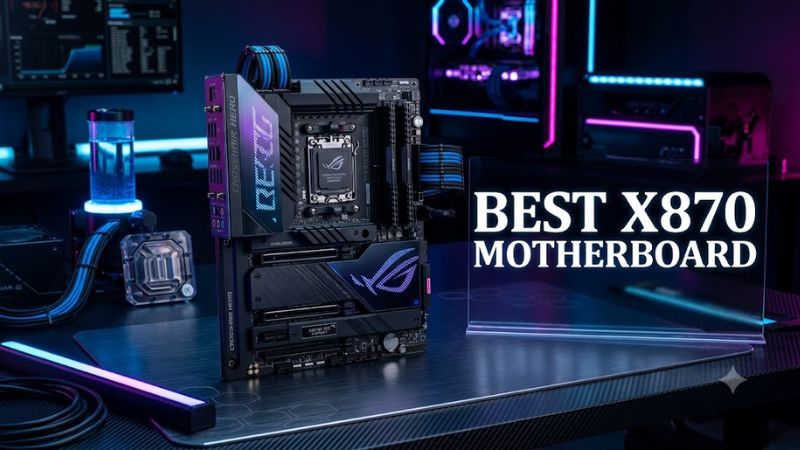
The ASUS ROG Crosshair X870E Hero offers a premium ATX platform with dual USB4 ports, Wi-Fi 7, fast wired networking, and extensive storage connectivity. Its power-delivery design and enthusiast-oriented firmware options suit builders who want room to tune memory and processor settings. The board also makes sense for a system combining gaming with demanding creative workloads.
The principal weakness is cost: premium motherboard features do not automatically translate into higher frame rates. If your build uses a single graphics card and conventional storage, a less expensive X870 board may deliver the same practical gaming experience. Choose the Hero when its specific connectivity, expansion, and tuning features justify the extra expenditure rather than buying it solely for its product tier.
Best for Storage and Connectivity: MSI MPG X870E Carbon WiFi
For users combining gaming with large local libraries, fast external drives, and demanding peripherals.
The MSI MPG X870E Carbon WiFi offers a substantial selection of internal storage connections, dual USB4, Wi-Fi 7, and 5GbE wired networking. Those features can benefit a PC used for large game libraries, media production, and frequent transfers between compatible external devices. Its ATX dimensions also make it easier to accommodate than many E-ATX enthusiast boards.
The trade-off is its premium price and the need to inspect the storage lane layout carefully. M.2 slot count alone does not tell you whether every drive can operate at its maximum interface speed alongside a populated graphics slot. If you will install only one SSD and use ordinary peripherals, the Carbon’s additional connectivity may remain unused, making a mainstream board the more economical choice.
FAQ
Is X870 better than X870E for gaming?
Not necessarily; X870E offers greater expansion potential, but it does not inherently produce higher gaming performance. With equivalent processors, graphics cards, memory settings, and software, motherboard chipset choice is rarely the main factor determining frame rates. Consider X870E when you need additional connectivity, more storage options, or a specific slot configuration rather than assuming its higher tier makes games run faster.
Do X870 motherboards support Ryzen 9000 processors?
Yes, AMD lists Ryzen 9000 desktop processors among the CPU families supported by the X870 platform. Before installing a particular processor, verify the exact motherboard’s CPU support list and minimum BIOS version. If the board requires a firmware update, check whether it provides a BIOS Flashback feature that can update firmware without a supported CPU installed.
Can an X870 motherboard use DDR4 memory?
No, X870 motherboards use DDR5 memory and cannot accept DDR4 modules. The memory slots are physically and electrically designed for DDR5, so an existing DDR4 kit from an older build cannot be reused. Budget for compatible DDR5 memory and check the motherboard’s supported DIMM configurations if you plan to use a high-capacity kit or enable an AMD EXPO profile.
Is the best X870 motherboard worth buying for a budget gaming PC?
Usually, a premium X870E board is difficult to justify for a tightly budgeted gaming PC unless you need its specific features. A less expensive AM5 motherboard may leave more money for the graphics card, processor, or SSD, components that can have a more direct effect on gaming experience. Compare the complete platform cost and required connectivity before deciding how much to spend on the motherboard.
Final Thoughts
The best x870 motherboard depends on your expansion plans, case size, and budget. The ASRock X870E Taichi suits feature-rich builds, the MSI MAG X870 Tomahawk WiFi targets mainstream gaming, and the ASUS and MSI premium models offer additional connectivity. Compare current prices and compatibility before choosing.