
- Top Pick: Dual Monitor Stand – Vertical Stack Screen Free-Standing Monitor Riser Fits Two 13 to 34 Inch Screen with Swivel, Tilt, Height Adjustable, Holds One (1) Screen Up to 44Lbs
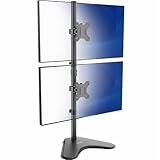
- Best Value: VIVO Dual Monitor Desk Stand Free-Standing LCD Mount, Holds in Stacked Vertical Position 2 Ultrawide Screens up to 34 inches, Black, STAND-V002L
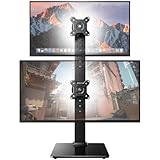
- Premium Choice: HUANUO Dual Monitor Stand for 13 to 34 Inch, Max Load 44 lbs, Vertical Monitor Mount, Freestanding Monitor Riser with Swivel, Tilt, Rotation, 13 Height Settings, Max VESA 100×100
Not every dual-monitor setup should sit side by side. If your desk is narrow, or you want a primary screen at eye level with a secondary display above it for chat, reference material, or a stream dashboard, a stacking monitor stand is the answer. It positions two screens in a vertical column, reclaiming horizontal desk space while giving you a tall, ergonomic wall of pixels.
The category is dominated by freestanding risers and clamp-on mounts, each with tradeoffs in stability, adjustability, and desk compatibility. I researched a range, from the versatile HUANUO vertical mount to the ultrawide-friendly VIVO stacked stand, to explain what separates a rock-solid vertical setup from a wobbly one. Here’s the guide.
As an Amazon Associate we earn from qualifying purchases at no extra cost to you.



🎮 Get More From Your Setup — Free
Prime Gaming gives you free PC games every month, in-game loot, and a free Twitch channel sub — plus fast free shipping on all the gear above. New members get a 30-day free trial.
Watch: Stacking Monitor Stand — Video Review
Design & Build
Stacking stands come in two flavors. Freestanding risers like the VIVO Dual Monitor Desk Stand (STAND-V002L) hold two ultrawide screens in a stacked column on a weighted base, needing no clamp, ideal for glass desks. Clamp and grommet mounts like the HUANUO vertical dual monitor mount and MOUNT PRO vertical stand attach to the desk edge for a floating look and more adjustability. Weight capacity varies: the ErGear stacked mount and single-column risers handle heavier panels, with some supporting up to 44 lbs on the primary screen. Build quality on the better mounts is genuinely heavy-duty, with thick steel arms and secure VESA plates.
Performance
The best stacking stands offer full articulation, meaning swivel, tilt, height adjustment, and rotation on each arm, so you can angle the top screen down toward your eyeline and set the bottom one at a comfortable primary height. The HUANUO’s 13 height settings and independent tilt make dialing in ergonomics easy. Freestanding models like the VIVO trade some adjustability for the convenience of no clamping, which suits ultrawide stacks. Stability is the crucial factor: a well-built mount keeps both screens dead still when you type, while a flimsy one lets the top monitor bounce. Cable routing through the arm keeps the vertical stack looking clean.
Pros & Cons
- Saves desk width: stacks two screens vertically instead of side by side.
- Full articulation: tilt, swivel, height, and rotation on quality mounts.
- High weight capacity: top models hold heavy panels securely.
- Clean cable routing: arms channel cables for a tidy vertical column.
- Clamp desk requirement: mount versions need a compatible desk edge.
- Neck angle: the top screen sits high, best used for secondary content.
Alternatives to Consider
If you run two ultrawide monitors, the freestanding VIVO STAND-V002L is purpose-built for that stacked configuration. For maximum adjustability on standard screens, the HUANUO vertical mount or MOUNT PRO clamp stands give you the most positioning freedom. Those needing the highest weight capacity for a large primary display should look at single-column risers rated up to 44 lbs.
Related Guides
- What Is The Best Gaming Monitor (2026)
- Best In-ear Monitor For Gaming (2026)
- Best 1440p 240Hz Gaming Monitor (2026)
- Double Curved Monitor (2026)
Frequently Asked Questions
Is a stacked setup ergonomic?
Yes, if configured correctly. Place your primary screen at eye level and the secondary above it for glanceable content. The top screen sits higher, so it’s best for reference material you don’t stare at constantly.
Will it fit my monitors?
Check two things: the size range (most support roughly 13-34″) and the VESA pattern (usually 75×75 or 100x100mm). Also confirm the per-arm weight rating exceeds your monitors’ weight.
Freestanding or clamp mount?
Freestanding risers work on any desk, including glass, and need no installation. Clamp mounts free up desk surface and offer more adjustment, but require a compatible desk edge and a bit of setup.
Can I stack two ultrawide monitors?
Yes, with a stand rated for ultrawides like the VIVO STAND-V002L. Make sure the weight capacity and arm width suit your specific ultrawide panels before buying, as they’re heavier than standard screens.
Verdict
A stacking monitor stand is the smart fix for a narrow desk or a workflow that benefits from a vertical screen column. For most people, the fully articulating HUANUO vertical mount offers the best blend of adjustability and stability, while ultrawide users should choose the freestanding VIVO. Prioritize weight capacity and build quality, and you’ll get a vertical setup that stays rock-steady all day.










