
A double curved monitor setup gives you two wrapped panels working as a single, immersive workspace, and it has quietly become one of the smartest upgrades for gamers, traders, and anyone juggling a dozen browser tabs. Instead of buying two mismatched screens and fiddling with color calibration, matched dual-packs arrive tuned to each other, ready to line up edge to edge.
In this guide we look at how these paired curved displays actually perform on a real desk, where the 1500R curve helps, and which configuration makes sense for your budget and use case. Our focus is on the popular Kado dual-packs and the space-saving Deco Gear super-ultrawide alternative.
As an Amazon Associate we earn from qualifying purchases at no extra cost to you.




🎮 Get More From Your Setup — Free
Prime Gaming gives you free PC games every month, in-game loot, and a free Twitch channel sub — plus fast free shipping on all the gear above. New members get a 30-day free trial.
Watch: Double Curved Monitor — Video Review
Design & Build
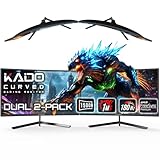
The defining feature here is the 1500R curvature, a gentle wrap that keeps the far edges of each screen angled toward your eyes. On the Kado 2-Pack 24″ and 27″ FHD models, that curve pays off most when you push the two panels into a slight V shape, closing the visual gap and reducing the neck swivel you get from flat dual setups. Build quality is functional rather than premium: slim bezels, plastic stands with basic tilt, and standard VESA holes so you can swap in an arm. The Deco Gear 49″ takes the opposite approach, folding both “screens” into one seamless 5120×1440 panel, which eliminates the center seam entirely and looks far cleaner on a desk.
Performance
For everyday work and content, the 75Hz Kado panels feel smooth and their 1080p-per-screen resolution is sharp enough at normal viewing distance. If you game competitively, the Kado Dual 2-Pack 24″ 180Hz/1ms model is the one to target; the higher refresh and faster response make fast shooters noticeably crisper. The Deco Gear 49″ runs at 120Hz with HDR400, adaptive sync, and a genuinely useful USB-C 65W input plus KVM, so it doubles as a laptop dock. Color from these VA-leaning curved panels is punchy, though viewing angles are narrower than IPS, one reason the inward curve matters.
Pros & Cons
- Matched pairs: Dual-packs guarantee identical color, size, and refresh out of the box.
- Immersive curve: The 1500R wrap reduces edge distortion and eye travel.
- Flexible mounting: VESA support lets you add a dual arm for a stacked or angled layout.
- Value: Two curved screens often cost less than one premium ultrawide.
- Center bezel: Two-panel setups always leave a seam that single-panel ultrawides avoid.
- Basic stands: Included bases offer limited height adjustment.
Alternatives to Consider
If a visible seam bothers you, the Deco Gear 49″ 32:9 ultrawide is the clear alternative, giving you the same horizontal real estate as two 27″ screens without the gap, plus HDR and KVM. If you value pixel sharpness, the Kado 2-Pack 27″ FHD spreads 1080p over a larger area, so the 24″ packs actually look slightly denser. Gamers who want speed over screen count should prioritize the 180Hz Kado dual over any of the 75Hz options.
Related Guides
- Monitor 21 9 Curved (2026)
- Best And Cheapest Gaming Monitor (2026)
- 720 Hertz Monitor (2026)
- Best 1440p 240Hz Gaming Monitor (2026)
Frequently Asked Questions
Do I need two graphics outputs to run a dual curved monitor?
Yes. Each panel needs its own HDMI or DisplayPort connection. Most modern GPUs and laptops with USB-C output can drive two 1080p screens easily.
Is a curved monitor better than flat for dual setups?
For side-by-side use, curved panels angled inward reduce how far your eyes travel and cut glare at the edges, which most users find more comfortable over long sessions.
Can I mount these on a single arm?
All the Kado packs include VESA holes, so a dual-monitor arm or desk mount works and frees up the desk space the stock stands occupy.
Which is best for competitive gaming?
The Kado Dual 2-Pack 24″ 180Hz/1ms model, thanks to its high refresh rate and low response time, is the strongest pick for fast-paced titles.
Verdict
A double curved monitor setup is one of the easiest ways to expand your workspace without color-matching headaches. For most people the Kado 2-Pack 27″ FHD hits the sweet spot of size and value, gamers should reach for the 180Hz 24″ pack, and anyone who wants a truly seamless canvas will be happiest with the Deco Gear 49″ ultrawide.










