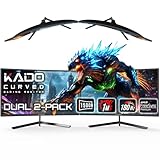
Running two curved monitors is one of the most satisfying ways to expand your desktop. The gentle 1500R curve wraps each panel slightly toward you, reducing the head-turning and edge distortion that flat dual setups suffer, and buying a matched two-pack guarantees identical color, height, and stands for a seamless look across both screens.
Matched dual-curve kits take the guesswork out of pairing displays, but sizes, resolutions, and refresh rates vary enough to change the experience significantly. We looked at how the leading dual curved options perform for work and play. Here is what to expect and which configuration fits your desk.
As an Amazon Associate we earn from qualifying purchases at no extra cost to you.





🎮 Get More From Your Setup — Free
Prime Gaming gives you free PC games every month, in-game loot, and a free Twitch channel sub — plus fast free shipping on all the gear above. New members get a 30-day free trial.
Watch: Curved Monitor Dual — Video Review
Design & Build
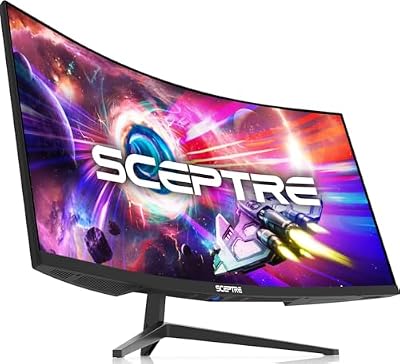
The Kado two-pack kits are purpose-built for dual setups, arriving as identical pairs with slim bezels and a consistent 1500R curve that lines up cleanly when placed side by side. They come in 24-inch, 27-inch, and 34-inch ultrawide flavors, so you can scale the setup to your desk depth. The lone Sceptre C248W is a single 24-inch curved panel with built-in speakers and VESA mounting, useful if you want to add one screen or mix and match rather than buy a matched pair.
Performance
Most of these Kado panels target productivity with sharp 1920×1080 resolution and a smooth 75Hz refresh, which is plenty for office work, browsing, and everyday multitasking across two screens. The standout for gamers is the Kado 34-inch ultrawide two-pack, which steps up to 165Hz and a 1ms response at 2560×1080, delivering fast motion alongside its immersive width. The Sceptre single panel matches the productivity tier at 1080p with useful extras like integrated speakers. For most desks, a matched 24 or 27-inch pair balances screen real estate against footprint nicely.
Pros & Cons
- Matched two-packs guarantee identical color, height, and curve.
- 1500R curve reduces edge distortion and neck strain across dual screens.
- Slim bezels minimize the gap between panels for a near-seamless view.
- Size options from 24-inch to 34-inch ultrawide suit different desks.
- Most panels are 75Hz, limiting fast-paced gaming outside the 34-inch pair.
- 1080p resolution looks softer on the larger screens than QHD would.
Alternatives to Consider
If your priority is productivity and a clean matched look, the Kado 24-inch and 27-inch two-packs are the natural picks, with the 27-inch pair offering more screen real estate for the same 75Hz smoothness. Gamers who want speed and immersion should consider the Kado 34-inch ultrawide two-pack with its 165Hz refresh, effectively giving you a very wide, fast canvas across two curves. If you only need to add a single curved screen to an existing setup, the Sceptre C248W with built-in speakers is a sensible standalone option.
Related Guides
- Best In-ear Monitor For Gaming (2026)
- Best Monitor Position For Gaming (2026)
- Best 4K Computer Monitor For Gaming (2026)
- What Is The Best Gaming Monitor (2026)
- Best And Cheapest Gaming Monitor (2026)
Frequently Asked Questions
Is a matched two-pack better than buying two separate monitors?
Yes. A two-pack ensures identical color calibration, stand height, and curve, avoiding the mismatches that come from pairing two different models.
Is 75Hz fine for dual monitors?
For work, browsing, and media, 75Hz feels smooth. If you game seriously, look to the 165Hz 34-inch ultrawide pair instead.
Does the curve help with two screens?
It does. The 1500R curve angles each panel’s edges toward you, cutting distortion and making a wide dual setup more comfortable to view.
What size is best for a typical desk?
A pair of 24-inch or 27-inch panels balances real estate against footprint well; 34-inch ultrawides need a deeper desk and more horizontal space.
Verdict
A dual curved monitor setup blends productivity and immersion, and a matched pair makes it effortless. The Kado 27-inch two-pack is our all-round productivity pick, the 34-inch ultrawide pair is the choice for gamers who want speed and width, and the Sceptre single panel suits adding one screen. Match the size and refresh to your desk and workload for a comfortable, cohesive multi-screen experience.