- Top Pick: Dell 27 Monitor S2725QS, 4K UHD IPS, 120Hz, 5ms, FreeSync Premium
- Best Value: ZZA 34 Inch Ultrawide Curved Monitor Built in Speakers 4K Gaming Computer Monitor 100Hz, WQHD(3440x1440P) Curved 3800R 21:9 Ultra Wide PC Display, 130% sRGB, HDMI &DP, VESA Mount Compatible-White
- Premium Choice: Samsung 37” Odyssey G7 (G75F) Series 4K UHD Curved Gaming Monitor
A great 4K monitor can serve two masters. The pixel density that makes spreadsheets, code, and documents razor-sharp for work also delivers gorgeous detail in games, and modern panels increasingly pair that resolution with high refresh rates. The result is a single display that handles a productive workday and a demanding gaming session without compromise.
- Watch: Best 4K Monitor For Productivity And Gaming — Video Review
- How to Choose a 4K Monitor for Work and Play
- The Best 4K Productivity and Gaming Monitors Reviewed
- What to Look For in a 4K Productivity and Gaming Monitor
- Which 4K Monitor Should You Choose?
- Common Mistakes When Buying a 4K Monitor
- Quick Setup Checklist for a New 4K Monitor
- Related Guides
- Related Guides
- Frequently Asked Questions
- Final Thoughts
- Related Articles
This roundup gathers 4K monitors that strike the right balance between crisp text, accurate color, and gaming-friendly refresh rates. Whether you want a compact desktop panel or a sprawling ultrawide, these picks are ready to do double duty.


As an Amazon Associate we earn from qualifying purchases at no extra cost to you.



🎮 Get More From Your Setup — Free
Prime Gaming gives you free PC games every month, in-game loot, and a free Twitch channel sub — plus fast free shipping on all the gear above. New members get a 30-day free trial.
Watch: Best 4K Monitor For Productivity And Gaming — Video Review
How to Choose a 4K Monitor for Work and Play
- Refresh rate: 120Hz or higher keeps gaming smooth, while still looking crisp for everyday productivity tasks.
- Color accuracy: Wide sRGB or DCI-P3 coverage benefits both creative work and vibrant, lifelike game visuals.
- Screen size and format: Larger and ultrawide panels boost multitasking, though they demand more desk space and GPU power.
- Connectivity: USB-C with power delivery simplifies laptop docking, while HDMI 2.1 and DisplayPort handle high-refresh gaming.
- Ergonomics: Adjustable stands and eye-care features matter when you spend long hours in front of the screen.
The Best 4K Productivity and Gaming Monitors Reviewed
Dell S2725QS
This 27-inch 4K IPS panel pairs 120Hz with FreeSync Premium in a clean, professional design. Its sharp text and smooth gaming make it our top all-around pick.
Acer Nitro VG270K
The Acer Nitro offers 4K at up to 160Hz with a DFR mode that boosts to FHD 320Hz, plus FreeSync Premium. It is a versatile choice for work and fast gaming.
Samsung Odyssey G7 (G75F)
This 37-inch curved 4K panel delivers immersive scale for both multitasking and gaming, with a high refresh rate that keeps motion fluid across a large canvas.
ZZA 34-Inch Ultrawide
The ZZA ultrawide brings a 3440×1440 curved panel with built-in speakers and 130% sRGB, offering expansive screen real estate for productivity and immersive play.
Amzfast 32-Inch 4K Curved
The Amzfast 32-inch 4K curved monitor combines 120Hz, HDR, and PIP/PBP support with HDMI 2.1, making it a feature-rich option for a dual-purpose desk.
What to Look For in a 4K Productivity and Gaming Monitor
Screen Size and Pixel Density
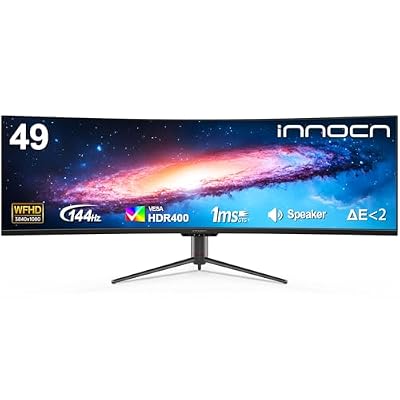
Pixel density determines how sharp text looks. A 4K panel (3840 x 2160) works out to roughly 163 pixels per inch at 27 inches and about 138 at 32 inches, which is why a 27-inch model suits close-up office work and a 32-inch model feels more spacious. By comparison, a 34-inch ultrawide at 3440 x 1440 lands near 110 pixels per inch, and a 49-inch super-ultrawide at 3840 x 1080 falls to about 81. The last is not true 4K in the usual sense, because it offers only 1080 rows of pixels. Expect to run operating-system scaling at around 150 percent on a 27-inch 4K screen.
Panel Type: IPS, VA, and QD-OLED
Fast IPS panels offer wide viewing angles and accurate color, which suits editing and shared screens. VA panels such as the curved CRUA model deliver deeper blacks and higher contrast, though motion handling can vary. QD-OLED panels, found in the Acer Predator and Samsung Odyssey OLED G8 listed here, give near-instant pixel response and strong contrast. Their trade-offs are burn-in risk with static content, such as a permanent taskbar or spreadsheet grid, and text rendering that some users find slightly softer. Manufacturers include mitigation features, but confirm the warranty terms on the listing.
Refresh Rate and Connection Bandwidth
Higher refresh rates require more bandwidth. A 4K signal at 144Hz with 8-bit color is more than a standard DisplayPort 1.4 link can carry without compression, so these monitors typically rely on Display Stream Compression, which your graphics card must support. HDMI 2.1 handles 4K at 120Hz over its 48Gbps link. Check the monitor’s ports and your graphics card’s outputs together to avoid ending up capped at 60Hz.
Workflow Features That Matter
For productivity, look for USB-C with DisplayPort Alt Mode and power delivery, a USB hub, height-adjustable stands, and picture-by-picture modes. Several monitors in this roundup advertise dual-mode switching or split-screen tools, which can help if you juggle a laptop and a desktop.
Which 4K Monitor Should You Choose?
| If you… | Choose… |
|---|---|
| Want OLED contrast with 4K and a very high refresh rate, plus USB-C | Samsung 27″ Odyssey OLED G8 (G80SH) |
| Want a QD-OLED 4K panel with FreeSync Premium Pro support | acer Predator 27″ Gaming Monitor QD-OLED |
| Want a 4K and a faster full-HD mode on the same monitor | Amzfast 27″ 4K Gaming Monitor |
| Want a larger, immersive curved 4K screen with strong contrast | CRUA 32″ Curved Gaming Monitor |
| Want an office-first 27-inch monitor with crisp text | Dell S2725QS |
| Want a plain 27-inch 4K gaming screen | Acer Nitro VG270K |
| Want a high-refresh gaming screen from a well-known brand (confirm resolution) | Samsung Odyssey G7 (G75F) |
| Want maximum horizontal workspace and accept lower resolution | INNOCN 49″ Curved Ultrawide |
| Want an ultrawide for multitasking and driving games | ZZA 34-Inch Ultrawide |
Common Mistakes When Buying a 4K Monitor
- Forgetting the GPU load. 4K has about 2.25 times as many pixels as 1440p and four times as many as 1080p, so confirm your graphics card can drive it at your target frame rate.
- Assuming the cable included will deliver the refresh rate. Use a certified DisplayPort or HDMI 2.1 cable, and enable the high refresh rate in the display settings.
- Treating every ultrawide as 4K. Many wide panels trade pixel count for width, so read the resolution line.
- Buying OLED for static desktop work without a plan. Use dark themes, auto-hide the taskbar, and enable screen savers if you do long document sessions.
- Skipping display scaling. Leaving scaling at 100 percent on a 27-inch 4K screen makes text tiny and leads to returns.
Quick Setup Checklist for a New 4K Monitor
- Connect with a cable rated for the refresh rate you want, using DisplayPort or HDMI 2.1.
- Open the operating-system display settings and select the highest refresh rate from the list, since it often defaults to 60Hz.
- Set scaling to about 150 percent on a 27-inch screen, or 125 to 150 percent at 32 inches.
- Enable adaptive sync in both the monitor menu and the graphics driver.
- Use HDR only with content that supports it, and adjust brightness for desktop use.
| Size and format | Resolution | Approx. pixels per inch |
|---|---|---|
| 27-inch 4K | 3840 x 2160 | 163 |
| 32-inch 4K | 3840 x 2160 | 138 |
| 34-inch ultrawide | 3440 x 1440 | 110 |
| 49-inch super-ultrawide | 3840 x 1080 | 81 |
Related Guides
- Best 27 Inch Gaming Monitor (2026)
- Stacking Monitor Stand (2026)
- Monitor Mounted Light (2026)
- Multi Screen Monitor (2026)
- Dual 4K Monitor (2026)
Frequently Asked Questions
Is 4K too demanding for gaming?
4K requires a powerful GPU for high frame rates, but upscaling technologies like DLSS and FSR make it far more attainable than it used to be.
Can one monitor really handle both work and gaming?
Yes. A 4K panel with a high refresh rate delivers sharp text for productivity and smooth, detailed visuals for gaming in a single display.
Do I need USB-C on my monitor?
USB-C with power delivery is convenient for docking a laptop with a single cable, though it is not essential for a desktop-only setup.
Is an ultrawide better than a standard 4K panel?
Ultrawides excel at multitasking and immersion, while standard 16:9 4K panels offer higher pixel density and broader game compatibility.
Final Thoughts
For a versatile do-it-all display, the Dell S2725QS is our top pick thanks to its 4K sharpness and smooth 120Hz refresh. The Acer Nitro VG270K is ideal for players who want higher refresh flexibility, while the ZZA ultrawide is the choice for maximum multitasking space.