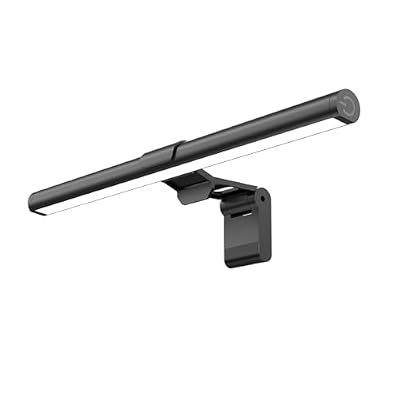
- Top Pick: Samphon Monitor Light Bar, Eye-Care USB Reading Mnitor lamp, 11.8'' LED Computer Lights with Ultrawide Lighting, 3 Color Temperature Dimmable Desk Light for Home Office Gaming
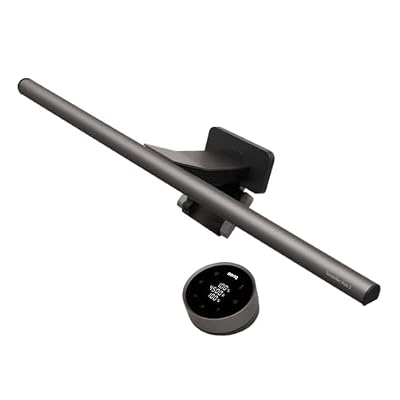
- Best Value: Quntis Computer Monitor Lamp, Screen Monitor Light Bar for Eye Caring, USB Reading LED Task Lamp with Auto-Dimming, Dimmable Light Bar, Touch Control, No Glare Space Saving Home Office Desk Lamps
- Premium Choice: LitONES Upgraded Ring Light for Laptop, Monitor & Desk, 50 Lighting Modes
A monitor-mounted light bar solves a problem most desk workers don’t realize they have: overhead and side lighting that either casts glare across the screen or leaves the keyboard in shadow. By perching a slim LED bar on top of your display, you get focused, even illumination exactly where you need it, without the desk clutter of a traditional lamp or any reflections bouncing back at your eyes.
This review explains what to look for in a screen-mounted light, evaluates real-world performance, and highlights the best bars for eye comfort, streaming, and productivity. If you spend long hours at a monitor, this is one of the most impactful small upgrades you can make.
As an Amazon Associate we earn from qualifying purchases at no extra cost to you.






🎮 Get More From Your Setup — Free
Prime Gaming gives you free PC games every month, in-game loot, and a free Twitch channel sub — plus fast free shipping on all the gear above. New members get a 30-day free trial.
Watch: Monitor Mounted Light — Video Review
Design & Build
Monitor light bars share a common design: a long LED strip with a counterweighted clip that rests on the top bezel, requiring no adhesive or screws. The Quntis Computer Monitor Lamp and Samphon Monitor Light Bar exemplify the type, with slim aluminum bodies, ultrawide light spread, and touch or auto-dimming controls. Compact options like the 16-inch USB LED bars keep things simple and affordable, while streaming-focused lights such as the Logitech Litra Glow add a premium, camera-oriented build. Most draw power over USB, so they tuck neatly behind your setup with minimal cabling.
Performance
The magic is in the asymmetric optics. These bars are engineered to throw light down onto your desk and keyboard while keeping it off the screen, so you get bright, even illumination with zero glare. The Quntis model’s auto-dimming feature adjusts to ambient conditions automatically, and adjustable color temperature on the Samphon and similar bars lets you switch between warm evening light and cool focus light. For creators, the Logitech Litra Glow delivers flattering, consistent light for video calls and streaming. The LitONES ring light option adds versatility with multiple lighting modes for both desk work and on-camera use.
Pros & Cons
- Pro: Casts even task light with no glare on the screen.
- Pro: Frees desk space compared to a traditional lamp.
- Pro: Adjustable brightness and color temperature reduce eye strain.
- Pro: Simple USB power and clip-on mounting, no tools needed.
- Con: Very thick or curved bezels may need a compatible clip design.
- Con: Premium streaming lights cost considerably more than basic bars.
- Con: Requires a free USB port or power adapter.
Alternatives to Consider
If your priority is on-camera lighting for calls and streaming, the Logitech Litra Glow or the LitONES ring light are purpose-built for flattering, adjustable illumination. For pure desk task lighting on a budget, a compact 16-inch USB LED bar or the Motumen clamp-on desk lamp gets the job done for less. Users who want set-and-forget convenience should prioritize the auto-dimming Quntis bar, while those who value simple manual control will appreciate the touch-operated Samphon.
Related Guides
- What Is The Best Gaming Monitor (2026)
- Best Monitor For Gaming And Work (2026)
- Huge Curved Monitor (2026)
- Best And Cheapest Gaming Monitor (2026)
Frequently Asked Questions
How does a monitor light bar avoid screen glare?
The bars use asymmetric optics that direct light downward onto your desk and keyboard, not toward the screen. This design keeps the panel free of reflections while lighting your work surface evenly.
Will a light bar fit my monitor?
Most use a flexible counterweighted clip that fits standard flat and gently curved bezels. Very thick or unusually curved screens may need a bar specifically rated for that shape, so check the clip range.
Are these good for reducing eye strain?
Yes. Proper task lighting reduces the harsh contrast between a bright screen and a dark room, and adjustable warm-to-cool color temperature lets you match the light to the time of day for greater comfort.
Can I use one for video calls?
Task-focused bars help brighten your face somewhat, but for the best on-camera look, a dedicated light like the Logitech Litra Glow or a ring light provides more even, flattering front illumination.
Verdict
A monitor-mounted light is a simple upgrade that meaningfully improves comfort and clears desk space. The auto-dimming Quntis Computer Monitor Lamp is our top pick for hands-free convenience, with the Samphon bar a great value for manual control. If streaming or video calls are your focus, step up to the Logitech Litra Glow instead.