🛒 Best Price Today on Amazon
Prime members get fast, free shipping on everything above, plus member-only deals. New members get a 30-day free trial — cancel anytime.
- Top Budget 1440P 240Hz Gaming Monitors Picks for 2026
- Best Budget 1440p 240Hz Monitors at a Glance
- 1. INNOCN 24.5″ 1440p 240Hz Fast IPS Gaming Monitor
- 2. AOC 27″ QD-OLED 1440p 240Hz Gaming Monitor
- 3. KOORUI 27″ QHD 260/240Hz Fast IPS Gaming Monitor
- 4. SANSUI 27″ 1440p 260/240Hz Fast IPS Gaming Monitor
- 5. AOC 27″ QD-OLED 1440p 240Hz Gaming Monitor (alt SKU)
- 6. CRUA 27″ 240Hz QHD IPS Gaming Monitor
- How to Choose a Budget 1440p 240Hz Monitor
- Frequently Asked Questions
- Related Guides
- About the Author
- About the Author
- Related Articles
- Related Guides
Quick answer: For most people in 2026, the best budget 1440p 240hz gaming monitors 2026 is the INNOCN 24.5" 1440p 240Hz Fast IPS — our #1 rated choice. See the full ranked comparison, alternatives and buying advice below.
Top Budget 1440P 240Hz Gaming Monitors Picks for 2026
Here are our current top budget 1440p 240hz gaming monitors picks, compared on real Amazon owner reviews, price, and features. Live prices update below.
For years a 1440p 240Hz monitor was an enthusiast luxury, but in 2026 the value end of this category has collapsed in price in the best possible way. The picks below start at around $140 and most of the genuine bargains land comfortably under $200 — close to what a decent 1080p 144Hz panel cost not long ago. That is the budget bracket this guide is built around: high-refresh QHD that does not need a flagship graphics card or a flagship wallet to enjoy. We also include two pricier QD-OLED options and label them plainly as the worth-the-stretch premium picks, so the list stays honest about what your money buys.
PC Gaming Universe is reader-supported. When you buy through links on our site, we may earn an affiliate commission at no extra cost to you.
The sweet spot here is the fast-IPS panel. Spend roughly $140 to $190 and you get sharp QHD resolution, genuine 240Hz (often with a 260Hz overclock), 1ms response claims and FreeSync that runs fine as G-Sync Compatible on most modern GPUs. We picked across that value range first, then added the OLED options for readers who have the budget and want the contrast and motion clarity those panels are famous for. Prices below run from about $140 to about $360, so there is a pick for a tight build and a pick for a treat.
A quick reality check on the refresh rate before the list: hitting a useful fraction of 240fps at 1440p in modern titles wants a capable GPU. In esports staples like Valorant, CS2 and Overwatch a mid-range card will saturate these panels easily; in heavy single-player games you may sit nearer 100-140fps, which still looks superb on a high-refresh screen thanks to adaptive sync. Read the per-monitor notes with your graphics card in mind and you will not overpay for frames you cannot feed.
Best Budget 1440p 240Hz Monitors at a Glance
| Model | Key Spec | Price | Rating | Best For |
|---|---|---|---|---|
| INNOCN 24.5″ 1440p 240Hz Fast IPS | 24.5″ QHD, 240Hz IPS | $139.99 | 4.2/5 | Tightest budget pick |
| AOC 27″ QD-OLED 240Hz | 27″ QHD QD-OLED, 0.03ms | $359.99 | 4.8/5 | Premium / worth-the-stretch |
| KOORUI 27″ QHD 260/240Hz Fast IPS | 27″ QHD, HDR400, 1ms | $183.99 | 4.3/5 | Best value 27-inch |
| SANSUI 27″ 1440p 260/240Hz IPS | 27″ QHD, FreeSync Premium | $189.98 | 4.5/5 | Color-accurate value |
| AOC 27″ QD-OLED 240Hz (alt) | 27″ QHD QD-OLED, 0.03ms | $359.99 | 4.4/5 | Premium / worth-the-stretch |
| CRUA 27″ 240Hz QHD IPS | 27″ QHD IPS, 120% sRGB | $179.99 | 4.2/5 | Built-in speakers value |
1. INNOCN 24.5″ 1440p 240Hz Fast IPS Gaming Monitor
At $139.99 the INNOCN 24.5-inch is the cheapest genuine 1440p 240Hz panel on this list and the natural starting point for a tight budget. The smaller 24.5-inch size is a deliberate plus for competitive play: at QHD it gives a noticeably sharper, denser image than a 24-inch 1080p panel while keeping the whole screen inside your central field of view, which is exactly what FPS players tend to prefer.
It is a fast-IPS panel, so you get the wide viewing angles and accurate-ish color IPS is known for, paired with a 240Hz refresh and quick pixel response. Do not expect punchy HDR or premium build at this price — the stand is basic and brightness is ordinary — but for pure high-refresh QHD gaming on a budget card, the value is hard to argue with. A 4.2 out of 5 rating reflects exactly that: a great-value panel with a few rough edges.
Pros: Lowest price here; sharp 24.5″ QHD; true 240Hz on a budget.
Cons: Basic stand and ordinary HDR; smaller than most rivals.
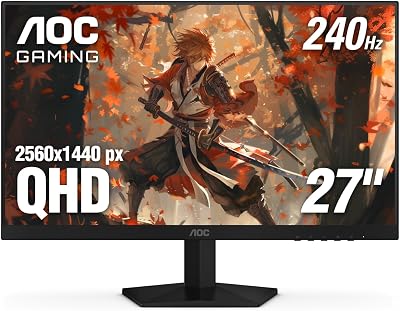
2. AOC 27″ QD-OLED 1440p 240Hz Gaming Monitor
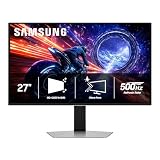
This is the premium, worth-the-stretch pick of the group, and at $359.99 it is more than double the budget heroes — so treat it as a treat, not a value play. What you get for the jump is a 27-inch QD-OLED panel with per-pixel contrast, near-instant 0.03ms response and the kind of inky blacks and color volume an IPS simply cannot match.
It runs QHD at 240Hz with HDMI 2.1 and G-Sync Compatible support, and the highest user rating on this entire list at 4.8 out of 5. If your build has the headroom and you want the endgame look, this is the panel that delivers it; if you are shopping strictly to a budget, scroll back up to the fast-IPS picks and put the difference toward your GPU.
Pros: Stunning QD-OLED contrast and motion; highest rating here; HDMI 2.1.
Cons: Premium price, well above the budget bracket; OLED care needed.
3. KOORUI 27″ QHD 260/240Hz Fast IPS Gaming Monitor
At $183.99 the KOORUI 27-inch is one of the strongest value 27-inch options in this range and a great step up for anyone who finds 24.5 inches a touch small. You get a fast-IPS panel at QHD with a 240Hz refresh that overclocks to 260Hz, a 1ms response claim and HDR400 entry-level high dynamic range support.
HDR400 will not transform the image the way an OLED does, but the extra brightness headroom and the larger, sharper 27-inch QHD canvas make this a comfortable everyday and gaming display. VESA mount support means you can ditch the stand for an arm. A 4.3 out of 5 rating puts it firmly in dependable-value territory for the price.
Pros: Big 27″ QHD canvas; 260Hz overclock; VESA mount; HDR400.
Cons: HDR400 is entry-level; stand is functional rather than premium.
4. SANSUI 27″ 1440p 260/240Hz Fast IPS Gaming Monitor
The SANSUI 27-inch at $189.98 sits right at the top of the under-$200 budget bracket and leans into color. It is a fast-IPS QHD panel with a 1ms response, FreeSync Premium and a 260/240Hz refresh, and SANSUI calls out wide DCI-P3-style color span that helps it look more vivid than the bargain-basement panels.

FreeSync Premium runs as G-Sync Compatible on modern Nvidia cards, so tearing-free play is not vendor-locked. For someone who games but also edits photos or watches a lot of content, the stronger color makes this the pick of the value 27-inch trio. A 4.5 out of 5 rating is the best of the budget IPS panels here and reflects a well-rounded display.
Pros: Strong color span; FreeSync Premium; best-rated value IPS here.
Cons: Top of the budget bracket; speakers are an afterthought.
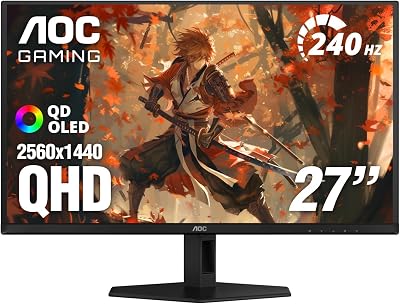
5. AOC 27″ QD-OLED 1440p 240Hz Gaming Monitor (alt SKU)
This is the second worth-the-stretch QD-OLED pick, an AOC 27-inch sibling priced at $359.99. Like its stablemate it is a premium option that sits well outside the budget framing of this guide, included for readers who have decided OLED is the goal and just want a strong 27-inch QHD choice at 240Hz.
You get the same QD-OLED strengths — 0.03ms response, deep contrast, vibrant color and G-Sync Compatible adaptive sync. The 4.4 out of 5 rating is a touch lower than the other AOC OLED but still excellent. Pick whichever of the two AOC OLEDs is in stock or cheaper on the day; both are clearly the premium tier of this list, not the value tier.
Pros: QD-OLED image quality; 240Hz; G-Sync Compatible; strong rating.
Cons: Premium price; outside the stated budget; OLED maintenance applies.
6. CRUA 27″ 240Hz QHD IPS Gaming Monitor
Rounding out the value picks, the CRUA 27-inch at $179.99 is a well-equipped budget QHD 240Hz IPS display that throws in built-in speakers — handy for a clean desk or a secondary setup where you would rather not run external audio. CRUA quotes 120% sRGB color span, AMD FreeSync and the usual fast-IPS response.
Built-in speakers are never a match for a real headset or desk speakers, but having them present matters for budget and dorm builds. The 4.2 out of 5 rating mirrors the other value picks: a lot of high-refresh QHD for under $200, with the trade-offs you would expect at the price rather than any single deal-breaker.
Pros: Built-in speakers; 120% sRGB; FreeSync; under $200.
Cons: Speakers are basic; HDR and stand are entry-level.
How to Choose a Budget 1440p 240Hz Monitor
Start with panel type, because it drives both price and look. For this budget the fast-IPS panels are the heroes: sharp, responsive, adaptive-sync capable and available well under $200. The QD-OLED options are gorgeous but sit in a different price class entirely, which is why we flagged them as premium stretch picks rather than value buys. If your budget is the hard constraint, an IPS panel here will not disappoint.
Match the monitor to your graphics card. A 240Hz panel only earns its refresh rate if your GPU can push high frame rates at 1440p. In competitive shooters even a mid-range card will do it; in demanding single-player titles you may land between 100 and 140fps, which still looks excellent thanks to FreeSync or G-Sync Compatible adaptive sync smoothing out the delivery. Buy the refresh you can realistically feed.
Then weigh size and color. 24.5 inches keeps everything in your central vision and suits pure FPS play; 27 inches gives a larger, more immersive canvas for mixed use. If color accuracy for photo or video work matters, the SANSUI’s wider color span is the value pick. Check that the panel supports VESA mounting if you plan to use a monitor arm, since several budget stands are basic.
Finally, read HDR claims with sober expectations. HDR400 on an IPS panel adds a little brightness headroom but is not transformative; only the OLED picks deliver true high-contrast HDR. For most budget buyers, prioritising a solid IPS panel, real 240Hz and reliable adaptive sync over a marketing HDR badge is the smarter way to spend.
Frequently Asked Questions
Is 1440p 240Hz worth it on a budget GPU?
Yes, with realistic expectations. In esports titles a mid-range card will hit high frame rates and saturate 240Hz. In heavy AAA games you will often sit at 100-140fps, and adaptive sync keeps that smooth and tear-free, so the high-refresh panel still pays off.
Should I buy IPS or OLED at this price?
For a true budget, buy fast-IPS — the panels here under $200 deliver sharp QHD and genuine 240Hz. The QD-OLED picks look stunning but cost roughly double, so they are the worth-the-stretch option for buyers who specifically want OLED contrast and motion clarity.
What is the difference between 240Hz and a 260Hz overclock?
Several panels here run 240Hz natively and overclock to 260Hz. The extra 20Hz is a small, mostly imperceptible bonus rather than a reason to choose one monitor over another. Judge these displays on panel quality, color and price, not the overclock headline.
Will FreeSync work with my Nvidia graphics card?
In almost all cases, yes. The FreeSync monitors here run as G-Sync Compatible on modern Nvidia GPUs, giving you tear-free, stutter-free gameplay without being locked to one brand. Just enable G-Sync Compatible mode in the Nvidia Control Panel.
Related Guides
- More gaming monitor reviews and buying guides
- Best 1440p 240Hz monitors for competitive FPS
- Best OLED gaming monitors of 2026
- VA vs OLED gaming panels compared
- HDR400 vs HDR600 vs HDR1000 explained
- HDMI 2.1 vs DisplayPort 2.1 for gaming
- Mini-LED vs OLED gaming monitors
- Ultrawide vs dual-monitor gaming setups
About the Author
David Park is the Displays Editor at PC Gaming Universe. He has spent the last eight years measuring and writing about gaming monitors, from budget fast-IPS panels to high-end QD-OLED, and pays particular attention to the things spec sheets hide — real motion clarity, panel uniformity, HDR behaviour and whether a refresh-rate number actually translates into a smoother game.
Ready to decide? Our #1 pick for 2026 is the INNOCN 24.5" 1440p 240Hz Fast IPS.
Live price & availability on Amazon.