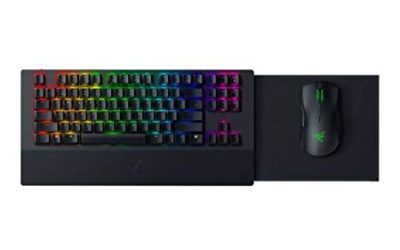
Finding the best gaming keyboard and mouse for Mac means solving two problems at once. The set has to feel right for games, with responsive keys and a precise mouse sensor, and it also has to work with macOS without constant remapping. Many sets are built first for Windows, so the macOS line in the specification table matters as much as the DPI number. A combo that lists macOS compatibility, a standard USB connection, or Bluetooth pairing is a safer starting point than a set that only lists Windows.
Our top pick: Redragon S101-3 PRO Gaming Keyboard and Mouse Combo. Runner-up: Logitech MK850 Performance Wireless Keyboard and Mouse Combo.
This guide compares published specifications only: macOS compatibility, keyboard switch type, mouse sensor and DPI, connection, battery, layout, backlighting, anti-ghosting, macro keys, and included accessories.
The four combos below cover the main ways Mac gamers set up a desk: two wired RGB gaming sets from Redragon, and two wireless Logitech sets with long listed battery life and explicit macOS support.
At a Glance
| Product | Best for | Key specification |
|---|---|---|
| Redragon S101-3 PRO Gaming Keyboard and Mouse Combo | All-around wired gaming on a Mac desktop | Full-size RGB keyboard with 25-key anti-ghosting and a mouse adjustable to 7,200 DPI |
| Redragon Updated S107 Gaming Keyboard and Mouse Combo | Higher DPI and faster polling in a wired set | RGB keyboard with 25-key anti-ghosting and a mouse up to 10,000 DPI at 1,000 Hz polling |
| Logitech MK850 Performance Wireless Keyboard and Mouse Combo | Multi-device wireless use across Mac and other devices | Bluetooth and 2.4 GHz connection, macOS 10.15 or later, and multi-device switching for up to 3 devices |
| Logitech MK345 Wireless Keyboard and Mouse Combo | A quiet wireless full-size set with a palm rest | Full-size spill-resistant keyboard with palm rest and a 2.4 GHz wireless connection up to 10 metres |
How to Choose
1. Check macOS compatibility first
Start with the operating system line in the listing, not with the lighting or the DPI figure. Look for macOS or Mac OS in the compatible operating system family, and note the minimum version when the listing gives one. The Logitech MK850 listing lists macOS 10.15 or later, Windows 10 or later, and ChromeOS. The Redragon S101-3 PRO listing lists MacOS and Windows, while the S101 description also notes limited Mac OS keyboard support, so basic plug-and-play typing and pointing should work while some Windows-focused software features may not carry over in full. The Redragon S107 listing describes compatibility with Windows and Mac OS for plug-and-play use.
2. Decide between wired and wireless
A wired combo connects through USB and draws power from the Mac, so there is no battery to charge and no wireless receiver to lose. That suits a Mac mini, an iMac, or a Mac Studio on a fixed desk. A wireless combo connects through Bluetooth, a 2.4 GHz USB receiver, or both, and it keeps the desk clear of cables. That suits a MacBook used with an external display. Check the port on the Mac before choosing a wireless set with a USB-A receiver, because many current MacBooks have USB-C ports only and need a hub or adapter.
3. Compare the keyboard switch type and feel
Most combos in this guide use a membrane keyboard or a mechanical-feel membrane keyboard, rather than a keyboard with individual mechanical switches under every key. A membrane keyboard uses a rubber dome layer under the keys, which gives a quieter and softer press than many mechanical keyboards. A mechanical-feel keyboard uses a membrane design tuned to feel firmer and more tactile, without the separate switch housing of a true mechanical keyboard. The Redragon S101-3 PRO and the Redragon S107 both use a membrane-style gaming keyboard with RGB backlighting, multimedia keys, and a full-size layout. The Logitech MK850 and the Logitech MK345 use quiet membrane-style keys as well, with media keys and a palm rest or cushioned palm rest.
4. Compare mouse sensor, DPI, and polling rate
DPI describes how far the pointer moves on screen for a given physical movement of the mouse, and a higher DPI setting allows faster pointer movement with less hand travel. The Redragon S101-3 PRO mouse is listed as adjustable to 7,200 DPI, which gives a wide range for different games and screen sizes. The Redragon Updated S107 mouse is listed up to 10,000 DPI, with a 1,000 Hz polling rate, which describes how often the mouse reports its position to the computer. A higher polling rate can give smoother pointer updates in fast games, while a lower DPI setting can give finer control for aiming. The Logitech wireless mice in this guide use optical tracking and are aimed at precise everyday pointing rather than a headline DPI figure, so compare them on shape, button count, and scroll control.
5. Check layout, size, and wrist support
A full-size keyboard includes a number pad, arrow keys, function keys, and media keys, which suits games that use the number row and work that uses a number pad. All four combos in this guide use a full-size keyboard layout. The Redragon sets include an integrated wrist rest, which supports the wrists during long sessions. The Logitech MK850 includes a cushioned palm rest and a curved, ergonomic keyboard shape, while the Logitech MK345 includes a palm rest and a spill-resistant keyboard design. Check the mouse shape before choosing, because a compact ambidextrous mouse suits a different hand size and grip than a larger right-handed mouse with a contoured side.
6. Compare backlighting and visibility
Backlighting helps in a dim room, and it also helps when the keyboard sits under a monitor shelf or away from a desk lamp. The Redragon S101-3 PRO has RGB backlighting on the keyboard, with multiple lighting modes and a red-backlit mouse, while the Redragon S107 has RGB backlighting on the keyboard and a matching backlit mouse. The Logitech MK850 and the Logitech MK345 do not focus on RGB gaming lighting, and their keyboards are built for clear key legends and a quiet office-style look rather than for colour effects.
7. Check battery life for wireless sets
Battery life matters only for wireless combos, because wired sets draw power through USB. The Logitech MK850 listing describes long battery life, with the keyboard listed for up to 36 months and the mouse listed for up to 24 months on the batteries included, depending on use and conditions. The Logitech MK345 listing describes a keyboard battery life of up to 3 years and a mouse battery life of up to 18 months, with batteries included. Those figures assume typical use and an on-off switch on each device, so a player who uses the mouse for long daily sessions will see shorter life in practice.
8. Check multi-device switching and software
Multi-device switching lets one keyboard and mouse pair with more than one computer or tablet and switch between them with a key or a button. The Logitech MK850 supports multi-device use for up to 3 devices through Bluetooth and a 2.4 GHz receiver, which suits a Mac plus a second computer or a tablet on the same desk. The Logitech MK345 uses a single 2.4 GHz receiver for one computer at a time, which suits a single-Mac desk. The Redragon wired sets use a wired USB connection for one computer at a time. Redragon lists programmable keys, macro record keys, and software for the S101-3 PRO and the S107, with DPI, lighting, and button settings that can be changed through that software. That software is Windows-focused in the listing, so Mac users should check the software requirements before assuming every macro or lighting control is available on macOS.
Our Picks
Redragon S101-3 PRO Gaming Keyboard and Mouse Combo — ASIN B00NLZUM36
The Redragon S101-3 PRO Gaming Keyboard and Mouse Combo includes a full-size RGB backlit keyboard and a programmable gaming mouse in one wired set. The keyboard has 104 keys, 25-key anti-ghosting, 5 dedicated macro keys, and 4 media keys, with an integrated wrist rest. The mouse is listed as adjustable to 7,200 DPI, with programmable buttons and a wired USB connection for plug-and-play use on MacOS and Windows.
Best for: All-around wired gaming on a Mac desktop where RGB lighting, macro keys, and a high DPI mouse matter more than wireless freedom.
Consideration: The listing notes limited Mac OS keyboard support, so some Windows-focused software features may not be available in full on macOS, and the set needs a free USB port or a hub on a USB-C-only Mac.
Redragon Updated S107 Gaming Keyboard and Mouse Combo — ASIN B0DWMQRK3M
The Redragon Updated S107 Gaming Keyboard and Mouse Combo includes a full-size RGB gaming keyboard and a programmable mouse in one wired set. The keyboard has 25-key anti-ghosting and RGB backlighting, with a mechanical-feel design and a full-size layout. The mouse is listed up to 10,000 DPI, with a 1,000 Hz polling rate and programmable buttons, and the set connects through wired USB with plug-and-play use on Windows and Mac OS.
Best for: Players who want a higher DPI ceiling and a 1,000 Hz polling rate in a wired Mac combo, with RGB lighting across the keyboard and mouse.
Consideration: The keyboard uses a mechanical-feel membrane design rather than individual mechanical switches, and the programmable software is Windows-focused in the listing, so Mac users should confirm software access before relying on macro controls.
Logitech MK850 Performance Wireless Keyboard and Mouse Combo — ASIN B0D2X9NM1V
The Logitech MK850 Performance Wireless Keyboard and Mouse Combo includes a full-size ergonomic keyboard and a contoured wireless mouse in one wireless set. The listing states compatibility with Windows, macOS, and ChromeOS, with macOS 10.15 or later, and the set connects through Bluetooth and a 2.4 GHz USB receiver. The keyboard has a cushioned palm rest, media keys, and multi-device switching for up to 3 devices, while the mouse has a sculpted shape, side buttons, and hyper-fast scrolling.
Best for: Multi-device wireless use on a Mac, with a comfortable ergonomic keyboard, a palm rest, and switching between a Mac and other devices.
Consideration: The keyboard does not have RGB gaming backlighting, and the mouse is aimed at comfortable everyday pointing rather than a headline gaming DPI figure, so it suits mixed play and work better than a dedicated high-DPI gaming set.
Logitech MK345 Wireless Keyboard and Mouse Combo — ASIN B00QXT5T3U
The Logitech MK345 Wireless Keyboard and Mouse Combo includes a full-size wireless keyboard with a palm rest and a right-handed wireless mouse in one wireless set. The listing describes plug-and-play use with Windows, macOS, and ChromeOS, with a 2.4 GHz wireless connection up to 10 metres through a single USB receiver. The keyboard has a spill-resistant design, quiet keys, and media keys, with a listed battery life of up to 3 years for the keyboard and up to 18 months for the mouse, with batteries included.
Best for: A quiet wireless full-size set for a Mac desk, with a palm rest, a right-handed mouse, and long listed battery life.
Consideration: The set uses a single 2.4 GHz receiver and does not list Bluetooth or multi-device switching, so it suits one Mac at a time, and a USB-C-only Mac needs a hub or adapter for the USB-A receiver.
Which One Is Right for You?
Choose the Redragon S101-3 PRO if the Mac stays on one desk, the setup is wired, and RGB lighting, macro keys, and a mouse adjustable to 7,200 DPI cover the games in regular rotation. Choose the Redragon Updated S107 if a higher DPI ceiling and a 1,000 Hz polling rate matter more, and the Mac has a free USB port for a wired set. Choose the Logitech MK850 if the keyboard and mouse need to move between a Mac and another device, or if an ergonomic keyboard with a cushioned palm rest matters for long sessions. Choose the Logitech MK345 if the goal is a quiet wireless full-size set with a palm rest and long listed battery life for one Mac.
Frequently Asked Questions
Do gaming keyboard and mouse combos work on a Mac?
Many combos work on a Mac for basic typing and pointing through a standard USB connection or Bluetooth, because macOS supports a standard external keyboard and mouse through those connections. The listing still matters, because the keyboard layout, media keys, and software features are often built first for Windows. Check the compatible operating system family for macOS or Mac OS, note the minimum macOS version when one is given, and check whether the listing describes limited Mac OS keyboard support. A combo that lists macOS 10.15 or later, as the Logitech MK850 does, gives a clearer baseline than a combo that only lists Windows.
Is a wired or wireless combo better for Mac gaming?
A wired combo gives a stable USB link and no battery to charge, which suits a fixed Mac desktop, a Mac mini, or an iMac where the keyboard and mouse stay in place. A wireless combo gives a clear desk and easier movement, which suits a MacBook on a stand or a shared desk. Wireless sets that support Bluetooth can pair with a MacBook without a USB receiver, while sets that use a 2.4 GHz USB-A receiver need a free USB-A port or a hub on a USB-C-only Mac.
What DPI should a Mac gaming mouse have?
DPI is a sensitivity setting, not a quality score on its own, and the right setting depends on the game, the screen size, and the hand movement that feels comfortable. A mouse adjustable to 7,200 DPI, as in the Redragon S101-3 PRO, gives a wide range for different games, while a mouse listed up to 10,000 DPI, as in the Redragon Updated S107, gives an even higher ceiling for fast pointer movement.
Do Mac users need a keyboard with Mac-specific keys?
A Mac keyboard normally has Command, Option, and Control keys in a Mac layout, while a Windows-first keyboard has Windows, Alt, and Control keys in a Windows layout. A Windows-first combo can still type on a Mac, because the basic letter, number, and arrow keys work through a standard USB or Bluetooth connection, and macOS allows the modifier keys to be remapped in System Settings. Media keys and function keys may map differently on macOS, and the listing may note limited Mac OS keyboard support for those keys.
Can the Redragon software be used on macOS?
Redragon lists programmable keys, macro record keys, and software for the S101-3 PRO and the S107, with settings for DPI, lighting, and buttons that can be changed through that software. The software described in those listings is Windows-focused, and the S101 listing notes limited Mac OS keyboard support, so Mac users should not assume every macro, lighting, or button control is available on macOS. Basic plug-and-play typing, pointing, and DPI changes through a DPI button on the mouse can still work without the software.
How do I connect a USB-A receiver to a USB-C MacBook?
A 2.4 GHz wireless combo with a USB-A receiver needs a USB-A port, a USB-C hub with a USB-A port, or a USB-C to USB-A adapter to connect to a current MacBook with USB-C ports only. Plug the receiver into the hub or adapter, switch the keyboard and mouse on, and macOS should recognise them as a standard external keyboard and mouse. A Bluetooth combo can pair without a receiver, by opening Bluetooth settings on the Mac, putting the keyboard and mouse in pairing mode, and selecting each device in the list. A wired USB combo needs the same hub or adapter when the cable ends in USB-A.
Bottom Line
The best gaming keyboard and mouse for Mac is the combo that matches the Mac, the desk, and the games in regular use, not the combo with the highest DPI figure alone. The Redragon S101-3 PRO gives a strong wired RGB starting point for a fixed Mac desktop, the Redragon Updated S107 gives a higher DPI ceiling and a 1,000 Hz polling rate in a wired set, the Logitech MK850 gives multi-device wireless use with explicit macOS support, and the Logitech MK345 gives a quiet wireless full-size set with a palm rest and long listed battery life.
Disclosure: As an Amazon Associate, this site earns from qualifying purchases.
Top picks from this guide
 RedragonRedragon S101-3 PRO Gaming Keyboard and Mouse, RGB Backlit Programmable…
 LogitechLogitech MK850 Performance Wireless Keyboard and Mouse Combo - Graphite…
 RedragonRedragon Updated S107 Gaming Keyboard and Mouse, RGB Gaming Keyboard…
 LogitechLogitech MK345 Full Size Wireless Keyboard and Mouse Combo -…